Sample project using Ansible and Jinja2 template to generate configurations and manage Juniper devices deployed in EVPN/VXLAN Fabric mode.
In this project you'll find:
- (1) Sample project for ansible with Playbooks and variables to generate EVPN/VXLAN configuration for multi-pod EVPN/Fabric in a multi-tenants environment.
- (2) Examples of configuration EVPN/VXLAN for QFX5k, QFX10k & MX.
- (3) Severals Jinja2 templates, packaged and documented into Ansible roles that can be reuse in other Ansible projects to easily generate Overlay & Underlay configuration.
- (4) Playbook to check the health of an EVPN/VXLAN Fabric.
White Paper on EVPN/VXLAN available on Juniper.net http://www.juniper.net/assets/us/en/local/pdf/whitepapers/2000606-en.pdf
1. Sample Ansible project to generate EVPN/VXLAN configuration for a multi-pod/multi-tenant EVPN Fabric
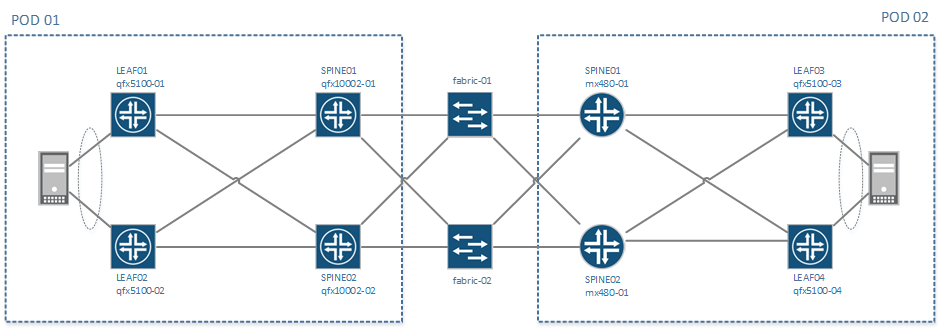
This project is simulating the creation of a 2 pods EVPN/VXLAN Fabric, POD1 & POD2:
- Each POD is composed of 2 spine and 2 leaf
- PODs are interconnected with 2 qfx5100 acting as Fabric, these are not running EVPN
On POD1 - Spine are QFX10K and leaf are QFX5000
- Leaf are configured with Vlan normalization on their access ports facing servers
On POD2 - Spine are MX480 and leaf are QFX5000
- Leaf are configured with standard trunk interface facing servers,
- 1 server is dual-attached to both leaf using EVPN/ESI and LACP
All devices names, Ip addresses loopback addresses etc .. are defined in the inventory file named hosts.ini. All physical connections are defined in the topology file under group_vars/all.
Even without real devices, it's possible to regenerate configurations for all devices using ansible playbooks provided with the project
To verify that Ansible & Ansible Junos module for Ansible are properly installed, you can try to regenerate all configs with this command:
ansible-playbook pb.conf.all.yaml
By default, all configurations generated will be stored under the directory
config/and will replace existing > configuration store there
The project come with some a solution to easily change the scale of the setup, it's possible to :
- Change the number of tenants
- Change the number of VNI per tenants
To scale the configuration, you need to change some input parameters in the file group_vars/all/tenant_vni.yaml
Please refer to instructions in generate-tenant-vni role
Once the input file is modified, you need to regenerate variables first and them regenerate configurations.
ansible-playbook pb.generate.variables.yaml
ansible-playbook pb.conf.all.yaml
Other Available Playbooks
All playbooks are stored at the root of the project and are named pb.*.yaml
pb.save.config.yaml               # Download configuration for all devices and save them locally

pb.conf.all.yaml                  # Generate and assemble configuration for all devices
pb.conf.all.commit.yaml           # Generate, assemble, push and commit configuration to all devices

pb.conf.fabric.yaml               # Generate configuration for group 'fabric'
pb.conf.leaf.qfx.l2.yaml          # Generate configuration for group 'leaf-qfx-l3'
pb.conf.leaf.qfx.l3.yaml          # Generate configuration for group 'leaf-qfx-l3'
pb.conf.spine.mx.yaml             # Generate configuration for group 'spines-mx'
pb.conf.spine.qfx.yaml            # Generate configuration for group 'spines-qfx'

pb.init.make_clean.yaml           # Create temp directory for all devices

pb.generate.variables.yaml        # Regenerate variables files for p2p links, Tenants and VNI

pb.check.connectivity.yaml        # Check if all devices are reachable via Netconf
pb.check.underlay.yaml            # Check the heath of the underlay
pb.check.overlay.yaml             # Check the health of the overlay

# This project has been updated to use the new Junos modules available in Ansible 2.1
# Some playbooks are also provided with the Junipe.junos modules available in Ansible Galaxy.
pb.conf.all.commit.galaxy.yaml    # Generate, assemble, push and commit configuration to all devices
# using the Junos modules provided in Ansible GalaxyAll examples of configuration are available in the config directory: Here are some links to specific features:
- EVPN/VXLAN configuration for QFX5100 (L2)
- EVPN/VXLAN Configuration for QFX10000 (L2/L3)
- EVPN/VXLAN Configuration for MX
- eBGP Fabric only configuration
- Vlan Normalization configuration on access ports
- Active/Active LAG between 2 devices using ESI. Switch1/Switch2
All configurations are generated using Jinja2 templates and variables.
To simplificy the management of these templates and make them reusable in other projects, these templates have been pacakges into several roles, each one is generating a part of the final configuration.
All roles are located under the directory roles and are organized as follow
├ underlay-ebgp           # Name of the role
  ├── README.md           # Documentation and Instructions to reuse
  ├── meta
  │   └── main.yaml       # Indicate author of the project and dependancies
  ├── defaults
  │   └── main.yaml       # Default variables, can be overwritten for each device
  ├── tasks
  │   └── main.yaml       # Action to execute when calling this Roles
  └── templates
      └── main.conf.j2    # Jinja2 Templates, in most cases, used to generate configuration
Below the list of roles available, classified per function, with a short description and a link to their respective documentation.
There are 3 different roles to create an underlay network, only one is needed and all devices must have the same.
- 'underlay-ebgp' role(default) # Create an Underlay with eBGP with p2p /31 network and 1 ASN per device
- 'underlay-ospf' role # Create an Underlay with OSPF with p2p /31 network and 1 Area
- 'underlay-ospf-unnumbered' role # Create an Underlay with OSPF with p2p unnumbered interface and 1 Area
These roles are complementary and are designed to work together. Each one is specific to a role in the architecture and is specific to device capabilities:
- 'overlay-evpn-qfx-l3' role # Create iBGP & EVPN configuration for QFX devices that support both L2 & L3 VTEP (QFX10000 today)
- 'overlay-evpn-qfx-l2' role # Create iBGP & EVPN configuration for QFX devices that only support L2 VTEP (QFX5100/QFX5200)
- 'overlay-evpn-mx-l3' role # Create iBGP & EVPN configuration for MX devices that only support L2 & L3 VTEP (MX)
- 'overlay-evpn-access' role # Create access ports configuration to maps existing resources into the overlay (Trunk/LAG/ESI/Vlan mapping)
- 'common' role # Generate base configuration
- 'build-config' role # Assemble all configuration snippet from other roles
- 'generate-tenant-vni' role # Generate variables files to scale Tenant and VNI
- 'generate-p2p-ips' role # Generate network and ip addresses for P2P links
This project has been designed to be easily deploy on multiple topologies, physical or virtual.
As much as possible, all information related to a given topology (interface names, device names etc ..) are centralized in 2 files:
- The topology file sample-topology.yaml, this file contains:
- Information required to construct the base configuration (login, dns, ntp etc ..)
- All physical interface names
- Directories to use to generate the configuration
- The inventory file hosts.ini, this file contains:
- Device names
- Device roles in the architecture (using ansible groups)
- Management IP addresses and loopback
- Login, password, management gateway etc ..
- The name of the topology file
When you call an Ansible playbook, you can specify explicitly the inventory file by using the option -i
To align, the name of the topology file needs to be define inside the inventory file
# Generate configurations for the sample-topology
ansible-playbook -i hosts.ini pb.conf.all.yaml

# Generate configurations for your own topology
ansible-playbook -i mytopology.ini pb.conf.all.yaml
It's very easy to create your own inventory and topology files to adapt device IP, device type and interface names to your environment assuming you have the same base design.
it's not recommended to change device names because all variables directories depend on the name
It's also possible to generate your own design but it will require a little bit more customization.
Documentation is not yet available on this part, Please open start a discussion on the issue tracker if you need help with that
Please refer to the file CONTRIBUTING.md for contribution guidelines.
- Ansible
- juniper.junos module for Ansible (min 1.2.2)
- junos-eznc