Midjourney is a new research lab focused on new mediums and tools for empowering people. There are two ways to experience the tools: the Discord server, where you will generate images, and the web app at https://www.midjourney.com/, where you can find a gallery of your own work and other users' creations.
- Don't be a jerk.
- Don't use our tools to make images that could inflame, upset, or cause drama. That includes gore and adult content.
- Be respectful to other people and the team.
Make sure you are familiar with the Full Content Guidelines.
You can also find more detail within the Midjourney Discord server in the #rules, #faq, #announcements, and #status channels.
TOC:
Once you have joined the Discord server you will be able to create a limited number of (about 25) images before needing to subscribe.

To use the Midjourney Bot, use a Discord Slash Command in a Bot channel, like #newbies-1, and type/imagine. Immediately after typing /imagine press spacebar, tab, or enter to create the prompt field. Bot slash commands will only work in Bot Channels. Typing /imagine will not work in general channels like #Support.

Requests take a minute to generate four options based on your prompt.

Two rows of buttons will appear: The top row of buttons: U1 U2 U3 and U4 are buttons for upscaling your chosen image. Upscaling an image generates a larger roughly 1024x1024 pixel version of the selected image while adding additional details.

After you use a "U" button to upscale, you will have a few more options:
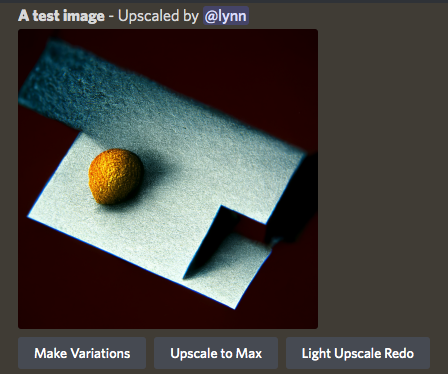
'Make Variations' does the same as the "V" buttons, generating new alternatives in a grid, and the other buttons upscale even larger, or upscale again without as much detail added.

You can click on the image to open it to full size, and then right-click and choose 'Save image' to save it to your local computer.
Your upscaled image (and 2x2 grid images) will immediately be visible on your website gallery at midjourney.com/app.
You can also react with the ✉️ emoji to direct message your upscaled image (or 2x2 grid images) to yourself using the MidJourney Bot.

You can also use the bot in a DM mode if you are a subscriber, which will still generate public images (subject to content rules) but will not be in a loud channel.)
If you have other questions you can find many answers in the #announcements, #status, #rules, #faq channels. If you still need help post your question in the #support channels.