terraform-aws-jenkins is a Terraform module to build a Docker image with Jenkins, save it to an ECR repo,
and deploy to Elastic Beanstalk running Docker.
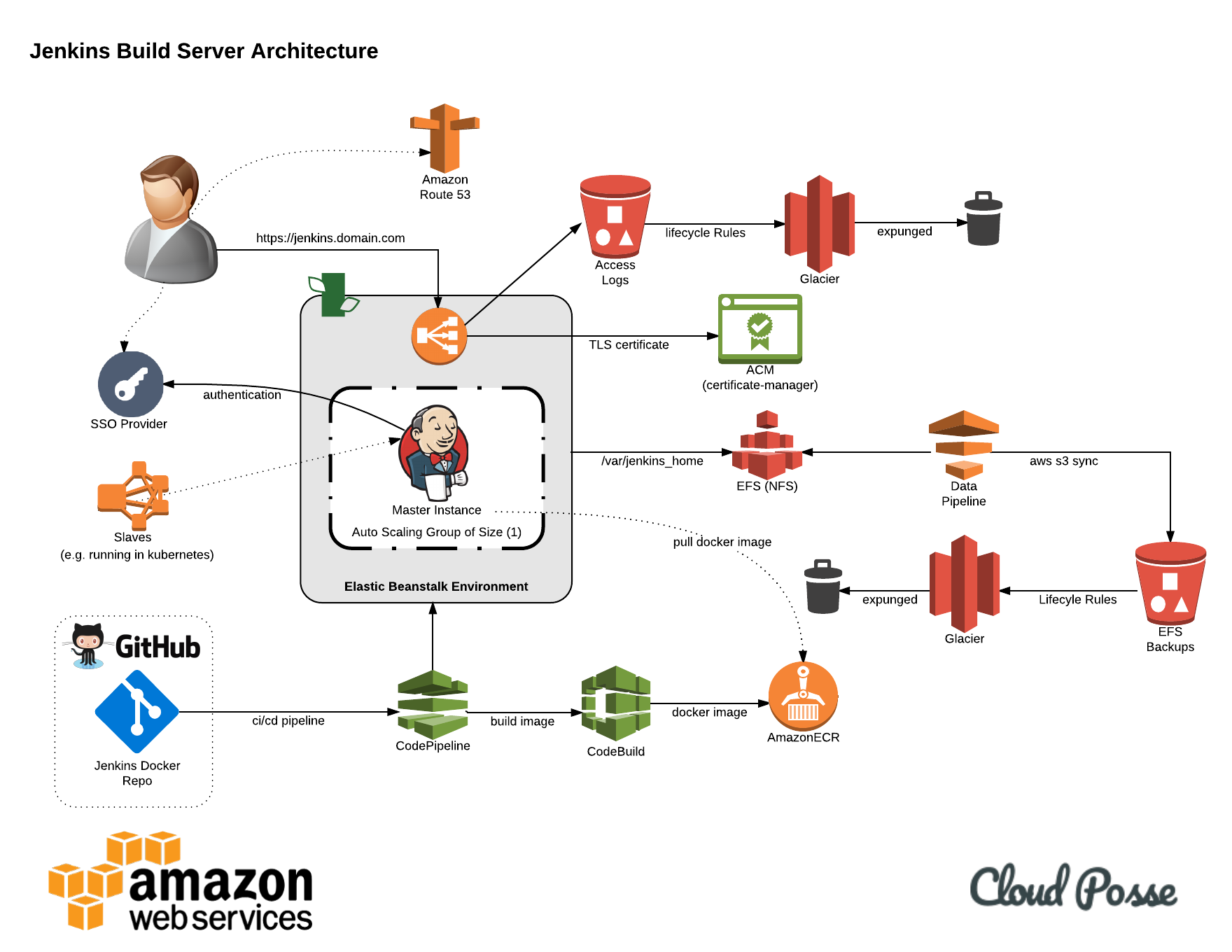
This is an enterprise-ready, scalable and highly-available architecture and the CI/CD pattern to build and deploy Jenkins.
The module uses these open-source Cloud Posse modules:
- https://github.com/cloudposse/terraform-aws-elastic-beanstalk-application
- https://github.com/cloudposse/terraform-aws-elastic-beanstalk-environment
- https://github.com/cloudposse/terraform-aws-ecr
- https://github.com/cloudposse/terraform-aws-efs
- https://github.com/cloudposse/terraform-aws-efs-backup
- https://github.com/cloudposse/terraform-aws-cicd
- https://github.com/cloudposse/terraform-aws-codebuild
The module will create the following AWS resources:
- Elastic Beanstalk Application
- Elastic Beanstalk Environment with Docker stack to run the Jenkins master
- ECR repository to store the Jenkins Docker image
- EFS filesystem to store Jenkins config and jobs (it will be mounted to a directory on the EC2 host, and then to the Docker container)
- CodePipeline with CodeBuild to build and deploy Jenkins so even Jenkins itself follows the CI/CD pattern
- CloudFormation stack to run a DataPipeline to automatically backup the EFS to S3
- CloudFormation stack for SNS notifications about the status of each backup
After all of the AWS resources are created,
CodePipeline will:
- Get the specified Jenkins repo from GitHub, e.g. https://github.com/cloudposse/jenkins
- Build a Docker image from it
- Save the Docker image to the ECR repo
- Deploy the Docker image from the ECR repo to Elastic Beanstalk running Docker stack
- Monitor the GitHub repo for changes and re-run the steps above if new commits are pushed into it
DataPipeline will run on the specified schedule and will backup all Jenkins files to an S3 bucket by doing the following:
- Spawn an EC2 instance
- Mount the EFS filesystem to a directory on the EC2 instance
- Backup the directory to an S3 bucket
- Notify about the status of the backup (Success or Failure) via email
- Destroy the EC2 instance
For complete examples, see examples.
data "aws_availability_zones" "available" {}

module "jenkins" {
  source      = "git::https://github.com/cloudposse/terraform-aws-jenkins.git?ref=master"
  namespace   = "cp"
  name        = "jenkins"
  stage       = "prod"
  description = "Jenkins server as Docker container running on Elastic Beanstalk"

  master_instance_type         = "t2.medium"
  aws_account_id               = "000111222333"
  aws_region                   = "us-west-2"
  availability_zones           = ["${data.aws_availability_zones.available.names}"]
  solution_stack_name          = "64bit Amazon Linux 2017.03 v2.7.4 running Docker 17.03.2-ce"
  vpc_id                       = "vpc-a22222ee"
  zone_id                      = "ZXXXXXXXXXXX"
  public_subnets               = ["subnet-e63f82cb", "subnet-e66f44ab", "subnet-e88f42bd"]
  private_subnets              = ["subnet-e99d23eb", "subnet-e77e12bb", "subnet-e58a52bc"]
  loadbalancer_type            = "application"
  loadbalancer_certificate_arn = "XXXXXXXXXXXXXXXXX"
  ssh_key_pair                 = "ssh-key-jenkins"

  github_oauth_token  = ""
  github_organization = "cloudposse"
  github_repo_name    = "jenkins"
  github_branch       = "master"

  build_image        = "aws/codebuild/docker:1.12.1"
  build_compute_type = "BUILD_GENERAL1_SMALL"
  image_tag          = "latest"

  datapipeline_config = {
    instance_type = "t2.medium"
    email         = "me@mycompany.com"
    period        = "12 hours"
    timeout       = "60 Minutes"
  }

  env_vars = {
    JENKINS_USER          = "admin"
    JENKINS_PASS          = "123456"
    JENKINS_NUM_EXECUTORS = 4
  }

  delimiter  = "-"
  attributes = []

  tags = {
    BusinessUnit = "ABC"
    Department   = "XYZ"
  }
}data "aws_availability_zones" "available" {}
module "jenkins" {
source = "git::https://github.com/cloudposse/terraform-aws-jenkins.git?ref=master"
namespace = "cp"
name = "jenkins"
stage = "prod"
description = "Jenkins server as Docker container running on Elastic Beanstalk"
master_instance_type = "t2.medium"
aws_account_id = "000111222333"
aws_region = "us-west-2"
availability_zones = ["${data.aws_availability_zones.available.names}"]
solution_stack_name = "64bit Amazon Linux 2017.03 v2.7.4 running Docker 17.03.2-ce"
vpc_id = "vpc-a22222ee"
zone_id = "ZXXXXXXXXXXX"
public_subnets = "${module.subnets.public_subnet_ids}"
private_subnets = "${module.subnets.private_subnet_ids}"
loadbalancer_type = "application"
loadbalancer_certificate_arn = "XXXXXXXXXXXXXXXXX"
ssh_key_pair = "ssh-key-jenkins"
github_oauth_token = ""
github_organization = "cloudposse"
github_repo_name = "jenkins"
github_branch = "master"
build_image = "aws/codebuild/docker:1.12.1"
build_compute_type = "BUILD_GENERAL1_SMALL"
image_tag = "latest"
datapipeline_config = {
instance_type = "t2.medium"
email = "me@mycompany.com"
period = "12 hours"
timeout = "60 Minutes"
}
env_vars = {
JENKINS_USER = "admin"
JENKINS_PASS = "123456"
JENKINS_NUM_EXECUTORS = 4
}
delimiter = "-"
attributes = []
tags = {
BusinessUnit = "ABC"
Department = "XYZ"
}
}
module "subnets" {
source = "git::https://github.com/cloudposse/terraform-aws-dynamic-subnets.git?ref=master"
availability_zones = ["${data.aws_availability_zones.available.names}"]
namespace = "cp"
name = "jenkins"
stage = "prod"
region = "us-west-2"
vpc_id = "vpc-a22222ee"
igw_id = "igw-s32321vd"
cidr_block = "10.0.0.0/16"
nat_gateway_enabled = "true"
vpc_default_route_table_id = "ZXXXXXXXXXXX"
public_network_acl_id = "ZXXXXXXXXXXX"
private_network_acl_id = "ZXXXXXXXXXXX"
delimiter = "-"
attributes = ["subnet"]
tags = {
BusinessUnit = "ABC"
Department = "XYZ"
}
}data "aws_availability_zones" "available" {}
module "jenkins" {
source = "git::https://github.com/cloudposse/terraform-aws-jenkins.git?ref=master"
namespace = "cp"
name = "jenkins"
stage = "prod"
description = "Jenkins server as Docker container running on Elastic Beanstalk"
master_instance_type = "t2.medium"
aws_account_id = "000111222333"
aws_region = "us-west-2"
availability_zones = ["${data.aws_availability_zones.available.names}"]
solution_stack_name = "64bit Amazon Linux 2017.03 v2.7.4 running Docker 17.03.2-ce"
vpc_id = "${module.vpc.vpc_id}"
zone_id = "ZXXXXXXXXXXX"
public_subnets = "${module.subnets.public_subnet_ids}"
private_subnets = "${module.subnets.private_subnet_ids}"
loadbalancer_type = "application"
loadbalancer_certificate_arn = "XXXXXXXXXXXXXXXXX"
ssh_key_pair = "ssh-key-jenkins"
github_oauth_token = ""
github_organization = "cloudposse"
github_repo_name = "jenkins"
github_branch = "master"
build_image = "aws/codebuild/docker:1.12.1"
build_compute_type = "BUILD_GENERAL1_SMALL"
image_tag = "latest"
datapipeline_config = {
instance_type = "t2.medium"
email = "me@mycompany.com"
period = "12 hours"
timeout = "60 Minutes"
}
env_vars = {
JENKINS_USER = "admin"
JENKINS_PASS = "123456"
JENKINS_NUM_EXECUTORS = 4
}
delimiter = "-"
attributes = []
tags = {
BusinessUnit = "ABC"
Department = "XYZ"
}
}
module "vpc" {
source = "git::https://github.com/cloudposse/terraform-aws-vpc.git?ref=master"
namespace = "cp"
name = "jenkins"
stage = "prod"
cidr_block = "10.0.0.0/16"
delimiter = "-"
attributes = ["vpc"]
tags = {
BusinessUnit = "ABC"
Department = "XYZ"
}
}
module "subnets" {
source = "git::https://github.com/cloudposse/terraform-aws-dynamic-subnets.git?ref=master"
availability_zones = ["${data.aws_availability_zones.available.names}"]
namespace = "cp"
name = "jenkins"
stage = "prod"
region = "us-west-2"
vpc_id = "${module.vpc.vpc_id}"
igw_id = "${module.vpc.igw_id}"
cidr_block = "10.0.0.0/16"
nat_gateway_enabled = "true"
vpc_default_route_table_id = "${module.vpc.vpc_default_route_table_id}"
public_network_acl_id = "${module.vpc.vpc_default_network_acl_id}"
private_network_acl_id = "${module.vpc.vpc_default_network_acl_id}"
delimiter = "-"
attributes = ["subnet"]
tags = {
BusinessUnit = "ABC"
Department = "XYZ"
}
}| Name | Default | Description | Required |
|---|---|---|---|
| namespace | Namespace (e.g. cp or cloudposse) |
Yes | |
| stage | Stage (e.g. prod, dev, staging) |
Yes | |
| name | jenkins | Name of the application | Yes |
| description | Used as Elastic Beanstalk application description | Yes | |
| aws_region | us-west-2 | AWS Region to provision all the AWS resources in | Yes |
| solution_stack_name | 64bit Amazon Linux 2017.03 v2.7.4 running Docker 17.03.2-ce | Elastic Beanstalk stack | Yes |
| master_instance_type | t2.medium | EC2 instance type for Jenkins master | Yes |
| vpc_id | AWS VPC ID where module should operate (e.g. vpc-a22222ee) |
Yes | |
| availability_zones | List of Availability Zones for EFS | Yes | |
| healthcheck_url | /login | Application Health Check URL. Elastic Beanstalk will call this URL to check the health of the application running on EC2 instances | Yes |
| loadbalancer_type | application | Load Balancer type, e.g. application or classic |
Yes |
| loadbalancer_certificate_arn | Load Balancer SSL certificate ARN. The certificate must be present in AWS Certificate Manager | Yes | |
| public_subnets | List of public subnets to place Elastic Load Balancer | Yes | |
| private_subnets | List of private subnets to place EC2 instances and EFS | Yes | |
| zone_id | Route53 parent zone ID. The module will create sub-domain DNS records in the parent zone for the EB environment and EFS | Yes | |
| security_groups | [] | List of security groups to be allowed to connect to the EC2 instances | No |
| ssh_key_pair | "" | Name of SSH key that will be deployed on Elastic Beanstalk and DataPipeline instances. The key should be present in AWS | No |
| github_oauth_token | "" | GitHub Oauth Token for accessing private repositories. Leave it empty when deploying a public Jenkins repository | No |
| github_organization | cloudposse | GitHub organization, e.g. cloudposse. By default, this module will deploy https://github.com/cloudposse/jenkins repository |
Yes |
| github_repo_name | jenkins | GitHub repository name, e.g. jenkins. By default, this module will deploy https://github.com/cloudposse/jenkins repository |
Yes |
| github_branch | master | GitHub repository branch, e.g. master. By default, this module will deploy https://github.com/cloudposse/jenkins master branch |
Yes |
| build_image | aws/codebuild/docker:1.12.1 | CodeBuild build image | Yes |
| build_compute_type | BUILD_GENERAL1_SMALL | CodeBuild compute type (instance type) | Yes |
| aws_account_id | AWS Account ID. Used as CodeBuild ENV variable $AWS_ACCOUNT_ID when building Docker images | Yes | |
| image_tag | latest | Docker image tag in the ECR repository, e.g. latest. Used as CodeBuild ENV variable $IMAGE_TAG when building Docker images |
Yes |
| env_default_key | DEFAULT_ENV_%d | Default ENV variable key for Elastic Beanstalk aws:elasticbeanstalk:application:environment setting |
No |
| env_default_value | UNSET | Default ENV variable value for Elastic Beanstalk aws:elasticbeanstalk:application:environment setting |
No |
| env_vars | {} | Map of custom ENV variables to be provided to the Jenkins application running on Elastic Beanstalk | No |
| noncurrent_version_expiration_days | 35 | S3 object versions expiration period (days) for backups | No |
| datapipeline_config | ${map("instance_type", "t2.micro", "email", "", "period", "24 hours", "timeout", "60 Minutes")}" | DataPipeline configuration options | Yes |
| attributes | [] | Additional attributes (e.g. vpc) |
No |
| tags | {} | Additional tags (e.g. map("BusinessUnit","ABC") |
No |
| delimiter | - | Delimiter to be used between name, namespace, stage and attributes |
No |
| Name | Default | Description | Required |
|---|---|---|---|
| instance_type | t2.micro | Instance type to use in DataPipeline | Yes |
| "" | Email to use in SNS. Needs to be provided, otherwise the module will fail | Yes | |
| period | 24 hours | Frequency of pipeline execution (frequency of backups) | Yes |
| timeout | 60 Minutes | Pipeline execution timeout | Yes |
- http://docs.aws.amazon.com/elasticbeanstalk/latest/dg/create_deploy_docker_image.html
- http://docs.aws.amazon.com/codebuild/latest/userguide/sample-docker.html
- http://docs.aws.amazon.com/codebuild/latest/userguide/build-spec-ref.html
Got a question?
File a GitHub issue, send us an email or reach out to us on Gitter.
Please use the issue tracker to report any bugs or file feature requests.
If you are interested in being a contributor and want to get involved in developing terraform-aws-jenkins, we would love to hear from you! Shoot us an email.
In general, PRs are welcome. We follow the typical "fork-and-pull" Git workflow.
- Fork the repo on GitHub
- Clone the project to your own machine
- Commit changes to your own branch
- Push your work back up to your fork
- Submit a Pull request so that we can review your changes
NOTE: Be sure to merge the latest from "upstream" before making a pull request!
APACHE 2.0 © 2017 Cloud Posse, LLC
See LICENSE for full details.
Licensed to the Apache Software Foundation (ASF) under one
or more contributor license agreements.  See the NOTICE file
distributed with this work for additional information
regarding copyright ownership.  The ASF licenses this file
to you under the Apache License, Version 2.0 (the
"License"); you may not use this file except in compliance
with the License.  You may obtain a copy of the License at

  http://www.apache.org/licenses/LICENSE-2.0

Unless required by applicable law or agreed to in writing,
software distributed under the License is distributed on an
"AS IS" BASIS, WITHOUT WARRANTIES OR CONDITIONS OF ANY
KIND, either express or implied.  See the License for the
specific language governing permissions and limitations
under the License.
terraform-aws-jenkins is maintained and funded by Cloud Posse, LLC. Like it? Please let us know at hello@cloudposse.com
We love Open Source Software!
See our other projects or hire us to help build your next cloud-platform.
 Erik Osterman |
 Andriy Knysh |
|---|