An interactive educational tool that visualizes Dijkstra's shortest path algorithm in real-time using Python and Pygame.


This application provides an intuitive, visual way to understand how Dijkstra's algorithm explores a grid-based environment to find the optimal path between two points. Watch as the algorithm systematically evaluates nodes, navigates around obstacles, and ultimately discovers the shortest route.
- Interactive Grid System: Click and drag to create custom maze layouts
- Visual Algorithm Execution: Real-time visualization of the pathfinding process
- Customizable Environment: Place start points, end points, and walls anywhere on the grid
- Path Highlighting: Clear visualization of the discovered shortest path
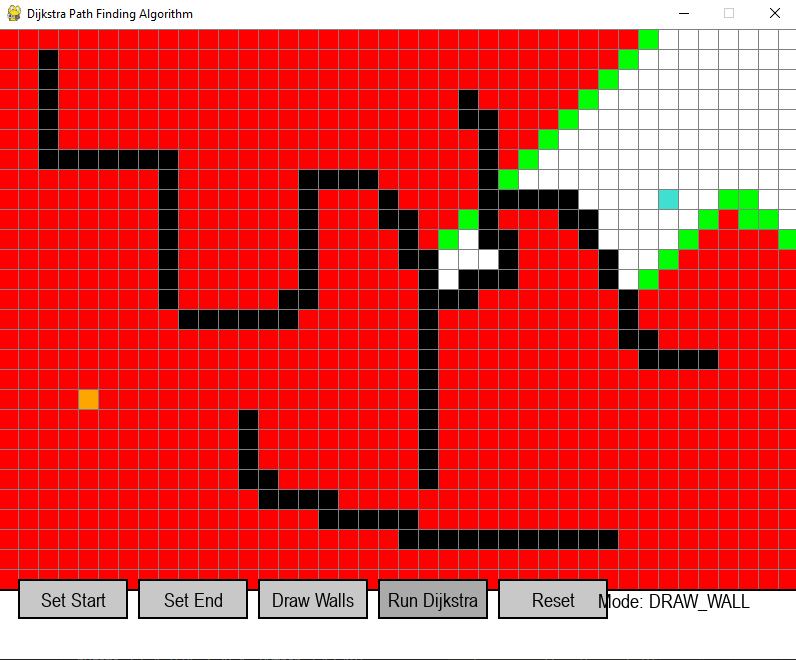
- 🟠 Orange: Start node
- 🔵 Turquoise: End/Target node
- ⬛ Black: Walls/Obstacles
- 🟢 Green: Open nodes (being explored)
- 🔴 Red: Closed nodes (already evaluated)
- 🟣 Purple: Final shortest path
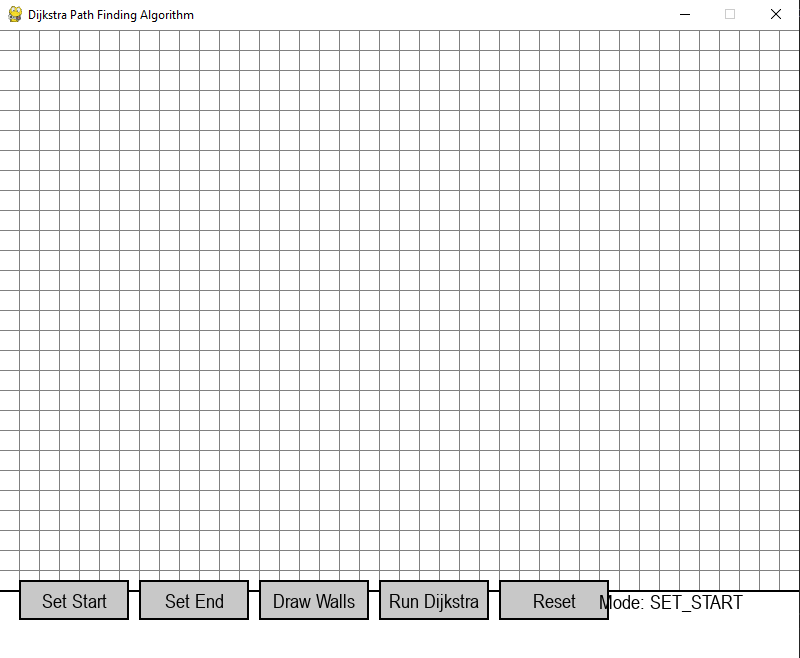
- Set Start: Define the starting position for pathfinding
- Set End: Define the destination point
- Draw Walls: Create obstacles to navigate around
- Run Dijkstra: Execute the pathfinding algorithm with visualization
- Reset: Clear the entire grid and start fresh
- Right-Click: Remove any placed element (walls, start, or end nodes)
- Python 3.7 or higher
- pip (Python package installer)
-
Clone or download this repository
git clone https://github.com/harshil2424/Dijkstra-pathfinding-algo.git cd Dijkstra-pathfinding-algo -
Install required dependencies
pip install pygame
-
Run the application
python main.py
- Launch the application - Run
python main.py - Place the start node - Click "Set Start" button, then click on any grid cell
- Place the end node - Click "Set End" button, then click on another grid cell
- Draw obstacles - Click "Draw Walls" button, then click and drag across cells to create barriers
- Run the algorithm - Click "Run Dijkstra" or press
SPACEBARto start visualization - Reset if needed - Click "Reset" or press
Cto clear the grid
| Action | Control |
|---|---|
| Place start/end/walls | Left Click |
| Remove items | Right Click |
| Drag to draw walls | Click + Drag |
| Key | Action |
|---|---|
SPACEBAR |
Run Dijkstra's algorithm |
C |
Clear/Reset the grid |
Dijkstra's algorithm is a graph search algorithm that finds the shortest path between nodes in a graph. This implementation uses:
- Priority Queue: Explores nodes in order of their distance from the start
- Distance Tracking: Maintains the shortest known distance to each node
- Backtracking: Reconstructs the path once the target is reached
- Green nodes: Represent the "frontier" - nodes currently being considered
- Red nodes: Show explored territory - nodes already evaluated
- Purple path: The final shortest path from start to finish
Dijkstra-pathfinding-algo/
│
├── main.py              # Main application file
├── README.md            # Project documentation
└── requirements.txt     # Python dependencies
- Grid-based pathfinding on a 2D plane
- Configurable grid size and cell dimensions
- Supports obstacle placement for complex pathfinding scenarios
- Efficient priority queue implementation for node selection
- Distance calculation using grid-based coordinates
- Path reconstruction using parent node tracking
This visualizer is perfect for:
- Computer Science Students: Understanding graph algorithms visually
- Algorithm Enthusiasts: Exploring pathfinding behavior with different obstacle configurations
- Teachers: Demonstrating shortest path algorithms in an engaging way
- Developers: Learning algorithm implementation and visualization techniques
pygame>=2.0.0Potential improvements for future versions:
- Additional pathfinding algorithms (A*, BFS, DFS)
- Diagonal movement options
- Variable terrain costs/weights
- Save/Load maze configurations
- Speed control for visualization
- Step-by-step mode
- Performance metrics display
Add screenshots of your application here to showcase:



Note: This is an educational tool designed to help visualize and understand pathfinding algorithms. It is not optimized for production pathfinding systems.