主機下載 備用下載 Github Gitee Download and unzip ryan.zip,3 files: ryantc.usb, ryantc.iso, version. 請下載ryan.zip,並解壓縮得到3個檔案:ryantc.usb, ryantc.iso, version.
Use Rufus to write the ryantc.usb into your usb disk. 現在我們把影像檔ryantc.usb用Rufus寫進usb盤去.
Caution!!!Please backup your usb key before write, otherwise all data will lost!!! 溫馨提示!!!請先備份好USB內的內容, 否則是會導至USB內的文件隕失!!!

Linux: dd if=ryantc.usb of=/dev/[s,v]da
虛擬機中掛載或燒錄到實體光碟即可。
Switch on the computer and press "DEL" key on your keyboard continuously. 開啟電腦電源並不停按下鍵盤上的 "DEL"鍵
Now, please set your computer first boot priority from usb disk/cd-rom,not your harddisk. 請設定電腦第一啟動設備為U盤/光碟機,而不是硬盤
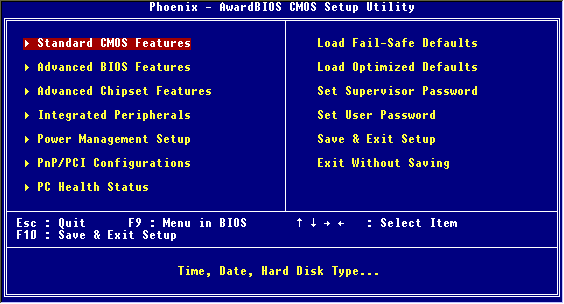
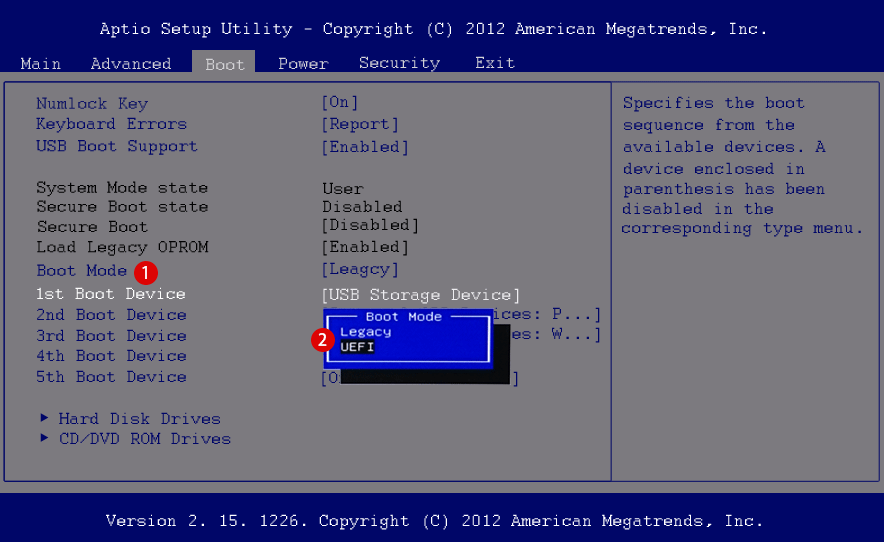
:max_bytes(150000):strip_icc()/149238278-56a1ad765f9b58b7d0c19fe8.jpg)