-Through the keyboard mapping, the effect of another key can be produced after a key is pressed. For example, you can specify that after pressing A/a, the print output is Z/z. For another example, specify F2 to realize the original function of F10.
-New version [September 30] VoodooPS2Controller.kext separates the brightness shortcut key part into an independent driver BrightnessKeys.kext and provides the method Notify (^^^GFX0.***, 0x86) And Notify (^^^GFX0.***, 0x87), the traditional brightness shortcut patch is no longer needed. If the new driver is invalid, please refer to the content in this chapter to assign 2 keys to F14, F15 to realize the shortcut key to adjust the brightness function.
-VoodooPS2Controller.kext: https://github.com/acidanthera/VoodooPS2
-BrightnessKeys.kext: https://github.com/acidanthera/BrightnessKeys
Note: Some dell machines and asus machines need SSDT-OCWork-*** or operating system patch to uncheck Notify (^^^GFX0.***, 0x86) and Notify ( ^^^GFX0.***,0x87) restrictions, make BrightnessKeys.kext work normally. For details, please refer to "Special Patches for Dell Machines" and "Special Patches for Asus Machines".
-Not all keys can be mapped, only the keys that can capture the PS2 scan code under the MAC system can be mapped.
-Use VoodooPS2Controller.kext and its sub-drivers. -Clear the previous key mapping content of other methods.
One button will generate 2 scan codes, which are PS2 scan code and ABD scan code. For example, the PS2 scan code of the Z/z key is 2c, and the ABD scan code is 6. Because of the different scan codes, there are two mapping methods corresponding to:
-PS2 scan code —> PS2 scan code
-PS2 scan code —> ADB scan code
-Refer to the header file ApplePS2ToADBMap.h, the scan codes of most buttons are listed in the file.
-Get the keyboard scan code from the console (choose one)
-Terminal install ioio
```bash
  ioio -s ApplePS2Keyboard LogScanCodes 1
```
-Modify VoodooPS2Keyboard.kext\info\IOKitPersonalities\Platform Profile\Default\LogScanCodes = 1
Open the console and search for ApplePS2Keyboard. Press the keys, such as A/a, Z/z.
  11:58:51.255023 +0800 kernel ApplePS2Keyboard: sending key 1e=0 down
  11:58:58.636955 +0800 kernel ApplePS2Keyboard: sending key 2c=6 down
among them:
The 1e in the first line of 1e=0 is the PS2 scan code of the A/a key, and 0 is the ADB scan code.
The 2c in the second line of 2c=6 is the PS2 scan code of the Z/z key, and 6 is the ADB scan code.
Keyboard mapping can be achieved by modifying the VoodooPS2Keyboard.kext\info.plist file and adding a third-party patch file. The method of using a third-party patch file is recommended.
Example: SSDT-RMCF-PS2Map-AtoZ. A/a maps Z/z.
-A/a PS2 Scan code: 1e
-Z/z PS2 scan code: 2c
-Z/z ADB scan code: 06
Choose one of the following two mapping methods
    ...
      "Custom PS2 Map", Package()
      {
          Package(){},
          "1e=2c",
      },
... ...
"Custom ADB Map", Package()
{
Package(){},
"1e=06",
}
...-The keyboard path in the example is \_SB.PCI0.LPCB.PS2K, please ensure that its path is consistent with the ACPI keyboard path when using it. The keyboard path of most Thinkpad machines is \_SB.PCI0.LPC.KBD or \_SB.PCI0.LPCB.KBD.
-The variable RMCF is used in the patch. If RMCF is also used in other keyboard patches, it must be merged and used. See SSDT-RMCF-PS2Map-dell. Note: SSDT-RMCF-MouseAsTrackpad is used to forcibly turn on the touchpad setting option.
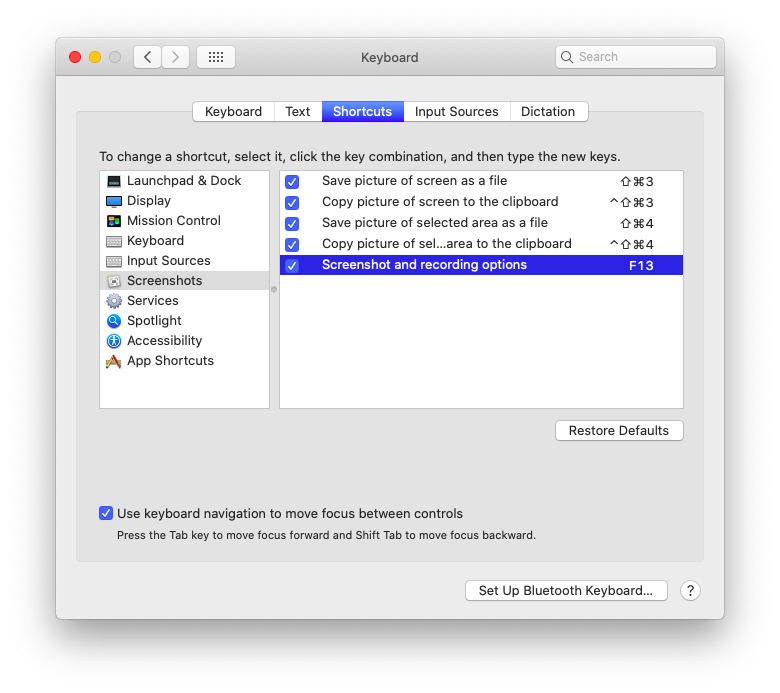
-In VoodooPS2, the PS2 scan code corresponding to the PrtSc button is e037, which is the switch of the touchpad (and the small red dot on ThinkPad machines). You can map this button to F13, and bind F13 to the screenshot function in the "System Preferences":
    ...
    "Custom ADB Map", Package()
    {
        Package(){},
        "e037=64", // PrtSc -> F13
    }
    ...