# CoVR: Composed Video Retrieval
## Learning Composed Video Retrieval from Web Video Captions
Lucas Ventura
·
Antoine Yang
·
Cordelia Schmid
·
Gül Varol
[](https://ojs.aaai.org/index.php/AAAI/article/view/28334) [](https://www.computer.org/csdl/journal/tp/5555/01/10685001/20okuQexFXW)
[](https://arxiv.org/abs/2308.14746)
[](https://imagine.enpc.fr/~ventural/covr/)
[]()
[](https://github.com/lucas-ventura/CoVR)
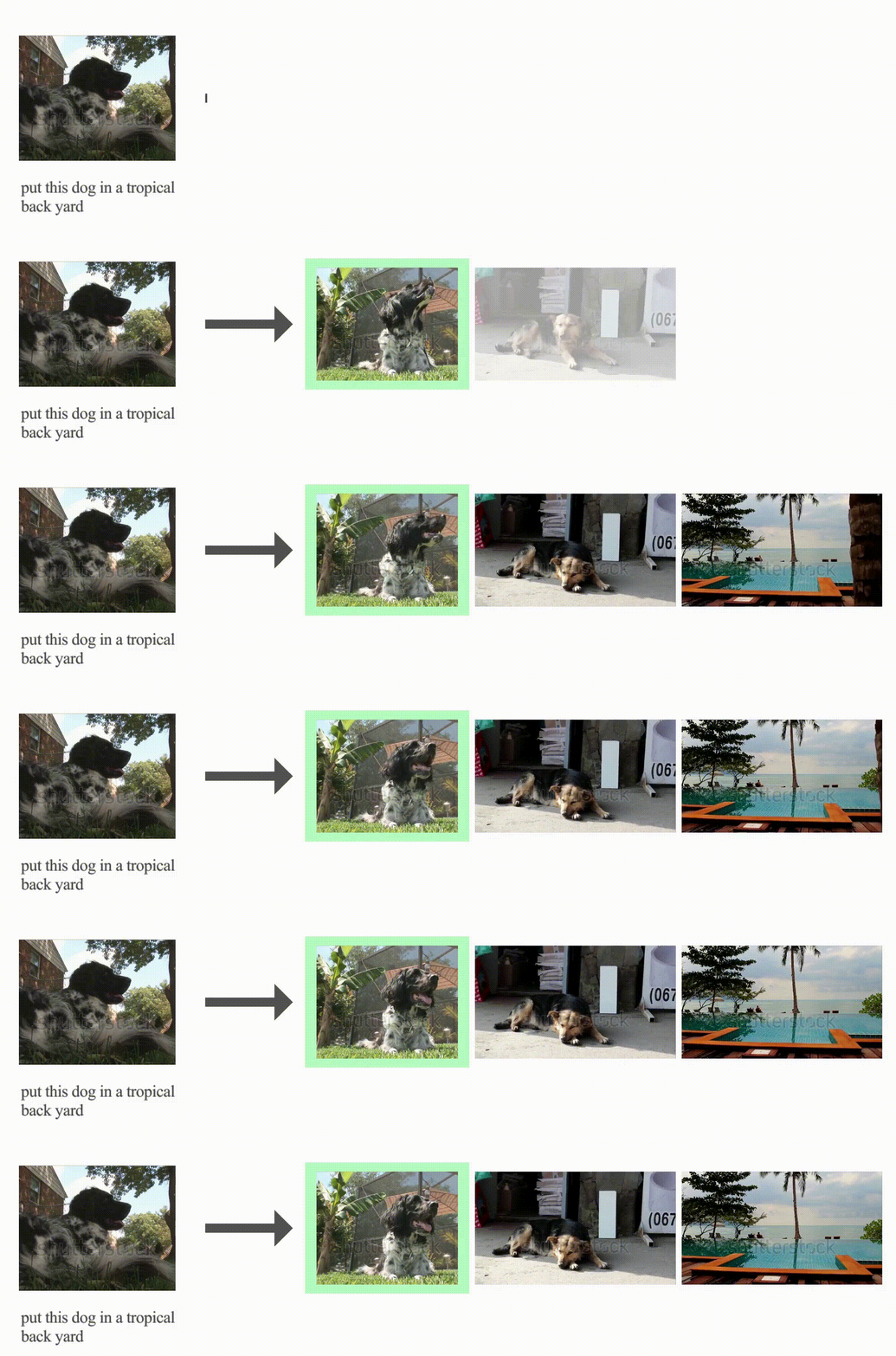
> Composed Image Retrieval (CoIR) has recently gained popularity as a task that considers _both_ text and image queries together, to search for relevant images in a database. Most CoIR approaches require manually annotated datasets, comprising image-text-image triplets, where the text describes a modification from the query image to the target image. However, manual curation of CoIR _triplets_ is expensive and prevents scalability. In this work, we instead propose a scalable automatic dataset creation methodology that generates triplets given video-caption _pairs_, while also expanding the scope of the task to include composed _video_ retrieval (CoVR). To this end, we mine paired videos with a similar caption from a large database, and leverage a large language model to generate the corresponding modification text. Applying this methodology to the extensive WebVid2M collection, we automatically construct our WebVid-CoVR dataset, resulting in 1.6 million triplets. Moreover, we introduce a new benchmark for CoVR with a manually annotated evaluation set, along with baseline results. Our experiments further demonstrate that training a CoVR model on our dataset effectively transfers to CoIR, leading to improved state-of-the-art performance in the zero-shot setup on both the CIRR and FashionIQ benchmarks. Our code, datasets, and models are publicly available.
## Description
This repository contains the code for the paper ["CoVR: Learning Composed Video Retrieval from Web Video Captions"](https://arxiv.org/abs/2308.14746).
Please visit our [webpage](http://imagine.enpc.fr/~ventural/covr) for more details.
This repository contains:
```markdown
📦 covr
┣ 📂 configs # hydra config files
┣ 📂 src # Pytorch datamodules
┣ 📂 tools # scrips and notebooks
┣ 📜 .gitignore
┣ 📜 LICENSE
┣ 📜 README.md
┣ 📜 test.py
┗ 📜 train.py
```
## Installation :construction_worker:
Create environment
```bash
conda create --name covr
conda activate covr
```
To install the necessary packages, you can use the provided requirements.txt file:
```bash
python -m pip install -r requirements.txt
```
The code was tested on Python 3.10 and PyTorch 2.4.
Download the datasets
### WebVid-CoVR
To use the WebVid-CoVR dataset, you will have to download the WebVid videos and the WebVid-CoVR annotations.
To download the annotations, run:
```bash
bash tools/scripts/download_annotation.sh covr
```
To download the videos, install [`mpi4py`](https://mpi4py.readthedocs.io/en/latest/install.html#) (``conda install -c conda-forge mpi4py``) and run:
```bash
ln -s /path/to/your/datasets/folder datasets
python tools/scripts/download_covr.py --split=
```
### CC-CoIR
To use the CC-CoIR dataset, you will have to download the Conceptual Caption images and the CC-CoIR annotations.
To download the annotations, run:
```bash
bash tools/scripts/download_annotation.sh coir
```
### CIRR
To use the CIRR dataset, you will have to download the CIRR images and the CIRR annotations.
To download the annotations, run:
```bash
bash tools/scripts/download_annotation.sh cirr
```
To download the images, follow the instructions in the [CIRR repository](https://github.com/lil-lab/nlvr/tree/master/nlvr2#direct-image-download). The default folder structure is the following:
```markdown
📦 CoVR
┣ 📂 datasets
┃ ┣ 📂 CIRR
┃ ┃ ┣ 📂 images
┃ ┃ ┃ ┣ 📂 train
┃ ┃ ┃ ┣ 📂 dev
┃ ┃ ┃ ┗ 📂 test1
```
### FashionIQ
To use the FashionIQ dataset, you will have to download the FashionIQ images and the FashionIQ annotations.
To download the annotations, run:
```bash
bash tools/scripts/download_annotation.sh fiq
```
To download the images, the urls are in the [FashionIQ repository](https://github.com/hongwang600/fashion-iq-metadata/tree/master/image_url). You can use the [this script](https://github.com/yanbeic/VAL/blob/master/download_fashion_iq.py) to download the images. Some missing images can also be found [here](https://github.com/XiaoxiaoGuo/fashion-iq/issues/18). All the images should be placed in the same folder (``datasets/fashion-iq/images``).
### CIRCO
To use the CIRCO dataset, download both the CIRCO images and the CIRCO annotations. Follow the structure provided in the [CIRCO respository](https://github.com/miccunifi/CIRCO.git) and place the files in the ``datasets/`` directory.
(Optional) Download pre-trained models
To download the checkpoints, run:
```bash
bash tools/scripts/download_pretrained_models.sh
```
Computing BLIP embeddings
Before training, you will need to compute the BLIP embeddings for the videos/images. To do so, run:
```bash
# This will compute the BLIP embeddings for the WebVid-CoVR videos.
# Note that you can use multiple GPUs with --num_shards and --shard_id
python tools/embs/save_blip_embs_vids.py --video_dir datasets/WebVid/2M/train --todo_ids annotation/webvid-covr/webvid2m-covr_train.csv
# This will compute the BLIP embeddings for the WebVid-CoVR-Test videos.
python tools/embs/save_blip_embs_vids.py --video_dir datasets/WebVid/8M/train --todo_ids annotation/webvid-covr/webvid8m-covr_test.csv
# This will compute the BLIP embeddings for the CIRR images.
python tools/embs/save_blip_embs_imgs.py --image_dir datasets/CIRR/images/
# This will compute the BLIP embeddings for FashionIQ images.
python tools/embs/save_blip_embs_imgs.py --image_dir datasets/fashion-iq/images/
# This will compute the BLIP embeddings for the WebVid-CoVR modifications text. Only needed if using the caption retrieval loss (model/loss_terms=si_ti+si_tc).
python tools/embs/save_blip_embs_txts.py annotation/webvid-covr/webvid2m-covr_train.csv datasets/WebVid/2M/blip-vid-embs-large-all
```
Computing BLIP-2 embeddings
Before training, you will need to compute the BLIP-2 embeddings for the videos/images. To do so, run:
```bash
# This will compute the BLIP-2 embeddings for the WebVid-CoVR videos.
# Note that you can use multiple GPUs with --num_shards and --shard_id
python tools/embs/save_blip2_embs_vids.py --video_dir datasets/WebVid/2M/train --todo_ids annotation/webvid-covr/webvid2m-covr_train.csv
# This will compute the BLIP-2 embeddings for the WebVid-CoVR-Test videos.
python tools/embs/save_blip2_embs_vids.py --video_dir datasets/WebVid/8M/train --todo_ids annotation/webvid-covr/webvid8m-covr_test.csv
# This will compute the BLIP-2 embeddings for the CIRR images.
python tools/embs/save_blip2_embs_imgs.py --image_dir datasets/CIRR/images/test1 --save_dir datasets/CIRR/blip2-embs-large/test1
python tools/embs/save_blip2_embs_imgs.py --image_dir datasets/CIRR/images/dev --save_dir datasets/CIRR/blip2-embs-large/dev
python tools/embs/save_blip2_embs_imgs.py --image_dir datasets/CIRR/images/train --save_dir datasets/CIRR/blip2-embs-large/train
# This will compute the BLIP-2 embeddings for FashionIQ images.
python tools/embs/save_blip2_embs_imgs.py --image_dir datasets/fashion-iq/images/
# This will compute the BLIP-2 embeddings for the WebVid-CoVR modifications text. Only needed if using the caption retrieval loss (model/loss_terms=si_ti+si_tc).
python tools/embs/save_blip2_embs_txts.py annotation/webvid-covr/webvid2m-covr_train.csv datasets/WebVid/2M/blip2-vid-embs-large-all
```
Training
The command to launch a training experiment is the folowing:
```bash
python train.py [OPTIONS]
```
The parsing is done by using the powerful [Hydra](https://github.com/facebookresearch/hydra) library. You can override anything in the configuration by passing arguments like ``foo=value`` or ``foo.bar=value``. See *Options parameters* section at the end of this README for more details.
Evaluating
The command to evaluate is the folowing:
```bash
python test.py test= [OPTIONS]
```
Options parameters
#### Datasets:
- ``data=webvid-covr``: WebVid-CoVR datasets.
- ``data=cirr``: CIRR dataset.
- ``data=fashioniq``: FashionIQ dataset.
- ``data=cc-coir``: CC-CoIR dataset.
- ``data=cc-coir+webvid-covr``: WebVid-CoVR and CC-CoIR dataset.
#### Models:
- ``model=blip-large``: BLIP model.
- ``model=blip2-coco``: BLIP-2 model. Needs to be used in conjunction with ``model/ckpt=blip2-l-coco`` or BLIP-2 checkpoint.
#### Tests:
- ``test=all``: Test on WebVid-CoVR, CIRR and all three Fashion-IQ test sets.
- ``test=webvid-covr``: Test on WebVid-CoVR.
- ``test=cirr``: Test on CIRR.
- ``test=fashioniq``: Test on all three Fashion-IQ test sets (``dress``, ``shirt`` and ``toptee``).
- ``test=circo``: Test on CIRCO.
#### Checkpoints:
- ``model/ckpt=blip-l-coco``: Default checkpoint for BLIP-L finetuned on COCO.
- ``model/ckpt=webvid-covr``: Default checkpoint for CoVR finetuned on WebVid-CoVR.
- ``model/ckpt=fashioniq-all-ft_covr``: Default checkpoint pretrained on WebVid-CoVR and finetuned on FashionIQ.
- ``model/ckpt=cirr_ft-covr+gt``: Default checkpoint pretrained on WebVid-CoVR and finetuned on CIRR.
- ``model/ckpt=blip2-l-coco``: Default checkpoint for BLIP-2 L finetuned on COCO.
- ``model/ckpt=blip2-l-coco_coir``: Default checkpoint for BLIP-2 L pretrained on COCO and finetuned on CC-CoIR.
- ``model/ckpt=blip2-l-coco_coir+covr``: Default checkpoint for BLIP-2 L pretrained on COCO, finetuned on CC-CoIR and WebVid-CoVR.
#### Training
- ``trainer=gpu``: training with CUDA, change ``devices`` to the number of GPUs you want to use.
- ``trainer=ddp``: training with Distributed Data Parallel (DDP), change ``devices`` and ``num_nodes`` to the number of GPUs and number of nodes you want to use.
- ``trainer=cpu``: training on the CPU (not recommended).
#### Logging
- ``trainer/logger=csv``: log the results in a csv file. Very basic functionality.
- ``trainer/logger=wandb``: log the results in [wandb](https://wandb.ai/). This requires to install ``wandb`` and to set up your wandb account. This is what we used to log our experiments.
- ``trainer/logger=``: Other loggers (not tested).
#### Machine
- ``machine=server``: You can change the default path to the dataset folder and the batch size. You can create your own machine configuration by adding a new file in ``configs/machine``.
#### Experiment
There are many pre-defined experiments from the paper in ``configs/experiment`` and ``configs/experiment2``. Simply add ``experiment=`` or ``experiment2=`` to the command line to use them.