Interact with GitHub from messaging platforms like Slack, Mattermost & Microsoft Teams using Nimbella Commander.
- Create an issue.
- Close an issue.
- Reopen an issue.
- Label an issue/pull request.
- Request someone to review a pull request.
- View repository community statistics.
- Searching repositories, commits, code, issues, pull requests, users and topics using given words.
Please make sure Commander is installed in your Slack workspace or other messaging platforms before executing this Slash command.
/nc csm_install github
In order to use this command set, you need to add .
Create a secret named github_repos to avoid passing repository (-r) to commands.

For commands that only work with single repository the first repository in github_repos is used.
Only for Github Enterprise version, you need to specify the host. Below are the ways to do it, you can follow any of them
-
Specify
--hostor-hwhile invoking the command. -
Create a secret with key name
github_hostusing/nc secret_create, and add the host as the value.
If you use more than one of the approaches listed above, the precedence is decided top-down (e.g., command line supersedes all others).
github- View GitHub command set documentation.github_close_issue- Close an issue.github_create_issue- Create an issue.github_label- Label an issue/pull request.github_reopen_issue- Reopen an issue.github_request_review- Request someone to review a pull request.github_search- Search repositories, commits, code, issues, pull requests, users and topics using keywords.github_stats- View repository community statistics.github_view_pr- View recent pull requests.assignees- Manage Assignees.comments- Manage Comments.issues- Manage Issues and PRs.labels- Manage Labels.milestones- Manage Milestones.
View GitHub command set documentation
/nc githubClose an issue.
/nc github_close_issue <issueNumber> [-r <repo>]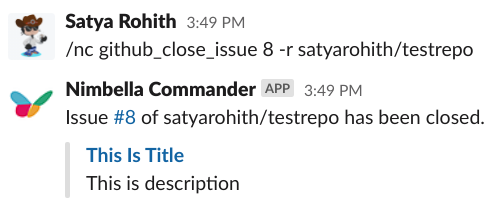
Create an issue.
/nc github_create_issue <title> <body> [-r <repo>]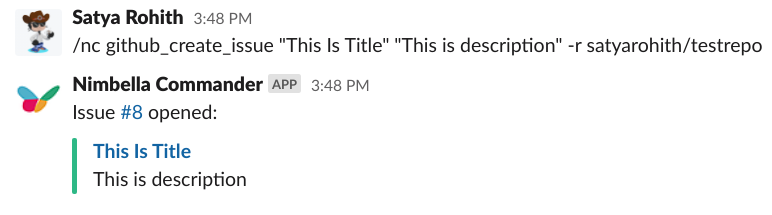
Label an issue/pull request.
/nc github_label <issueNumber> <labels> [-r <repo>]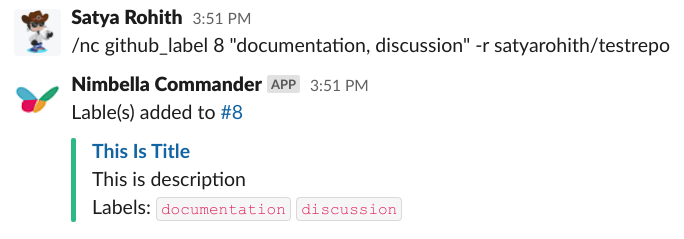
Reopen an issue.
/nc github_reopen_issue <issueNumber> [-r <repo>]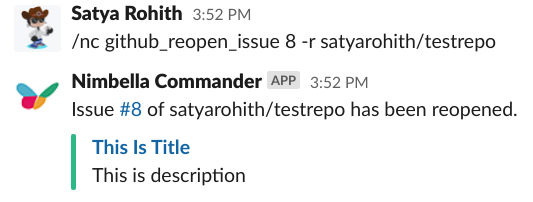
Request someone to review a pull request
/nc github_request_review <prNumber> <reviewers> [-r <repo>]Note: Mattermost support for this command is yet to be added.
Search repositories, commits, code, issues, pull requests, users and topics using keywords.
/nc github_search <entity> [<keywords>] [-q <query>] [-r <repositories>] [-l <language>] [-s <pageSize>] [-n <pageNumber>]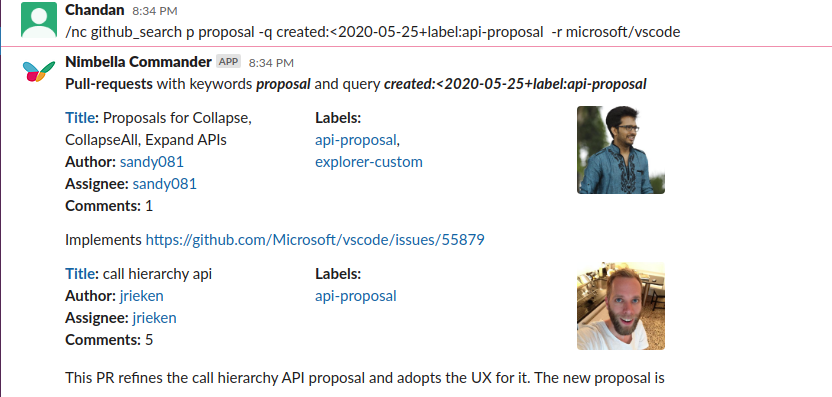
Entity can be passed in as an abbreviation:
r- repositoriescm- commitsc- codei- issuesp- pull requestsu- userst- topics
Multiple keywords can be combined using + sign. e.g. atom+design
Optionally the following options can be provided for more specific search.
[-q <query>]query can be formed using github search syntax.[-r <repositories>]specific repositories can be given (e.g.-r microsoft/vscode,nimbella/command-sets).[-l <language>]specific language can be mentioned (e.g.-l python).[-s <pageSize>]number of records to be fetched in one go (e.g.-s 10).[-n <pageNumber>]next set of records can be fetched using (e.g.-n 2).
View repository community statistics.
/nc github_stats [<repo>]
View recent pull requests.
/nc github_view_pr [<repo>] [-state <state>]Manage Assignees.
/nc assignees (add|remove|check|list) [-a <assignees>] [-i <issue_number|pr_number>] [-r <repo>] [-h <host>]Manage Comments.
/nc comments (add|update|delete|get|list) [-c <comment_id>] [-i <issue_number|pr_number>] [-b <body>] [-r <repo>] [-h <host>]Manage Issues and PRs.
/nc issues (add|update|get|list|lock|unlock) [-i <issue_number|pr_number>] [-a <assignees>] [-t <title>] [-b <body>] [-m <milestone>] [-l <labels>] [-s <state>] [-reason (off-topic|too heated|resolved|spam)] [-list_option (repository|org|user|all)] [-o <org>] [-r <repo>] [-h <host>]Manage Labels.
/nc labels (create|add|update|get|list|set|remove|removeall) [-i <issue_number|pr_number>] [-m <milestone_number>] [-l <labels>] [-n <name>] [-new_name] [-c <color>] [-d <description>] [-list_option (repo|issue|milestone)] [-r <repo>] [-h <host>]Note: set purges the labels whereas add only augments. Both create labels if they don't exist already.
Manage Milestones.
/nc milestones (add|update|get|list|delete) [-m <milestone_number>] [-t <title>] [-due_on ] [-s <state>] [-d <description>] [-r <repo>] [-h <host>]Note: due_on accepts a timestamp in ISO 8601 format: YYYY-MM-DDTHH:MM:SSZ.
We're always happy to help you with any issues you encounter. You may want to join our Slack community to engage with us for a more rapid response.