Led.Matrix
The Led.Matrix class constructs an object that may represent one or more (chained) 8x8 or 8x16 LED Matrix (MAX7219, MAX7221 and HT16K33) devices attached to the physical board. Up to 8 devices can be controlled with one instance, giving you 512 controllable LEDs.
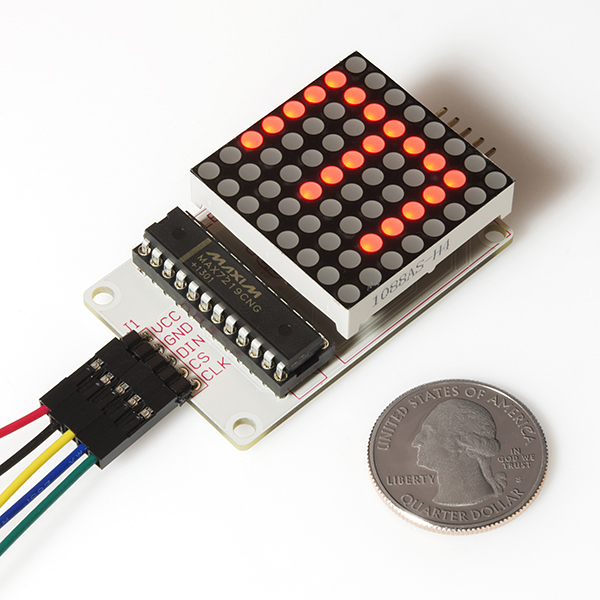

Known supported devices:
-
Shift Register Devices
-
I2C devices
If you are working with HT16K33 devices, you will need to run at least version 2.4.0 of Firmata on the board, currently available in beta.
Adafruit offers a selection of 8x8 matrices in various colors:
(This list only represents devices that I've personally confirmed, please add devices as needed.)
- shift register options An object of property parameters.
| Property Name | Type | Value(s) | Properties | Required |
|---|---|---|---|---|
| pins | Object | A valid pins object or pins array | data, clock, cs | yes |
| devices | Number | 1-8 | For single device cases, this can be omitted. Defaults to 1. | no |
- I2C options (Requires StandardFirmata 2.4.0 or greater)
| Property Name | Type | Value(s) | Properties | Required |
|---|---|---|---|---|
| controller | string | A valid controller model name | HT16K33 | yes |
| addresses | array | An array of I2C addresses | Defaults to array of addresses in range 0x70 - 0x77, up to length specified by devices | no |
| isBicolor | Boolean | true|false | Defaults to false | no |
| dims | A valid dims object, array or string | rows, columns | The dimensions for the devices being used: either 8x8, 16x8 or 8x16. | no |
// Shift Register device
var matrix = new five.Led.Matrix({
  pins: {
    data: 2,
    clock: 3,
    cs: 4
  }
});

// I2C device
var matrix = new five.Led.Matrix({
  controller: "HT16K33",
  isBicolor: true
});

// 16x8 I2C device
var matrix = new five.Led.Matrix({
  controller: "HT16K33",
  dims: "16x8"
});{
isMatrix: true. READONLY
devices: ...Number of devices controlled. READONLY
}var five = require("johnny-five");
var board = new five.Board();
board.on("ready", function() {
var matrix = new five.Led.Matrix({
pins: {
data: 2,
clock: 3,
cs: 4
},
devices: 1
});
matrix.on();
this.repl.inject({
display: matrix.device(0)
});
});NOTE: When the device is turned off (with the
offmethod), data is retained and will be displayed on the device when turned on (with theonmethod). This is useful when powering the devices from a battery, by providing a power saving mechanism.
- on() Turn on all matrix devices.
- on(device index) Turn on matrix device at specified device index.
var matrix = new five.Led.Matrix({
  pins: {
    data: 2,
    clock: 3,
    cs: 4
  }
});

// Turn on a specific device by device index.
matrix.on(0);

// Turn on all devices
matrix.on();- off() Turn off all matrix devices.
- off(device index) Turn off matrix device at specified device index.
var matrix = new five.Led.Matrix({
  pins: {
    data: 2,
    clock: 3,
    cs: 4
  }
});

// Turn off a specific device by device index.
matrix.off(0);

// Turn off all devices
matrix.off();

// Send data to the the matrix
// ...Turn on the device to see the data displayed- clear() Shut off all LEDs, for all devices.
- clear(device index) Shut off all LEDs, for a device at specified device index.
Note: clear() does not shut off the device.
var matrix = new five.Led.Matrix({
  pins: {
    data: 2,
    clock: 3,
    cs: 4
  }
});

// Clear the entire display of a specified device.
matrix.clear(0);

// Clear the entire display for all devices
matrix.clear();- brightness(0-100) Set the brightness from 0-100%, of all devices.
-
brightness(device index, 0-100) Set the brightness from 0-100%, for a device at specified
device index.
var matrix = new five.Led.Matrix({
  pins: {
    data: 2,
    clock: 3,
    cs: 4
  }
});

// Set the brightness of a specified device.
matrix.brightness(0, 100);

// Set the brightness for all devices
matrix.brightness(100);-
led(row, col, state) Set on/off/color state for led at
rowandcol(0-16, 0-16), of all devices. -
led(device index, row, col, state) Set on/off/color state for led at
rowandcol(00-16), for a device at the specifieddevice index.
// Shift Register device
var matrix = new five.Led.Matrix({
  pins: {
    data: 2,
    clock: 3,
    cs: 4
  }
});

// Turn on the top-left led of the specified device
matrix.led(0, 0, 0, 1);

// Turn on the top-left led of all devices
matrix.led(0, 0, 1);

// Turn off the top-left led of all devices
matrix.led(0, 0, 0);

// I2C device (bicolor)
var matrix = new five.Led.Matrix({
  controller: "HT16K33",
  isBicolor: true
});
// Turn top-left led of the specified device yellow
matrix.led(0, 0, 0, LedControl.COLORS.YELLOW);-
row(row, 0-255) Set
row(0-16) to 8-bit or 16-bit value (0-0xFFFF), of all devices. -
row(device index, row, 0-255) Set
row(0-16) to 8-bit or 16-bit value (0-0xFFFF), for a device at the specifieddevice index.
var matrix = new five.Led.Matrix({
  pins: {
    data: 2,
    clock: 3,
    cs: 4
  }
});

// Turn on the entire first row of the specified device
matrix.row(0, 0, 255);

// Turn on the entire first row of all devices
matrix.row(0, 255);

// 8x16 I2C device
var matrix = new five.Led.Matrix({
  controller: "HT16K33",
  dims: [8,16]
});
// Turn on entire first row of all devices (16-bit value)
matrix.row(0,0xFFFF)-
column(column, 0-255) Set
column(0-16) to 8-bit or 16-bit value (0-0xFFFF), of all devices. -
column(device index, column, 0-255) Set
column(0-16) to 8-bit or 16-bit value (0-0xFFFF), for a device at the specifieddevice index.
var matrix = new five.Led.Matrix({
  pins: {
    data: 2,
    clock: 3,
    cs: 4
  }
});

// Turn on the entire first column of the specified device
matrix.column(0, 0, 255);

// Turn on the entire first column of all devices
matrix.column(0, 255);- draw(character) Draw a "character" to all devices.
-
draw(device index, character) Draw a "character" to a device at the specified
device index.
Valid "character" values:
- A single character string, eg.
"A", "b", "1", "$" - An array (with 8 or 16 elements) of 8-bit or 16-bit values, eg.
[0x00, 0x04, 0x15, 0x0E, 0x15, 0x04, 0x00, 0x00](That array represents*character). The dimensions of the character array must match the dimensions of the matrix i.e. 8x8, 8x16 or 16x8 - An 8 or 16 element array of 8 or 16 character long strings, where each character represents the on/off/color state of the LED at that position in the matrix, eg.
[
  "01100110",
  "10011001",
  "10000001",
  "10000001",
  "01000010",
  "00100100",
  "00011000",
  "00000000"
];
var matrix = new five.Led.Matrix({
pins: {
data: 2,
clock: 3,
cs: 4
}
});
var heart = [
"01100110",
"10011001",
"10000001",
"10000001",
"01000010",
"00100100",
"00011000",
"00000000"
];
// Draw a heart to the specified device
matrix.draw(0, heart);
// Draw a heart to all devices
matrix.draw(heart);
// NOTE: this is actually a predefined character
var exclamation = [
0x04,
0x04,
0x04,
0x04,
0x00,
0x00,
0x04,
0x00
];
// Draw an exclamation to the specified device
matrix.draw(0, exclamation);
// Draw an exclamation to all devices
matrix.draw(exclamation);
var asterisk = "*";
// Draw an asterisk to the specified device
matrix.draw(0, asterisk);
// Draw an asterisk to all devices
matrix.draw(asterisk);Led.Matrix.CHARS
0 1 2 3 4 5 6 7 8 9
! " # $ % & ' ( ) * + , - . / : ; < = > ? @
A B C D E F G H I J K L M N O P Q R S T U V W X Y Z [ \ ] ^ _ `
a b c d e f g h i j k l m n o p q r s t u v w x y z { | } ~
Led.Matrix objects are output only and therefore do not emit any events.