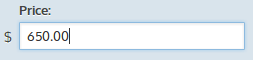
The number field type should be a numeric type in your database.
'price' => array(
	'type' => 'number',
	'title' => 'Price',
	'symbol' => '$', //optional, defaults to ''
	'decimals' => 2, //optional, defaults to 0
	'thousands_separator' => ',', //optional, defaults to ','
	'decimal_separator' => '.', //optional, defaults to '.'
)
In the edit form, an admin user will be presented with a text input. This text input will force your users to enter a number in the proper format.
The symbol option lets you set a symbol in front of the number. This is for aesthetic purposes only and shows up outside of the input (as seen above).
The decimals option lets you set the precision of your number.
The thousands_separator option lets you define the character to use to separate thousand groups.
The decimal_separator option lets you define the character to use as a decimal point.

The number filter comes with a minimum and maximum value. This lets you either set a maximum and a minimum to narrow the result set to a range, only a minimum, or only a maximum.