Welcome to PocketMocker! This is an in-page HTTP controller designed specifically for frontend developers. This manual will help you master the features of PocketMocker, from basic rule configuration to advanced dynamic simulations.
PocketMocker provides two modes of usage to meet different needs.
Best for quick trials or non-Vite projects. Data is stored only in the browser's LocalStorage. It persists across refreshes but cannot be shared with a team.
Installation:
npm install pocket-mocker -DUsage:
Add the following to your project's entry file (e.g., main.ts or index.js):
import { pocketMock } from 'pocket-mocker';

if (process.env.NODE_ENV === 'development') {
  pocketMock();
}Best for team collaboration. Mock rules are saved as JSON files in the project's root directory and can be committed to Git.
Configure vite.config.ts:
import { defineConfig } from 'vite';
import pocketMockPlugin from 'pocket-mocker/vite-plugin';

export default defineConfig({
  plugins: [
    pocketMockPlugin()
  ]
});
After starting the dev server, PocketMocker automatically detects and connects to the file system.
After starting your project, you'll see the PocketMocker floating capsule at the bottom right of the page.
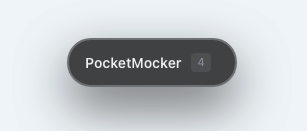
- Click: Expand/Collapse the control panel.
- Drag: Move the capsule to any position on the screen.
- Rule Count: Displays the number of currently active rules.
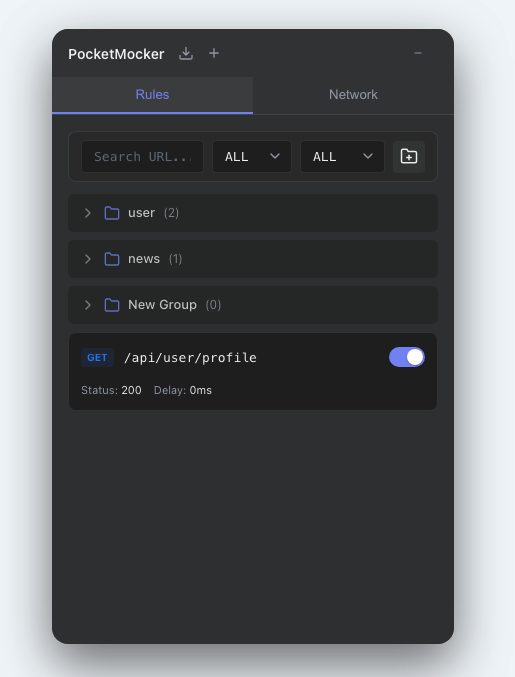
The panel is divided into three main areas:
- Header:
- Import Button: Support for importing Postman or OpenAPI files.
- New Rule (+): Manually create a blank rule.
- Minimize: Collapse the panel.
- Tabs:
- Rules: Manage all Mock rules.
- Network: Monitor network request logs in real-time.
- Content Area: Displays the rule list or network logs.
Tip: You can drag the edges of the panel to resize it.
You can create rules in several ways:
- Click the + button in the header to create one manually.
- In the Network tab, click the "Mock" button on any request log (Recommended).
- Import external API documentation.
Click any rule to enter edit mode.
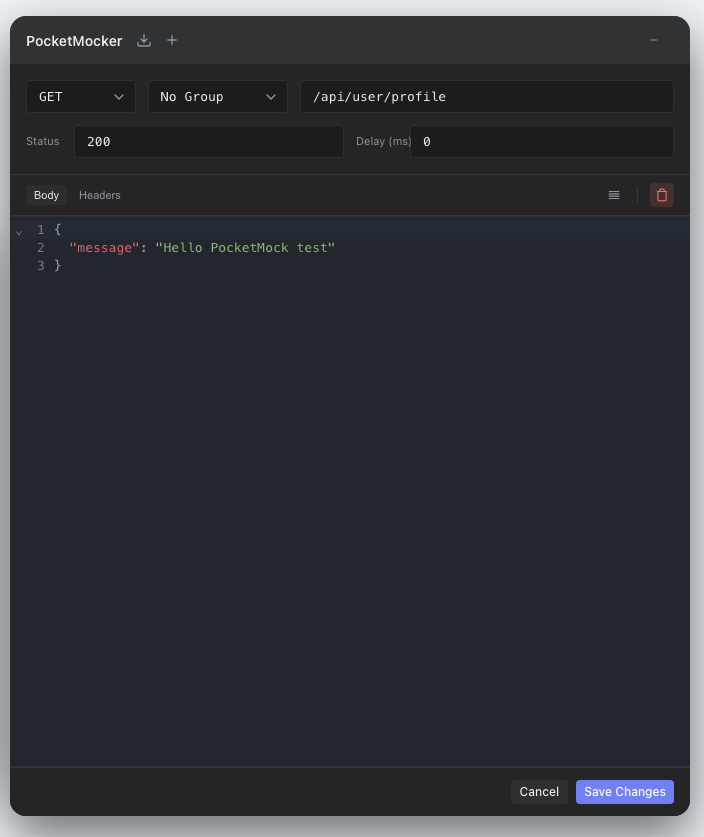
- URL: Request path, supports pattern matching.
- Exact match:
/api/user - Param match:
/api/user/:id(e.g.,/api/user/123) - Wildcard:
/api/*
- Exact match:
- Method: HTTP method (GET, POST, etc.).
- Status: Response status code. Common: 200 (Success), 404 (Not Found), 500 (Server Error).
- Delay: Response delay (ms). Used to simulate slow networks and test loading states.
- Response Type:
- JSON: Returns static JSON data, supports Smart Mock syntax.
- Function: Write JavaScript functions for dynamic responses.
When you have many rules, use groups to manage them.
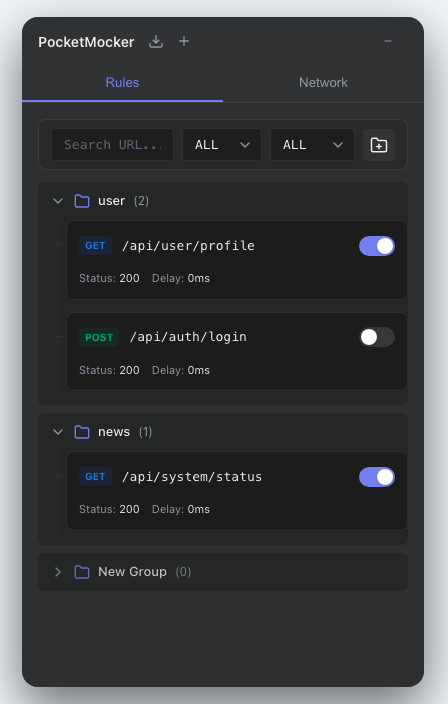
- Click the Folder Icon on the toolbar to create a new group.
- In the rule details, use the "Group" dropdown to move a rule to a specific group.
- Click a group title to collapse/expand its rules.
In the toolbar at the top of the rule list:
- Search Box: Filter rules by URL keywords.
- Method: Filter by HTTP method.
- Status: Filter "Enabled" or "Disabled" rules.
In the JSON editor, PocketMocker supports special syntax to generate random data.
| Syntax | Description | Example |
|---|---|---|
@guid |
Generate a UUID | "550e84..." |
@integer(min, max) |
Random integer | @integer(1, 100) → 42 |
@float(min, max, dec) |
Random float | @float(0, 100, 2) → 42.57 |
@boolean |
Random boolean | true |
@string(length) |
Random string of specific length | @string(8) → "aB3dEf9g" |
@pick(a, b, c) |
Pick one randomly | @pick(Admin, User) → "Admin" |
@date(start, end) |
Random date | @date(2023-01-01, 2023-12-31) |
@color |
Random hex color | "#f0a1b2" |
| Syntax | Description | Example |
|---|---|---|
@name |
Random name | "John Doe" |
@email(domains) |
Random email | @email(gmail.com, outlook.com) |
@phone(prefix) |
Random phone number | @phone(+86) |
@username |
Random username | "happy_cat_123" |
@ip |
Random IP address (supports v6) | @ip or @ip(v6) |
@address(country) |
Random address object | @address(US) |
@company(industry) |
Random company object | @company(Tech) |
| Syntax | Description | Example |
|---|---|---|
@image(WxH) |
Placeholder image URL | @image(200x200) |
@url(tlds) |
Random URL | @url(com, cn) |
@text(words) |
Random English text paragraph | @text(20) |
Generate an array by adding |count to the key name.
Example:
{
  "users|5": {  // Generates an array of 5 users
    "id": "@guid",
    "name": "@name",
    "avatar": "@image(100x100)",
    "role": "@pick(admin, editor, viewer)"
  }
}PocketMocker's editor features smart detection. When you write a JavaScript function in the Body editor (instead of standard JSON format), the editor automatically recognizes and switches to Function mode for full dynamic response logic.
(req) => {
  // req contains: url, method, params, query, body, headers

  // Case 1: Return different data based on ID
  if (req.params.id === '1') {
    return { name: 'Admin', role: 'admin' };
  }

  // Case 2: Simulate an error
  if (req.query.forceError) {
    return {
      status: 500,
      body: { error: 'Internal Server Error' }
    };
  }

  // Case 3: Echo request body
  return {
    receivedData: req.body,
    timestamp: Date.now()
  };
}Switch to the Network tab, where PocketMocker records all fetch and XMLHttpRequest requests (whether mocked or not).
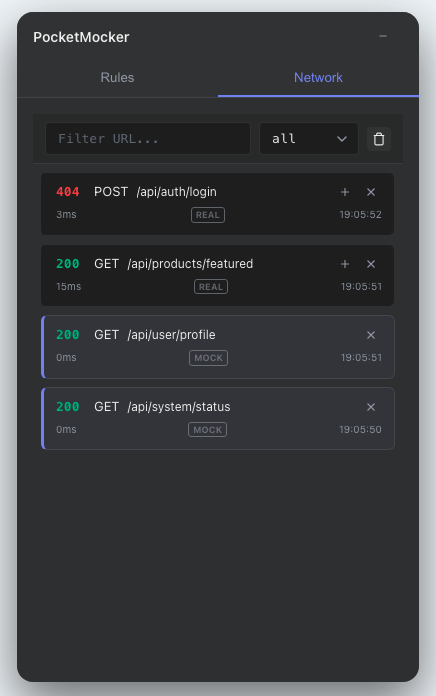
- View Details: Click a list item to expand and view full Request Headers, Body, and Response Body.
- One-click Mock: Click the Mock button on the right of a log. The system automatically extracts the URL, Method, and Response to create a new Mock rule. This is the fastest way to create rules!
- Status Markers:
- MOCK: Logs with a blue left border and a "MOCK" tag indicate the request was intercepted.
- REAL: Logs with a "REAL" tag indicate a real passthrough request.
- Status Color: Green indicates success (2xx), red indicates failure (4xx/5xx).
PocketMocker supports importing configurations from popular API documentation tools.
- Click the Import icon in the header (folder with arrow).
- Select an exported JSON file.
- The system will automatically convert and generate Mock rules with Smart syntax.
Supported Formats:
- Postman Collection (v2.1)
- OpenAPI 3.0 (Swagger)
Q: Why is my request not being intercepted? A: Please check the following:
- Ensure the rule is set to "Enabled".
- Check if the request URL matches the rule's Pattern.
- Ensure the request Method matches.
- Verify that PocketMocker is correctly initialized at the project entry point.
Q: Why is req.body empty in my Function Mock?
A: Ensure you set the correct Content-Type (e.g., application/json) when sending the request; otherwise, the parser may fail to parse the body.
Q: How do I disable PocketMocker in production? A: Wrap the initialization with an environment variable check:
if (process.env.NODE_ENV === 'development') {
  pocketMock();
}
This way, the Tree-shaking process will automatically remove the related code during production builds.