It is possible to enable a "Pixel-Unshuffle" (also known as: Inverse Pixel Shuffle, Space to Depth, etc) which allows to convert an image tensor of shape (∗, C, H × r, W × r) to a tensor of shape (∗, C × r^2, H, W), where r is a downscale factor (or block size).
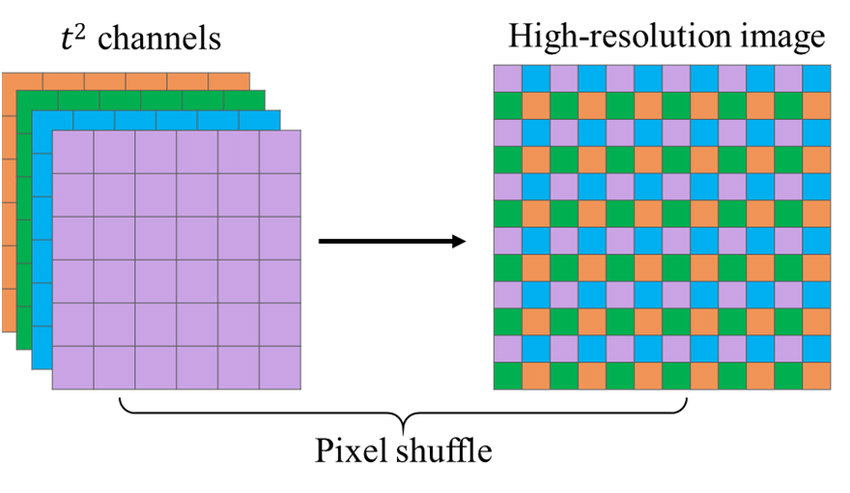
There are multiple uses for Pixel-Unshuffle, but in essence it makes it possible to use a Super-Resolution model (with an architecture that upscales images) for different (smaller) scale than the model is designed for. This allows to use a 4x SR model to work, for example with scales 2x and 1x, without requiring to modify the training batch size or patch size to prevent VRAM limitations, since the feature extraction happens at the lower scale resolution. The number of input channels of the model will have to be adjusted from the original configuration (usually 3 channels) to the expanded depth after Pixel-Unshuffle (for example: 3 x r x r).
Using Pixel-Unshuffle introduces this additional unshuffle_scale, besides the standard global training scale, but unlike other alternatives, with the code in this repository it is possible to use it with any of the supported architectures (using the sr_model or ppon_model options), without modifying the networks.
Below are the main use cases and configuration examples.
The Cutblur batch augmentation is designed for Super-Resolution models, but in order to mix the High-Resolution and Low-Resolution images, it first needs the LR to match the HR scale and this is done in the original work by using a nearest-neighbor upscale of the LR image. The logic is that in this way, the model is provided with the raw image signal (pixel), instead of using any high-level interpolation method (bicubic, bilinear, etc).
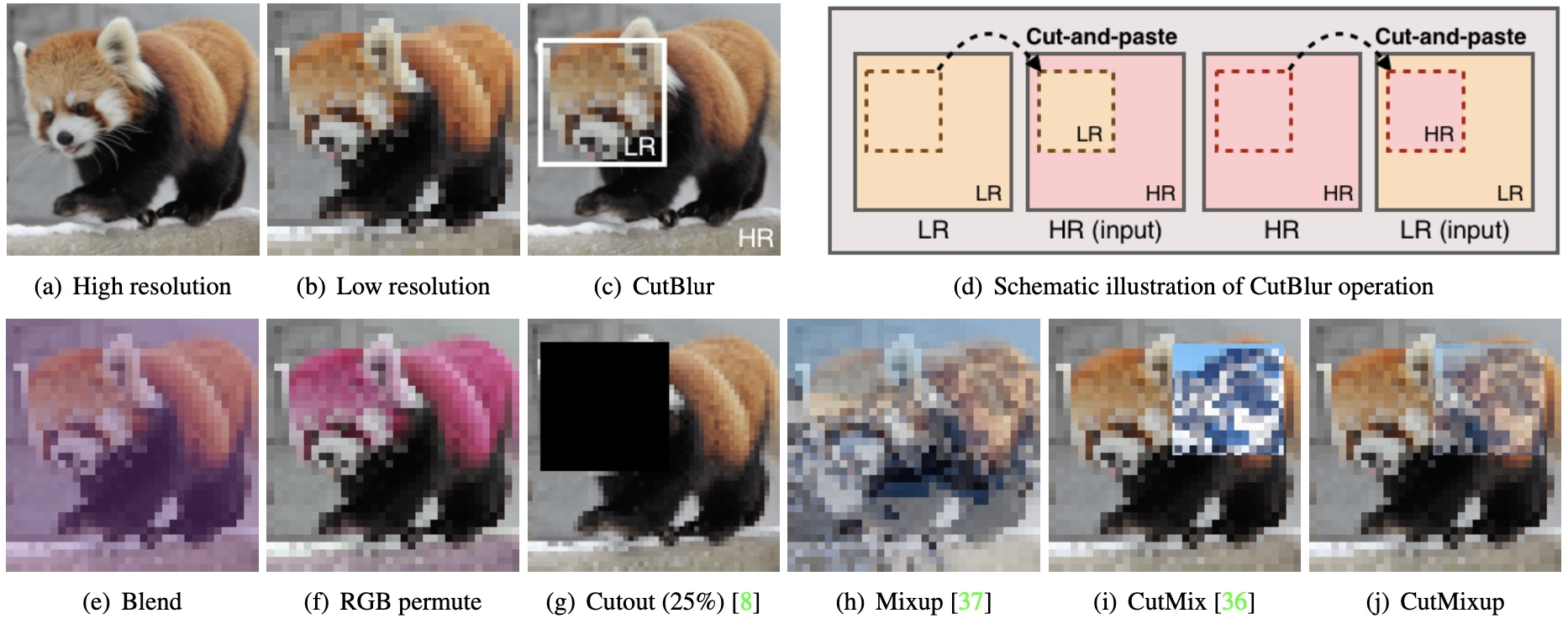
For this reason, Cutblur expects input images to be of the same size as ther target images and Pixel-Unshuffle is then used before the model is applied to convert the image back to the original LR size, which in the original work is 4x scale.
To achieve this configuration, Cutblur must be part of the configured Batch augmentations, for example:
    # Batch (Mixup) augmentations
    mixup: true
    mixopts: [cutblur]
    mixprob: [1.0]
    mixalpha: [0.7]
    aux_mixprob: 1.0
    aux_mixalpha: 1.2
This will automatically enable the nearest-neighbor upscale before images are sent to the network.
Additionally, using the original work as an example, for 4x scale factor, the global scale has to be set to 4, use_unshuffle must be enabled and the unshuffle_scale must match the model scale (4).
scale: 4
use_unshuffle: true
unshuffle_scale": 4
One caveat with this option is that at the moment LR and HR validation images must be provided at the same resolution, since the nearest-neighbor upscale is not being applied automatically to validation images at the moment.
Note that at this time, this is the only supported configuration for Cutblur. A pretrained 4x_cutblur.pth model is available here.
Typically, unlike the case of the first SRCNN, upscaling layers are located at the end of the super-resolution networks, in order to extract all features in the low-resolution space, saving computing resources (specially VRAM).
When the downscale factor is reduced (for example, from 4x to 2x), the resource utilization increases by about a squared factor of the scale change, leading to out of memory issues. The typical solutions are to reduce the patch size and/or reduce the batch size (optionally using a virtual batch size), which can harm the model performance.
For this purpose, Pixel-Unshuffle can also be used to transform the larger LR images to a lower resolution, instead increasing the channel depth, allowing to use the networks at their original scale without mayor modifications of it's configuration, other than the input channel size, and the training strategy (patch and batch size).
In this case, the global scale and use_unshuffle are defined and the network scale must also be provided. This is an example configuration using the ESRGAN architecture as an example:
scale: 1
use_unshuffle: true
...
 network_G:
    which_model_G: esrgan
    scale: 4
Another example option is for 2x scale models, which would be set up as:
scale: 2
use_unshuffle: true
...
 network_G:
    which_model_G: esrgan
    scale: 4
Pretrained models for both 1x and 2x ESRGAN models are available here: 1x_unshuffle.pth and 2x_unshuffle.pth respectively. These models can be interpolated with the 4x ESRGAN models in the model database if the first convolution (feature extraction) layer is skipped, since the shapes don't match. Note that the 4x_cutblur.pth model can also be used as pretrained for 1x models using Pixel-Unshuffle.
Note that Real-ESRGAN used this same approach for 2x and 1x models, keeping the original 4x network scale, but unnecessarily changes the names of the network parameters, so they cannot be loaded directly. For this reason, the rESRGAN models with the original parameter names can be found here. The 2x model can be loaded using the above 2x scale models Pixel-Unshuffle configuration, however, these models are not compatible to interpolate with the models from the model database. The 4x anime model (RealESRGAN_x4plus_anime_6B.pth) was trained using 6 blocks (nb=6) in the network, which can be configured using:
which_model_G: esrgan-mid