
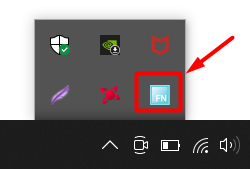
How to use:
-
Download the exe file (for hassle free usage) for enthusiasts I will recommend modifying the .ahk script to fulfill custom needs.
-
Double click the icon (of exe file) to run it.
Purpose: It was created for my needs on a laptop (Asus Tuf a15) on which I have to press the fn key and F1-F3 or F7-F8 keys for volume or brightness controls. I did not have the option to lock fn:
1)by fn+capslock or fn+ esc
2)or by a software provided by the OEM
3)or in BIOS
Features: By this .exe file one can press these keys (listed below) without Fn key to:
- F1: mute
- F2: decrease volume
- F3: increase volume
- F7: decrease brightness
- F8: increase brightness
Additional Benefits:
- No reboots
- No need to enter BIOS
- No need to remember complex hotkeys for fn lock
- No regedits
- No complex setups procedures or complex UI
- No need to turn antivirus off
- No ads or trial end msgs
- Size 1085 kb ...will not eat RAM like google chrome.
- No need to provide personal data, No privacy breaches and no internet needed (will never ask for updates).
- Not a Chinese app/software.
- Will not ruin your keyboard like other apps.
Note:
- Copy the .exe file and place it in (C:\Users\user\AppData\Roaming\Microsoft\Windows\Start Menu\Programs\Startup)
- Disable it from startup via Taskmanager.
- To close it click the arrow key (right hand side of taskbar) and close it from there.
- To remove it completely just delete the .exe file.
- I had autohotkey preinstalled in my system.
Credits: Autohotkey community for providing the code chunks ...which I later modified and made this. Icon is from the myasus app ...since i made it for my usage only...will later modify it.