





The documentation workflow publishes with GitHub Actions; in the repository Settings → Pages, set Build and deployment source to GitHub Actions (once per repo or fork).
A Python library and CLI for TrueMap v6 and GelSight TMD height maps: I/O, processing, visualization, map export, and 3D mesh generation.
- Features
- Installation
- Usage
- CLI command reference
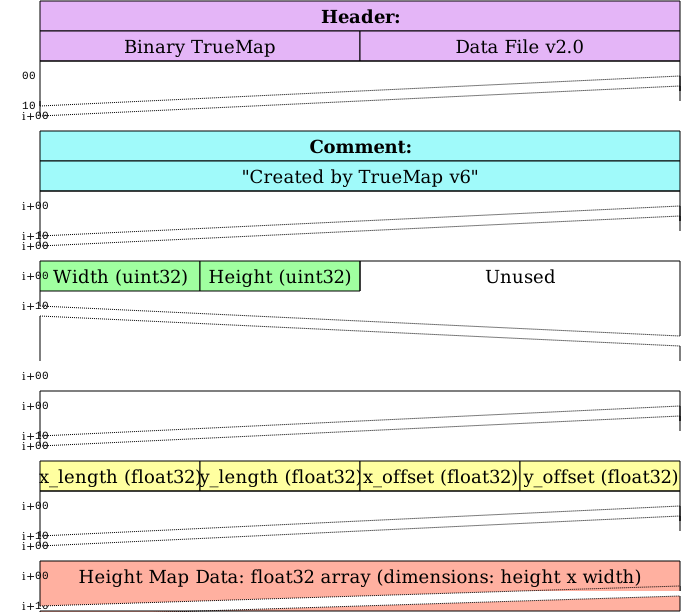
- TMD file format
- Sample data
- Visual examples
- GelSight sequence visualization
- Contributing
- License
| Feature | Description |
|---|---|
| Rich visualizations | 3D surfaces, 2D heatmaps, profiles (matplotlib, plotly, seaborn, optional Polyscope) |
| Export | Displacement/normal maps, STL/OBJ/PLY/glTF/USD meshes, NumPy-friendly workflows |
| Formats | TrueMap v6-style TMD (v2) and legacy v1; GelSight-compatible layouts |
| Python | 3.8+ (see requires-python in pyproject.toml) |
From PyPI:
pip install truemapdataFrom a git checkout:
pip install -r requirements.txt
pip install -e .
The console entry point is tmd-process. From the repository you can also run python tmd_cli.py.
from tmd import TMD

data = TMD.load("path/to/your/file.tmd")
height_map = data.height_map
metadata = data.metadata
Use a real .tmd from your instrument or pipeline; no sample .tmd files are committed to this repository (size, licensing). You can generate synthetic terrain for tests via TMDTerrain / the terrain CLI.
Console entry point: tmd-process (or python tmd_cli.py from a checkout). Global help: tmd-process --help. Embedded CLI examples (markdown): tmd-process visualize examples.
Full documentation: GitHub Pages (same URL as pyproject.toml [project.urls] Documentation).
| Command | Feature | Example |
|---|---|---|
info |
Inspect one .tmd (metadata, optional height sample) |
tmd-process info path/to/file.tmd |
version |
Print CLI and core __version__ |
tmd-process version |
check |
Verify optional dependencies / environment | tmd-process check |
maps |
Export image maps (normal, height, AO, …) | tmd-process maps list |
mesh |
Height field → STL / OBJ / PLY / glTF / USD | tmd-process mesh formats |
visualize |
2D/3D plots, profiles, Polyscope, backends | tmd-process visualize basic path/to/file.tmd |
sequence |
Align frames and export maps/meshes from a run | tmd-process sequence align a.tmd b.tmd c.tmd -o ./aligned |
roughness |
ISO 25178 areal roughness (needs Surfalize) | tmd-process roughness file path/to/file.tmd --quick |
defect |
Detect pits, peaks, scratches, cracks, and directionality anomalies | tmd-process defect file path/to/file.tmd --json |
terrain |
Synthetic heightmaps and texture exports | tmd-process terrain generate perlin --width 512 --height 512 -o ./synthetic |
compress |
Downsample / quantize / combined / batch TMDs | tmd-process compress downsample path/to/file.tmd --scale 0.5 |
cache |
Inspect or clear visualization cache | tmd-process cache info |
config |
Show or change CLI-related settings | tmd-process config show |
| Subcommand | Feature | Example |
|---|---|---|
list |
List supported map type names | tmd-process maps list |
batch |
Export many .tmd files from a directory |
tmd-process maps batch ./data -o ./textures --pattern "*.tmd" |
all |
Export the default map set for one file | tmd-process maps all path/to/file.tmd -o ./maps_out |
height |
Grayscale height map PNG | tmd-process maps height path/to/file.tmd --output-file height.png |
normal |
Tangent-space normal map | tmd-process maps normal path/to/file.tmd -o normal.png |
ao |
Ambient occlusion map | tmd-process maps ao path/to/file.tmd -o ao.png |
bump |
Bump / relief map | tmd-process maps bump path/to/file.tmd -o bump.png |
hillshade |
Hillshade rendering | tmd-process maps hillshade path/to/file.tmd --output-file hill.png |
curvature |
Curvature visualization | tmd-process maps curvature path/to/file.tmd --output-file curv.png |
displacement |
Displacement map | tmd-process maps displacement path/to/file.tmd --output-file disp.png |
Use tmd-process maps --help for every map type (roughness, metallic, parallax_ao, angle, depth, synthetic, …).
| Subcommand | Feature | Example |
|---|---|---|
formats |
List registered mesh exporters | tmd-process mesh formats |
generate |
Unified mesh export (--format, --method, --quality) |
tmd-process mesh generate path/to/file.tmd --format stl --method adaptive --quality high |
stl / obj / ply / gltf / usd |
Shorthand export to one format | tmd-process mesh stl path/to/file.tmd --quality high |
batch |
Mesh many files from a directory | tmd-process mesh batch ./data --output-dir ./meshes --pattern "*.tmd" |
Mesh generation notes:
adaptive— error-driven refinement; lowererror_thresholdand highermax_trianglesyield finer meshes.quadtree— hierarchical grid refinement;max_subdivisionscaps depth. The Python API also exposesdetail_boostonExportConfig.
| Command | Feature | Example |
|---|---|---|
visualize 3d |
3D surface (matplotlib / plotly / …) | tmd-process visualize 3d path/to/file.tmd -o surf.html |
visualize profile |
Row or column height profile | tmd-process visualize profile path/to/file.tmd |
visualize backends |
Which backends are installed | tmd-process visualize backends |
sequence export |
After sequence align, export maps + meshes for *_aligned.tmd |
tmd-process sequence export ./aligned_out |
roughness batch |
CSV / stdout roughness over a folder | tmd-process roughness batch ./tmds --pattern "*.tmd" |
defect batch |
CSV / stdout defect counts and confidence over a folder | tmd-process defect batch ./tmds -o ./defects.csv |
compress quantize |
Reduce unique height levels | tmd-process compress quantize path/to/file.tmd |
cache clear |
Drop cached visualization artifacts | tmd-process cache clear |
config set |
Persist a config key | tmd-process config set --help |
tmd-process defect file --jsonandtmd-process defect batchnow use a fast summary mode by default.- Opt into heavier computations only when needed:
--include-mask--include-overlay--include-responses--mask-output <file.png>--overlay-output <file.png>
| Field | Description |
|---|---|
| Header (32 bytes) | ASCII prefix, e.g. Binary TrueMap Data File v2.0 (null-padded) |
| Comment (24 bytes in reader path) | ASCII comment / padding |
| Dimensions (8 bytes) | Little-endian uint32 width, height |
| Spatial info (16 bytes) | float32 x_length, y_length, x_offset, y_offset |
| Height data | float32 row-major block, logical shape (height, width) |
Same overall binary layout as v2; comments and naming may differ. The reader uses header cues and metadata to interpret the grid.
Shorter header (28-byte offset to dimensions), then width, height, x_length, y_length (two floats only), then height samples.
Examples in docs and tests use paths like path/to/file.tmd or synthetic heightmaps. Committing large proprietary .tmd fixtures is avoided; use your own captures or published attachments.
| Metric | Value |
|---|---|
| Shape | (200, 200) |
| Min | 0.0 |
| Max | 1.0 |
| Mean | 0.41206 |
| Std Dev | 0.18863 |
| 3D surface | X profile |
|---|---|
 |
 |
| Displacement | Y profile |
|---|---|
 |
 |
| STL | 3D crop |
|---|---|
 |
 |
| Plotly | HeightMap |
|---|---|
 |
 |
| Bump maps | Smoothing |
|---|---|
 |
 |
python visualize_gelsight_sequence.py --show
python visualize_gelsight_sequence.py --files path/to/a.tmd path/to/b.tmd --format 3d --z-scale 1.5 2.0 --showSee CONTRIBUTING.md for local setup, tests, Ruff, docs, and how to use the GitHub issue and PR templates. Report security issues privately as described in SECURITY.md. For a reproducible editor environment, use the Dev Container definition in .devcontainer/devcontainer.json.
This project is licensed under the MIT License. See the LICENSE file for details.