If you haven’t already, check out our contributing guidelines for onboarding and email contributors@expensify.com to request to join our Slack channel!
Action Performed:
- Login to e.cash
- Go to Profile
- Click on Add Phone Number
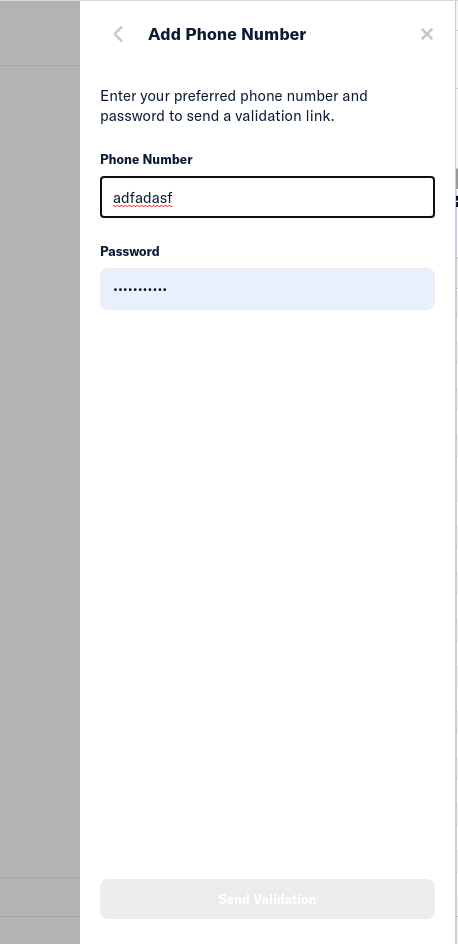
- Write english letters and it'll not stop you
Expected Result:
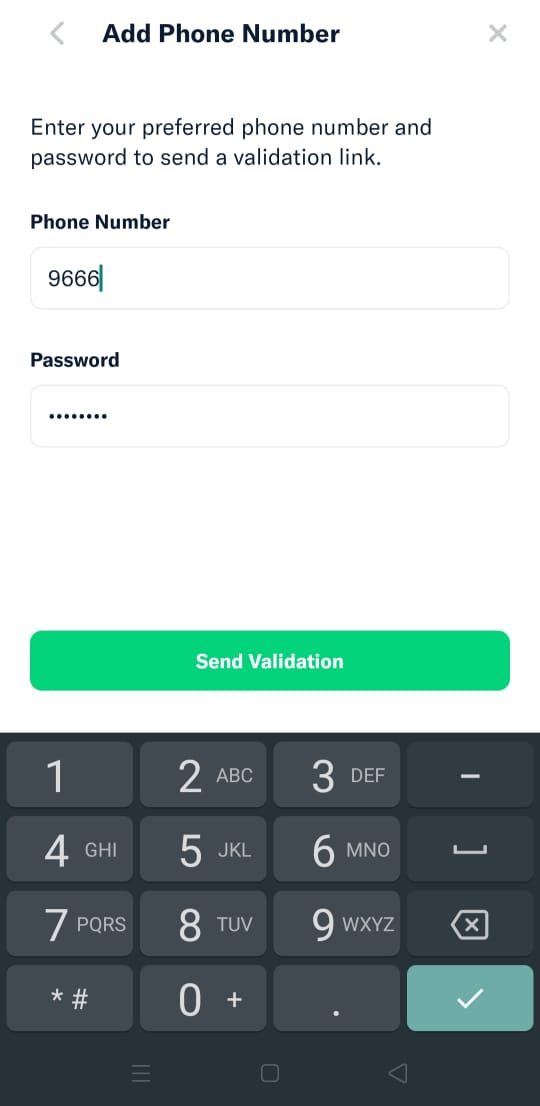
Just like in Android , Mobile web (and maybe iOS?) , it should not let users enter any invalid characters into the Phone Number field.
Android
Actual Result:
It's letting users type anything
Workaround:
Remove invalid characters manually to proceed
Platform:
Where is this issue occurring?
- [ ✔️ ] Web
- [ ❓ ] Desktop App
- [ ❌ ] iOS
- [ ❌ ] Android
- [ ❌ ] Mobile Web
Version Number:
Logs: https://stackoverflow.com/c/expensify/questions/4856
Notes/Photos/Videos: Any additional supporting documentation
Expensify/Expensify Issue URL:
View all open jobs on Upwork


If you haven’t already, check out our contributing guidelines for onboarding and email contributors@expensify.com to request to join our Slack channel!
Action Performed:
Expected Result:
Just like in Android , Mobile web (and maybe iOS?) , it should not let users enter any invalid characters into the Phone Number field.
Android
Actual Result:
It's letting users type anything

Workaround:
Remove invalid characters manually to proceed
Platform:
Where is this issue occurring?
Version Number:
Logs: https://stackoverflow.com/c/expensify/questions/4856
Notes/Photos/Videos: Any additional supporting documentation
Expensify/Expensify Issue URL:
View all open jobs on Upwork