The step to add manually a bank account has a more relaxed validation on the routing number compared to the validation performed during the company step.
Ideally, the error should appear during the manually add account step.
Test data:
Routing number: 123456789
Account number: 123
Action Performed:
- Create and verify an account for NewDot
- In NewDot, create workspace and start VBA flow
- Click "Connect manually"
- Input: Routing number:
123456789, Account number: 123
- Click "Save & continue", it should let you continue to the Company Step
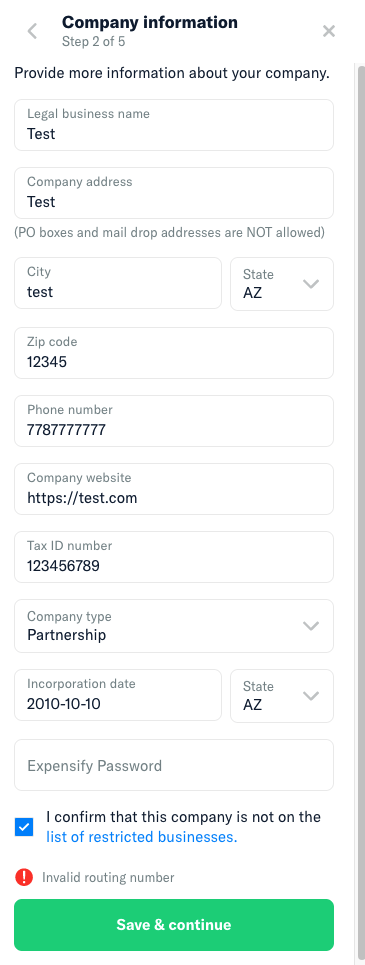
- Enter ""valid"" information in the Company Step form (see error screenshot below if you need sample data)
- Click "Save & Continue"
Expected Result:
I would have expected to move forward to the next step
Actual Result:
There is an error above the "Save & continue" telling me that the routing number is invalid. This error could have been notified on the previous step.
Workaround:
No workaround necessary, it just makes experience a little worse.
Platform:
Where is this issue occurring?
- Web
- iOS
- Android
- Desktop App
- Mobile Web
Version Number: Latest
Reproducible in staging?: Yes
Reproducible in production?: Yes
**Upwork URL: https://www.upwork.com/jobs/~012258c903b29a0f0d
View all open jobs on GitHub
cc @aldo-expensify


The step to add manually a bank account has a more relaxed validation on the routing number compared to the validation performed during the company step.
Ideally, the error should appear during the manually add account step.
Test data:
Routing number:
123456789Account number:
123Action Performed:
123456789, Account number:123Expected Result:
I would have expected to move forward to the next step
Actual Result:
There is an error above the "Save & continue" telling me that the routing number is invalid. This error could have been notified on the previous step.
Workaround:
No workaround necessary, it just makes experience a little worse.
Platform:
Where is this issue occurring?
Version Number: Latest
Reproducible in staging?: Yes
Reproducible in production?: Yes
**Upwork URL: https://www.upwork.com/jobs/~012258c903b29a0f0d
View all open jobs on GitHub
cc @aldo-expensify