If you haven’t already, check out our contributing guidelines for onboarding and email contributors@expensify.com to request to join our Slack channel!
Action Performed:
- On mobile navigate to settings > Payments
- Tap on add new payment method
Expected Result:
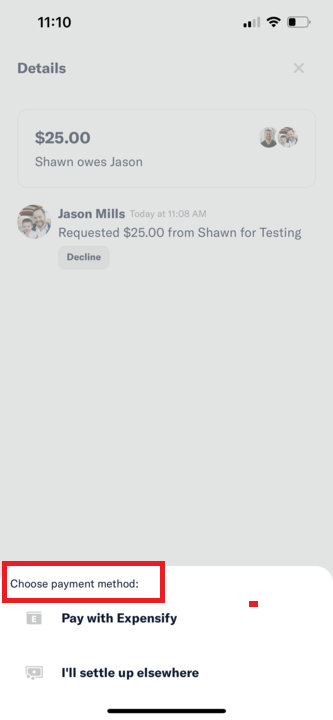
There should be no label in the popup menu.
Actual Result:
Comment from @shawnborton: I feel like the small label above the payment options menu doesn't really add anything valuable and also doesn't look great.
Workaround:
Can the user still use Expensify without this being fixed? Have you informed them of the workaround?
Platform:
Where is this issue occurring?
Version Number: 1.1.10-0
Reproducible in staging?: Yes
Reproducible in production?: Yes
Logs: https://stackoverflow.com/c/expensify/questions/4856
Notes/Photos/Videos: Any additional supporting documentation
Expensify/Expensify Issue URL:
Issue reported by: @shawnborton
Slack conversation: https://expensify.slack.com/archives/C01GTK53T8Q/p1635185564079700
View all open jobs on GitHub


If you haven’t already, check out our contributing guidelines for onboarding and email contributors@expensify.com to request to join our Slack channel!
Action Performed:
Expected Result:
There should be no label in the popup menu.
Actual Result:
Comment from @shawnborton: I feel like the small label above the payment options menu doesn't really add anything valuable and also doesn't look great.
Workaround:
Can the user still use Expensify without this being fixed? Have you informed them of the workaround?
Platform:
Where is this issue occurring?
Version Number: 1.1.10-0
Reproducible in staging?: Yes
Reproducible in production?: Yes
Logs: https://stackoverflow.com/c/expensify/questions/4856
Notes/Photos/Videos: Any additional supporting documentation
Expensify/Expensify Issue URL:
Issue reported by: @shawnborton
Slack conversation: https://expensify.slack.com/archives/C01GTK53T8Q/p1635185564079700
View all open jobs on GitHub