If you haven’t already, check out our contributing guidelines for onboarding and email contributors@expensify.com to request to join our Slack channel!
Action Performed:
- Click "+"
- Click "New room"
- Type a name into the "Room name" field that is already used as a room name
Expected Result:
See a message in red below the "Room name" field that reads "A room on this workspace already uses this name"
Actual Result:
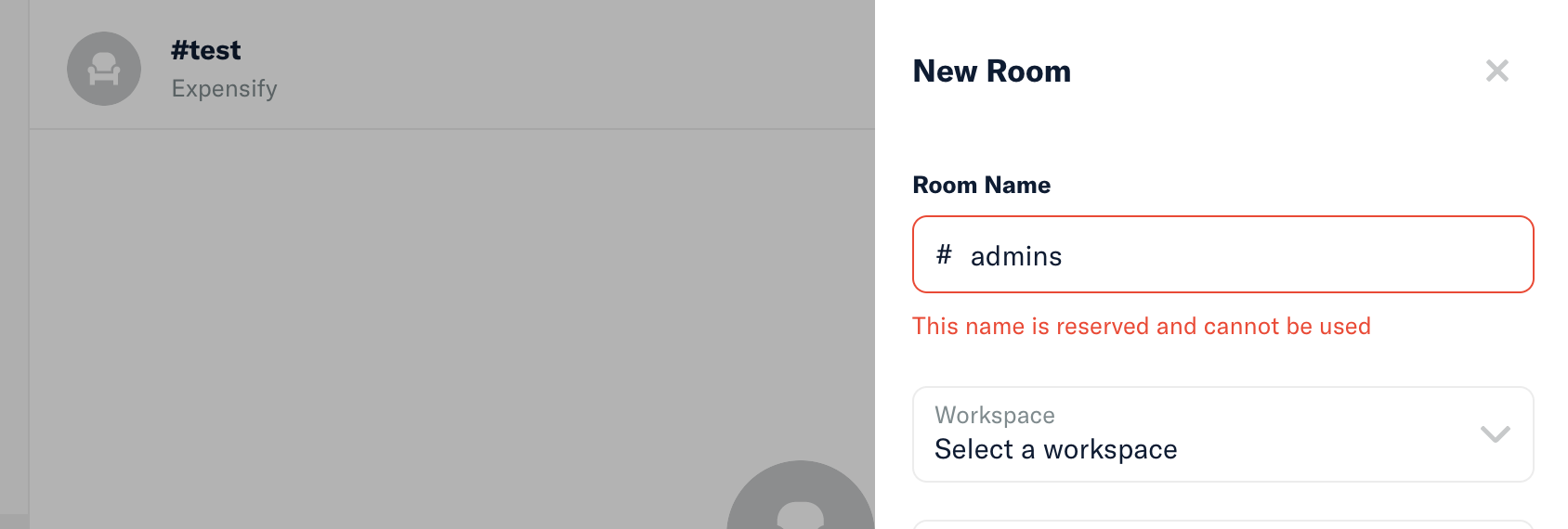
See a message in red below the "Room name" field that reads "This name is reserved and cannot be used"
Workaround:
User can ignore
Platform:
All
Reproducible in staging?: Yes
Reproducible in production?: Yes
Logs: https://stackoverflow.com/c/expensify/questions/4856
Notes/Photos/Videos:
Issue reported by: Mitch
Slack conversation: Internal Slack Thread
View all open jobs on GitHub
this job on upwork


If you haven’t already, check out our contributing guidelines for onboarding and email contributors@expensify.com to request to join our Slack channel!
Action Performed:
Expected Result:
See a message in red below the "Room name" field that reads "A room on this workspace already uses this name"
Actual Result:
See a message in red below the "Room name" field that reads "This name is reserved and cannot be used"
Workaround:
User can ignore
Platform:
All
Reproducible in staging?: Yes

Reproducible in production?: Yes
Logs: https://stackoverflow.com/c/expensify/questions/4856
Notes/Photos/Videos:
Issue reported by: Mitch
Slack conversation: Internal Slack Thread
View all open jobs on GitHub
this job on upwork