Skip to content

Remove report.ownerEmails that slipped through or were recently added#22559

Merged
madmax330 merged 12 commits into
mainfrom
beaman-removeMoreOwnerEmails
Jul 17, 2023
Merged

Remove report.ownerEmails that slipped through or were recently added#22559
madmax330 merged 12 commits into
mainfrom
beaman-removeMoreOwnerEmails

Conversation

@Beamanator

@Beamanator Beamanator commented Jul 10, 2023

Copy link
Copy Markdown
Contributor

Details

Follow-up to #22075 where we're working on removing many uses of emails where we now have accountIDs. Here specifically we're removing remaining uses of report.ownerEmail.

Fixed Issues

$ Related to https://github.com/Expensify/Expensify/issues/294647

Tests

To cover our bases, let's create new accounts while performing these tasks:

  1. New task assignee + edit task title & description
  2. Create new workspace
  3. Invite users to workspaces
  4. Close workspace & view archived workspaces + closed report action
  5. New 1:1 & group chats
  6. Send money, request money, split bill

For each of ^ tests, verify:

  1. Avatars & tooltips appear correctly (these accounts should all show defaults)
  2. Display names / logins show where they should (not showing as blank anywhere)

Finally log in to a brand new account, make sure everything works well

  • Verify that no errors appear in the JS console

Offline tests

All of the above should be able to be done offline too, except logging in to a brand new account

QA Steps

Same as above

  • Verify that no errors appear in the JS console

PR Author Checklist

  • I linked the correct issue in the ### Fixed Issues section above
  • I wrote clear testing steps that cover the changes made in this PR
    • I added steps for local testing in the Tests section
    • I added steps for the expected offline behavior in the Offline steps section
    • I added steps for Staging and/or Production testing in the QA steps section
    • I added steps to cover failure scenarios (i.e. verify an input displays the correct error message if the entered data is not correct)
    • I turned off my network connection and tested it while offline to ensure it matches the expected behavior (i.e. verify the default avatar icon is displayed if app is offline)
    • I tested this PR with a High Traffic account against the staging or production API to ensure there are no regressions (e.g. long loading states that impact usability).
  • I included screenshots or videos for tests on all platforms
  • I ran the tests on all platforms & verified they passed on:
    • Android / native
    • Android / Chrome
    • iOS / native
    • iOS / Safari
    • MacOS / Chrome / Safari
    • MacOS / Desktop
  • I verified there are no console errors (if there's a console error not related to the PR, report it or open an issue for it to be fixed)
  • I followed proper code patterns (see Reviewing the code)
    • I verified that any callback methods that were added or modified are named for what the method does and never what callback they handle (i.e. toggleReport and not onIconClick)
    • I verified that the left part of a conditional rendering a React component is a boolean and NOT a string, e.g. myBool && <MyComponent />.
    • I verified that comments were added to code that is not self explanatory
    • I verified that any new or modified comments were clear, correct English, and explained "why" the code was doing something instead of only explaining "what" the code was doing.
    • I verified any copy / text shown in the product is localized by adding it to src/languages/* files and using the translation method
      • If any non-english text was added/modified, I verified the translation was requested/reviewed in #expensify-open-source and it was approved by an internal Expensify engineer. Link to Slack message:
    • I verified all numbers, amounts, dates and phone numbers shown in the product are using the localization methods
    • I verified any copy / text that was added to the app is grammatically correct in English. It adheres to proper capitalization guidelines (note: only the first word of header/labels should be capitalized), and is approved by marketing by adding the Waiting for Copy label for a copy review on the original GH to get the correct copy.
    • I verified proper file naming conventions were followed for any new files or renamed files. All non-platform specific files are named after what they export and are not named "index.js". All platform-specific files are named for the platform the code supports as outlined in the README.
    • I verified the JSDocs style guidelines (in STYLE.md) were followed
  • If a new code pattern is added I verified it was agreed to be used by multiple Expensify engineers
  • I followed the guidelines as stated in the Review Guidelines
  • I tested other components that can be impacted by my changes (i.e. if the PR modifies a shared library or component like Avatar, I verified the components using Avatar are working as expected)
  • I verified all code is DRY (the PR doesn't include any logic written more than once, with the exception of tests)
  • I verified any variables that can be defined as constants (ie. in CONST.js or at the top of the file that uses the constant) are defined as such
  • I verified that if a function's arguments changed that all usages have also been updated correctly
  • If a new component is created I verified that:
    • A similar component doesn't exist in the codebase
    • All props are defined accurately and each prop has a /** comment above it */
    • The file is named correctly
    • The component has a clear name that is non-ambiguous and the purpose of the component can be inferred from the name alone
    • The only data being stored in the state is data necessary for rendering and nothing else
    • If we are not using the full Onyx data that we loaded, I've added the proper selector in order to ensure the component only re-renders when the data it is using changes
    • For Class Components, any internal methods passed to components event handlers are bound to this properly so there are no scoping issues (i.e. for onClick={this.submit} the method this.submit should be bound to this in the constructor)
    • Any internal methods bound to this are necessary to be bound (i.e. avoid this.submit = this.submit.bind(this); if this.submit is never passed to a component event handler like onClick)
    • All JSX used for rendering exists in the render method
    • The component has the minimum amount of code necessary for its purpose, and it is broken down into smaller components in order to separate concerns and functions
  • If any new file was added I verified that:
    • The file has a description of what it does and/or why is needed at the top of the file if the code is not self explanatory
  • If a new CSS style is added I verified that:
    • A similar style doesn't already exist
    • The style can't be created with an existing StyleUtils function (i.e. StyleUtils.getBackgroundAndBorderStyle(themeColors.componentBG))
  • If the PR modifies code that runs when editing or sending messages, I tested and verified there is no unexpected behavior for all supported markdown - URLs, single line code, code blocks, quotes, headings, bold, strikethrough, and italic.
  • If the PR modifies a generic component, I tested and verified that those changes do not break usages of that component in the rest of the App (i.e. if a shared library or component like Avatar is modified, I verified that Avatar is working as expected in all cases)
  • If the PR modifies a component related to any of the existing Storybook stories, I tested and verified all stories for that component are still working as expected.
  • If a new page is added, I verified it's using the ScrollView component to make it scrollable when more elements are added to the page.
  • If the main branch was merged into this PR after a review, I tested again and verified the outcome was still expected according to the Test steps.
  • I have checked off every checkbox in the PR author checklist, including those that don't apply to this PR.

Screenshots/Videos

Web Screenshot 2023-07-11 at 2 46 09 PM Screenshot 2023-07-11 at 2 49 08 PM
Mobile Web - Chrome
Mobile Web - Safari
Desktop
iOS
Android

@Beamanator Beamanator self-assigned this Jul 10, 2023
@Beamanator Beamanator marked this pull request as ready for review July 11, 2023 11:50
@Beamanator Beamanator requested a review from a team as a code owner July 11, 2023 11:50
@melvin-bot melvin-bot Bot requested review from madmax330 and removed request for a team July 11, 2023 11:51
@melvin-bot

melvin-bot Bot commented Jul 11, 2023

Copy link
Copy Markdown

@madmax330 Please copy/paste the Reviewer Checklist from here into a new comment on this PR and complete it. If you have the K2 extension, you can simply click: [this button]

@allroundexperts

allroundexperts commented Jul 11, 2023

Copy link
Copy Markdown
Contributor

Reviewer Checklist

  • I have verified the author checklist is complete (all boxes are checked off).
  • I verified the correct issue is linked in the ### Fixed Issues section above
  • I verified testing steps are clear and they cover the changes made in this PR
    • I verified the steps for local testing are in the Tests section
    • I verified the steps for Staging and/or Production testing are in the QA steps section
    • I verified the steps cover any possible failure scenarios (i.e. verify an input displays the correct error message if the entered data is not correct)
    • I turned off my network connection and tested it while offline to ensure it matches the expected behavior (i.e. verify the default avatar icon is displayed if app is offline)
  • I checked that screenshots or videos are included for tests on all platforms
  • I included screenshots or videos for tests on all platforms
  • I verified tests pass on all platforms & I tested again on:
    • Android / native
    • Android / Chrome
    • iOS / native
    • iOS / Safari
    • MacOS / Chrome / Safari
    • MacOS / Desktop
  • If there are any errors in the console that are unrelated to this PR, I either fixed them (preferred) or linked to where I reported them in Slack
  • I verified proper code patterns were followed (see Reviewing the code)
    • I verified that any callback methods that were added or modified are named for what the method does and never what callback they handle (i.e. toggleReport and not onIconClick).
    • I verified that the left part of a conditional rendering a React component is a boolean and NOT a string, e.g. myBool && <MyComponent />.
    • I verified that comments were added to code that is not self explanatory
    • I verified that any new or modified comments were clear, correct English, and explained "why" the code was doing something instead of only explaining "what" the code was doing.
    • I verified any copy / text shown in the product is localized by adding it to src/languages/* files and using the translation method
    • I verified all numbers, amounts, dates and phone numbers shown in the product are using the localization methods
    • I verified any copy / text that was added to the app is grammatically correct in English. It adheres to proper capitalization guidelines (note: only the first word of header/labels should be capitalized), and is approved by marketing by adding the Waiting for Copy label for a copy review on the original GH to get the correct copy.
    • I verified proper file naming conventions were followed for any new files or renamed files. All non-platform specific files are named after what they export and are not named "index.js". All platform-specific files are named for the platform the code supports as outlined in the README.
    • I verified the JSDocs style guidelines (in STYLE.md) were followed
  • If a new code pattern is added I verified it was agreed to be used by multiple Expensify engineers
  • I verified that this PR follows the guidelines as stated in the Review Guidelines
  • I verified other components that can be impacted by these changes have been tested, and I retested again (i.e. if the PR modifies a shared library or component like Avatar, I verified the components using Avatar have been tested & I retested again)
  • I verified all code is DRY (the PR doesn't include any logic written more than once, with the exception of tests)
  • I verified any variables that can be defined as constants (ie. in CONST.js or at the top of the file that uses the constant) are defined as such
  • If a new component is created I verified that:
    • A similar component doesn't exist in the codebase
    • All props are defined accurately and each prop has a /** comment above it */
    • The file is named correctly
    • The component has a clear name that is non-ambiguous and the purpose of the component can be inferred from the name alone
    • The only data being stored in the state is data necessary for rendering and nothing else
    • For Class Components, any internal methods passed to components event handlers are bound to this properly so there are no scoping issues (i.e. for onClick={this.submit} the method this.submit should be bound to this in the constructor)
    • Any internal methods bound to this are necessary to be bound (i.e. avoid this.submit = this.submit.bind(this); if this.submit is never passed to a component event handler like onClick)
    • All JSX used for rendering exists in the render method
    • The component has the minimum amount of code necessary for its purpose, and it is broken down into smaller components in order to separate concerns and functions
  • If any new file was added I verified that:
    • The file has a description of what it does and/or why is needed at the top of the file if the code is not self explanatory
  • If a new CSS style is added I verified that:
    • A similar style doesn't already exist
    • The style can't be created with an existing StyleUtils function (i.e. StyleUtils.getBackgroundAndBorderStyle(themeColors.componentBG)
  • If the PR modifies code that runs when editing or sending messages, I tested and verified there is no unexpected behavior for all supported markdown - URLs, single line code, code blocks, quotes, headings, bold, strikethrough, and italic.
  • If the PR modifies a generic component, I tested and verified that those changes do not break usages of that component in the rest of the App (i.e. if a shared library or component like Avatar is modified, I verified that Avatar is working as expected in all cases)
  • If the PR modifies a component related to any of the existing Storybook stories, I tested and verified all stories for that component are still working as expected.
  • If a new page is added, I verified it's using the ScrollView component to make it scrollable when more elements are added to the page.
  • If the main branch was merged into this PR after a review, I tested again and verified the outcome was still expected according to the Test steps.
  • I have checked off every checkbox in the PR reviewer checklist, including those that don't apply to this PR.

Screenshots/Videos

Web Screenshot 2023-07-13 at 4 26 15 AM Screenshot 2023-07-13 at 4 26 22 AM Screenshot 2023-07-13 at 4 30 06 AM Screenshot 2023-07-13 at 4 30 15 AM
Mobile Web - Chrome Screenshot 2023-07-13 at 4 37 42 AM Screenshot 2023-07-13 at 4 37 55 AM Screenshot 2023-07-13 at 4 38 13 AM Screenshot 2023-07-13 at 4 38 35 AM
Mobile Web - Safari Screenshot 2023-07-13 at 4 35 05 AM Screenshot 2023-07-13 at 4 35 20 AM Screenshot 2023-07-13 at 4 35 32 AM Screenshot 2023-07-13 at 4 35 44 AM
Desktop Screenshot 2023-07-13 at 4 46 25 AM Screenshot 2023-07-13 at 4 46 33 AM Screenshot 2023-07-13 at 4 46 43 AM Screenshot 2023-07-13 at 4 46 56 AM
iOS Screenshot 2023-07-13 at 4 39 57 AM Screenshot 2023-07-13 at 4 40 08 AM Screenshot 2023-07-13 at 4 40 20 AM Screenshot 2023-07-13 at 4 40 32 AM
Android Screenshot 2023-07-13 at 4 41 59 AM Screenshot 2023-07-13 at 4 42 11 AM Screenshot 2023-07-13 at 4 42 31 AM Screenshot 2023-07-13 at 4 42 42 AM

@@ -107,7 +107,6 @@ function MoneyRequestAction(props) {
}),
'',
CONST.POLICY.OWNER_EMAIL_FAKE,

Copy link
Copy Markdown
Contributor

Choose a reason for hiding this comment

The reason will be displayed to describe this comment to others. Learn more.

Why are we not removing this?

Copy link
Copy Markdown
Contributor Author

Choose a reason for hiding this comment

The reason will be displayed to describe this comment to others. Learn more.

That param is for the optimistic policyID - it was like that before so I'm keeping it :D

The below line was for the optimistic ownerEmail

CONST.REPORT.NOTIFICATION_PREFERENCE.DAILY,
);
const createdReportAction = ReportUtils.buildOptimisticCreatedReportAction(policyReport.ownerEmail);
const createdReportAction = ReportUtils.buildOptimisticCreatedReportAction(CONST.POLICY.OWNER_EMAIL_FAKE);

Copy link
Copy Markdown
Contributor

Choose a reason for hiding this comment

The reason will be displayed to describe this comment to others. Learn more.

How is this supposed to work?

Copy link
Copy Markdown
Contributor Author

Choose a reason for hiding this comment

The reason will be displayed to describe this comment to others. Learn more.

Sorry can you clarify your question? Like why is it appropriate to set CONST.POLICY.OWNER_EMAIL_FAKE here?

If that's your question, here's my answer: Because previously, we were passing CONST.REPORT.OWNER_EMAIL_FAKE, into ReportUtils.buildOptimisticChatReport( above which would set that fake email as the ownerEmail. However, now that we're removing policyReport.ownerEmail, we can now just directly pass the fake email here.

However, if you're asking something like "isn't it weird to pass a FAKE email (__FAKE__) to buildOptimisticCreatedReportAction since that function will just add the fake email into the message property in some weird way"...

My answer is "yes that seems pretty weird, but it's how it worked before so I don't think we'll break anything with this change - and in the future it def would make sense to clean that up somehow, if possible - like maybe in this case we don't even need a message prop?

@allroundexperts

Copy link
Copy Markdown
Contributor

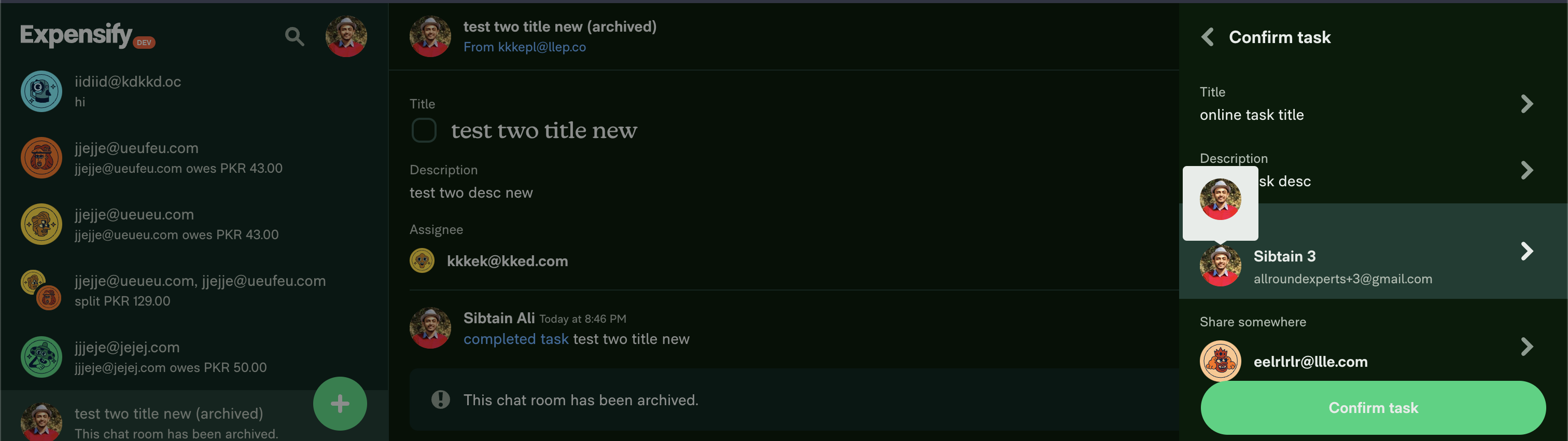
When creating a task, on confirm screen, hovering over the avatar shows the following:
Screenshot 2023-07-11 at 8 48 25 PM

@allroundexperts

Copy link
Copy Markdown
Contributor

Not sure if its related to this change, but getting this when creating a workspace:
Screenshot 2023-07-11 at 8 55 38 PM

@allroundexperts

Copy link
Copy Markdown
Contributor

Same thing when creating a workspace:
Screenshot 2023-07-11 at 9 24 29 PM

@allroundexperts

Copy link
Copy Markdown
Contributor

The workspace members are not shown in the announce room.

Screen.Recording.2023-07-11.at.9.35.55.PM.mov

@Beamanator

Copy link
Copy Markdown
Contributor Author

The WorkspaceInviteMessagePage prop type error was actually being fixed here - #21201 but I may move that fix to this PR just to have it all in 1

@Beamanator

Copy link
Copy Markdown
Contributor Author

@allroundexperts it would be great if you could super clear how to reproduce those issues you saw :D But I will play around to try to reproduce! It looks like some of those things you tested while offline?

@Beamanator

Beamanator commented Jul 12, 2023

Copy link
Copy Markdown
Contributor Author

When creating a task, on confirm screen, hovering over the avatar shows the following: Screenshot 2023-07-11 at 8 48 25 PM

FYI This exists on staging, it's not from my changes 👍

Screenshot 2023-07-12 at 10 39 15 AM

@Beamanator

Copy link
Copy Markdown
Contributor Author

The workspace members are not shown in the announce room.

Screen.Recording.2023-07-11.at.9.35.55.PM.mov

@allroundexperts I tried reproducing like this, but I saw the new member in the announce room:

  1. invite brand new user account to workspace
  2. Verified new user appeared in member list
  3. Navigated to announce room
  4. Verified new user appeared in member list

@allroundexperts

Copy link
Copy Markdown
Contributor

The workspace members are not shown in the announce room.
Screen.Recording.2023-07-11.at.9.35.55.PM.mov

@allroundexperts I tried reproducing like this, but I saw the new member in the announce room:

  1. invite brand new user account to workspace
  2. Verified new user appeared in member list
  3. Navigated to announce room
  4. Verified new user appeared in member list

Were you offline during all of this?

@Beamanator

Copy link
Copy Markdown
Contributor Author

@allroundexperts nope was online 😅 I just briefly tried offline and I basically only see failing pusher requests in the console teehee - I'll try again in about 1/2 hour

@Beamanator

Copy link
Copy Markdown
Contributor Author

@allroundexperts ok so I did a bit more testing of the flow in staging and here's what I saw:

For an account where I am 99% sure I already had personal details in onyx:

Screen.Recording.2023-07-12.at.3.54.41.PM.mov

For an account where I definitely didn't have personal details in Onyx:

Screen.Recording.2023-07-12.at.3.55.32.PM.mov

This was on staging so YES we definitely need to get it fixed (seems like another case of needing to store the optimistic data in Onyx, then clear it on success) BUT it's not related to changes in this PR

@Beamanator

Copy link
Copy Markdown
Contributor Author

If you find any more bugs from testing this PR can you please also test if those bugs exist in staging?? 🙏 Thanks 👍

@allroundexperts

Copy link
Copy Markdown
Contributor

@allroundexperts ok so I did a bit more testing of the flow in staging and here's what I saw:

For an account where I am 99% sure I already had personal details in onyx:

Screen.Recording.2023-07-12.at.3.54.41.PM.mov
For an account where I definitely didn't have personal details in Onyx:

Screen.Recording.2023-07-12.at.3.55.32.PM.mov
This was on staging so YES we definitely need to get it fixed (seems like another case of needing to store the optimistic data in Onyx, then clear it on success) BUT it's not related to changes in this PR

I'm sure I tested both the bugs on staging as well. I'll re-test and from now on, will try to post staging vides as well!

@Beamanator

Copy link
Copy Markdown
Contributor Author

@allroundexperts Innnnnnteresting, I wonder why we seem to have had different results - you're saying you previously didn't reproduce those on staging? I'm quite interested to know if you can today 🙃

@allroundexperts

Copy link
Copy Markdown
Contributor

@allroundexperts Innnnnnteresting, I wonder why we seem to have had different results - you're saying you previously didn't reproduce those on staging? I'm quite interested to know if you can today 🙃

I'm unsure myself what happened. It might have been different accounts that I used on staging vs testing this PR. I can now confirm that these are currently on staging as well.

@allroundexperts

Copy link
Copy Markdown
Contributor

Found another bug.
Steps (Online):

  1. Create a new workspace.
  2. Invite members such that some of them are new and others already exist.
  3. Notice that the members are duplicated in the workspace members list page. Seems like the data from the backend is not merged correctly with the optimistic data.

Video for this PR:

Screen.Recording.2023-07-13.at.4.56.43.AM.mov

Video for staging:

Screen.Recording.2023-07-13.at.4.57.41.AM.mov

@Beamanator

Copy link
Copy Markdown
Contributor Author

@allroundexperts that bug that you just found loooooks like it's the same as this issue: #21706

Do you agree or disagree? 🤔

@allroundexperts

Copy link
Copy Markdown
Contributor

@allroundexperts that bug that you just found loooooks like it's the same as this issue: #21706

Do you agree or disagree? 🤔

I agree. Can you try this on staging and confirm if this happens there or not? I'm doing the exact same steps in the video I posted and was not able to reproduce.

@Beamanator

Copy link
Copy Markdown
Contributor Author

WTH that's weird you can't reproduce! I took this vid earlier today on staging:

Screen.Recording.2023-07-13.at.11.36.11.AM.mov

@allroundexperts

Copy link
Copy Markdown
Contributor

Weird. I'll continue my tests then.

@allroundexperts allroundexperts left a comment

Copy link
Copy Markdown
Contributor

Choose a reason for hiding this comment

The reason will be displayed to describe this comment to others. Learn more.

Testing well. I wasn't able to find anything other than what was on staging as well!

@melvin-bot melvin-bot Bot requested a review from youssef-lr July 13, 2023 16:11
@melvin-bot

melvin-bot Bot commented Jul 13, 2023

Copy link
Copy Markdown

@youssef-lr Please copy/paste the Reviewer Checklist from here into a new comment on this PR and complete it. If you have the K2 extension, you can simply click: [this button]

@Beamanator Beamanator removed the request for review from youssef-lr July 14, 2023 07:21
@Beamanator

Copy link
Copy Markdown
Contributor Author

@youssef-lr removing you being requested for review since @madmax330 is already assigned to review, but feel free to review if you'd like :D

@madmax330 ready for your review if you have a chance today 🙏

@madmax330 madmax330 merged commit 5cdf9cb into main Jul 17, 2023
@madmax330 madmax330 deleted the beaman-removeMoreOwnerEmails branch July 17, 2023 07:44
@OSBotify

Copy link
Copy Markdown
Contributor

✋ This PR was not deployed to staging yet because QA is ongoing. It will be automatically deployed to staging after the next production release.

@OSBotify

Copy link
Copy Markdown
Contributor

🚀 Deployed to staging by https://github.com/madmax330 in version: 1.3.42-0 🚀

platform result
🤖 android 🤖 cancelled 🔪
🖥 desktop 🖥 cancelled 🔪
🍎 iOS 🍎 cancelled 🔪
🕸 web 🕸 cancelled 🔪

@OSBotify

Copy link
Copy Markdown
Contributor

🚀 Deployed to production by https://github.com/jasperhuangg in version: 1.3.42-26 🚀

platform result
🤖 android 🤖 success ✅
🖥 desktop 🖥 success ✅
🍎 iOS 🍎 success ✅
🕸 web 🕸 success ✅

Comment thread src/libs/actions/Task.js
* @param {String} editedTask.assignee
* @param {Number} editedTask.assigneeAccountID
*/
function editTaskAndNavigate(report, ownerEmail, ownerAccountID, {title, description, assignee = '', assigneeAccountID = 0}) {

Copy link
Copy Markdown
Contributor

Choose a reason for hiding this comment

The reason will be displayed to describe this comment to others. Learn more.

I think there is a problem here, when we create a new task we don't store ownerEmail, so after the first creation we edit the task title or description we won't pass the assgnee. then the task will be treated as unassigned. what do you think @Beamanator

Sign up for free to join this conversation on GitHub. Already have an account? Sign in to comment

Labels

None yet

Projects

None yet

Development

Successfully merging this pull request may close these issues.

5 participants