split digit cut off fix#9102
Conversation


|
Hey! I see that you made changes to our Form component. Make sure to update the docs in FORMS.md accordingly. Cheers! |
 melvin-bot
Bot
requested review from
pecanoro and
rushatgabhane
and removed request for
a team
melvin-bot
Bot
requested review from
pecanoro and
rushatgabhane
and removed request for
a team

|
What do you mean by |

|
@pecanoro i have posted already on slack 2 times but couldn’t find any help. It looks like i have to buy a new machine to run the project. Also i have tested these changes on all platforms when the app was running. |

|
Here's the slack thread which @aneequeahmad was referring to - https://expensify.slack.com/archives/C01GTK53T8Q/p1652066886829219 I'll see what I can do to help on the thread. |
|
Ohh gotcha! Ok, that is tricky because I am not sure what's wrong either, I think there has been some movement on the thread, I am hoping tomorrow it gets resolved, otherwise not sure what's the best way to proceed, I will ask to the team. |
|
Hmm, there isn't any movement on the thread. |
|
@rushatgabhane Thats so nice of you 🙇♂️. I have setup the linux on VM but would require another day to get the project up and running. If you can post screenshots over the weekend that would be great. I’ll also be available over the weekend. Let’s get it done. Let me know if there are any changes required in the PR. Thanks |
|
@rushatgabhane also, what should i do to run the project on my macBook ? Should i re-install the the OS completely ? Maybe lower version of OS. It’s stoping me from the work :( |
| <Text | ||
| style={[...this.props.inputStyle, styles.hiddenElementOutsideOfWindow, styles.visibilityHidden]} | ||
| onLayout={e => this.setState({textInputWidth: e.nativeEvent.layout.width})} | ||
| onLayout={e => this.setState({textInputWidth: e.nativeEvent.layout.width + 1})} |

There was a problem hiding this comment.
@aneequeahmad we gotta bump the width to + 2. It worked better for me on cases like
- back from currency selection
- back from participant page
Also, we should def add a comment explaining why we are adding +2 to the width
Screen.Recording.2022-05-30.at.12.53.48.AM.mov
There was a problem hiding this comment.
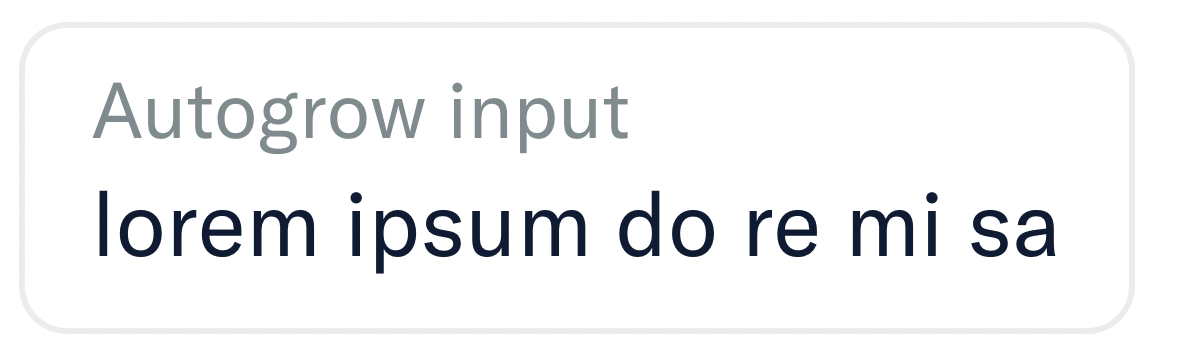
Here's the storybook preview of the input after a +2 width increase.
Not noticeble even when I pixel peep with web inspector 🔍
|
Hey @aneequeahmad just a gentle nudge to address the comments |
|
@rushatgabhane Done, Thank you for pounting this out. |
|
@rushatgabhane I pushed 1 commit that was unsigned. Rebased it pushed again but still it's appearing. |

There was a problem hiding this comment.
Rebased it pushed again but still it's appearing
@aneequeahmad this is one of the only situation you should force push to remove the unverified commit from remote.
There was a problem hiding this comment.
Please move the comment to top of onLayout, and link the issue for full context.
There was a problem hiding this comment.
@rushatgabhane If i add comment on top of onLayout between style line break comment it throws eslint error that there shoule be no line break between style and onLayout if i remove line break it throws error that line break is needed.
Should i disable the eslint error ?
There was a problem hiding this comment.
Ohh, in that case move it above the Text component.
There was a problem hiding this comment.
| // Added +2 in width so that the first digit of split amount do not cut off on mWeb. | |
| // Add +2 to width so that the first digit of amount do not cut off on mWeb - https://github.com/Expensify/App/issues/8158 |
There was a problem hiding this comment.
- You need to remove the unverified commit and force push.
- Fix lint error
|
@rushatgabhane did force push but seems like unsigned commit wasn't removed |
|
@aneequeahmad try this
|
 aneequeahmad
force-pushed
the
main
branch
2 times, most recently
from
aneequeahmad
force-pushed
the
main
branch
2 times, most recently
from
6ed007c to
8a46bf9
Compare
|
@rushatgabhane unverified commit is not removed i think i should |
|
@rushatgabhane Unverified commit removed and feedback changes applied. Thanks for guiding |
There was a problem hiding this comment.
@pecanoro tests well and LGTM! 🎉
I've attached screenshots below.
PR Reviewer Checklist
- I verified the correct issue is linked in the
### Fixed Issuessection above - I verified testing steps are clear and they cover the changes made in this PR
- I verified the steps for local testing are in the
Testssection - I verified the steps for Staging and/or Production testing are in the
QA stepssection - I verified the steps cover any possible failure scenarios (i.e. verify an input displays the correct error message if the entered data is not correct)
- I turned off my network connection and tested it while offline to ensure it matches the expected behavior (i.e. verify the default avatar icon is displayed if app is offline)
- I verified the steps for local testing are in the
- I checked that screenshots or videos are included for tests on all platforms
- I verified tests pass on all platforms & I tested again on:
- iOS / native
- Android / native
- iOS / Safari
- Android / Chrome
- MacOS / Chrome
- MacOS / Desktop
- I verified there are no console errors (if there’s a console error not related to the PR, report it or open an issue for it to be fixed)
- I verified proper code patterns were followed (see Reviewing the code)
- I verified that any callback methods that were added or modified are named for what the method does and never what callback they handle (i.e.
toggleReportand notonIconClick). - I verified that comments were added to code that is not self explanatory
- I verified that any new or modified comments were clear, correct English, and explained “why” the code was doing something instead of only explaining “what” the code was doing.
- I verified any copy / text shown in the product was added in all
src/languages/*files - I verified any copy / text that was added to the app is correct English and approved by marketing by tagging the marketing team on the original GH to get the correct copy.
- I verified proper file naming conventions were followed for any new files or renamed files. All non-platform specific files are named after what they export and are not named “index.js”. All platform-specific files are named for the platform the code supports as outlined in the README.
- I verified the JSDocs style guidelines (in
STYLE.md) were followed
- I verified that any callback methods that were added or modified are named for what the method does and never what callback they handle (i.e.
- If a new code pattern is added I verified it was agreed to be used by multiple Expensify engineers
- I verified that this PR follows the guidelines as stated in the Review Guidelines
- I verified all code is DRY (the PR doesn't include any logic written more than once, with the exception of tests)
- I verified any variables that can be defined as constants (ie. in CONST.js or at the top of the file that uses the constant) are defined as such
- If a new component is created I verified that:
- A similar component doesn't exist in the codebase
- All props are defined accurately and each prop has a
/** comment above it */ - Any functional components have the
displayNameproperty - The file is named correctly
- The component has a clear name that is non-ambiguous and the purpose of the component can be inferred from the name alone
- The only data being stored in the state is data necessary for rendering and nothing else
- For Class Components, any internal methods passed to components event handlers are bound to
thisproperly so there are no scoping issues (i.e. foronClick={this.submit}the methodthis.submitshould be bound tothisin the constructor) - Any internal methods bound to
thisare necessary to be bound (i.e. avoidthis.submit = this.submit.bind(this);ifthis.submitis never passed to a component event handler likeonClick) - All JSX used for rendering exists in the render method
- The component has the minimum amount of code necessary for its purpose and it is broken down into smaller components in order to separate concerns and functions
- If a new CSS style is added I verified that:
- A similar style doesn’t already exist
- The style can’t be created with an existing StyleUtils function (i.e.
StyleUtils.getBackgroundAndBorderStyle(themeColors.componentBG)
- If the PR modifies a generic component, I tested and verified that those changes do not break usages of that component in the rest of the App (i.e. if a shared library or component like
Avataris modified, I verified thatAvataris working as expected in all cases) - If the PR modifies a component related to any of the existing Storybook stories, I tested and verified all stories for that component are still working as expected.
mWeb - iOSScreen.Recording.2022-06-08.at.12.46.41.AM.movmWeb - Androidscreen-20220608-005544.mp4iOSScreen.Recording.2022-06-08.at.12.45.43.AM.movAndroidscreen-20220608-010451.mp4WebScreen.Recording.2022-06-08.at.12.49.26.AM.movDesktopScreen.Recording.2022-06-08.at.12.56.13.AM.mov |

| This Text component is intentionally positioned out of the screen. | ||
| */} | ||
| {this.props.autoGrow && ( | ||
|
|

There was a problem hiding this comment.
Really? What an odd place to add the line break lol Anyways, if it pleases the linter, all good.


|
✋ This PR was not deployed to staging yet because QA is ongoing. It will be automatically deployed to staging after the next production release. |

|
🚀 Deployed to production by @roryabraham in version: 1.1.75-1 🚀
|


4 participants


Details
Fixed Issues
$ #8158
Tests
[] Verify that no errors appear in the JS console
PR Review Checklist
Contributor (PR Author) Checklist
### Fixed Issuessection aboveTestssectionQA stepssectiontoggleReportand notonIconClick)src/languages/*filesSTYLE.md) were followedAvatar, I verified the components usingAvatarare working as expected)/** comment above it */displayNamepropertythisproperly so there are no scoping issues (i.e. foronClick={this.submit}the methodthis.submitshould be bound tothisin the constructor)thisare necessary to be bound (i.e. avoidthis.submit = this.submit.bind(this);ifthis.submitis never passed to a component event handler likeonClick)StyleUtils.getBackgroundAndBorderStyle(themeColors.componentBG)Avataris modified, I verified thatAvataris working as expected in all cases)PR Reviewer Checklist
### Fixed Issuessection aboveTestssectionQA stepssectiontoggleReportand notonIconClick).src/languages/*filesSTYLE.md) were followed/** comment above it */displayNamepropertythisproperly so there are no scoping issues (i.e. foronClick={this.submit}the methodthis.submitshould be bound tothisin the constructor)thisare necessary to be bound (i.e. avoidthis.submit = this.submit.bind(this);ifthis.submitis never passed to a component event handler likeonClick)StyleUtils.getBackgroundAndBorderStyle(themeColors.componentBG)Avataris modified, I verified thatAvataris working as expected in all cases)QA Steps
Screenshots
cannot run app on my local machine as im getting error 403 by api's that's why cant upload screenshots unfortunately.
Web
Desktop
IOS
Android
Mweb