A fork of MetaMask focused on helping the SOV users
SoundMoneyCoin (SOV) Wallet Browser Extension
Note: Soon we will make available the full code , we are just finishing some changes
Architecture
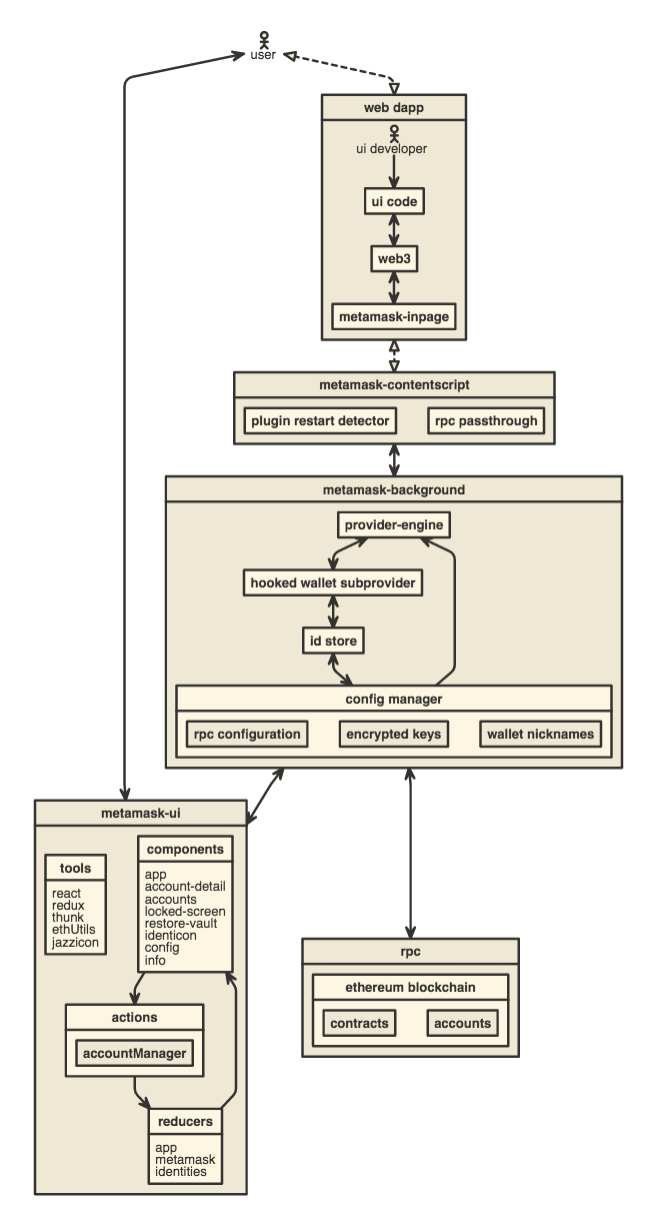
How to add on Chrome
- Open Settings > Extensions.
- Check "Developer mode".
- Alternatively, use the URL chrome://extensions/ in your address bar
- At the top, click Load Unpacked Extension.
- Navigate to your metamask-plugin/dist/chrome folder.
- Click Select.
- Change to your locale via chrome://settings/languages
- Restart the browser and test the plugin in your locale
- You now have the plugin, and can click 'inspect views: background plugin' to view its dev console.
How to add on Firefox
- Go to the url about:debugging.
- Click the button Load Temporary Add-On.
- Select the file dist/firefox/manifest.json.
- You can optionally enable debugging, and click Debug, for a console window that logs all of Metamask's processes to a single console.
- If you have problems debugging, try connecting to the IRC channel #webextensions on irc.mozilla.org.
- For longer questions, use the StackOverfow tag firefox-addons.