Voice-enabled AI copilot for Architecture Design Sessions
Powered by the GitHub Copilot SDK + Azure AI Services — it listens, talks back through a photorealistic avatar, and draws architecture diagrams in real time.


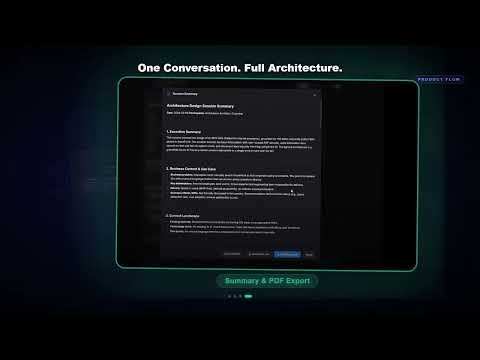


ADS Copilot is an AI agent that runs Architecture Design Sessions the way a senior solutions architect would — it asks probing questions, challenges vague answers, evaluates trade-offs, and generates architecture diagrams on the spot. You speak; it listens via Azure VoiceLive real-time STT, responds through Azure Speech TTS and a talking avatar over WebRTC, and produces Mermaid architecture diagrams as the session progresses.
Works like a senior SA pair: it knows when to push back on "we just need a data lake" and when to surface the three architectural patterns that actually fit the requirements. It looks up real-time Azure documentation via MCP servers so answers stay current.
Ships with three domain skills out of the box — Azure Databricks and Microsoft Fabric for data platform sessions, and Microsoft Foundry for AI platform sessions. The pluggable skill architecture means you can swap in any domain — Contact Centers, SAP migrations — without touching the agent core. A landing page lets users pick their topic; the conversation UI adapts its branding per domain.
| Feature | Detail | |
|---|---|---|
| 🎙️ | Voice-first interaction | Azure VoiceLive real-time STT over WebSocket |
| 🗣️ | AI speech synthesis | Azure Speech TTS with natural prosody |
| 🧑💼 | Talking avatar | Azure Speech Avatar rendered via WebRTC |
| 💬 | Lite conversation mode | Text-only toggle — no voice or avatar required |
| 📊 | Live Mermaid diagram generation | 8+ architecture patterns per skill, rendered in browser |
| 📄 | Session summary export | Download as Markdown or optimized PDF (JPEG-compressed, ~2-4 MB) with rendered diagrams |
| 📧 | Email session summary | Send PDF summary via email (with automatic BCC) using Azure Logic App + Outlook |
| 🔌 | Pluggable domain skills | Swap knowledge domains without code changes — ships with Databricks, Fabric + Foundry |
| 🔍 | MCP server integration | Microsoft Learn real-time docs lookup |
| 🏗️ | GitHub Copilot SDK backend | Agent loop with structured tool calls |
| ☁️ | One-click Azure deployment | azd up + Bicep IaC |
| 🐳 | Docker Compose | Full local dev stack in one command |

- Python 3.11+
- Node.js 20+
- Azure subscription with Azure AI Services (multi-service) and Azure Speech Service provisioned
- GitHub Copilot access (for SDK token)
- Azure CLI:
az login
# Clone
git clone https://github.com/HaoZhang615/ads-copilot.git
cd ads-copilot

# Configure
cp .env.sample .env
# Edit .env with your Azure credentials

# Backend
cd app/backend
pip install -r requirements.txt
cd ../..
python -m uvicorn app.backend.main:app --reload

# Frontend (new terminal)
cd app/frontend
npm install
npm run devcp .env.sample .env
# Edit .env
cd app
docker compose up --buildADS Copilot ships with full Azure Developer CLI (azd) support.
azd auth login
azd up
This provisions: Azure Container Apps (backend + frontend), Azure AI Services, Azure Speech Service, Azure Key Vault, Azure Container Registry, Azure Logic App (email), and Log Analytics workspace. Secrets are injected at deploy time — no manual Key Vault configuration required.
Email setup (one-time): After
azd up, the Logic App's Office 365 Outlook API connection needs manual OAuth consent. In the Azure Portal, navigate to the deployed API Connection resource → Edit API connection → Authorize → Save. This grants the Logic App permission to send emails on behalf of the authorized account.
The agent's ADS methodology — conversation flow, phase transitions, probing question banks, trade-off evaluation — lives in the backend system prompt and is domain-agnostic.
Domain knowledge lives in skill directories under skills/:
skills/
  databricks-ads-session/   # Azure Databricks domain
    SKILL.md                # Skill manifest: conversation phases, question banks
    references/             # Architecture patterns, migration playbooks, industry templates
    scripts/                # Mermaid diagram generator (8 patterns)
  fabric-ads-session/       # Microsoft Fabric domain
    SKILL.md                # Skill manifest for Fabric
    references/             # Fabric patterns, migration playbooks, industry templates
    scripts/                # Mermaid diagram generator (8 patterns)
  foundry-ads-session/      # Microsoft Foundry domain (AI platform)
    SKILL.md                # Skill manifest for Foundry
    references/             # Foundry patterns, deployment models, trade-offs
    scripts/                # Mermaid diagram generator (8 AI-focused patterns)
To add a new domain: create a skill directory under skills/ with a SKILL.md manifest and references/ docs, register it in the backend's _SKILL_DIRECTORIES dict in copilot_agent.py, and add a topic card to the frontend landing page. No changes to the agent core required.
The frontend landing page (/) lets users choose their topic (Foundry, Fabric, or Databricks), then loads the conversation UI at /session/[topic] with per-topic branding and colors.
Azure Databricks skill — 8 architecture patterns (Medallion, Streaming, ML Platform, Data Mesh, Migration, DWH Replacement, IoT, Hybrid), industry-specific question banks, and source-system migration playbooks.
Microsoft Fabric skill — 8 architecture patterns (Lakehouse, Data Warehouse, Real-Time Intelligence, Data Mesh, Migration, DWH Replacement, IoT, Hybrid), Fabric-native capacity/licensing guidance, and OneLake-centric design playbooks.
Microsoft Foundry skill — 8 AI-focused architecture patterns (Baseline Chat, Multi-Agent, Batch Inference, PTU Gateway, Fine-Tuning, Multi-Project, AOAI Migration, Enterprise Landing Zone), version-aware guidance across Hub-based, Project V1, and Project V2 deployment models, and portal UI migration playbooks.
Each session loads only the skill matching the user's chosen topic — the AI never sees content from other domains:
- User picks a topic on the landing page (e.g. Fabric) → navigates to
/session/fabric - The frontend opens a WebSocket with
?skill=fabric - The backend reads the
skillquery parameter and creates aCopilotAgent(skill="fabric") - The agent looks up
_SKILL_DIRECTORIES["fabric"]→["./skills/fabric-ads-session"]and passes those directories to the GitHub Copilot SDK - The SDK loads only the Fabric
SKILL.mdmanifest andreferences/docs — Databricks and Foundry content is never loaded
The domain-agnostic ADS methodology (conversation phases, voice rules, diagram conventions) lives in the backend system prompt and applies to all skills equally. Domain-specific knowledge — architecture patterns, migration playbooks, trade-off tables — comes exclusively from the loaded skill.
├── app/
│   ├── backend/              # FastAPI + WebSocket server
│   │   ├── services/         # VoiceLive, TTS, Avatar, Copilot Agent
│   │   ├── routers/          # WebSocket + health endpoints
│   │   ├── models/           # Pydantic models
│   │   └── Dockerfile
│   ├── frontend/             # Next.js 15 + React 19
│   │   ├── src/
│   │   │   ├── app/
│   │   │   │   ├── page.tsx              # Landing page (topic selection)
│   │   │   │   ├── session/[topic]/      # Dynamic conversation route
│   │   │   │   └── api/                  # API routes (config, email)
│   │   │   ├── components/   # ChatInterface, MessageBubble, AvatarPanel
│   │   │   ├── hooks/        # useVoiceSession, useAudioCapture, useWebRTC
│   │   │   └── lib/          # WebSocket protocol
│   │   └── Dockerfile
│   └── docker-compose.yml
├── skills/                       # Pluggable domain skills
│   ├── databricks-ads-session/   # Azure Databricks knowledge
│   │   ├── SKILL.md
│   │   ├── references/
│   │   └── scripts/
│   ├── fabric-ads-session/       # Microsoft Fabric knowledge
│   │   ├── SKILL.md
│   │   ├── references/
│   │   └── scripts/
│   └── foundry-ads-session/      # Microsoft Foundry knowledge (AI platform)
│       ├── SKILL.md
│       ├── references/
│       └── scripts/
├── infra/                    # Azure Bicep IaC
├── .env.sample              # Environment template
└── azure.yaml               # azd configuration
| Layer | Technology |
|---|---|
| Frontend | Next.js 15, React 19, Tailwind CSS 4, TypeScript |
| Backend | Python 3.11, FastAPI, WebSockets |
| AI Agent | GitHub Copilot SDK |
| Voice Input | Azure AI VoiceLive (real-time STT) |
| Voice Output | Azure Speech Service (TTS) |
| Avatar | Azure Speech Avatar (WebRTC) |
| Knowledge | MCP Servers (Microsoft Learn) |
| Diagrams | Mermaid.js |
| Infrastructure | Azure Container Apps, Bicep, azd |
| Containers | Docker, Docker Compose |
Contributions are welcome. Please see the Contributing Guide for branch conventions, commit style, and the pull request process.
This project is licensed under the MIT License — see the LICENSE file for details.
- Azure AI Services team for VoiceLive, Speech TTS, and Speech Avatar
- GitHub Copilot SDK team for the agent framework
- The open-source community for Mermaid.js, FastAPI, and Next.js