     ____.             ________        ________
    |    |____  ___.__.\_____  \       \_____  \   ____   ____
    |    \__  \<   |  | /  / \  \       /   |   \ /    \_/ __ \
/\__|    |/ __ \\___  |/   \_/.  \     /    |    \   |  \  ___/
\________(____  / ____|\_____\ \_/_____\_______  /___|  /\___  >
              \/\/            \__>_____/       \/     \/     \/

--=[ PrEsENtZ ]=--

--=[ 🚀 Cloud Infra Lab: Scalable ALB + ASG + NGINX + RDS Setup ]=--

--=[ Provision a complete AWS stack using Terraform ]=--

--=[ #StayUp | #End2EndBurner ]=--
First time using ChatGPT to assist my AWS and Terraform knowledge in building and troubleshooting a small, cheap yet scalable, cloud project end-to-end for learning purposes.
Beginner to advanced level.
Enjoy!
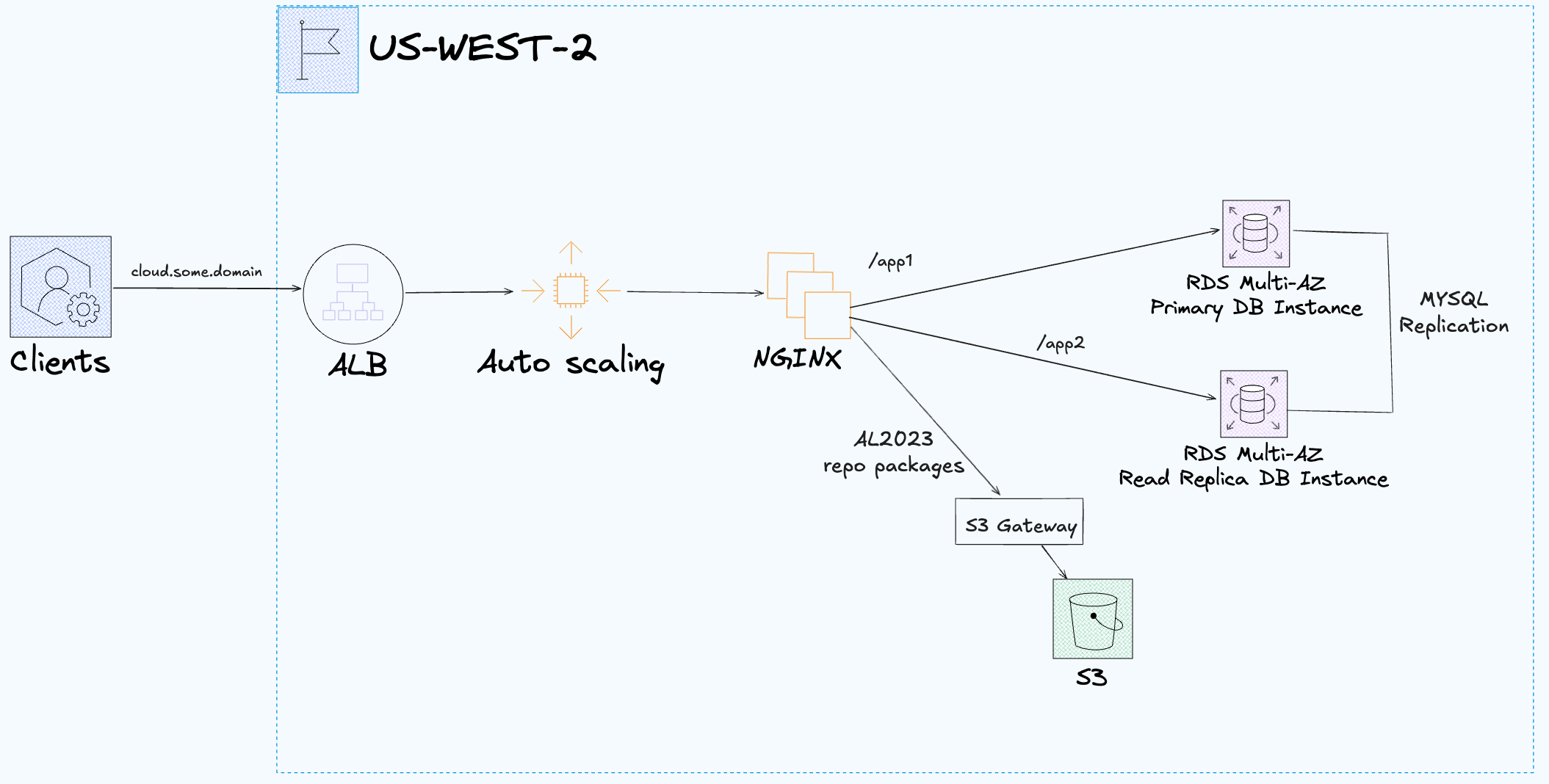
Without RDS Proxy (default):
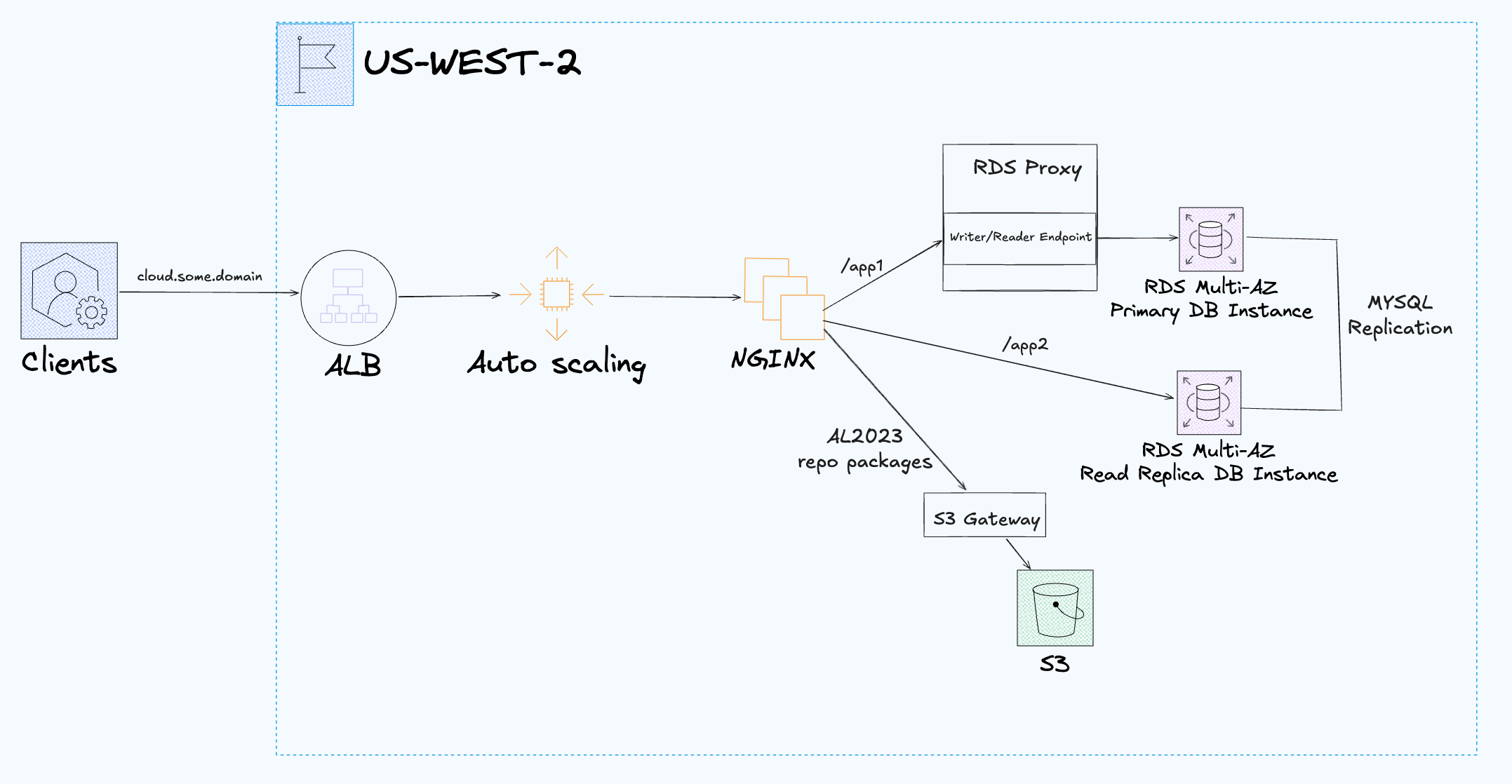
With RDS Proxy (via toggle):
AWS:
- Install:
awscli withsession-manager-pluginextension and configure with an AWS account.- Terraform Version Manager
tfenv. brew install awscli session-manager-plugin tfenv
Zone and Domain:
- AWS Route53 zone resource should already exist (either manually or in Terraform).
- Must own the DNS zone via some domain registrar with the DNS servers pointed to the Route53 zone name servers.
- Demo will look up the AWS Route53 zone resource by name.
- Change the
zone_namevariable in variables.tf to your own zone.- The
cloud.some.domainDNS record will be created from thevar.zone_name(ie.var.zone_name = "jq1.io"->output.url = "https://cloud.jq1.io") - Demo is not configured for an apex domain at this time.
- The
IPAM Configuration:
- There are many ways to configure IPAM but there are a two options to consider before building the lab.
- Note that there can only be one IPAM per region.
- Initially, the lab recommended manually creating IPAM resources, pools and provisioned CIDRS.
- The default behavior (
var.enable_ipam = false) is to use the manually created IPAM pool inus-west-2via thedata.aws_vpc_ipam_pool.ipv4read/lookup for the region.- Manually configure your own IPv4 pools/subpools in IPAM (advanced tier) in the AWS UI.
- The existing IPAM pools will be looked up via filter on description and IPv4 type.
- Advanced Tier IPAM in
us-west-2operating regions.- No IPv4 regional pools at the moment.
us-west-2(IPAM locale)- IPv4 Pool (private scope)
- Description:
ipv4-test-usw2 - Provisioned CIDRs:
10.0.0.0/18
- Description:
- IPv4 Pool (private scope)
- Advanced Tier IPAM in
- Now there's a toggle to enable IPAM, pools and CIDRS via module by changing
var.enable_ipam = truein variables.tf.- Prerequisite:
- If there is already an IPAM in the lab region
us-west-2then it must be deleted along with associate pools and provisioned CIDRs. - If there is a different region (not
us-west-2) that has IPAM with a pool that already provisions the10.0.0.0/18CIDR then the CIDR must be deprovisioned before provisioning it in the IPAM module (including overlapping CIDRs).
- If there is already an IPAM in the lab region
- Prerequisite:
Notes:
- Cloud Infra Lab attempts to demonstrate:
- Opinionated object oriented patterns.
- Uses configuration objects.
- Passing modules to modules instead of nesting.
- Sane defaults and variable validation examples.
- Composition and flexible architecture via abstraction.
- Modules as classes and inputs as constructors.
- Interfaces via contracts.
- Opinionated object oriented patterns.
- Terraform state is local in this lab.
- Users should decide what they need for remote state.
Build:
terraform init- To experiment with:
- IPAM: change
var.enable_ipamtotruein variables.tf. - SSM: change
var.enable_ssmtotruein variables.tf. - RDS Proxy: change
var.enable_rds_proxytotruein variables.tf.
- IPAM: change
- To experiment with:
terraform apply- It takes a few minutes for ASG instances to finish spinning up once apply is complete.
- profit!
Caveats:
- With RDS Proxy:
- If you're getting the following error for
/app1when RDS Proxy is enabled it's because the RDS Proxy default target group is still becoming "Available".- It will eventually come online by itself after 3-5min+.
- If you're getting the following error for
ERROR 2013 (HY000): Lost connection to MySQL server at 'handshake: reading initial communication packet', system error: 11
Tear Down:
- Remove RDS deletion protection:
aws rds modify-db-instance --db-instance-identifier test-app-primary --no-deletion-protection --apply-immediately --region us-west-2
- Destroy resources:
terraform destroy- note: VPCs will take 10-15min to destroy due to IPAM taking a long time to release the IP.
- Force delete the Secrets Manager path instead of waiting for scheduled deletion:
aws secretsmanager delete-secret --region us-west-2 --secret-id rds/test/mysql/app --force-delete-without-recovery --region us-west-2
- Delete snapshot that was created when destroying the DB.
aws rds delete-db-snapshot --db-snapshot-identifier test-app-primary-final-snapshot --region us-west-2
Health Check:
https://cloud.some.domain/->NGINX Health: OK: MaD GrEEtz! #End2EndBurner
RDS Connectivity Checks:
https://cloud.some.domain/app1->App1: MySQL Primary OK (RDS Proxy: false) or MySQL Primary ERRORhttps://cloud.some.domain/app2->App2: MySQL Read Replica OK or MySQL Read Replica ERROR
To use another region like us-east-2 instead of us-west-2 there's a small set of changes to be made.
-
Be sure to start with an empty TF state.
-
If using the IPAM Pool lookup (
var.ipam = falsedefault) then you'll need to update the filters in thedata.aws_vpc_ipam_pool.ipv4data source for the manually created IPAM Pools inus-east-2other wise you can usevar.ipam = truefor the new region. -
Add the new region and it's AZs to
var.region_az_labelsinvariables.tf:
variable "region_az_labels" {
  description = "Update this map with regions and AZs that will be in use for short name labeling."
  type        = map(string)
  default = {
    us-west-2  = "usw2"
    us-west-2a = "usw2a"
    us-west-2b = "usw2b"
    us-west-2c = "usw2c"
    us-east-2  = "use2"
    us-east-2a = "use2a"
    us-east-2b = "use2b"
    us-east-2c = "use2c"
  }
}- Add a new egress security group rule for the ASG instances to reach the region's S3 gateway IP ranges in
security_groups.tf:
# curl -S https://ip-ranges.amazonaws.com/ip-ranges.json  | jq '.prefixes[] | select(.region == "us-east-2" and .service == "S3")|.ip_prefix'
resource "aws_security_group_rule" "instance_egress_tcp_443_to_s3_us_east_2" {
  security_group_id = aws_security_group.instance.id
  cidr_blocks = [
    "52.219.212.0/22",
    "3.5.92.0/23",
    "52.219.143.0/24",
    "52.219.141.0/24",
    "3.5.88.0/22",
    "18.34.72.0/21",
    "3.5.128.0/22",
    "52.219.142.0/24",
    "52.219.96.0/20",
    "3.5.132.0/23",
    "52.219.232.0/22",
    "18.34.252.0/22",
    "16.12.64.0/22",
    "52.219.176.0/22",
    "16.12.60.0/22",
    "52.219.224.0/22",
    "52.219.80.0/20",
    "52.219.228.0/22",
    "1.178.8.0/24",
    "3.141.102.208/28",
    "3.141.102.224/28",
  ]
  type      = "egress"
  protocol  = "tcp"
  from_port = 443
  to_port   = 443
}- Then update the provider region in
provider.tf:
# base region
provider "aws" {
  region = "us-east-2"
}- Now you can apply to the new region.
- Notes:
- It's not recommended to switch out the provider region while resources exist in state for the region
us-west-2. - If
us-west-2resources already exist, you should tear down (destroy) the resources for the current region first, then make the region changes and apply for the new regionus-east-2. - Update any manual
awscommands for theus-east-2region.
- It's not recommended to switch out the provider region while resources exist in state for the region
- Configure SSM Agent to pull RDS creds directly from Secrets Manager instead of rendering them via cloud-init template.
- Switch out
socatTCP server for a more useful HTTP server with Go, Ruby or Python using only the standard library (maybe).
Application Load Balancer (ALB):
- HTTPS (TLS 1.2 & 1.3 termination).
- ACM + ELBSecurityPolicy-TLS13-1-2-2021-06.
- HTTP to HTTPS Redirects.
Auto Scaling Group (ASG):
- EC2 instances with cloud-init & socat health endpoints.
- Using
t3.microinstance with encrypted root volumes. - One important footnote for ASGs: T3 runs in "Unlimited" by default, so if instances sustain high CPU long enough, you can incur CPU credit charges beyond the base hourly rate.
- Utilizing MariaDB as the MYSQL client.
- Some IMDSv2 config in metadata options.
- Stop SSRF/metadata theft via IMDSv1.
- No Multihop access.
- Stop leaking tags into IMDS.
- Hardened systemd configuration.
- Locked down environment variables for MYSQL credentials.
- App services run with non privileged user.
- Using
- Scales based on CPU utilization.
- Deployed across multiple AZs.
- Instances can spin up without a NATGW because there's an S3 gateway.
- This is because Amazon Linux 2023 AMI uses S3 for the yum repo.
- If you plan on using NATGWs for the ASG instances when modifying the cloud-init script then set
natgw = true(on public subnet per AZ) and you'll need to add an egress security group rule to the instances security group.
- It's difficult to test scale-out with no load testing scripts (at the moment) but you can test the scale-in by selecting a desired capacity of 6 and watch the ASG terminate unneeded instance capacity down back to 2.
- The boolean to auto deploy instance refresh is set to
trueby default in the ASG module.- It will use latest launch template version after the launch template is modified.
- The config prioritizes availability (launch before terminate) over cost control (terminate before launch).
- Only one instance refresh can be run at a time but will cancel any. in progress instance refresh if another instance refresh is started.
- View in progress instance refreshes with
aws autoscaling describe-instance-refreshes --auto-scaling-group-name test-web --region us-west-2. - Current demo configuration will take up to 10min for a refresh to finish, manually cancel or start another instance refresh (auto cancel).
- SSM (AWS Systems Manager)
- Enable SSM via toggle, set
var.enable_ssmtotruein variables.tf. - Amazon Linux 2023 AMIs already comes with amazon-ssm-agent installed and started so no need to add it to the cloud-init template.
- IAM Role, EC2 Instance Profile, Security group and rules configured for SSM.
- VPC endpoints for SSM, EC2 messages and SSM messages.
- Most of the cost will be for the SSM Interfaces per AZ (see infracost section below).
- No CloudWatch Logs VPC endpoint at this time.
- Check registered instances (get instance id):
aws ssm describe-instance-information --region us-west-2
- Start SSM session with instance id instead of using ssh from bastion host:
aws ssm start-session --target i-07e941ffe289a2e2c --region us-west-2
- Free features:
- SSM Agent itself (runs on EC2 at no cost).
- Session Manager (interactive shell & port forwarding).
- Run Command (ad-hoc commands/scripts).
- State Manager (lightweight config mgmt).
- Inventory (collecting OS/software metadata).
- Patch Manager (scheduling OS patches).
- Parameter Store – Standard parameters (basic string storage).
- Enable SSM via toggle, set
NGINX reverse proxy + Socat Health Checks:
- Path-based routing: /app1, /app2.
- /app1 returns primary db health.
- /app2 returns read replica db health.
- Uses socat for reliable TCP responses.
- Lightweight bash scripts to simulate apps.
- mysql -e "SELECT 1" run with credentials pulled from Secrets Manager.
Amazon RDS (MYSQL):
- Primary DB Instance with Multi-AZ and encryption via KMS.
- Read Replica DB Instance (Intra-region and Multi-AZ).
- Access controlled by SGs (only from ASG instances to RDS Proxy, and ASG instances to RDS directly).
- Secrets (MYSQL credentials) stored in AWS Secrets Manager.
- DB paramters for MYSQL replication and enforcing SSL server side (MYSQL clients are also connecting with --ssl).
- RDS Proxy: is for scaling connections and managing failover smoother.
- Using RDS Proxy in front of a
db.t3.microis usually overkill unless you absolutely need connection pooling (ie you’re hitting it with Lambdas). For small/steady workloads with a few long-lived connections (ie web apps on EC2s). It’s better to skip proxy. The cost/benefit only makes sense once you’re on larger instance sizes or serverless-heavy patterns. - The RDS proxy can be toggled via
var.enable_rds_proxyin variables.tf boolean value (default isfalse).- This will demonstrate easily spinning up or spinning up an RDS proxy when scaling connections is needed or for experimenting with RDS Proxy
- Enforces TLS server side.
- Module Implementation:
- IAM roles and policies for access to Secrets Manager MYSQL secrets.
- Access to the primary is through the RDS Proxy to take advantage of DB pooling and failover benefits.
- Access to the read replica bypasses the RDS Proxy, always directly connected.
- RDS proxy doesn't support read only endpoints for DB instances (cheap HA), only RDS clusters (more expensive) and therefore read replica access bypasses the RDS proxy with no db pooling and failover benefits.
- Using RDS Proxy in front of a
Security Groups:
- Fine-grained rules for ALB ↔ EC2 ↔ RDS.
- And ALB ↔ EC2 ↔ RDS Proxy ↔ RDS.
- Outbound rules configured for necessary security groups.
Scaling Behavior:
- Scale Out: if average CPU > 70% for 2 minutes.
- Scale In: if average CPU < 30% for 2 minutes.
- Policies managed via CloudWatch alarms + ASG.
VPC:
- Requires IPAM.
- Uses Tiered VPC-NG module.
- Currently utilizing 2 AZs but more can be added.
- Has a VPC Endpoint for sending S3 traffic direct to S3 instead of traversing IGW or NATGW.
- Using isolated subnets for db subnets for future use when scaling VPCs in a Centralized Router (TGW hub and spoke).
- It will make it easier for db connections to be same VPC only so other intra region VPCs cant connect when full mesh TGW routes exist.
- example: Centralized Egress Demo
- Without RDS Proxy (default):
Project: main

 Name                                                           Monthly Qty  Unit                    Monthly Cost

 module.rds.aws_db_instance.this_primary
 ├─ Database instance (on-demand, Multi-AZ, db.t3.micro)                730  hours                         $24.82
 ├─ Storage (general purpose SSD, gp2)                                   20  GB                             $4.60
 └─ Additional backup storage                             Monthly cost depends on usage: $0.095 per GB

 module.rds.aws_db_instance.this_read_replica
 ├─ Database instance (on-demand, Multi-AZ, db.t3.micro)                730  hours                         $24.82
 └─ Storage (general purpose SSD, gp2)                                   20  GB                             $4.60

 module.asg.aws_autoscaling_group.this
 └─ module.asg.aws_launch_template.this
    ├─ Instance usage (Linux/UNIX, on-demand, t3.micro)               1,460  hours                         $15.18
    └─ block_device_mapping[0]
       └─ Storage (general purpose SSD, gp3)                             16  GB                             $1.28

 module.alb.aws_lb.this
 ├─ Application load balancer                                           730  hours                         $16.43
 └─ Load balancer capacity units                          Monthly cost depends on usage: $5.84 per LCU

 module.asg.aws_kms_key.this
 ├─ Customer master key                                                   1  months                         $1.00
 ├─ Requests                                              Monthly cost depends on usage: $0.03 per 10k requests
 ├─ ECC GenerateDataKeyPair requests                      Monthly cost depends on usage: $0.10 per 10k requests
 └─ RSA GenerateDataKeyPair requests                      Monthly cost depends on usage: $0.10 per 10k requests

 module.rds.aws_kms_key.this
 ├─ Customer master key                                                   1  months                         $1.00
 ├─ Requests                                              Monthly cost depends on usage: $0.03 per 10k requests
 ├─ ECC GenerateDataKeyPair requests                      Monthly cost depends on usage: $0.10 per 10k requests
 └─ RSA GenerateDataKeyPair requests                      Monthly cost depends on usage: $0.10 per 10k requests

 aws_secretsmanager_secret.rds
 ├─ Secret                                                                1  months                         $0.40
 └─ API requests                                          Monthly cost depends on usage: $0.05 per 10k requests

 module.asg.aws_cloudwatch_metric_alarm.this_cpu_high
 └─ Standard resolution                                                   1  alarm metrics                  $0.10

 module.asg.aws_cloudwatch_metric_alarm.this_cpu_low
 └─ Standard resolution                                                   1  alarm metrics                  $0.10

 module.alb.aws_route53_record.this_alb_cname
 ├─ Standard queries (first 1B)                           Monthly cost depends on usage: $0.40 per 1M queries
 ├─ Latency based routing queries (first 1B)              Monthly cost depends on usage: $0.60 per 1M queries
 └─ Geo DNS queries (first 1B)                            Monthly cost depends on usage: $0.70 per 1M queries

 module.alb.aws_route53_record.this_cert_validation
 ├─ Standard queries (first 1B)                           Monthly cost depends on usage: $0.40 per 1M queries
 ├─ Latency based routing queries (first 1B)              Monthly cost depends on usage: $0.60 per 1M queries
 └─ Geo DNS queries (first 1B)                            Monthly cost depends on usage: $0.70 per 1M queries

 OVERALL TOTAL                                                                                            $94.32

*Usage costs can be estimated by updating Infracost Cloud settings, see docs for other options.

──────────────────────────────────
69 cloud resources were detected:
∙ 11 were estimated
∙ 57 were free
∙ 1 is not supported yet, see https://infracost.io/requested-resources:
  ∙ 1 x aws_db_proxy

┏━━━━━━━━━━━━━━━━━━━━━━━━━━━━━━━━━━━━━━━━━━━━━━━━━━━━┳━━━━━━━━━━━━━━━┳━━━━━━━━━━━━━┳━━━━━━━━━━━━┓
┃ Project                                            ┃ Baseline cost ┃ Usage cost* ┃ Total cost ┃
┣━━━━━━━━━━━━━━━━━━━━━━━━━━━━━━━━━━━━━━━━━━━━━━━━━━━━╋━━━━━━━━━━━━━━━╋━━━━━━━━━━━━━╋━━━━━━━━━━━━┫
┃ main                                               ┃           $94 ┃           - ┃        $94 ┃
┗━━━━━━━━━━━━━━━━━━━━━━━━━━━━━━━━━━━━━━━━━━━━━━━━━━━━┻━━━━━━━━━━━━━━━┻━━━━━━━━━━━━━┻━━━━━━━━━━━━┛
-
With SSM (via toggle)
- SSM core features: $0.00
- VPC Interface Endpoints for SSM: 3 SSM Endpoints (required) × 2 AZs × $0.01 × 730h ≈ $43.80.
- Result: $94 + $44 = $138
-
With RDS Proxy (via toggle):
- A
db.t3.microRDS DB instance itself costs only about $15–20/month (depending on region, reserved vs. on-demand).- RDS Proxy billing is per vCPU-hour of the underlying DB instance(s)
- Rate: $0.015 per vCPU-hour (us-west-2) -> 2 vCPUs × $0.015 × 730 hrs ≈ $21.90 / month.
- That means the proxy can actually cost as much as, or more than, the tiny database itself.
- Result: $94 (default monthly cost) + $44 (SSM VPC Endpoints) + $22 (RDS Proxy monthly cost) = $160 a month (roughly).
- A
Advantages:
- Horizontal scalability.
- ASG lets you scale NGINX nodes based on CPU, connections, etc.
- Managed ingress.
- ALB handles TLS termination, health checks, and routing to NGINX instances cleanly.
- Separation of concerns.
- NGINX handles HTTP logic (e.g., authentication, load balancing), MYSQL stays private.
- Custom routing logic.
- You can implement advanced logic like conditional proxying, auth, throttling, etc.
- Can front many apps.
- One NGINX can proxy to multiple backends, including MYSQL-checking microservices.
Limitations:
- NGINX is not a MYSQL proxy.
- NGINX is built for HTTP, not stateful MYSQL TCP connections.
- You cannot proxy raw MYSQL traffic through NGINX.
- Unnecessary complexity.
- If just connecting to MYSQL from backend apps, NGINX is likely overkill.
- Extra latency.
- Adds a hop: ALB → NGINX → app → MYSQL.
- This could slightly slow down reads/writes if not designed carefully.
- Scaling not tied to DB load
- Scaling NGINX does not help with MYSQL bottlenecks unless your NGINX is doing significant compute (auth, caching, etc.).
- Maintains state poorly.
- MYSQL connections are long-lived and stateful, not ideal for stateless NGINX workers.
- Not resilient to MYSQL issues.
- If MYSQL becomes slow/unavailable, NGINX becomes a bottleneck or fails with 5xx unless you explicitly handle those errors.