




Couples, flatmates, or families often manage shopping lists chaotically across scattered notes, messages, or different apps.
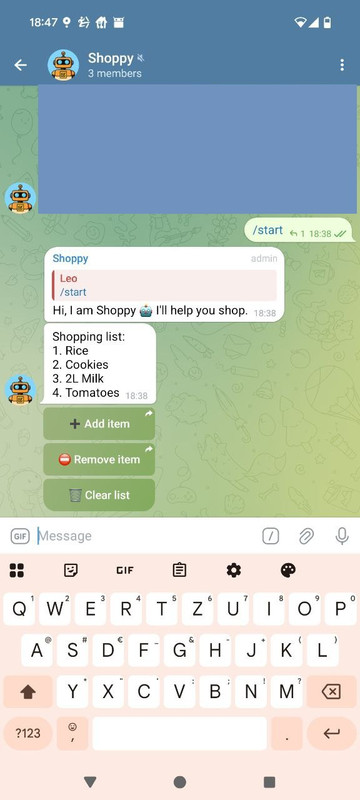
Shoppy solves this problem directly within Telegram. It's simple, fast and accessible for everyone in the chat.
- Add items to a shared shopping list via simple commands.
- Clear the entire list or keep specific items.
- Inline buttons for quick interaction.
- Works in private chats and groups.
git clone https://github.com/LeoGr777/shoppy-telegram-bot.git
cd <repo>
cp .env # Add your API_KEY- A Telegram API token, see https://core.telegram.org/bots/api for details
- Docker & Docker Compose installed and running
- A .env file in the project root with at least: API_KEY=your-telegram-bot-token
docker compose up -d --build- Docker will create a new user 'appuser' and grant ownership to the DIR to be able to write into the DB
- The service binds ./app/data (host) to ./data (container). Your SQLite DB will appear on the host as .app/data/<shopping-list.db>.
- Security hardening is enabled in docker-compose.yaml (cap_drop: [ALL], security_opt: no-new-privileges:true).
.
├── data/                   # persisted DB (bind mount)
│   └── shopping-list.db
├── main.py                 # Bot entrypoint
├── pyproject.toml
├── docker-compose.yaml
├── dockerfile
├── .dockerignore
├── .gitignore
└── README.md- Within Telegram the bot can be searched via the chosen name
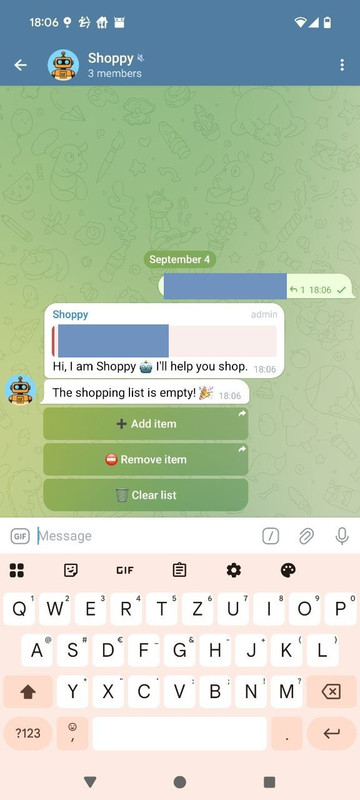
- Start a direct Chat or add the Bot to a group
- Available actions via buttons
- Add item: Add an item via Keyboard. Multiple items can be added, separated by comma (e.g. bread, milk, rice)
- Remove item: Remove an item by typing in the number(s separated with by comma)
- Clear list: If this is chosen, a confirmation popup asks to
- Clear the complete list
- Keep items: Type in items to keep separated by comma
- Abort clearing process
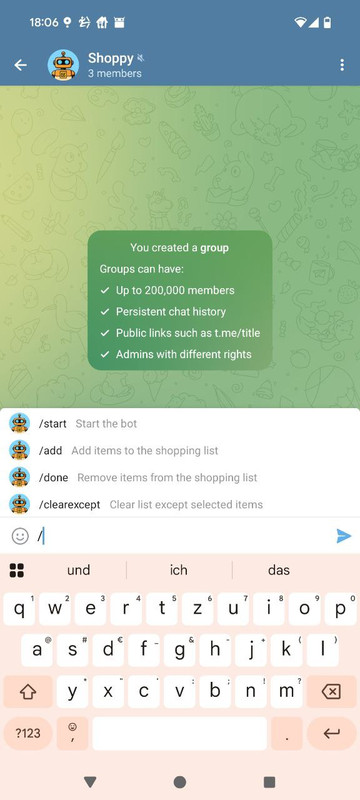
- Available commands via Keyboard:
- /start: Starts the bot
- /add: Adds an item / multiple items
- /done: Removes an item / multiple items via number(s)
- /clearexcept: Clears the list except item number(s)
-
Error: API_KEY not found → Make sure .env exists and contains API_KEY=<your_token>.
-
Docker build fails → Check Dockerfile and .dockerignore paths.
-
Bot not responding in group → Add bot to group and grant message permissions.
Pull requests are welcome. Please fork the repo and create a feature branch:
git checkout -b feature/your-featureMIT