WatchApp success haptic for carb, bolus sends#757
Conversation


 diggabyte
changed the title
diggabyte
changed the title

|
@Kdisimone @ps2 @bharat any feedback on this? Wasn't sure if I missed something or if there were thoughts as to why this shouldn't be included. It's super intuitive and improves safety as well. Just sync'd with latest upstream dev. |

|
I like this change, but I'm not the decision maker :-) |

|
I tried testing this and did not get haptic responses. Not sure what's up...sorry. I'll try it again later |

|
|
@ps2 thanks for the feedback. I'll take a closer look at implementing these recommendations. The thinking that initially inspired the success haptic was due to just how many places on the watch face a touch can close the carb and bolus entry sheets by accident, without submitting. If you give it try, lots of areas around the edges cause it to close. This isn't as big of a deal with carb screen, since closing it will not bring up the bolus screen. At least there's a visual indication of "did I submit or did I close?". However, where it is particularly important to consider is with the bolus screen, wherein an accidental close and a submit both simply close the screen (no indication you hit submit). And while I recognize the bolus replyHandler doesn't mean a bolus was sent successfully to the pump, but it does indicate that I truly hit submit and the phone got the message (vs accidental close) A failure of bolus to send to pump, as you mentioned, would still trigger an error notification later if necessary. And that still makes perfect sense. Perhaps some of the concern about these screens too easily being closed can be addressed by adjusting the ui scaling or positioning? Error haptics in the errorhandlers should be no problem. |

|
Loop’s alerts and alarms are beautifully designed to focus on when things don’t work and thus require user action, e.g. low battery, Loop hasn’t closed the loop X minutes. This means that we don’t get alerts when we don’t have to do something. Based on my understanding, this proposed notification would break with Loop's current notification standards and ethos of minimizing notifications. A notification is a disruption, and I appreciate that Loop minimizes notifications and only provides them when I need to do something. This standard minimizes diabetes's footprint in my life and notification burnout and means that I pay attention to alerts from Loop. As I understand this proposed notification, it would introduce an alert indicating that the system is functioning as expected and that the user does not need to take action. While some may want this sort of notification, I would find it unnecessary and disruptive and think that it would dilute the effectiveness of Loop's notifications. The problem this sort of alert tries to address is carb/bolus entry not going through by notifying users when it does go through. What about turning that around so that the system provides an alert when user action is required? |
|
@eszcloud I agree with that minimizing alerts and the overall interaction footprint is something we should aim to uphold. Haptic feedback on the watch app is not an alert. Haptics provide the perception of touch and manipulation of objects. The button provides haptic feedback so I can move on with my day without overthinking or second-guessing how accurate my tap was on this tiny screen. Before this change, these two key screens ("Add Carbs" or "Bolus", respectively) could be closed without any indication of whether they were submitted or merely cancelled and closed. That means I had often had to double-check my phone to be sure I actually submitted the bolus screen. After this change, and as this pull request stands currently, the watch app simply provides a brief haptic vibration which indicates (quite naturally) that you actually submitted these these two very key user interface controls ("Add Carbs" / "Bolus"). The feedback is near-instantaneous and not an alert of any kind. I believe that this upholds the principal of minimizing the annoyances and overall footprint because I no longer need to double-check my phone or worry if it did what I meant. |
|
Perhaps rather than in success handlers, we simply add the haptics to the button presses themselves? |
|
This should make it a little easier to visualize how easily it can be cancelled. The blue and red are clickable control areas. The red closes the screen. You can see that accidentally clicking cancel is quite easy given the proximity to other controls (less than 3mm on smaller watch faces). Using the crown to adjust the +/- values reduces the accidental close risk on these upper controls to some degree. But given the submit buttons are so large, one could also accidentally send an errant submit touch without any feedback (arguably quite dangerous).
|
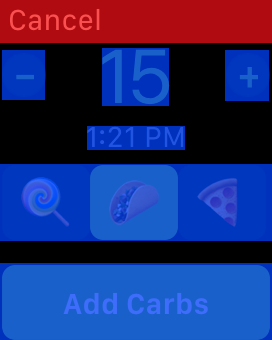
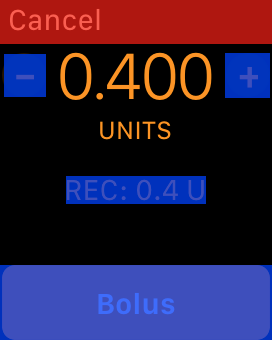

|
Reading the comments here, it seems like a core issue is "what is the haptic for?" @diggabyte clarified that the original intent was successful submission of carbs or bolus ("successful" in the sense of pressing submit on the watch), whereas @ps2 was suggesting something a bit different. My feeling is that a haptic doesn't seem like quite the right response for just hitting Submit - maybe a visual cue of some kind instead? Personally I haven't felt uncertainty about whether I've submitted (maybe partly because I use the crown to change numbers and so my finger isn't too close to the Cancel button)- my uncertainty generally lies in whether the phone received it and is doing anything there, particularly for a bolus - but I guess the failed bolus case is handled already. Hmm, not sure if this shows a path forward, but just trying to clarify the core issue. |
|
Thanks @elnjensen, that does help. Perhaps it's just me, the watch is small. Our fingers our big. I particularly use the watch to bolus in restaurants and in social situations where bumps and distractions occur. It just gives me natural and subconscious feedback without having to stare at my wrist. Haptics are great for that very reason. I struggle to see any real drawback. |
|
I agree with @elnjensen that a visual animated check post bolus submit would be fine to differentiate the cancel animation from the submit one. It’s also reasonable to build an indicator that waits for the bolus to succeed, and wire up the necessary messages for that. |
|
Seems consensus is that haptics aren't the ideal solution here, so I'll go ahead and close. Thanks all for the input! |
|
Haptics are a good solution, and it would be nice to cover the case where comms are slow. Just maybe not for bolus, which is covered with the bolus error notification. |
|
I don't recall running into the comms being slow between screens. Might that occur when there's a lot of background noise? |

|
The Dexcom watchApp also sends an haptic feedback when low or high, so if you translate that logic to Loop, haptic feedback when something is worrying would seem logical. Personally I do like to feel that the bolus failed, especially because I always have some issues with the watch face turning off too quickly when turning my arm and I am usually too busy with other things after blousing (like wanting to eat ;-)) |
|
The dexcom watch app sends a "stop" haptic which is by far the most aggressive. The success haptic is very subtle. The human brain can distinguish between the variety of haptics extraordinarily well. Here's a great way to see the differences: https://developer.apple.com/design/human-interface-guidelines/watchos/user-interaction/haptic-feedback/ |
|
The other thing to keep in mind, this haptic occurs occurs in direct response to the user action. It feels like "yes, did what I wanted" without having to really take the mental effort to be certain you hit the right button. It is not a notification or alert haptic that might happen at some later time. |

…was manually edited (LoopKit#757)
7 participants


This change adds success haptic feedback to the WatchApp for carb and bolus entries that have been sent successfully. This small, but meaningful change allows for the user to know that it was sent successfully.
Currently, a user could accidentally close / cancel the bolus or carb entry windows without any indication it wasn't sent.