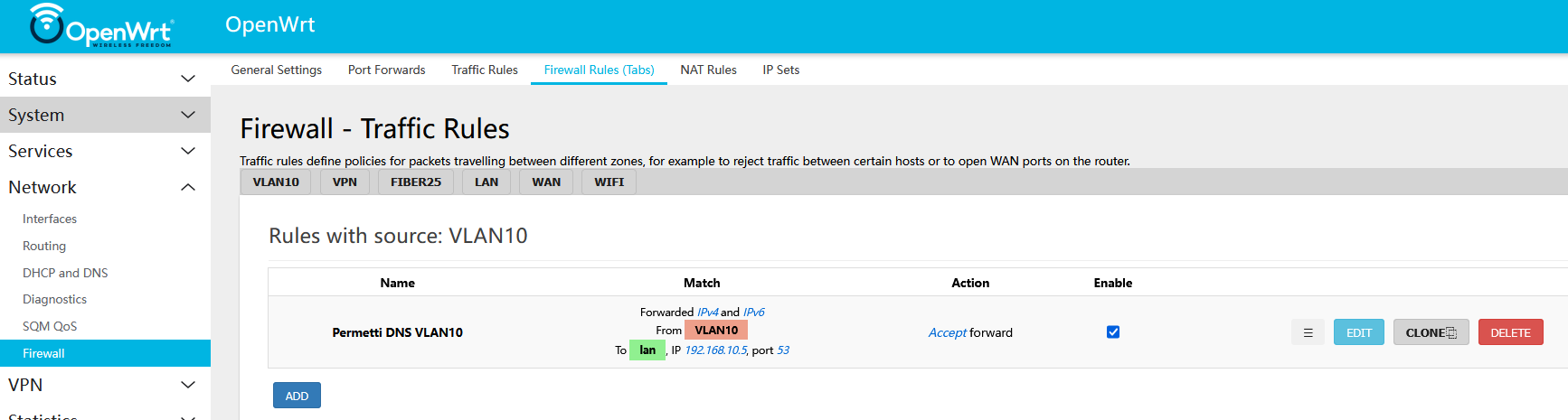
Following my first attempt to improve the LuCI interface so that Firewall rules would be displayed in separate tabs based on their originating zone: OpenWRT-Viewer, this is my second attempt, implemented directly in LuCI without using an external server.
This file will add a dedicated tab under Network → Firewall, providing a more organized and user-friendly way to manage/view firewall rules.
This JavaScript file adds a tab next to the existing Firewall rules tab and is read-only. It simply collects all firewall rules and categorizes them into separate tabs, displaying rules specific to their originating zone. No modifications can be made here—it's purely for viewing.
Here, I attempted to reproduce the entire "Firewall Rules" tab. Like the previous JavaScript file, it takes all firewall rules and organizes them into separate tabs based on their originating zone.
In this version, users can modify, delete, or create new rules just like in the original tab.
⚠ WARNING: Unfortunately, I haven't been able to fully resolve a minor issue related to adding and editing rules. For example, when a new rule is added, it will not immediately display all its parameters in the GUI. The page needs to be refreshed or, more simply, the user needs to click on the tab again.
This is a LuCI refresh issue that I have yet to address.
Other than that, the interface functions perfectly: rules can be added, modified, or deleted as expected—it’s purely a visual matter.
I hope to resolve this issue in the coming days, and any contributions are welcome.
Since there are only two files, I did not create an IPK package. Instead, the files need to be copied manually to their respective directories.
-
Choose the view you prefer (
firewalltabs-full.jsorfirewalltabs_view.js) and rename the.jsfile tofirewalltabs.js. -
Copy the two files exactly to these locations:
/usr/share/luci/menu.d/luci-app-firewall-rules.json
/www/luci-static/resources/view/firewall/firewalltabs.js
- Clear the cache on OpenWRT and in your browser:
- Run this command on OpenWRT:
root@OpenWRT # rm -f /tmp/*cach* - On the browser: Press
CTRL+SHIFT+RorCTRL+F5.
The new tab will appear under Network → Firewall, as shown in the image below.