Skip to content

Wrap fenced code blocks on-demand#1668

Merged
jonahtanjz merged 24 commits into
MarkBind:masterfrom
riyadh-h:feature-code-wrap-button
Oct 13, 2021
Merged

Wrap fenced code blocks on-demand#1668
jonahtanjz merged 24 commits into
MarkBind:masterfrom
riyadh-h:feature-code-wrap-button

Conversation

@riyadh-h

@riyadh-h riyadh-h commented Sep 14, 2021

Copy link
Copy Markdown
Contributor

What is the purpose of this pull request?

  • Documentation update
  • Bug fix
  • Feature addition or enhancement
  • Code maintenance
  • Others, please explain:

Resolves #1289

Overview of changes:

  • Place "copy" buttons for code blocks inside a custom container (in order to provide room for more buttons with different functionalities).
  • Add a "wrap text" button plugin for code blocks.

Anything you'd like to highlight / discuss:

  • Modifications were made for markbind.css; thus, frontend bundles should be updated for the best results.

  • In case the first line of the code block is long, the button will appear overlaid on the code like so:
    image

    • Note: the original implementation of the "copy" button also had this issue.
    • Thus, a change in the positioning/design of the buttons might be preferred. Here's an example:

    potential
    Feel free to suggest more designs.
    EDIT: A design similar to the example above was implemented:
    implemented

Testing instructions:
Since there doesn't seem to be any automated tests for the basis of this feature (i.e., the "copy" code block plugin), this feature also does not have such tests. If there are automated tests for the "copy" code block button that I might have missed, please let me know; otherwise, feel free to ask me to write automated tests for both plugins.

With that said, here are some steps to test this feature manually:

  1. Initialize a new MarkBind project (if none exist).
  2. Add codeBlockWrapButtons to the plugins array in the root's site.json.
    • If site.json does not have a plugins attribute, copy and paste the following before the last closing curly brace at the end of the file:
    "plugins": [
      "codeBlockWrapButtons"
    ],
  3. Add a code block to some page in the project (if none exist).
  4. Write a long line of code inside the code block.
    • E.g., This is a very very very very very very very very very very very very very very very very very very very very very very very very very very very very very long line of code.
  5. Serve the project using markbind serve -d.
  6. The button should appear on the top-right corner (EDIT: right-hand side) of any code block.
  7. Click the button to enable line wrapping.
  8. Click the button again to disable line wrapping. The code block should return to its original state.
  • Note: other scenarios can also be tested similarly, such as using both codeBlockCopyButtons and codeBlockWrapButtons plugins or using the "wrap text" button with code block consisting of short lines.

Proposed commit message: (wrap lines at 72 characters)

Wrap fenced code blocks on-demand

Fenced code blocks are displayed without text wrapping and do not offer
a way of doing so.

In some cases, viewing a code snippet with text wrapping is preferred,
since it allows the readers to read the code without the need to scroll
sideways for long lines.

Let's add a button, in the form of a plugin, that allows the readers to
toggle text-wrapping for code blocks.

Implementing this button as a plugin can simplify the addition of this
feature in MarkBind websites due to its similarity with the "copy" code
block button feature.

Checklist: ☑️

  • Updated the documentation for feature additions and enhancements
  • Added tests for bug fixes or features
  • Linked all related issues
  • No unrelated changes
    • Some changes to the original codeBlockCopyButton code were made in order to allow for the implementation of more buttons with different functions.

@riyadh-h riyadh-h marked this pull request as ready for review September 14, 2021 16:13

@jonahtanjz jonahtanjz left a comment

Copy link
Copy Markdown
Contributor

Choose a reason for hiding this comment

The reason will be displayed to describe this comment to others. Learn more.

Thanks for working on this @riyadh-h. The implementation looks good 👍

In case the first line of the code block is long, the button will appear overlaid on the code like so

Yup agree that the positioning of the buttons should be shifted. I'm fine with the suggested design.

One more thing I would like to add:
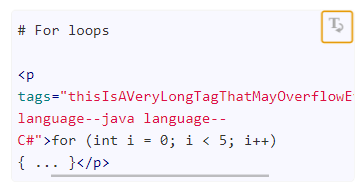
What do you think about having word-break as well? Although we currently do not have any issues in our docs, there may be instances of users having a long single word (function names, tags etc).
image

@riyadh-h

Copy link
Copy Markdown
Contributor Author

No problem, and thank you for the feedback, @jonahtanjz! 😄

Yup agree that the positioning of the buttons should be shifted. I'm fine with the suggested design.

Alright, I'll try implementing that design with some modifications to give it a better look 👍.

What do you think about having word-break as well? Although we currently do not have any issues in our docs, there may be instances of users having a long single word (function names, tags etc).

I agree, because in such cases the wrapping feature would be of no use.
I'll try implementing it as well, though it might take me a bit longer to do so (due to some experimenting).

@riyadh-h riyadh-h changed the title Wrap fenced code blocks on-demand (WIP) Wrap fenced code blocks on-demand Oct 6, 2021
@riyadh-h riyadh-h changed the title (WIP) Wrap fenced code blocks on-demand Wrap fenced code blocks on-demand Oct 6, 2021

@jonahtanjz jonahtanjz left a comment

Copy link
Copy Markdown
Contributor

Choose a reason for hiding this comment

The reason will be displayed to describe this comment to others. Learn more.

Thanks for making the changes :)

LGTM 👍

Sign up for free to join this conversation on GitHub. Already have an account? Sign in to comment

Labels

None yet

Projects

None yet

Development

Successfully merging this pull request may close these issues.

Wrap fenced code blocks on-demand

2 participants
