Fix unexpected behavior in UG due to invalid HTML markup#1837
Conversation


 ryoarmanda
left a comment
ryoarmanda
left a comment
ryoarmanda
left a comment
There was a problem hiding this comment.
Interesting issue 👀 I'm also a bit intrigued on the embed case, maybe the issue is for specific block-level elements like tables? (cc @jonahtanjz) I think we can also change those to use div for posterity sake, what do you think?
The docs you have written up are a good start, maybe some little stylization nits below:

Having block elements within inline elements should not be allowed according to the SSR guide for Vue. For some reason, Vue does not always warn or have issues with some of the cases. For example, putting the following code on a MarkBind site, <span>
<div>Test</div>
</span>doesn't seem to have any warnings. Similarly, even using the example provided on Vue's page, <p>
<div>Test</div>
</p>no warnings as well. Putting a table in a The following seems to cause the warning to show up as well, <p>
<ul>
<li>1</li>
<li>2</li>
</ul>
</p>
Although some of the offending components don't result in any warnings, I think they should still be changed as well since they are not valid HTML and may cause some problematic issues in the future. |

 jonahtanjz
left a comment
jonahtanjz
left a comment
jonahtanjz
left a comment
There was a problem hiding this comment.
Thanks @tlylt!
A couple more invalid HTML:
- docs/index.md#19 (
<p>in<span>) - docs/userGuide/addingPages.md#17 (
<p>in<span>) - docs/userGuide/deployingTheSite.md#17 (
<p>in<span>) - docs/userGuide/formattingContents.md#17 (
<p>in<span>) - docs/userGuide/makingTheSiteSearchable.md#19 (
<p>in<span>) - docs/userGuide/markBindInTheProjectWorkflow.md#16 (
<p>in<span>) - docs/userGuide/markBindSyntaxOverview.md#17 (
<p>in<span>) - docs/userGuide/reusingContents.md#17 (
<p>in<span>) - docs/userGuide/siteJsonFile.md#10 (
<p>in<span>) - docs/userGuide/themes.md#16 (
<p>in<span>) - docs/userGuide/usingHtmlJavaScriptCss.md#34 (example used is not valid HTML as it will create a
<p>in<span>) - docs/userGuide/syntax/tree.md#96 and #110 (codeblock and
<tree>in<span>) - docs/userGuide/syntax/popovers.md#48 (
<div>in<p>)
Also noticed a few of our Vue components having block-level elements in <span>. This can be fixed in another PR.

Good catch! I have fixed the cases mentioned. I also:
|
jonahtanjz
left a comment
jonahtanjz
left a comment
There was a problem hiding this comment.
Thanks @tlylt! Looks good to me 👍
Let's wait for @ryoarmanda to look through and approve as well :)
ryoarmanda
left a comment
ryoarmanda
left a comment
There was a problem hiding this comment.
Looks good to me as well! Will merge tonight


|
Some weird thing happening here 🤔 the checks have been in queue for a while now, and I didn't see it ever running. Even the checks tab show 0 checks, and no workflow records appear. If this keeps going, I might have to close and reopen this PR to kick the checks back up again. |
GitHub is experiencing some operational error, we can probably wait out. |
Will need to try this since it is still stuck in queue. |
|
Okay, checks are running now. |
3 participants


What is the purpose of this pull request?
Overview of changes:
Fixes #1794
Also fixes #1840 (very much related so putting it together here)
Anything you'd like to highlight / discuss:
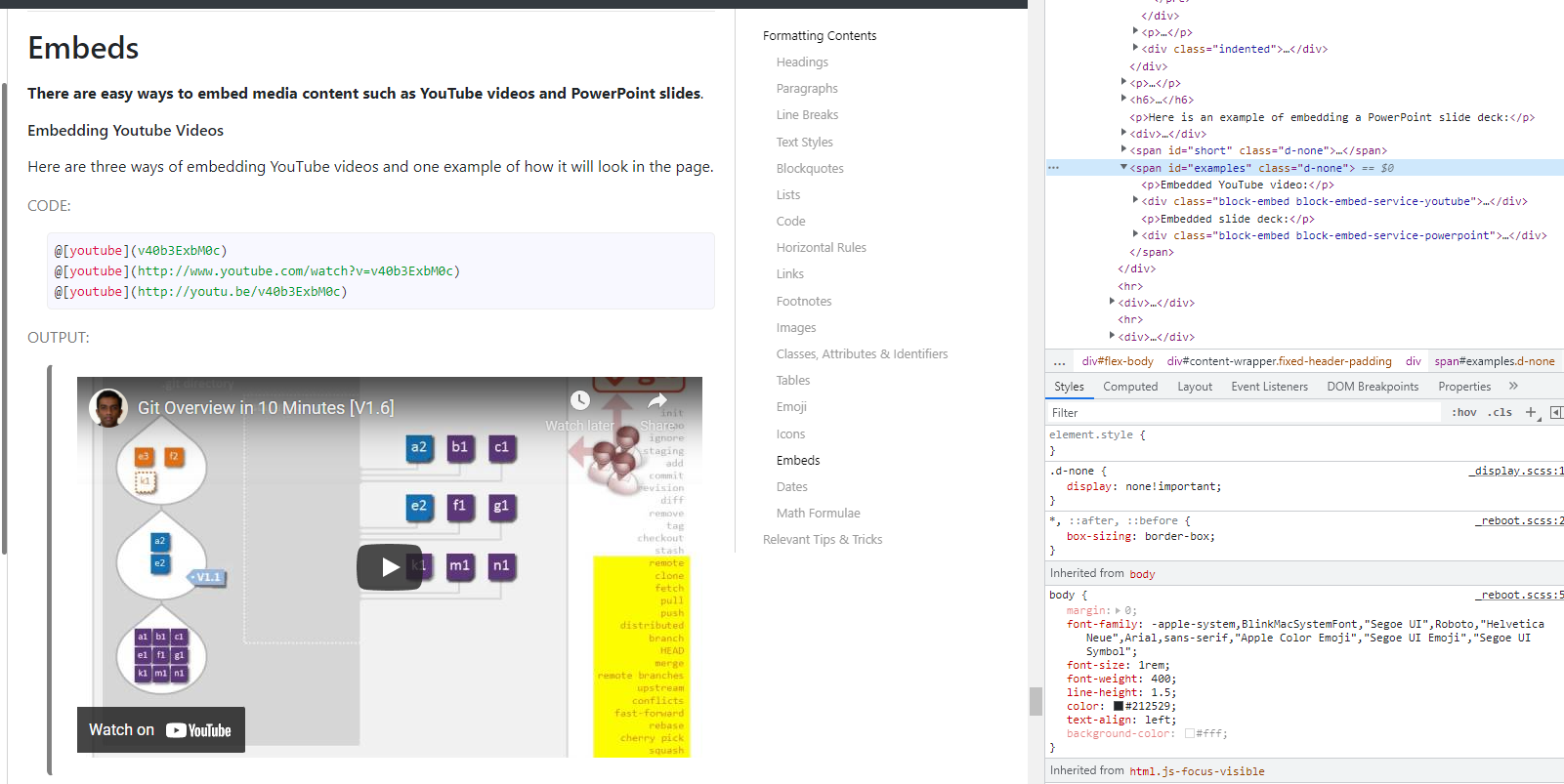
Not too sure why, but sometimes it's fine for block-level elements to be in
<span>but sometimes not.E.g. in embed section, seems like this span tag works fine and does not trigger any vue warning.
Testing instructions:
Proposed commit message: (wrap lines at 72 characters)
Fix unexpected behavior in UG due to invalid HTML markup
Invalid HTML markup may cause Vue hydration issues.
Let's replace span tags with div tags to avoid invalid
inclusion of block-level elements in span tags.
This prevents possible errors in HTML syntax.
Checklist: ☑️