[12.0][ADD] report_excel, report_excel_demo - #313
Conversation


1f40bb4 to
b2c1bde
Compare

|
The easiest way to see how this works is by installing report_excel_demo |
b2c1bde to
1922823
Compare

1922823 to
5eb1518
Compare

|
There's already |
|
@pedrobaeza thanks for your comment. May I clarify my view first :). In fact, for us, this module is used largely as reporting tools (excel and csv), and very few as import/export. Without having a Report Action, it need to store file in wizard first to click on file to download (vs just click) It also can't work along side with other reports like HTML or QWeb. So, technically, we see strong use of this report action. And so, as it become another type of report action, my idea to have this as separated module so user can see it as alternative reporting tools, and not the import/export tools. I think there are 2 options,
As I clarify it, I am ok with both. You can make the call? 👍 |
|
Again, I think this is redundant with export tool having profiles already stored, which serves as well for reporting purposes. Which feature is not included in core export that it is here? |
Nothing except being another report action. It is the main purpose though. |
|
So that's why I think this is not adding any value, and it's only 2 click less (on usual flow, click on action, then on export, then select profile, and export). What you can do is to create a module |
|
@pedrobaeza sorry, I am a bit confused. We didn't have the report action to use yet, that's why I create it. When you say, If you exclude the demo file, there are only 3 files for this (I use sample from report_xlsx).
Once we have this new action, we can set the profile (template to use) in the action. |

|
@kittiu the question is that IMO you are reinventing the wheel with |
|
I think I understand you now. When you say "regular export option", I thought you talk about So....please allow me to assume that you never use the
The
In contrast, the
The flexibility of how data is presented is achieved through dictionary instruction (templates.xml), which is also updated into Odoo's XLSX Template window, and also configurable through UI. This window keeps both excel template file and the instruction how to import/export.
What is the main difference?
In fact, I got to do
We use it to create good looking form / reports with minimum (wizard and model view at most) or no coding involved. I hope this explain a bit. I am not too sure, but from what I know, it is not capable with Odoo's import/export. If it is, it would be new knowledge to me also. Thank you @pedrobaeza, please feel free to comment. |

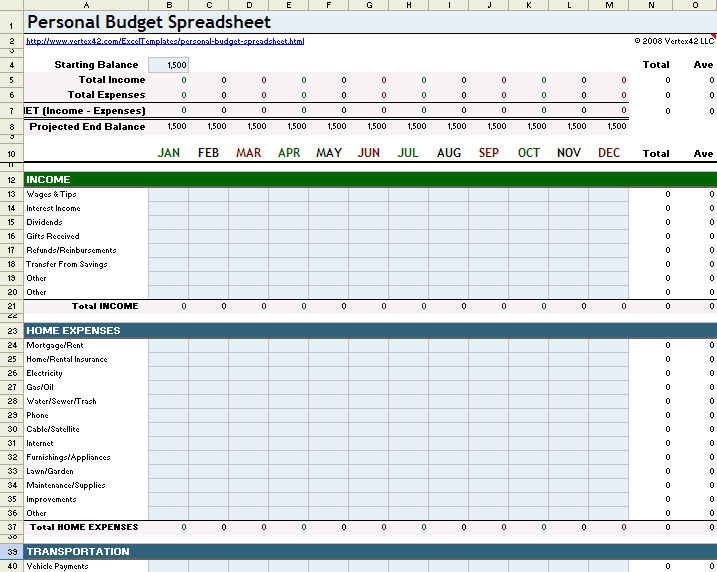
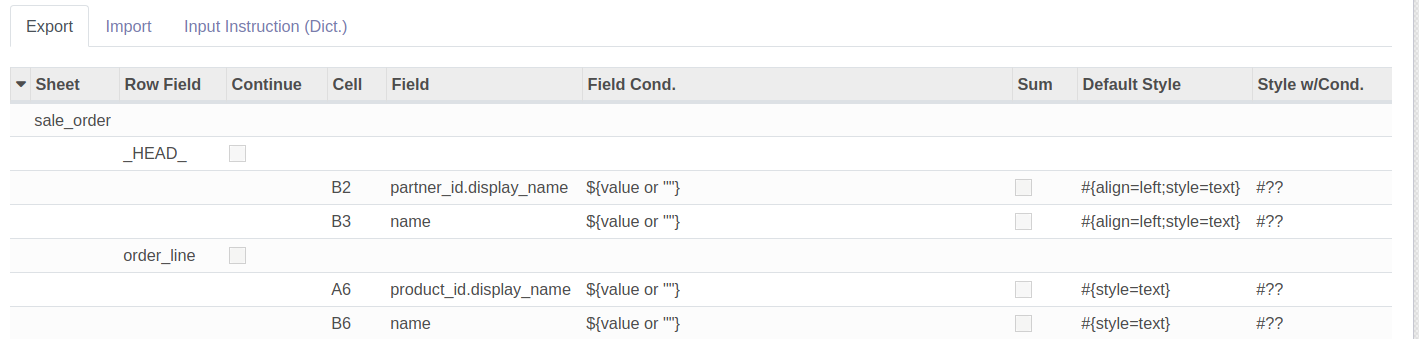
|
OK, indeed I haven't tried that module, and I still see it as a complication over the concept of importing things. For exporting things in "rich" format, it might work though, but I'm still reducing any reporting "paper style" for all my customers. It requires more time to format than to obtain information. Going back to this PR, why not including this inside |
|
I hope you have chance test it, it also make import easy too. You gives valuable feedback. I will include it to excel_import_export later on. Thanks! |
|
Moved to OCA/server-tools#1641 |
2 participants


This module add new report action of report_type = "excel", which will allow user to create excel form or
report with ease (no coding necessary in generating excel file).
This module leverage capability to generate excel file from module OCA/server-tools/excel_import_export
Report Action which pass an object + Dict Instruction on how to fill data + Excel template --> Output Excel
For example, creating a print out form will consist of,
Note:
Use report_xlsx with total control (by coding)