removeRow #2442

Description

This is:
- [x] a bug report
- [ ] a feature request
- [ ] **not** a usage question (ask them on https://stackoverflow.com/questions/tagged/phpspreadsheet or https://gitter.im/PHPOffice/PhpSpreadsheet)
What is the expected behavior?
remove Row and keep style of other cells
What is the current behavior?
remove Row and keep style of removed Row.
Before removeRow

After removeRow (row 4)
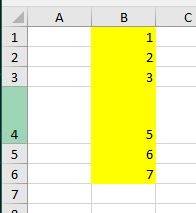
What are the steps to reproduce?
Please provide a Minimal, Complete, and Verifiable example of code that exhibits the issue without relying on an external Excel file or a web server:
<?php

require __DIR__ . '/vendor/autoload.php';

// Create new Spreadsheet object
$spreadsheet = new \PhpOffice\PhpSpreadsheet\Spreadsheet();

$excel  = new PhpOffice\PhpSpreadsheet\Spreadsheet();
$excel  = PhpOffice\PhpSpreadsheet\IOFactory::load($file);
$org    = $excel->getSheetByName('Feuil1');

$org->removeRow(4, 1);

$writer = PhpOffice\PhpSpreadsheet\IOFactory::createWriter($excel, 'Xlsx');
$writer->setPreCalculateFormulas(false);
$writer->save($filemodified);

?>
Which versions of PhpSpreadsheet and PHP are affected?
PHP 7.3.21 (cli) (built: Aug 4 2020 11:21:19) ( ZTS MSVC15 (Visual C++ 2017) x64 )
Copyright (c) 1997-2018 The PHP Group
Zend Engine v3.3.21, Copyright (c) 1998-2018 Zend Technologies
"name": "phpoffice/phpspreadsheet",
"version": "1.20.0",
"source": {
"type": "git",
"url": "https://github.com/PHPOffice/PhpSpreadsheet.git",
"reference": "44436f270bb134b4a94670f3d020a85dfa0a3c02"