python的opencv库 #9

Description

安装
要确保已经安装了numpy库,去官网下载对应的版本
下载完whl文件后,比如我下载的是opencv_python-3.4.0.12-cp27-cp27m-win_amd64.whl文件
用命令pip实现安装
pip install opencv的下载目录/opencv_python-3.4.0.12-cp27-cp27m-win_amd64.whl入门
在命令中新建test.py,键入以下代码,然后运行
# encoding=utf-8
import cv2 as cv2
import numpy as np
img = cv2.imread("img/test.jpg")
# cv2.imshow("lena",img)
# cv2.waitKey(10000)
cv2.namedWindow("Image")  # 初始化一个名为Image的窗口
cv2.imshow("Image", img)  # 显示图片
cv2.waitKey(0)  # 等待键盘触发事件,释放窗口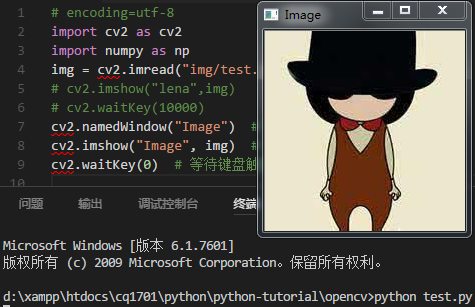
图片转矩阵
参考文章用 opencv和numpy进行图片和字符串互转,并保存至 json
# encoding=utf-8
import cv2
import numpy as np
from json import dumps
# 图片路径
IMAGE_NAME = "img/test.jpg"
# 保存为的json文件
JSON_NAME = 'opencv_temp.json'
img = cv2.imread(IMAGE_NAME)

# numpy中ndarray文件转为list
# img_list = img.tolist()
img_list = img[:,:,::-1].tolist() # [B,G,R]转[R,G,B]
# print(img_list)
# 字典形式保存数组
img_dict = {}
img_dict['name'] = IMAGE_NAME
img_dict['content'] = img_list

# 保存为json格式
json_data = dumps(img_dict, indent=2)

# 将数据保存到文件
with open(JSON_NAME, 'w') as json_file:
json_file.write(json_data)经过上面转换如果矩阵没有进行翻转img[:,:,::-1],则会显示下图偏绿的效果,具体可以参考这篇文章OpenCV与Python之图像的读入与显示以及利用Numpy的图像转换

还有相对简单的方法可以实现图片转矩阵
# encoding=utf-8
import cv2
import numpy as np
# 1、图像转换为矩阵
img = cv2.imread("./img/test.jpg")
matrix = np.asarray(img)
print(matrix)
# 2、矩阵转换为图像
# image = Image.fromarray(matrix)
前端显示
根据上面生成的opencv_temp.json文件,我们可以配合前端技术获取json文件的数据然后显示
<!DOCTYPE html>
<html lang="en">
<head>
<meta charset="UTF-8">
<meta name="viewport" content="width=device-width, initial-scale=1.0">
<meta http-equiv="X-UA-Compatible" content="ie=edge">
<title>Document</title>
</head>
<body>
<style>
* {
margin: 0;
padding: 0;
}
p {
height: 1px;
}
span {
display: inline-block;
height: 1px;
width: 1px;
}
</style>
<div id="demo">
<p v-for="ss in screen">
<span v-for="s in ss" :style="{'backgroundColor':`rgb(${s})`}"> </span>
</p>
</div>
<script src="js/vue.js"></script>
<script src="js/axios.js"></script>
<script>
new Vue({
el: "#demo",
data: {
screen: []
},
methods: {},
mounted() {
console.log(axios)
axios.get('./opencv_temp.json')
.then(function (response) {
console.log(response);
this.screen = response.data.content;
console.log(this)
}.bind(this))
.catch(function (error) {
console.log(error);
});
}
})
</script>
</body>
</html>直方图
图像直方图是反映一个图像像素分布的统计表,其实横坐标代表了图像像素的种类,可以是灰度的,也可以是彩色的。纵坐标代表了每一种颜色值在图像中的像素总数或者占所有像素个数的百分比。
图像是由像素构成,因为反映像素分布的直方图往往可以作为图像一个很重要的特征。在实际工程中,图像直方图在特征提取、图像匹配等方面都有很好的应用。摘至OpenCV成长之路(4):图像直方图
还可以参考常用的直方图计算公式OpenCV成长之路(5):图像直方图的应用