Completion
CodeMirror provides the hint feature to manage completion in the editor. CodeMirror-XQuery uses this feature to support completion for XQuery in several context :
Completion works with global (declare variable) and local (let) variables :

Completion works with parameters function:

Completion works with declared functions :


In XQuery you can have default module (like fn:*) and you not need to import it. For instance in the Marklogic you have default xdmp map modules. So in the demo if you do Ctrl+Space, it displays xdmp, and map:

To manage that, you register the module with a prefix (and functions) like this :
CodeMirror.defineXQueryModule({
  "prefix" : "map",
  "namespace" : "http://marklogic.com/xdmp/map",
  "functions" : [ {
    "name" : "clear",
    "as" : "empty-sequence()",
    "params" : [ {
      "name" : "map",
      "as" : "map:map"
    } ]
  },
...
   ]
});
If you don't declare prefix, you must to use import module to use it.
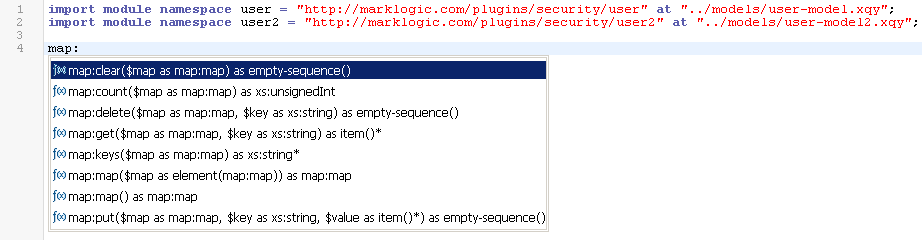
if you type map: the completion displays the function of the module :
If you do (not in this demo) Ctrl+Space after import module namespace user = " it displays list of namespace which comes from modules registered CodeMirror.defineXQueryModule (without prefix).