On Google Chrome, with Lock version 10.10.2, the input error state does not get reset on transition to a different page, and it seems to mess with the transitions. It is a big issue for me because this might be the first thing a user sees, and it looks quite unprofessional.
To reproduce:
- Go to https://auth0.com/lock
- Scroll to the web form example
- Hit the "Login" button, errors should show up next to the inputs
- Hit the "Reset password" link.
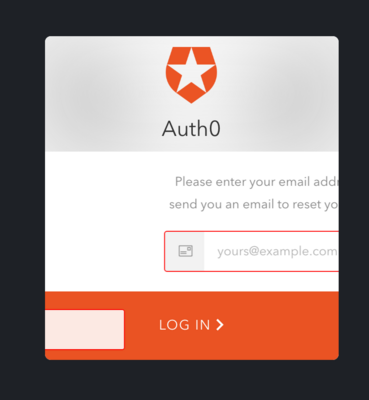
You should see that the input is shown during the transition to the password reset page, and the error state of the previous page is applied to the password reset input.
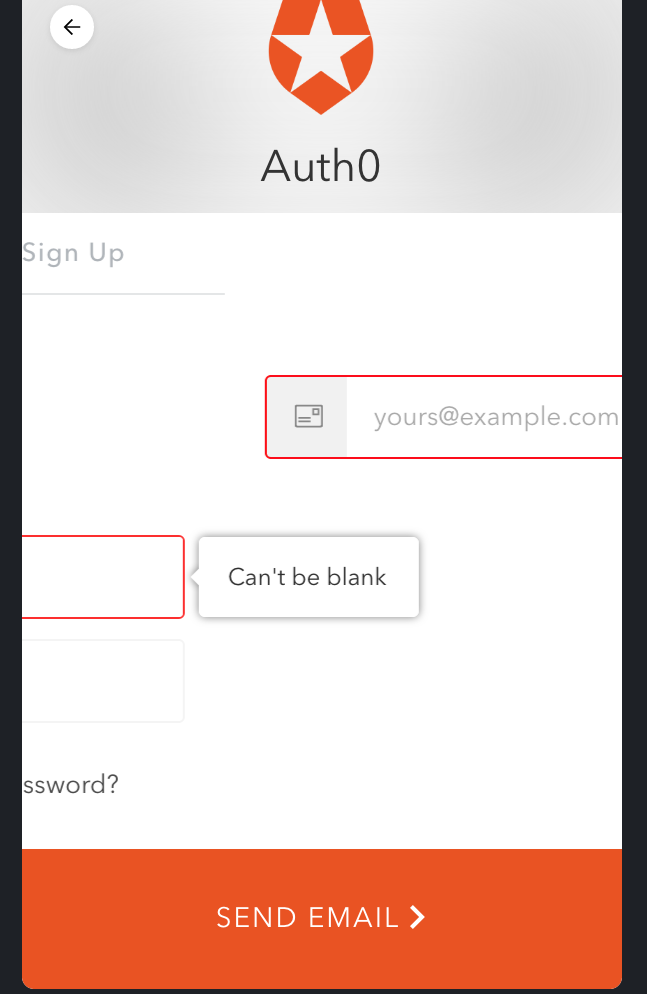
Now hit the back button, and you'll see that the password reset input is visible during the transition (it's over the bottom button), and the error state is only applied to the first input of the login page.
I think a good fix could be to just clear the input error state when you change the page.

On Google Chrome, with Lock version 10.10.2, the input error state does not get reset on transition to a different page, and it seems to mess with the transitions. It is a big issue for me because this might be the first thing a user sees, and it looks quite unprofessional.
To reproduce:
You should see that the input is shown during the transition to the password reset page, and the error state of the previous page is applied to the password reset input.
Now hit the back button, and you'll see that the password reset input is visible during the transition (it's over the bottom button), and the error state is only applied to the first input of the login page.
I think a good fix could be to just clear the input error state when you change the page.