An embedded sim racing dash with a real instrument-cluster layout. Built for readability and reliability while racing. Runs on Raspberry Pi with 7" displays and supports Gran Turismo 7 telemetry.
Join the Discord to share ideas and influence what gets built next.

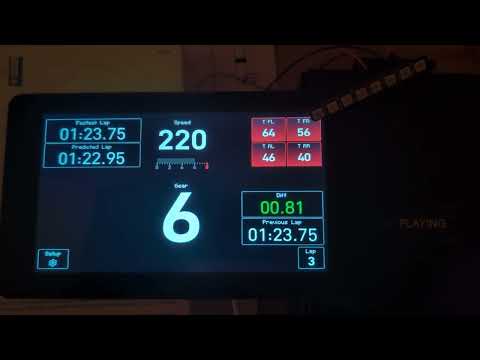


- Tire temperatures
- Vehicle speed
- Gear indicator
- Graphical RPM
- Shift lights (torque-based optimal shift point)
- Best lap time
- Previous lap time
- Predicted lap time
- Live delta (in real-time)
-
Single-board computers
- Raspberry Pi 4 Model B (at least 1GB RAM, built-in Wi-Fi)
-
Display
- Raspberry Pi Touch Display 2, 24-bit RGB, 720×1280, supporting five-finger touch
-
Peripherals
- Pimoroni Blinkt! (8-LED bar)
-
Input
- Touch control (UI buttons)
- On-screen soft keys for display brightness (+ / −)
If you prefer the turnkey experience of a standalone system (fast boot straight into the dash), download the prebuilt Raspberry Pi image and follow the installation instructions in the Wiki.
The codebase uses uv for managing the dependencies and the virtual environment. Follow the installation guide for uv.
After installing uv on your system switch to the repo root and execute
uv venv
source .venv/bin/activate # Windows: .venv\Scripts\activate
uv sync

python -m instrument_clusterSpecify the debugger configuration by creating a launch.json file in the "Run and Debug" view. Then paste the following and save.
{
    "version": "0.2.0",
    "configurations": [{
        "name": "Python Debugger: Current File",
        "type": "debugpy",
        "request": "launch",
        "module": "instrument_cluster.main",
        "cwd": "${workspaceFolder}",
        "env": {
            "PYTHONPATH": "${workspaceFolder}/src"
        },
        "console": "integratedTerminal"
    }]
}
Now you are ready to start debugging by hitting F5 or by pressing the green arrow.
This project is created for educational and personal use and provided without warranty of any kind, express or implied. Use at your own risk.
All trademarks, logos, and brand names are the property of their respective owners.
Gran Turismo, Gran Turismo 7, GT7 and PlayStation are trademarks or registered trademarks of Sony Interactive Entertainment Inc. and Polyphony Digital Inc.
All of my code is MIT licensed. Libraries follow their respective licenses.