Skip to content
Merged
Show file tree
Hide file tree
Changes from all commits
Commits
File filter

Filter by extension

Filter by extension

Conversations
Failed to load comments.
Loading
Jump to
Jump to file
Failed to load files.
Loading
Diff view
Diff view
14 changes: 13 additions & 1 deletion products/stream/src/content/faq/index.md
Original file line number Diff line number Diff line change
Expand Up @@ -38,6 +38,8 @@ If the frame rate is variable we will drop frames (e.g. if there are more than 1

The Stream player can be successfully embedded on the following platforms:

<TableWrap>

Browser | Version
----------------|-----------------------------------
Chrome | Supported since Chrome version 30+
Expand All @@ -46,6 +48,10 @@ Internet Explorer | Supported since IE 11 (Windows 8+ only)
Safari | Supported since Safari version 8+
Opera | Supported since Opera version 15+

</TableWrap>

<TableWrap>

Mobile Platform | Version
------------------|-----------------------------------------------------------------------------------
Chrome on Android | Supported on Chrome and Firefox for Android 4.0+ and all browsers for Android 4.1+
Expand All @@ -54,6 +60,8 @@ Samsung Internet | Supported on 5+
iOS | Supported on iOS 8+
Windows | Supported on Windows Phone 8+

</TableWrap>

## What are the recommended upload settings for video uploads?

If you're producing a brand new file for Cloudflare Stream, we recommend you use the following settings:
Expand All @@ -68,9 +76,13 @@ If you're producing a brand new file for Cloudflare Stream, we recommend you use

Below are bitrate reccomendations for encoding new videos for Stream:

<TableWrap>

Resolution | Recommended bitrate
------------|---------
1080p | 8 Mbps
720p | 4.8 Mbps
480p | 2.4 Mbps
360p | 1 Mbps
360p | 1 Mbps

</TableWrap>
Original file line number Diff line number Diff line change
Expand Up @@ -40,7 +40,7 @@ Please refer to [Cloudflare GraphQL analytics for HTTP requests](https://develop
Here is how you would get the view count and minutes viewed for the videos in your Stream account:

1. Make a query to https://api.cloudflare.com/client/v4/graphql
1. Include your Cloudflare email and key in the headers (see cURL example included on this page)
1. Include your Cloudflare API token in the headers (see cURL example included on this page)
1. It is important that you change the $ACCOUNT_ID with your account ID and the date range
1. The body of the query should contain the following GraphQL Query:

Expand Down Expand Up @@ -78,8 +78,7 @@ Here is the exact cURL request:
curl --request POST \
--url https://api.cloudflare.com/client/v4/graphql \
--header 'content-type: application/json' \
--header 'x-auth-email: $EMAIL' \
--header 'x-auth-key: $CF_KEY' \
--header 'Authorization: Bearer $TOKEN' \
--data '{"query":"query {\n viewer {\n accounts(filter:{\n accountTag:\"$ACCOUNT_ID\"\n\n }) {\n videoPlaybackEventsAdaptiveGroups(\n filter: {\n date_geq: \"2020-09-01\"\n date_lt: \"2020-09-25\"\n }\n orderBy:[uid_ASC]\n limit: 10000\n ) {\n count\n sum {\n timeViewedMinutes\n }\n dimensions{\n uid\n }\n }\n }\n }\n}\n\n"}'
```

Expand Down
22 changes: 12 additions & 10 deletions products/stream/src/content/index.md
Original file line number Diff line number Diff line change
Expand Up @@ -17,25 +17,21 @@ To get started with Stream, simply visit the Stream Dashboard in your Cloudflare

## Make your first API request

To make your first request to the Stream API, you must obtain three pieces of information:
To make your first request to the Stream API, you must obtain these pieces of information:

1. Your Cloudflare Account ID
2. Email address associated with the account
3. Your Cloudflare Account API Token

Alternatively, you can also use [bearer tokens](https://support.cloudflare.com/hc/en-us/articles/200167836-Managing-API-Tokens-and-Keys).
1. A Cloudflare Account API Token

Copy link
Copy Markdown
Contributor

Choose a reason for hiding this comment

The reason will be displayed to describe this comment to others. Learn more.

Getting an API token is not easy

There's no preset for stream yet
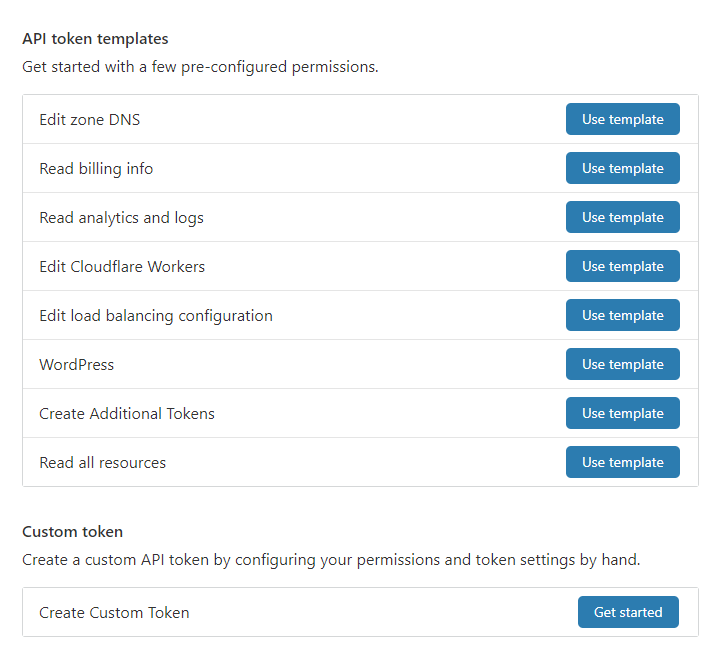
image

So you have to go through this dialog
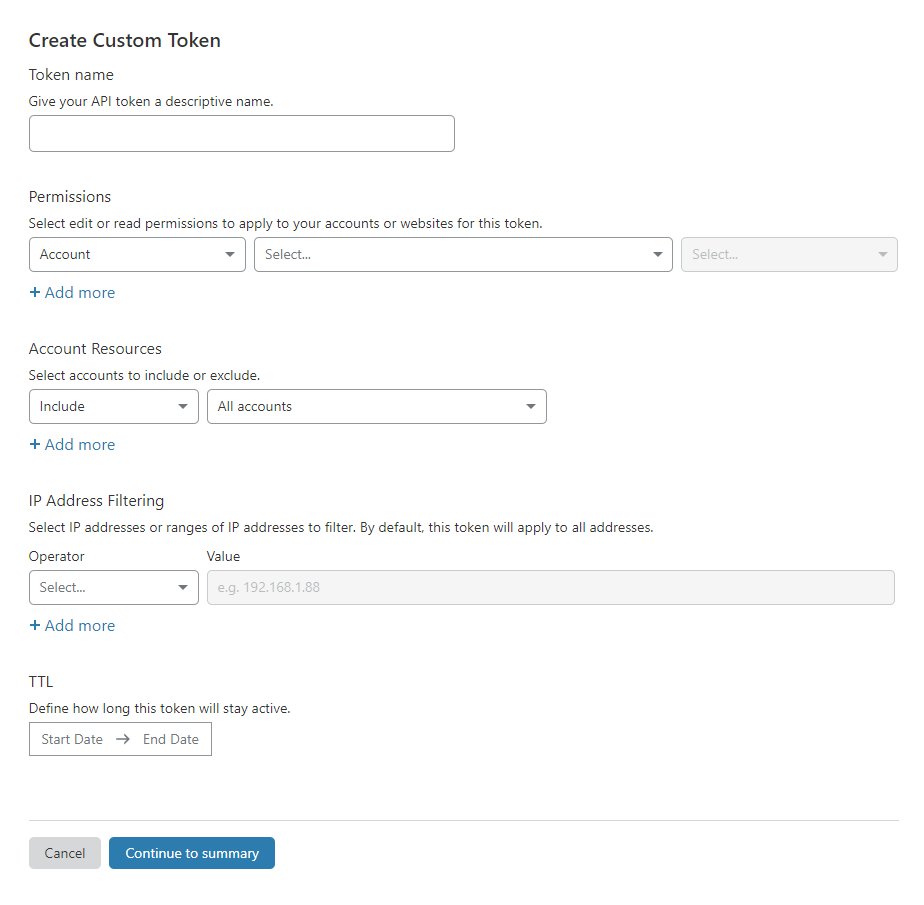
image

Which is very complicated.

We should either have at least one token preset or a dedicated docs page for 'Getting an API token'


### Step 1: Uploading your first video
Stream provides multiple ways to upload videos. For this example, we will upload an MP4 file that is stored in a storage bucket onto Stream. The MP4 file can be found here:

To make your first request, simply take the cURL command below and replace the API Key, email and account id placeholders with your credentials.
To make your first request, simply take the cURL command below and replace the API token, and account id placeholders with your credentials.

```bash
curl \
-X POST \
-d '{"url":"https://storage.googleapis.com/stream-example-bucket/video.mp4","meta":{"name":"My First Stream Video"}}' \
-H "X-Auth-Key: $API_KEY" \
-H "X-Auth-Email: $EMAIL" \
-H "Authorization: Bearer $TOKEN" \
https://api.cloudflare.com/client/v4/accounts/$ACCOUND_ID/stream/copy
```

Expand Down Expand Up @@ -73,8 +69,7 @@ Use the video UID from the first step to poll the video:

```bash
curl \
-H "X-Auth-Key: $API_KEY" \
-H "X-Auth-Email: $EMAIL" \
-H "Authorization: Bearer $TOKEN" \
https://api.cloudflare.com/client/v4/accounts/$ACCOUND_ID/stream/$VIDEO_UID
```

Expand Down Expand Up @@ -137,3 +132,10 @@ https://github.com/cloudflare/cloudflare-docs-engine/issues/281
allowFullScreen></iframe>
</div>
</figure>

### Next steps

- [Securing your Stream](/viewing-videos/securing-your-stream)
- [Displaying thumbnails to your video](/viewing-videos/securing-your-stream)
- [Programatically controling the video player](/viewing-videos/using-the-player-api)
- [Uploading without a API token](/uploading-videos/direct-creator-uploads)
12 changes: 4 additions & 8 deletions products/stream/src/content/uploading-videos/adding-captions.md
Original file line number Diff line number Diff line change
Expand Up @@ -8,9 +8,7 @@ Adding captions and subtitles to your video library.

## Add or modify a caption

To create or modify a caption on a video, you will need your
[Cloudflare API key](https://www.cloudflare.com/a/account/my-account)
and your email address.
To create or modify a caption on a video a [Cloudflare API Token](https://www.cloudflare.com/a/account/my-account) is required.

The `$LANGUAGE` must adhere to the [BCP 47 format](http://www.unicode.org/reports/tr35/#Unicode_Language_and_Locale_Identifiers). For convenience, the most common
language codes are provided [at the bottom of this document](#most-common-language-codes).
Expand Down Expand Up @@ -38,8 +36,7 @@ be created; if sent `de`, the label `Deutsch` will be created.

```bash
curl -X PUT \
-H 'X-Auth-Key:$APIKEY' \
-H 'X-Auth-Email:$EMAIL' \
-H 'Authorization: Bearer $TOKEN' \
-F file=@/Users/mickie/Desktop/example_caption.vtt \
https://api.cloudflare.com/client/v4/accounts/$ACCOUNT/stream/$VIDEOID/captions/$LANGUAGE
```
Expand All @@ -63,7 +60,7 @@ https://api.cloudflare.com/client/v4/accounts/$ACCOUNT/stream/$VIDEOID/captions/
To view captions associated with a video:

```bash
curl -H 'X-Auth-Key:$APIKEY' -H 'X-Auth-Email:$EMAIL'
curl -H 'Authorization: Bearer $TOKEN' \
https://api.cloudflare.com/client/v4/accounts/$ACCOUNT/stream/$VIDEO/captions
```

Expand Down Expand Up @@ -93,8 +90,7 @@ To remove a caption associated with your video:

```bash
curl -X DELETE \
-H 'X-Auth-Key:$APIKEY' \
-H 'X-Auth-Email:$EMAIL' \
-H 'Authorization: Bearer $TOKEN' \
https://api.cloudflare.com/client/v4/accounts/$ACCOUNT/stream/$VIDEO/captions/$LANGUAGE
```

Expand Down
25 changes: 11 additions & 14 deletions products/stream/src/content/uploading-videos/applying-watermarks.md
Original file line number Diff line number Diff line change
Expand Up @@ -16,7 +16,7 @@ Watermark profile has many customizable options. However, the default parameters
### Step 1: Create a profile

```bash
curl -X POST -H "X-Auth-Key: $APIKEY" -H "X-Auth-Email: $EMAIL" \
curl -X POST -H 'Authorization: Bearer $TOKEN' \
-F file=@/Users/rchen/cloudflare.png \
https://api.cloudflare.com/client/v4/accounts/$ACCOUNT/stream/watermarks
```
Expand All @@ -25,8 +25,7 @@ https://api.cloudflare.com/client/v4/accounts/$ACCOUNT/stream/watermarks

```bash
tus-upload --chunk-size 5242880 \
--header X-Auth-Key $APIKEY \
--header X-Auth-Email $EMAIL \
--header Authentication 'Bearer $TOKEN' \
--metadata watermark $WATERMARKUID \
/Users/rchen/cat.mp4 https://api.cloudflare.com/client/v4/accounts/$ACCOUNT/stream
```
Expand All @@ -37,8 +36,7 @@ tus-upload --chunk-size 5242880 \
## Profiles

To create, list, delete, or get information about the profile, you will need your
[Cloudflare API key](https://www.cloudflare.com/a/account/my-account)
and your email address.
[Cloudflare API token](https://www.cloudflare.com/a/account/my-account).

### Optional parameters

Expand Down Expand Up @@ -82,7 +80,7 @@ and your email address.

To upload the image directly, please send a POST request using `multipart/form-data` as the content-type and specify the file under the `file` key. All other fields are optional.
```bash
curl -X POST -H "X-Auth-Key: $APIKEY" -H "X-Auth-Email: $EMAIL" \
curl -X POST -H "Authorization: Bearer $TOKEN" \
-F file=@{path-to-image-locally} \
-F name='marketing videos' \
-F opacity=1.0 \
Expand All @@ -96,7 +94,7 @@ https://api.cloudflare.com/client/v4/accounts/$ACCOUNT/stream/watermarks

To specify a URL for upload, please send a POST request using `application/json` as the content-type and specify the file location using the `url` key. All other fields are optional.
```bash
curl -X POST -H "X-Auth-Key: $APIKEY" -H "X-Auth-Email: $EMAIL" \
curl -X POST -H "Authorization: Bearer $TOKEN" \
-H 'Content-Type: application/json' \
-d '{
"url": "{url-to-image}",
Expand Down Expand Up @@ -144,7 +142,7 @@ Unfortunately, Stream does not currently support specifying watermark profile at
### Upload video with a link

```bash
curl -X POST -H "X-Auth-Key: $APIKEY" -H "X-Auth-Email: $EMAIL" \
curl -X POST -H "Authorization: Bearer $TOKEN" \
-H 'Content-Type: application/json' \
-d '{
"url": "{url-to-video}",
Expand Down Expand Up @@ -191,8 +189,7 @@ highlight: [10,11,12,13,14,15,16,17,18,19,20,21,22]

```bash
tus-upload --chunk-size 5242880 \
--header X-Auth-Key $APIKEY \
--header X-Auth-Email $EMAIL \
--header Authentication 'Bearer $TOKEN' \
--metadata watermark $WATERMARKUID \
$PATH_TO_VIDEO https://api.cloudflare.com/client/v4/accounts/$ACCOUNT/stream
```
Expand All @@ -201,7 +198,7 @@ $PATH_TO_VIDEO https://api.cloudflare.com/client/v4/accounts/$ACCOUNT/stream
The video uploaded with the generated unique one-time URL will be watermarked with the profile specified.

```bash
curl -X POST -H "X-Auth-Key: $APIKEY" -H "X-Auth-Email: $EMAIL" \
curl -X POST -H "Authorization: Bearer $TOKEN" \
-H 'Content-Type: application/json' \
-d '{
"maxDurationSeconds": 3600,
Expand Down Expand Up @@ -246,7 +243,7 @@ https://api.cloudflare.com/client/v4/accounts/$ACCOUNT/stream/direct_upload
To view a watermark profile that you created:

```bash
curl -X GET -H "X-Auth-Key: $APIKEY" -H "X-Auth-Email: $EMAIL" \
curl -H "Authorization: Bearer $TOKEN" \
https://api.cloudflare.com/client/v4/accounts/$ACCOUNT/stream/watermarks/$WATERMARKUID
```

Expand Down Expand Up @@ -278,7 +275,7 @@ https://api.cloudflare.com/client/v4/accounts/$ACCOUNT/stream/watermarks/$WATERM
To list watermark profiles that you created:

```bash
curl -X GET -H "X-Auth-Key: $APIKEY" -H "X-Auth-Email: $EMAIL" \
curl -H "Authorization: Bearer $TOKEN" \
https://api.cloudflare.com/client/v4/accounts/$ACCOUNT/stream/watermarks/
```

Expand Down Expand Up @@ -325,7 +322,7 @@ https://api.cloudflare.com/client/v4/accounts/$ACCOUNT/stream/watermarks/
To delete a watermark profile that you created:

```bash
curl -X DELETE -H "X-Auth-Key: $APIKEY" -H "X-Auth-Email: $EMAIL" \
curl -X DELETE -H 'Authorization: Bearer $TOKEN' \
https://api.cloudflare.com/client/v4/accounts/$ACCOUNT/stream/watermarks/$WATERMARKUID
```

Expand Down
Original file line number Diff line number Diff line change
Expand Up @@ -4,7 +4,7 @@ order: 3

# Direct creator uploads

Direct creator uploads allow users to upload videos without API keys. A common place to
Direct creator uploads allow users to upload videos without API tokens. A common place to

Copy link
Copy Markdown
Contributor

Choose a reason for hiding this comment

The reason will be displayed to describe this comment to others. Learn more.

Maybe this can be more general; ie, 'without API credentials'

That way its generic across tokens and keys.

use Direct creator uploads is on web apps, client side applications, or on mobile apps
where users upload content directly to Stream.

Expand All @@ -13,8 +13,7 @@ where users upload content directly to Stream.
To give users the ability to directly upload their videos, first generate and
provide them with a unique one-time upload URL with the following API request.

To make API requests you will need your [Cloudflare API key](https://www.cloudflare.com/a/account/my-account)
your email address and your Cloudflare [account ID](https://www.cloudflare.com/a/overview/).
To make API requests you will need your [Cloudflare API token](https://www.cloudflare.com/a/account/my-account) and your Cloudflare [account ID](https://www.cloudflare.com/a/overview/).

### Upload constraints

Expand Down Expand Up @@ -58,8 +57,7 @@ any other additional arbitrary keys for metadata to be stored.

```bash
curl -X POST \
-H 'X-Auth-Key:$APIKEY' \
-H 'X-Auth-Email:$EMAIL' \
-H 'Authorization: Bearer $TOKEN' \
https://api.cloudflare.com/client/v4/accounts/$ACCOUNT/stream/direct_upload \
--data '{
"maxDurationSeconds": 3600,
Expand Down
5 changes: 2 additions & 3 deletions products/stream/src/content/uploading-videos/searching.md
Original file line number Diff line number Diff line change
Expand Up @@ -4,15 +4,14 @@ You can search for videos by name through the Stream API by adding a `search` qu

## What you will need

To make API requests you will need your [Cloudflare API key](https://www.cloudflare.com/a/account/my-account), your email address and your Cloudflare [account ID](https://www.cloudflare.com/a/overview/).
To make API requests you will need a [Cloudflare API token](https://www.cloudflare.com/a/account/my-account) and your Cloudflare [account ID](https://www.cloudflare.com/a/overview/).

## cURL example

This example lists media where the name matches `puppy.mp4`.

```bash
curl -X GET "https://api.cloudflare.com/client/v4/accounts/$ACCOUNT/stream?search=puppy" \
-H "X-Auth-Email: $EMAIL" \
-H "X-Auth-Key: $APIKEY" \
-H "Authorization: Bearer $TOKEN" \
-H "Content-Type: application/json"
```
Original file line number Diff line number Diff line change
Expand Up @@ -16,8 +16,7 @@ Make a HTTP request to the Stream API with the URL of the video.
curl \
-X POST \
-d '{"url":"https://storage.googleapis.com/zaid-test/Watermarks%20Demo/cf-ad-original.mp4","meta":{"name":"My First Stream Video"}}' \
-H "X-Auth-Key: $API_KEY" \
-H "X-Auth-Email: $EMAIL" \
-H "Authorization: Bearer $TOKEN" \
https://api.cloudflare.com/client/v4/accounts/$ACCOUND_ID/stream/copy
```

Expand Down
Original file line number Diff line number Diff line change
Expand Up @@ -14,8 +14,7 @@ Make an HTTP request with content-type header set to `multipart/form-data` and i

```bash
curl -X POST \
-H "X-Auth-Key: $APIKEY" \
-H "X-Auth-Email: $EMAIL" \
-H "Authorization: Bearer $TOKEN" \
-F file=@/Users/kyle/Desktop/video.mp4 \
https://api.cloudflare.com/client/v4/accounts/$ACCOUNT/stream
```
Expand Down Expand Up @@ -79,7 +78,7 @@ pip install -U tus.py
```

```bash
tus-upload --chunk-size 5242880 --header X-Auth-Key $APIKEY --header X-Auth-Email $EMAIL $PATH_TO_VIDEO https://api.cloudflare.com/client/v4/accounts/$ACCOUNT/stream
tus-upload --chunk-size 5242880 --header Authorization "Bearer $TOKEN" $PATH_TO_VIDEO https://api.cloudflare.com/client/v4/accounts/$ACCOUNT/stream
```

In the beginning of the response from tus, you’ll see the endpoint for getting information about your newly uploaded video.
Expand Down Expand Up @@ -119,8 +118,7 @@ func main() {
defer f.Close()

headers := make(http.Header)
headers.Add("X-Auth-Email", "$EMAIL")
headers.Add("X-Auth-Key", "$APIKEY")
headers.Add("Authorization", "Bearer $TOKEN")

config := &tus.Config{
ChunkSize: 5 * 1024 * 1024, // Cloudflare Stream requires a minimum chunk size of 5MB.
Expand Down Expand Up @@ -170,7 +168,7 @@ npm install tus-js-client
Set up an index.js and configure:

* API endpoint with your Cloudflare Account ID
* Request headers to include your Cloudflare Email and API Key
* Request headers to include a API token

```javascript
var fs = require("fs");
Expand All @@ -184,8 +182,7 @@ var size = fs.statSync(path).size;
var options = {
endpoint: "https://api.cloudflare.com/client/v4/accounts/{ACCOUNT ID}/stream",
headers: {
'X-Auth-Email': '$EMAIL',
'X-Auth-Key': '$APIKEY',
'Authorization': 'Bearer $TOKEN',
},
chunkSize: 5 * 1024 * 1024, // Cloudflare Stream requires a minimum chunk size of 5MB.
resume: true,
Expand Down
13 changes: 4 additions & 9 deletions products/stream/src/content/uploading-videos/using-webhooks.md
Original file line number Diff line number Diff line change
Expand Up @@ -10,19 +10,15 @@ A tool to notify your service when videos successfully finish processing and are

### Create or modify the webhook subscription

To subscribe to receive webhook notifications on your service, or modify an
existing subscription, you will need your
[Cloudflare API key](https://www.cloudflare.com/a/account/my-account)
and your email address.
To subscribe to receive webhook notifications on your service, or modify an existing subscription, you will need a [Cloudflare API token](https://www.cloudflare.com/a/account/my-account).

```bash
curl -X PUT --header 'X-Auth-Key:$APIKEY' --header 'X-Auth-Email:$EMAIL'
curl -X PUT --header 'Authorization: Bearer $TOKEN'
https://api.cloudflare.com/client/v4/accounts/$ACCOUNT/stream/webhook
--data '{"notificationUrl":"$WEBHOOK_NOTIFICATION_URL}'
```

The webhook notification URL must include the protocol. Only `http://`
or `https://` is supported.
The webhook notification URL must include the protocol. Only `http://` or `https://` is supported.

#### Example response to create or modify the webhook subscription

Expand All @@ -41,8 +37,7 @@ or `https://` is supported.

## Notifications

When a video on your account finishes processing, you will receive a `POST`
request notification with information about the video.
When a video on your account finishes processing, you will receive a `POST` request notification with information about the video.

Note the `status` field indicates whether the video processing finished successfully.

Expand Down
Loading