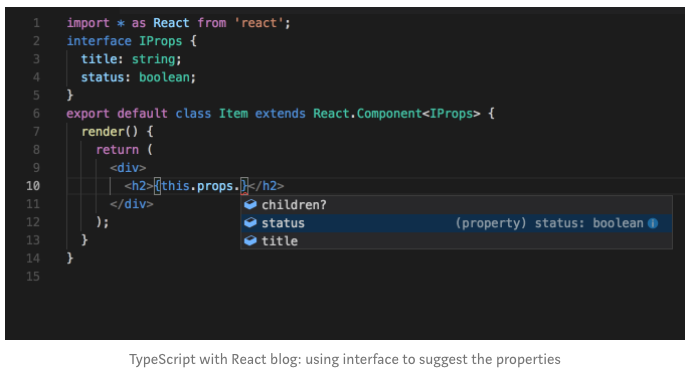
TypeScript populates with the options while you type which saves a lot of dev effort of figuring out what should be written. Writing in TypeScript makes it self explanatory. E.g if a new developer joins the team and he is reusing a component, TypeScript will suggest what are the props required in the following screenshot.
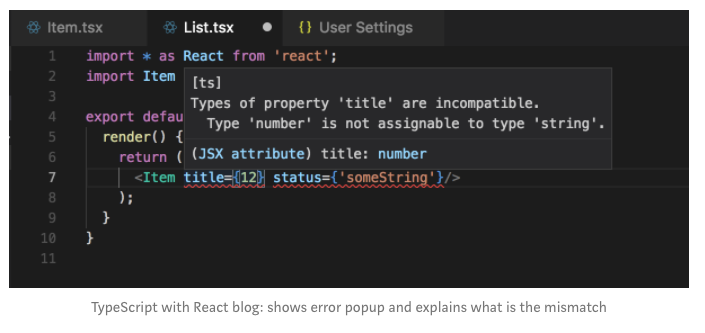
While you are writing, TypeScript tells you what is wrong.
// Type Annotations
// Definition: Type annotations, code we add to tell Typescript what type of value a variable will refer to
// Primitive Types: number, boolean, void, undefined, string, symbol, null
// Object Types: functions, arrays, classes, objects
// ex. You assign the type annotation by using colon and the desire type
let fundraiser: string = 'Victor';
let fundraiser: number = 'hi'; // typescript will show an error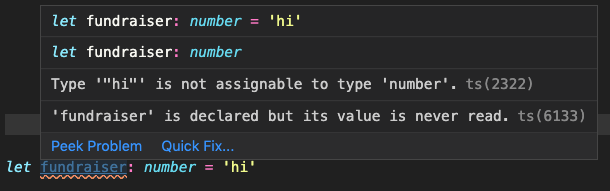
let nothing: undefined = undefined // Something hasn't been initialized
let almostNothing: null = null     // Something is currently unavailable

 // Built In Objects
let now: Date = new Date(); // Date is an internal TypeScript objectlet giftcards: string[] = ['Amazon', 'Walmart', 'Apple']
let intentIds: number[] = [1,2,3]
let userHaveJoinedTeam: boolean[] = [true, true, false]
let giftcards: (string | number)[] = ['Amazon', 'Walmart', 'Apple', 1]
// classes
class Fundraiser {
  constructor(name: string, email: string){
    name  = 'Sean'
    email = 'sye@flipgive.com'
  };
}

let sean: Fundraiser = new Fundraiser();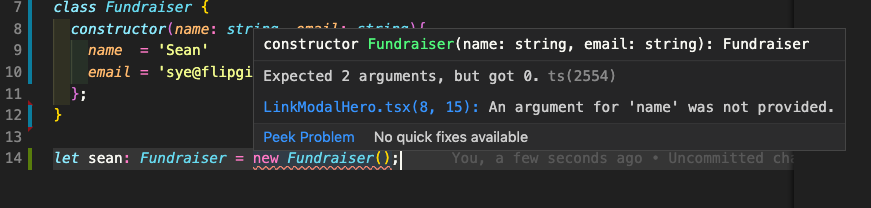
// ex. we assign an object to the variable 'point'
// with x and y properties that can only be a number type

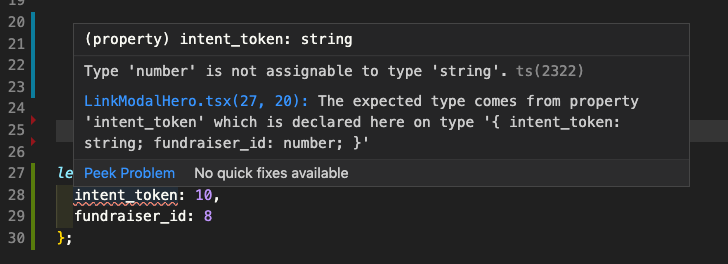
let transaction: { intent_token: string; fundraiser_id: number } = {
  intent_token: 'abc', // if intent_token: 10, an error message will appear
  fundraiser_id: 8
};
// Function
// - as developers, we care about what arguments that will go into the function, and what the function will return
// - annotation is on the left side of equal sign, right hand side is the actual implementation

// Without TS
const joinTeam = (user_id) => {
  console.log(user_id);
}

// With TS
const joinTeam: (user_id: number) => void = (user_id) => {
  console.log(user_id);
}// Type Inference
// Definition: Type inference, TypeScript tries to figure out what type of value a variable refers to
// It happens when the "variable declaration" and "variable initialization" are on the same line, TypeScript will look at the type of the "variable initialization" and use that as the type.
// example,
let campaign = "FlipGive"
campaign = 1 // typescript will show an warning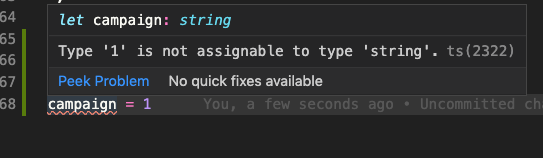
// Type Inference will not work if declaration and initialization are not on the same line
let donation;
donation = 5;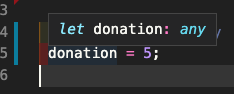
// 1. any is one of the Primitive types, same as 'string', 'boolean', or 'number' etc
// 2. It means that TS has no idea what this is, because it can't check for correct property references
// 3. We should avoid variables with 'any' at all cost, because the purpose of TS is to catch errors in our code, if it does not know the type, it cannot do any error checking

// 1) Function that returns the 'any' type
const json = '{"x": 10, "y": 20}';
const coordinates = JSON.parse(json); // coordinates and the function are both any
console.log(coordinates); // {x: 10, y: 20};

coordinates.invalid_method(); // TS is not able to show errors when im calling a property that does not exist, bc the variable 'coordinates' has an 'any' type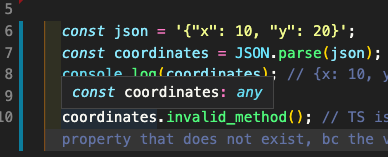
const coordinates:{ x: number, y: number } = JSON.parse(json);

coordinates.invalid_method(); // TS will now show an error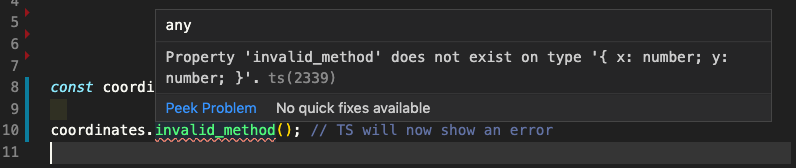
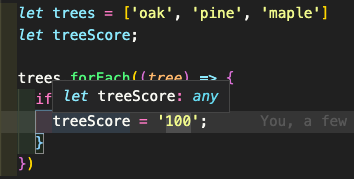
// 2) When we declare a variable on one line and initialize it later

// TS Will Not Show Error
let trees = ['oak', 'pine', 'maple']
let treeScore;

trees.forEach((tree) => {
  if (tree === 'maple'){
    treeScore = '100';
  }
})
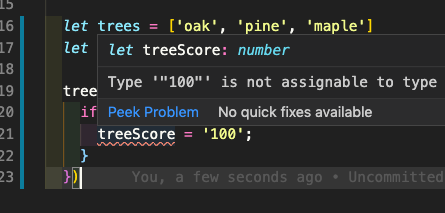
// TS Will Show Error
let trees = ['oak', 'pine', 'maple']
let treeScore: number;

trees.forEach((tree) => {
  if (tree === 'maple'){
    treeScore = '100';
  }
})
  const add = (a: number, b: number): number => {
    return a + b;
}// You should always add return annotations for functions
const subtract = (a: number, b: number) => {
a - b;
} // we forgot to return here, however TS is not warning us bc of type inference
const subtract = (a: number, b: number): number => {
return a - b;
} // after adding type annotation for the function's return type, TS will now warn us if we did not return the correct type 
const logger = (message: string): void => {
  console.log(message);
}

// The never type is used when you are sure that something is never going to occur.
// For example, you write a function which will not return to its end point or always throws an exception
const throwError = (message: string): never => {
  throw new Error(message);
}const todaysWeather = {
date: new Date(),
weather: 'sunny'
}
// Before Destructuring
const logWeather =(todaysWeather: {
date: Date;
weather: string;
}): void => {
console.log(todaysWeather.date);
console.log(todaysWeather.weather);
}
// After Destructuring
const logWeather =({
date,
weather
}: {
date: Date;
weather: string;
}): void => {
console.log(date);
console.log(weather);
}const profile = {
name: "alex",
age: 20,
coords: {
lat: 0,
lng: 15
},
setAge(age: number): void {
this.age = age;
}
};
// Without TS
const { age } = profile;
const {
coords: { lat, lng }
} = profile;
// With TS
const { age }: { age: number } = profile;
const {
coords: { lat, lng }
}: { coords: { lat: number; lng: number } } = profile;Short answer, it doesn't really matter. The feature sets of both Interface and Types have become so similar
// Geared towards defining the shape of objects or classes
// Most of the time, we are using objects (Campaigns, Fundraisers etc)
// And Interfaces are built deliberately for that.


// 1. Implementing an Object

interface Campaign {
  name: string,
  amount_raised: number
}

const flipgive: Campaign = {
  name: 'FlipGive Giving Club',
  amount_raised: 1000
}

// If I type in `n1ame`
// TS will show a warning

const flipgive: Campaign = {
  n1ame: 'FlipGive Giving Club',
  amount_raised: 1000
}


// 2. Functions
interface LeaveCampaign {
  (name: string): string;
}

const leftCampaign: LeaveCampaign = (name) => 'FlipGive Giving Club';

// if we assign `name` with Boolean, TS will yell at me

const leftCampaign: LeaveCampaign = (name: boolean) => 'FlipGive Giving Club';


// 3. Extends
interface User {
  name: string;
  email: string;
}
interface Fundraiser extends User {
  campaign_id: ID;
}

// This will show an error because I'm missing a required property
const fundraiser_1: Fundraiser = {
  name: 'Gerry',
  email: 'gsuwignyo@flipgive.com'
}

// 4. Declaration Merging (Interface's unique feature)
// TS allows you to merge these two interfaces
interface Fundraiser {
  name: string;
  email: string;
}
interface Fundraiser {
  campaign_id: ID;
}

// Again, this will STILL show an error because I'm missing a required property
// Is this good or bad? We will let the Senior devs decide.
const fundraiser_1: Fundraiser = {
  name: 'Gerry',
  email: 'gsuwignyo@flipgive.com'
}
Type aliases are exactly the same as their original types, they are simply alternative names.
// 1. General Use
type isFundraiser = boolean;

// Downside of using Type Aliases:
  // warning message is not as descriptive as Interface
  // ex. it will warn me that string 'true' is not assignable to type 'boolean', not type 'isFundraiser', bc 'isFundraiser' is just a boolean
  // side note: this can be achieved by using an Opaque Type, it has been requested but not supported in TS at the moment
  const gerry: isFundraiser = 'true';


// 2. Why Type Alias and Interface are very similar now days.
// Improved error message when using Type Alias to define an object

type Fundraiser = {
  name: string;
  campaign_name: string;
}

const fundraiser: Fundraiser = {
  name: 'Gerry'
}


// 3. Type Alias will not able to extend
// why not? bc when an object is defined with Type Alias, the shape is very fixed.

// Method 1: Intersection (As of version 2.7)

type Fundraiser = {
  name: string;
  campaign_name: string;
} & { amount_raised: number; }

const fundraiser: Fundraiser = {
  name: 'Gerry',
  campaign_name: 'FlipGive'
} // this will show amount_raised is missing

// Method 2: Union

type Fundraiser = {
  name: string;
  campaign_name: string;
}

type User = {
  amount_raised: number;
}

type Gerry = Fundraiser | User;

const gerry: Gerry = {
  name: 'Gerry',
  campaign_name: 'FlipGive'
}- Because an ideal property of software is being open to extension, you should always use an interface over a type alias if possible.
- On the other hand, if you can’t express some shape with an interface and you need to use a union or tuple type, type aliases are usually the way to go.
- It lets you define dynamically what the types that the function will use by utilizing a Type Variable
// 1. Pre-Generics
// We have two functions, they are used to removing a value from an array
// one removes an array of numbers
// the other one removes an array of strings

function removeItemFromArray(arr: Array<number>, item: number): Array<number> {
  const index = arr.findIndex(i => i === item)
  arr.splice(index, 1);
  return arr
}

removeItemFromArray([1,2,3], 2)

function removeStringItemFromArray(arr: Array<string>, item: string): Array<string> {
  const index = arr.findIndex(i => i === item)
  arr.splice(index, 1);
  return arr
}

removeStringItemFromArray(['1','2','3'], '2')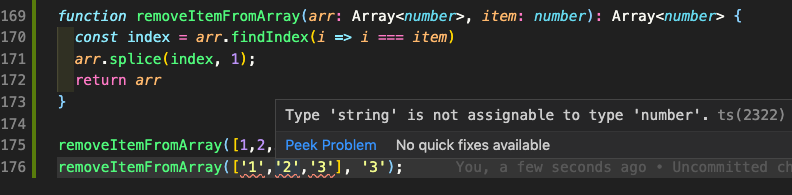
// 2. Using Generics
function removeItemFromArray<T>(arr: Array<T>, item: T): Array<T> {
  const index = arr.findIdex(i => i === item)
  arr.splice(index, 1);
  return arr
}

removeItemFromArray([1,2,3], 2)
removeItemFromArray(['1','2','3'], '2')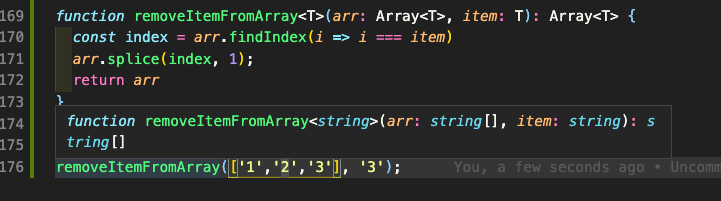
function removeItemFromArray<T>(arr: Array<T>, item: T): Array<T> {
  const index = arr.findIdex(i => i === item)
  arr.splice(index, 1);
  return arr
}

removeItemFromArray<number>([1,2,3], 2)
removeItemFromArray<string>(['1','2','3'], '2')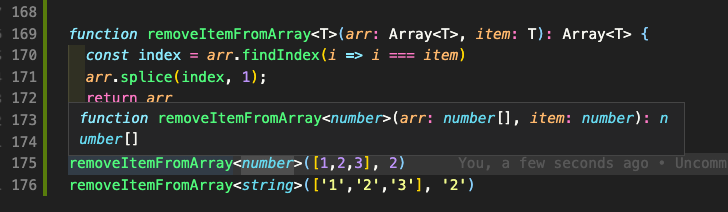
The most commonly used type parameter names are:

E - Element (used extensively by the Java Collections Framework)
K - Key
N - Number
T - Type
V - Value
S,U,V etc. - 2nd, 3rd, 4th types