CrickHit is a real-time cricket batting game built from scratch on the TI MSPM0G3507 LaunchPad with a ST7735R 128x160 TFT LCD. The player controls a batsman using a slide potentiometer and physical switches to hit balls bowled with realistic curve trajectories. The game runs entirely on bare-metal interrupts with no RTOS, using fixed-point physics, sprite compositing, a custom 5-bit binary-weighted DAC for audio, and multilingual UI support.
Developed as the final project for ECE 319H: Introduction to Embedded Systems (Honors) at The University of Texas at Austin, Spring 2026.
Authors: Devansh Joshi and Calum Cheah
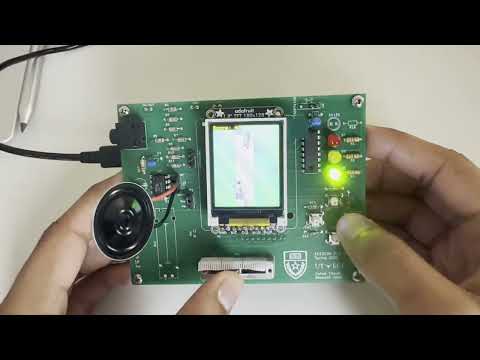
A top-down cricket scene is rendered on the LCD. A bowler at the top of the screen delivers balls toward the stumps at the bottom. The player moves the batsman horizontally with a slide potentiometer and triggers left or right bat swings using physical switches.
A demo of CrickHit is available here:
Runs are awarded based on how precisely the bat contacts the ball:
| Result | Condition | Runs |
|---|---|---|
| Perfect Hit | Ball within 3px of ideal contact point | +6 |
| Good Hit | Ball within 8px of ideal contact point | +4 |
| Hit | Ball within 14px of ideal contact point | +2 |
| Wide | Ball delivered too far from the batsman | +1 |
| Wicket (OUT) | Ball hits the stumps without being hit | Score resets |
Swinging on the correct side (left swing for balls approaching from the left, right swing for the right) gives a threshold bonus. Swinging on the wrong side applies a 2px penalty to all scoring thresholds, making it harder to score high.
Each delivery uses kinematic equations with 6-bit fixed-point arithmetic for sub-pixel precision:
- Initial horizontal velocity is randomized
- A curve acceleration (
ax) is computed so the ball arcs toward the stumps - Target position uses a Gaussian random distribution (Central Limit Theorem approximation) so slower deliveries aim more accurately at the stumps while faster ones scatter wider
- Speed-proportional jitter is added to the scoring calculation to prevent quantization lockout at high speeds, where the large step size would otherwise restrict the ball to only a few Y positions in the hit zone
A ball is called wide if it passes the batsman's reach without being hit:
- Off-wide: Ball passes more than 15px past the batsman's right edge
- Leg-wide: Ball is left of the pitch with a gap greater than 3px from the batsman's left edge
If a wide ball subsequently hits the stumps or gets hit by the bat, the wide run is revoked.
| Input | Action |
|---|---|
| Slide potentiometer | Move batsman left/right |
| LEFT switch (PA25) | Swing bat to the left |
| RIGHT switch (PA27) | Swing bat to the right |
| TOP switch (PA24) | Increase ball delivery speed |
| BOTTOM switch (PA26) | Decrease ball delivery speed |
| TOP + BOTTOM | Return to home screen |
| LEFT + RIGHT | Pause / unpause |
| S1 (LaunchPad) | Enable speaker |
| S2 (LaunchPad) | Disable speaker |
A 1500ms cooldown is enforced between swings to prevent spam.
- MCU: TI MSPM0G3507 LaunchPad (ARM Cortex-M0+, 80 MHz)
- Display: ST7735R 128x160 TFT LCD over SPI
| Peripheral | Pin(s) | Function |
|---|---|---|
| SPI1 SCLK | PB9 | LCD clock |
| SPI1 CS | PB6 | LCD chip select |
| SPI1 MOSI | PB8 | LCD data |
| LCD Reset | PB15 | ST7735 !RST |
| LCD D/C | PA13 | ST7735 RS (Data/Command) |
| Slide Pot | PB18 (ADC1 Ch5) | Batsman horizontal position |
| 5-bit DAC | PB0-PB4 | Binary-weighted audio output |
| Speaker Enable | PB12 | Active-low speaker control |
| TOP Switch | PA24 | Increase ball speed |
| LEFT Switch | PA25 | Left bat swing |
| BOTTOM Switch | PA26 | Decrease ball speed |
| RIGHT Switch | PA27 | Right bat swing |
| LED 0 | PA15 | 2-run hit indicator |
| LED 1 | PA16 | 4-run hit indicator |
| LED 2 | PA17 | 6-run hit indicator |
- MSPM0G3507 LaunchPad
- ST7735R 128x160 TFT LCD
- Slide potentiometer
- 4 momentary push switches
- 5-bit binary-weighted DAC
- Speaker with enable circuit
- 3 LEDs with current-limiting resistors
We designed a custom PCB in KiCad that consolidates all of the hardware circuitry onto a single board. The PCB integrates the ST7735R LCD connector, the 5-bit binary-weighted DAC, the speaker amplifier circuit (MCP34119P), all four game switches, the slide potentiometer input, LED indicators, IR receiver (TSOP31438), a ULN2003B Darlington driver, UART debugging header, and TExaS connector -- all routed to the MSPM0G3507 LaunchPad. This eliminates the need for breadboard wiring and makes the entire system compact and reliable.
A custom controller-style enclosure was designed in Autodesk Fusion to house the PCB and LaunchPad together as a handheld game controller.


An STL of the enclosure is included in the 3D_Enclosure/
The entire game runs on three interrupt sources with no polling loops in the main thread:
| ISR | Source | Rate | Purpose |
|---|---|---|---|
TIMG12_IRQHandler |
TimerG12 | 30 Hz | Main game tick: polls ADC, updates all sprite positions, runs collision detection, sets render flag |
TIMG0_IRQHandler |
TimerG0 | 1 kHz | Swing cooldown timer (counts up to 1500ms between allowed swings) |
| SysTick | SysTick | 11 kHz | Streams audio samples through the 5-bit DAC |
The main loop blocks on a flag set by the 30 Hz ISR, then handles rendering, UI updates, and screen transitions. All ST7735 drawing occurs in main context only, never inside an ISR.
A Sprite base class provides position tracking, dirty-flag rendering, overlap detection, and background-aware erasure. Four derived classes implement the game objects:
Ball -- Fixed-point position (fx, fy) and velocity (vx, vy) with curve acceleration (ax). A 5-state machine drives the lifecycle:
IDLE --> BOWLING --> HIT_LEFT/HIT_RIGHT --> RESET --> IDLE
                 \-> (stump collision) --> RESET --> IDLE
Batsman -- Position mapped from the slide potentiometer ADC reading (calibrated range 1587-192). Left swing has 8 animation frames, right swing has 10. The current frame pointer is updated each game tick during a swing.
Bowler -- Cycles through 7 animation frames. Frame 4 is the release frame, which triggers ball delivery with randomized trajectory parameters.
Stump -- Two frames (intact and broken). On wicket, the broken frame displays for 30 game ticks (~1 second) before the OUT screen appears.
The Renderer module composites sprites against the pitch background to prevent texture artifacts:
- For each pixel in a sprite, check if it's transparent (
BG_COLOR = 0x9772) - If transparent, fetch the corresponding pixel from the pitch bitmap (or outfield green if outside the pitch bounds)
- White crease pixels in the pitch are substituted with pitch surface color to avoid visual bleed
- The composed buffer is written as a single SPI transaction for flicker-free output
EraseToBackground() restores the pitch texture when a sprite moves, handling the partial-width erase case when the batsman slides left or right.
Three sound effects are stored as raw sample arrays and played through a 5-bit binary-weighted DAC at 11 kHz via SysTick:
| Sound | Samples | Trigger |
|---|---|---|
| IPL Stadium | 28,179 | Title screen crowd atmosphere |
| Bat Hit | 2,239 | Ball contacts bat |
| Stump Hit | 3,592 | Ball hits stumps (wicket) |
The speaker can be muted/unmuted at runtime via the LaunchPad S1/S2 buttons, controlled through GPIO PB12.
The game supports English and Spanish, selectable on the home screen:
- TOP switch selects English, BOTTOM switch selects Spanish
- All UI strings ("Score"/"Puntaje", "Wide"/"Ancha", instruction text) are stored in a
Phrases[][]lookup table - A Devanagari (Hindi) font renderer (
HindiFont.h/cpp) with 31 glyphs and diacritic support is included for future localization
CrickHit/
|-- README.md
|-- LICENSE
|-- mspm0g3507.cmd                 Linker script
|
|-- src/                           Game source code
|   |-- Lab9HMain.cpp              Main game loop, ISRs, collision detection, game state
|   |-- GameDefs.h                 All constants: sprite dimensions, physics params, thresholds
|   |-- Sprites.h                  Sprite class hierarchy (Sprite, Ball, Batsman, Bowler, Stump)
|   |-- Sprite.cpp                 Base class: draw, erase, overlap detection
|   |-- Ball.cpp                   Fixed-point kinematics, trajectory, state machine
|   |-- Batsman.cpp                Potentiometer input mapping, swing animation
|   |-- Bowler.cpp                 Bowling animation, release frame detection
|   |-- Stump.cpp                  Intact/broken state, hit animation
|   |-- Renderer.h / .cpp          Background-compositing sprite renderer
|   |-- Screens.h / .cpp           Home, instruction, pause, and OUT screens + i18n
|   |-- Sound.h / .cpp             DAC audio playback (SysTick-driven)
|   |-- LED.h / .cpp               Hit-quality LED indicators
|   |-- Switch.h / .cpp            4-switch input reading
|   |-- SmallFont.h / .cpp         Numeric score display font
|   +-- HindiFont.h / .cpp         Devanagari script renderer (31 glyphs, 12x16px)
|
|-- inc/                           Hardware abstraction libraries (see Acknowledgments)
|   |-- Clock.h / .cpp             System clock configuration (80 MHz PLL)
|   |-- DAC5.h / .cpp              5-bit DAC GPIO driver
|   |-- LaunchPad.h / .cpp         LaunchPad GPIO and button initialization
|   |-- SPI.h / .cpp               SPI communication driver
|   |-- ST7735.h / .cpp            ST7735 LCD driver (drawing, text, bitmaps)
|   |-- SlidePot.h / .cpp          Slide potentiometer ADC driver
|   |-- TExaS.h / .cpp             TExaS grading and logic analyzer system
|   |-- Timer.h / .cpp             Hardware timer configuration and arming
|   |-- SysTick.s                  SysTick assembly routines
|   +-- msp.s                      MSP device assembly support
|
|-- images/                        Sprite assets
|   |-- images.h                   All sprite bitmap data as C arrays (RGB565, 16-bit)
|   |-- ball/                      Ball sprite source BMP
|   |-- batsman/                   Batsman idle + 7 swing frame BMPs
|   |-- bowler/                    7 bowling animation frame BMPs
|   |-- stump/                     Intact and broken stump BMPs
|   |-- pitch/                     35x140 pitch surface bitmap
|   +-- BmpConvert16.exe           BMP-to-RGB565 C array converter
|
|-- sounds/                        Audio assets
|   |-- sounds.h                   Audio sample arrays
|   |-- ipl_stadium.wav            Title screen crowd audio
|   |-- bat_hit.wav                Bat contact sound effect
|   +-- stump.wav                  Wicket sound effect
|
|-- PCB_Design/                    KiCad project for the custom game PCB
|   |-- CrickHit_PCB.kicad_sch    Schematic
|   |-- CrickHit_PCB.kicad_pcb    PCB layout
|   |-- CrickHit_PCB.kicad_pro    Project file
|   |-- utece.kicad_sym            Custom symbol library
|   +-- logo.bmp                   Board silkscreen logo
|
|-- 3D_Enclosure/                  STL file for the controller enclosure
|   +-- Enclosure.stl
|
|-- tools/                         Development utilities
|   |-- curve.py                   Ball trajectory simulation for tuning physics
|   +-- flood_fill_sprites.py      Sprite transparency preprocessing
|
|-- ticlang/
|   +-- startup_mspm0g3507_ticlang.c   MCU startup and vector table
|
+-- targetConfigs/
    +-- MSPM0G3507.ccxml           Debug target configuration
- Code Composer Studio (CCS) with the TI CLANG compiler (v4.0+)
- MSPM0 SDK (v2.9+)
- MSPM0G3507 LaunchPad with hardware wired per the pin assignments above
- Clone this repository into your CCS workspace
- File > Import > CCS Projects, point to the cloned folder
- Ensure the MSPM0 SDK is installed and
COM_TI_MSPM0_SDK_INSTALL_DIRis set - Build the project -- the
inc/folder contains all necessary driver libraries, so no external ValvanoWare dependency is needed - Connect the LaunchPad via USB and flash
The inc/ directory contains the hardware abstraction libraries that originally lived in a shared MSPM0_ValvanoWare/inc/ directory. Include paths have been updated so this project builds standalone.
curve.py -- Python script that simulates ball trajectories with the same kinematic equations used in the game. Plots predicted paths for tuning physics constants (velocity, acceleration, target variance) without reflashing the board.
flood_fill_sprites.py -- Post-processes images.h after BMP-to-C conversion. Flood-fills exterior background pixels with the transparent color (0x9772) while preserving interior white pixels (bat highlights, ball shine, etc.) that should not be treated as transparent during compositing.
This project was built for ECE 319H: Introduction to Embedded Systems (Honors) at The University of Texas at Austin, taught by Professor Ramesh Yerraballi. Thank you to Dr. Yerraballi, Dr. Valvano, Dr. Chin, Dr. Holt, and the ECE319 TAs for their instruction and support throughout ECE319H!
The hardware abstraction libraries in the inc/ directory -- Clock, DAC5, LaunchPad, SPI, ST7735, SlidePot, TExaS, and Timer -- were written by Jonathan Valvano as part of the MSPM0 ValvanoWare curriculum framework. These drivers provide the foundational embedded systems infrastructure (clock configuration, SPI communication, LCD rendering, ADC interfacing, timer management) that CrickHit is built on.
Devansh Joshi -- GitHub
Calum Cheah -- GitHub
This project is licensed under the MIT License.
The hardware abstraction libraries in inc/ are provided by Jonathan Valvano and Texas Instruments under their own respective terms and are not covered by the MIT License.