Skip to content

fix(den): recover imported MCP authentication setup - #2851

Merged
reachjalil merged 4 commits into
different-ai:devfrom
reachjalil:feature/connect-import-auth-recovery
Jul 16, 2026
Merged

fix(den): recover imported MCP authentication setup#2851
reachjalil merged 4 commits into
different-ai:devfrom
reachjalil:feature/connect-import-auth-recovery

Conversation

@reachjalil

@reachjalil reachjalil commented Jul 16, 2026

Copy link
Copy Markdown
Collaborator

Summary

This PR repairs MCP connections imported through plugins/chat without moving provider-specific behavior into the import path.

  • Derive required authentication from the plugin declaration and OpenWork's known-server presets before using the import-wide fallback.
  • Use one shared required-auth policy for import, marketplace readiness, and runtime admission.
  • Keep a stale or misclassified binding out of runtime capability use even when its stored record says connected.
  • Surface the mismatch as administrator setup, then move the existing plugin binding to the repaired connection without losing unrelated bindings or direct grants.
  • Validate public/no-auth MCPs through the shared live MCP runtime before recording connectedAt.
  • Keep pre-registered OAuth MCPs in administrator setup until the organization's client credentials exist; after that, members get the normal Connect your account flow.
  • Remove an obsolete server-created record only after its binding moves and only when no other binding or direct access grant remains.

Root cause

The GitHub/chat import accepted one authentication choice for every selected MCP. That choice could override a plugin's declared OAuth requirement. The no-auth path then wrote connectedAt without contacting the MCP endpoint.

The UI could partially mask this state, but server-side readiness and capability lookup still trusted the stale stored authentication type. That allowed a misclassified connection to appear usable and left administrators and members without a reliable recovery path.

End state

  • Plugin and preset authentication requirements win over a broad import choice.
  • A stored authentication mismatch is explicit in the readiness payload as authTypeMismatch with requiredAuthType.
  • Misclassified marketplace bindings are excluded from runtime use until repaired.
  • Administrators see Setup required rather than a stale connected timestamp or Disconnect action.
  • Members wait for administrator setup; after setup, individual-account OAuth remains member-owned.
  • For marketplace MCPs requiring a pre-registered OAuth client—currently Slack—members can connect their accounts after an administrator configures the organization's OAuth app.
  • No database migration or destructive bulk conversion is introduced.

Relationship to #2853

Security and data boundaries

  • OAuth tokens, API keys, and client secrets remain Den-owned and are not returned to agents or members.
  • Existing tenant scoping, SSRF checks, access grants, and administrator-only marketplace setup remain in force.
  • Repair preserves compatible bindings and grants.
  • Cleanup is narrowly limited to an unreferenced server-created record after replacement.

Validation

Branch head: bd52b98ea, based on upstream/dev at 55033420.

  • Den API TypeScript check passed.
  • Den Web TypeScript check passed.
  • Import/auth and marketplace cloud-readiness suites: 34 passed.
  • Den Web marketplace readiness suite: 12 passed.
  • git diff --check passed.
  • Full local admin-to-member Fraimz journey: 7 visual frames passed, plus cleanup and approved voice-over coverage.
    • Admin assigns the marketplace and configures its pre-registered OAuth client.
    • Member execution returns structured needs_connection without calling the provider.
    • The focused Your Connections URL opens the correct row.
    • The shared callback completes, the row becomes Connected as you, and no dynamic client registration occurs.
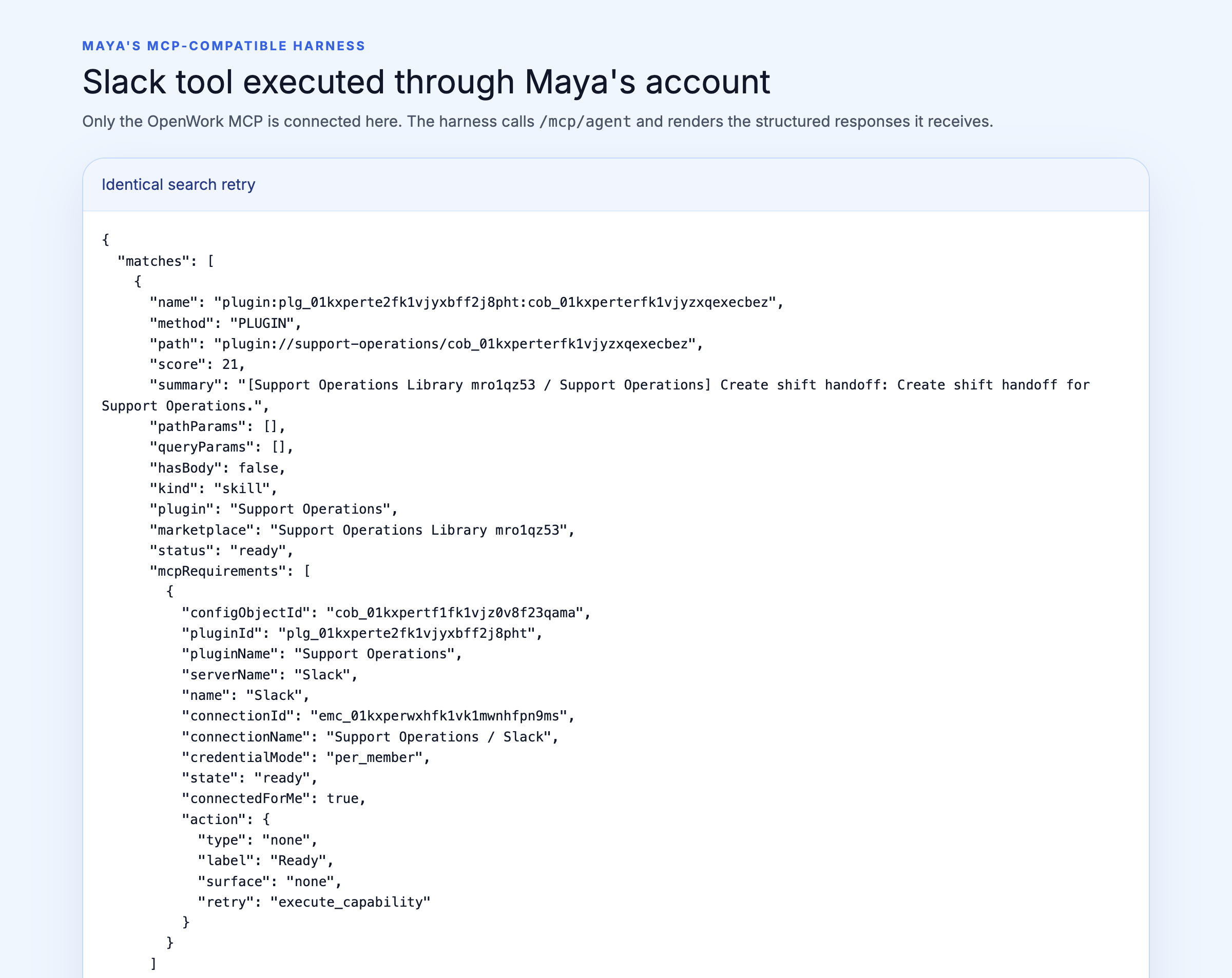
    • Retrying discovers and executes the authenticated MCP tool, returning SHIFT_HANDOFF_READY.
    • Vercel-hosted screenshots and frame assertions.
  • Combined with fix(mcp): handle provider OAuth interoperability gaps #2853 in a fresh isolated worktree:
    • enterprise MCP client: 40 passed
    • import/readiness API suites: 34 passed
    • connection/callback API suite: 15 passed
    • combined Web suites: 20 passed
    • enterprise client build and both affected TypeScript checks passed
  • The combined verification also caught and fixed the shared runtime mock export contract before publication.
  • GitHub Actions passed at bd52b98ea: Den API, Den Web, and inference builds; Linux and macOS test matrices; Helm validation; and i18n audit.

Reviewer flow

  1. Import a plugin containing an MCP whose declared/preset auth differs from the import-wide selection.
  2. Confirm the MCP is not exposed as ready or connected solely from the stale stored record.
  3. As an administrator, use the setup action to configure the required authentication.
  4. Confirm the plugin binding moves to the repaired connection and unrelated grants remain.
  5. For individual-account OAuth, confirm an assigned member sees Connect your account only after the organization client is configured.
  6. Disconnect/reconnect and confirm the marketplace binding remains recoverable.

Not run / external limits

  • Live Slack OAuth was not completed because it requires an organization-owned provider client and consent. The end-to-end OAuth proof uses the repository's pre-registered local MCP provider with dynamic client registration disabled.
  • No new video was captured; the PR comment contains the complete Vercel-hosted screenshot sequence and machine-checked assertions.

@vercel

vercel Bot commented Jul 16, 2026

Copy link
Copy Markdown
Contributor

The latest updates on your projects. Learn more about Vercel for GitHub.

Project Deployment Actions Updated (UTC)
openwork-landing Ready Ready Preview, Comment, Open in v0 Jul 16, 2026 10:01pm
1 Skipped Deployment
Project Deployment Actions Updated (UTC)
openwork-diagnostics Skipped Skipped Jul 16, 2026 10:01pm

@vercel
vercel Bot temporarily deployed to Preview – openwork-diagnostics July 16, 2026 18:14 Inactive
@vercel

vercel Bot commented Jul 16, 2026

Copy link
Copy Markdown
Contributor

@reachjalil is attempting to deploy a commit to the Different AI Team on Vercel.

A member of the Team first needs to authorize it.

@reachjalil

Copy link
Copy Markdown
Collaborator Author

fraimz — ✅ PASSED

1 passed · 0 failed · 0 skipped — run 2026-07-16T21-54-19-672Z

Full frame proof with validated screenshots: evals/results/2026-07-16T21-54-19-672Z/fraimz.html (re-run: pnpm fraimz --flow marketplace-plugin-mcp-auth)

✅ marketplace-plugin-mcp-auth — Assigned marketplace plugin skills guide each member through their required MCP connection

User-facing flow demo

  • ✅ Flow-owned marketplace resolves exactly one plugin named Support Operations
  • ✅ Support Operations has exactly the three approved skill config objects and one Slack MCP config object
  1. Alex grants the Support team access to the one-plugin Support Operations marketplace

    🎙 Alex opens the marketplace and assigns Support Operations to the Support team. Its three cloud skills become available through the OpenWork MCP automatically, with no separate installation step for Maya or anyone else on the team.

    • ✅ Flow-owned marketplace resolves exactly one plugin named Support Operations
    • ✅ Support Operations has exactly the three approved skill config objects and one Slack MCP config object
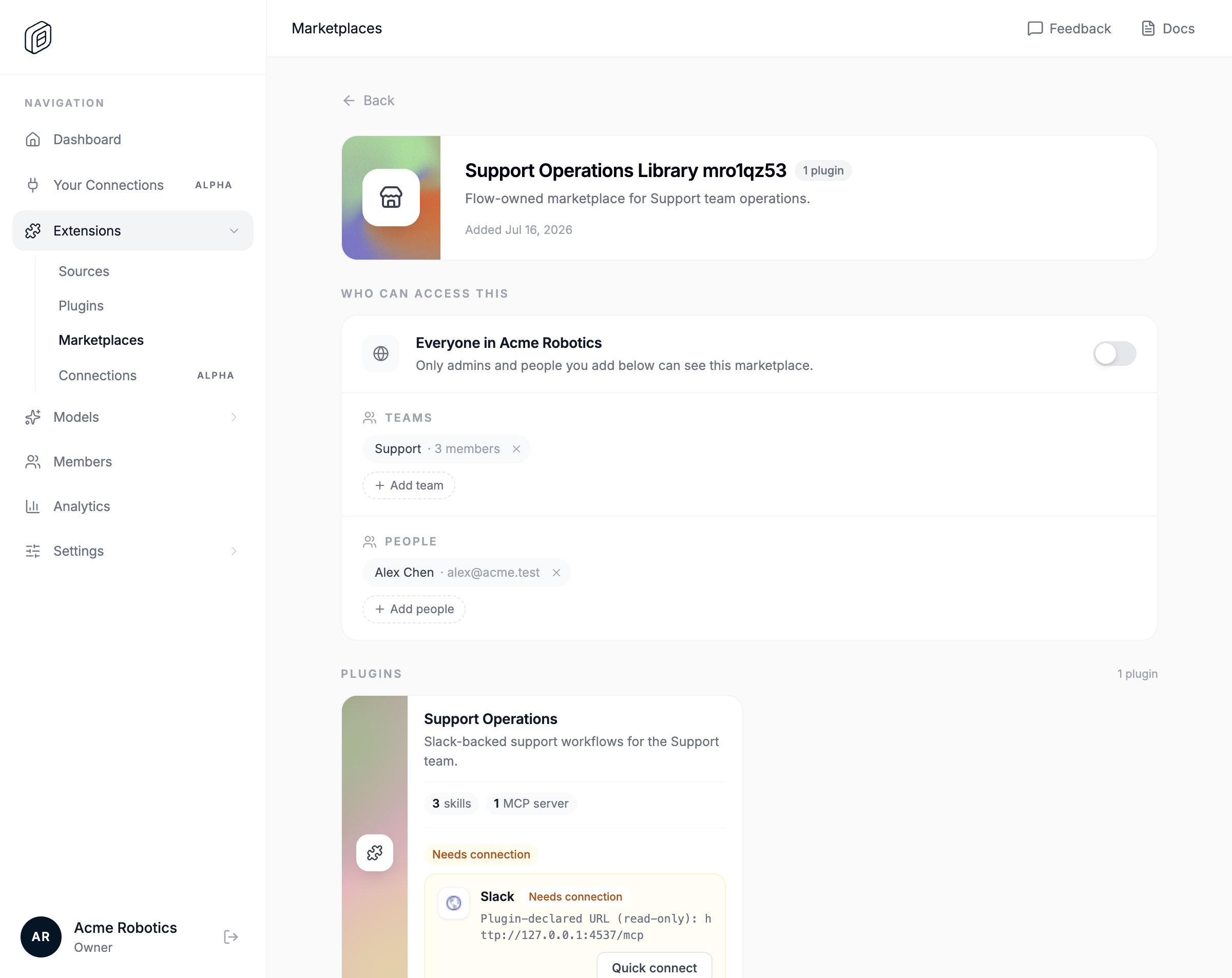
  2. Alex grants Support access to a marketplace containing only Support Operations with three skills and Slack MCP.

    🎙 Alex opens the marketplace and assigns Support Operations to the Support team. Its three cloud skills become available through the OpenWork MCP automatically, with no separate installation step for Maya or anyone else on the team.

    • 📸 marketplace-plugin-mcp-auth-01-frame-1-support-marketplace-assigned.png — 10 validations passed
    marketplace-plugin-mcp-auth-01-frame-1-support-marketplace-assigned.png
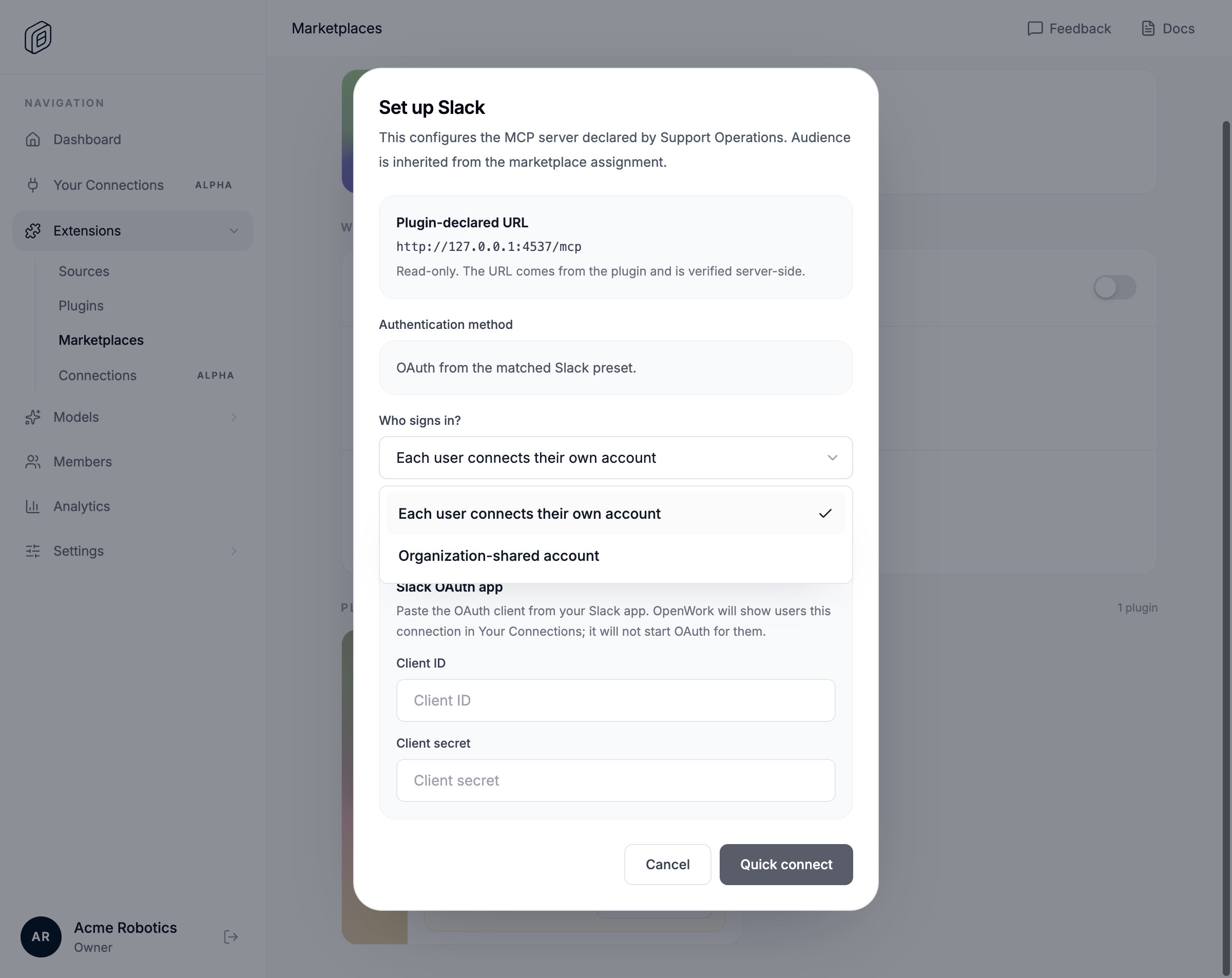
  3. Alex opens the missing Slack setup dialog and sees the read-only plugin-declared URL

    🎙 OpenWork recognizes that the assigned plugin contains a Slack MCP and shows Alex exactly what is missing. The server details come from the plugin, so Alex does not copy URLs or recreate the connection manually; he only chooses whether the organization shares one account or each user connects their own.

    • ✅ Visible text includes "Set up Slack"
    • ✅ Visible text includes "Plugin-declared URL"
    • ✅ Visible text includes "Read-only. The URL comes from the plugin and is verified server-side."
    • ✅ Visible text includes "Each user connects their own account"
    • ✅ Visible text includes "Organization-shared account"
  4. The Slack requirement opens with both sign-in modes and a read-only plugin-declared URL.

    🎙 OpenWork recognizes that the assigned plugin contains a Slack MCP and shows Alex exactly what is missing. The server details come from the plugin, so Alex does not copy URLs or recreate the connection manually; he only chooses whether the organization shares one account or each user connects their own.

    • 📸 marketplace-plugin-mcp-auth-02-frame-2-slack-setup-dialog.png — 9 validations passed
    marketplace-plugin-mcp-auth-02-frame-2-slack-setup-dialog.png
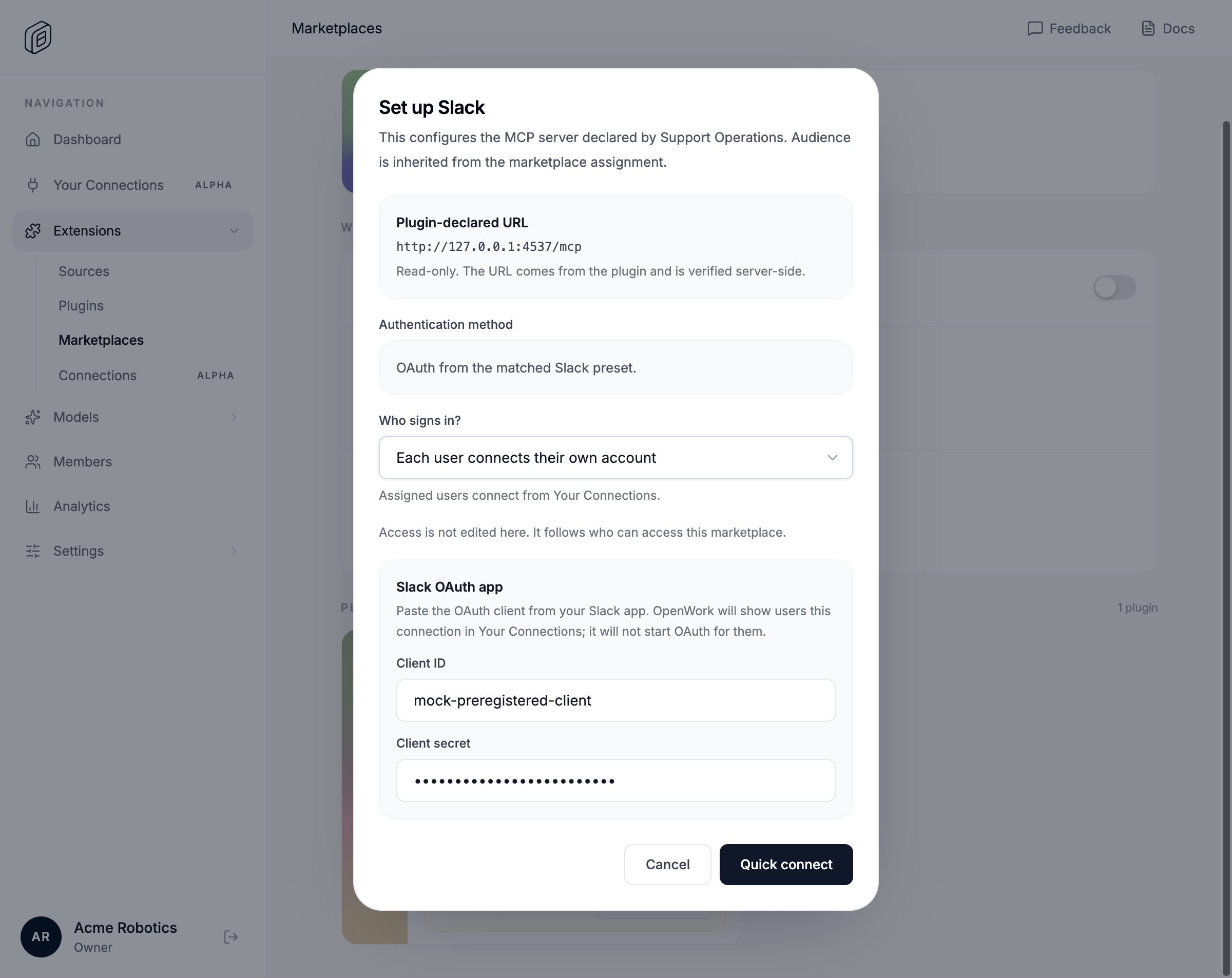
  5. Alex chooses individual accounts and saves the pre-registered Slack OAuth client for the Support-scoped requirement

    🎙 Alex chooses individual accounts. OpenWork configures the Slack requirement for the Support team and shows that assigned users can now connect, while all three skills remain automatically discoverable through search.

  6. Alex has selected individual accounts and entered the Slack OAuth client data before saving.

    🎙 Alex chooses individual accounts. OpenWork configures the Slack requirement for the Support team and shows that assigned users can now connect, while all three skills remain automatically discoverable through search.

    • 📸 marketplace-plugin-mcp-auth-03-frame-3-slack-oauth-client-entered.png — 9 validations passed
    marketplace-plugin-mcp-auth-03-frame-3-slack-oauth-client-entered.png
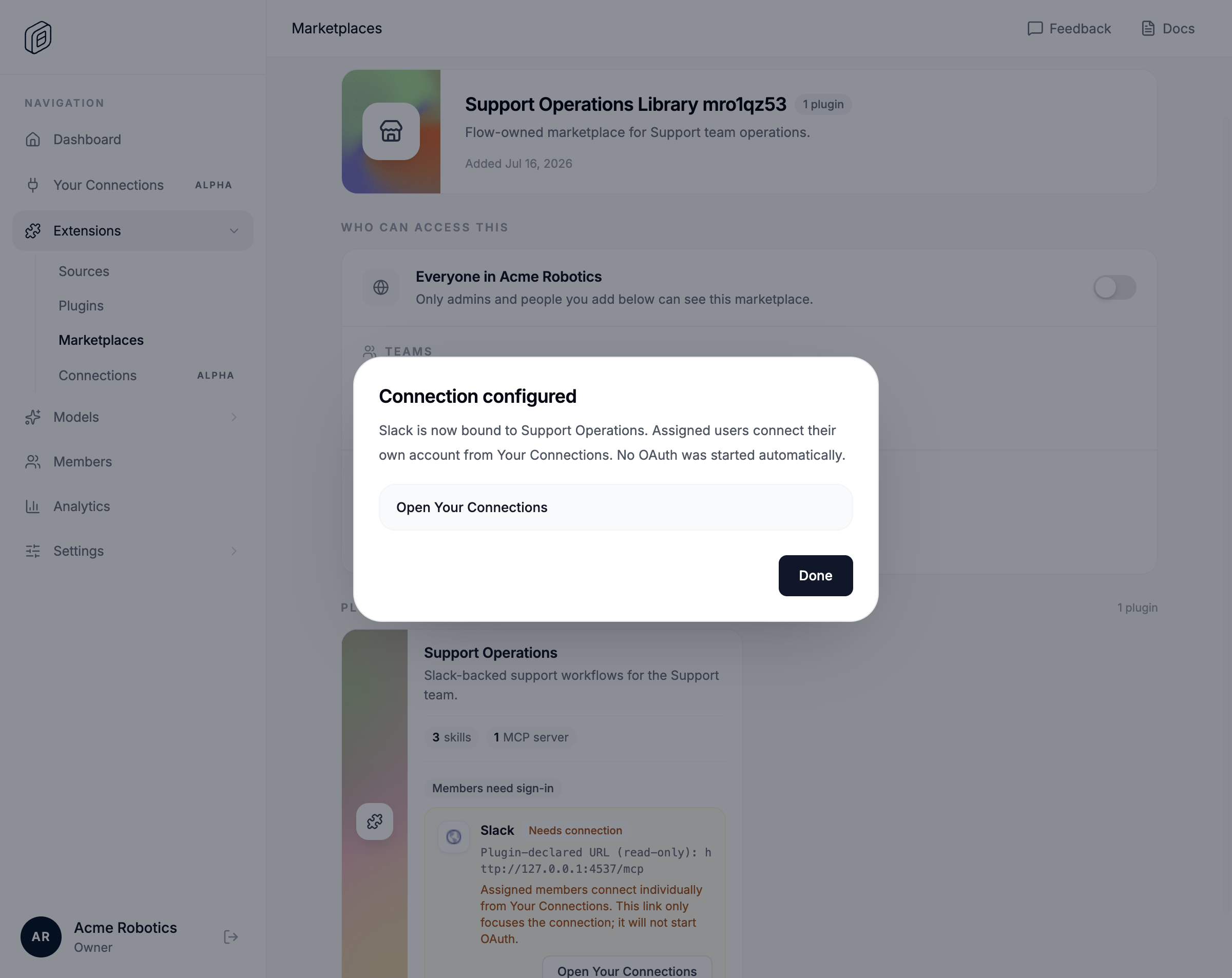
    • ✅ Configured connection is per-member, bound to Support Operations, and uses the plugin payload URL
    • ✅ All three Support Operations skills remain searchable for Maya through OpenWork MCP
  7. The Slack requirement is configured for individual accounts, scoped by the Support marketplace grant.

    🎙 Alex chooses individual accounts. OpenWork configures the Slack requirement for the Support team and shows that assigned users can now connect, while all three skills remain automatically discoverable through search.

    • 📸 marketplace-plugin-mcp-auth-04-frame-3-slack-connection-configured.png — 9 validations passed
    marketplace-plugin-mcp-auth-04-frame-3-slack-connection-configured.png
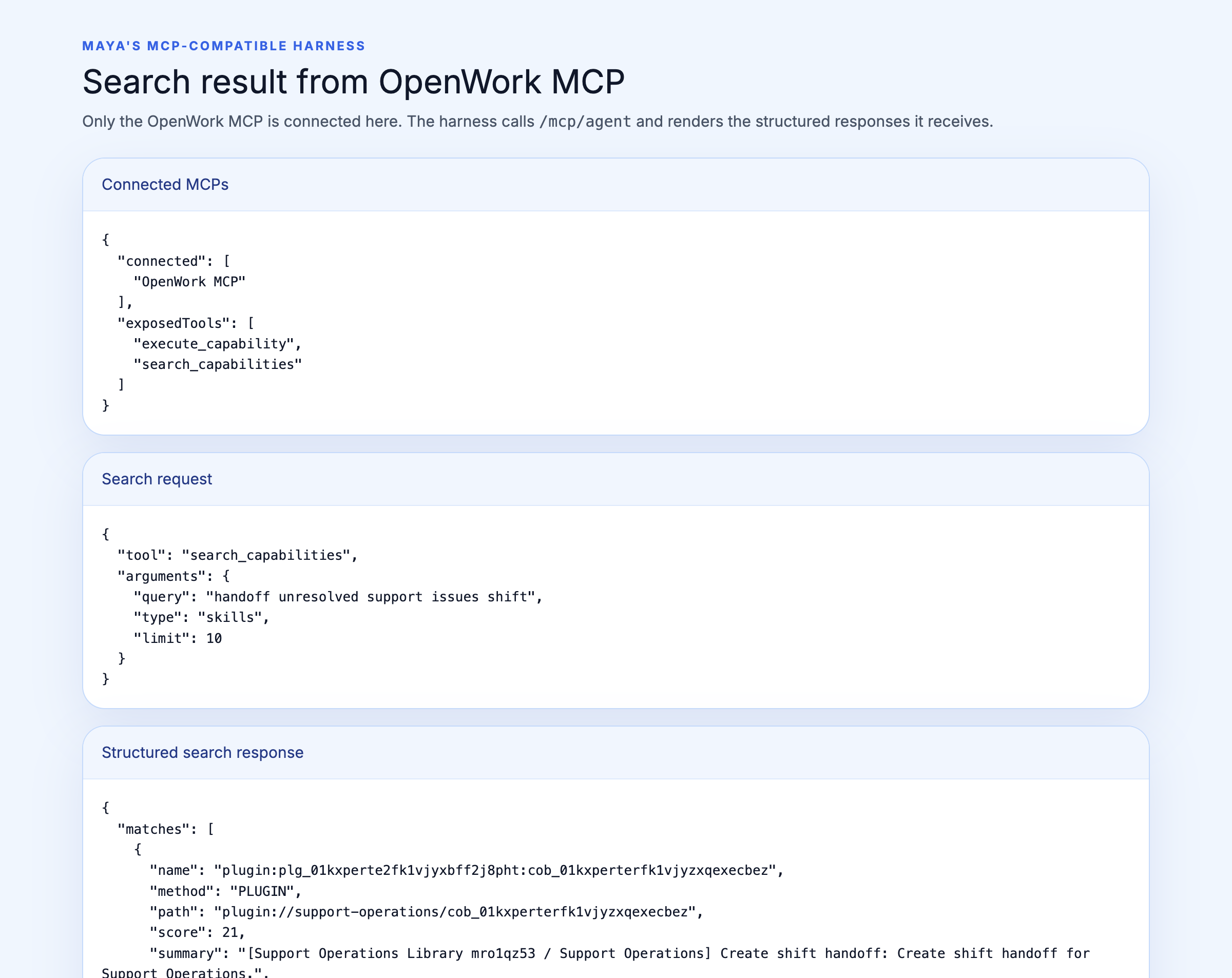
  8. Maya's MCP-compatible harness searches OpenWork and finds Create shift handoff from the assigned marketplace

    🎙 In her MCP-compatible harness, Maya asks for a handoff of unresolved support issues. OpenWork search finds Create shift handoff because the marketplace is assigned to her team, even though Maya never installed the plugin and the harness never loaded its skills or Slack MCP directly.

  9. Maya's visible harness finds Create shift handoff through OpenWork MCP only.

    🎙 In her MCP-compatible harness, Maya asks for a handoff of unresolved support issues. OpenWork search finds Create shift handoff because the marketplace is assigned to her team, even though Maya never installed the plugin and the harness never loaded its skills or Slack MCP directly.

    • 📸 marketplace-plugin-mcp-auth-05-frame-4-harness-search-finds-shift-handoff.png — 10 validations passed
    marketplace-plugin-mcp-auth-05-frame-4-harness-search-finds-shift-handoff.png
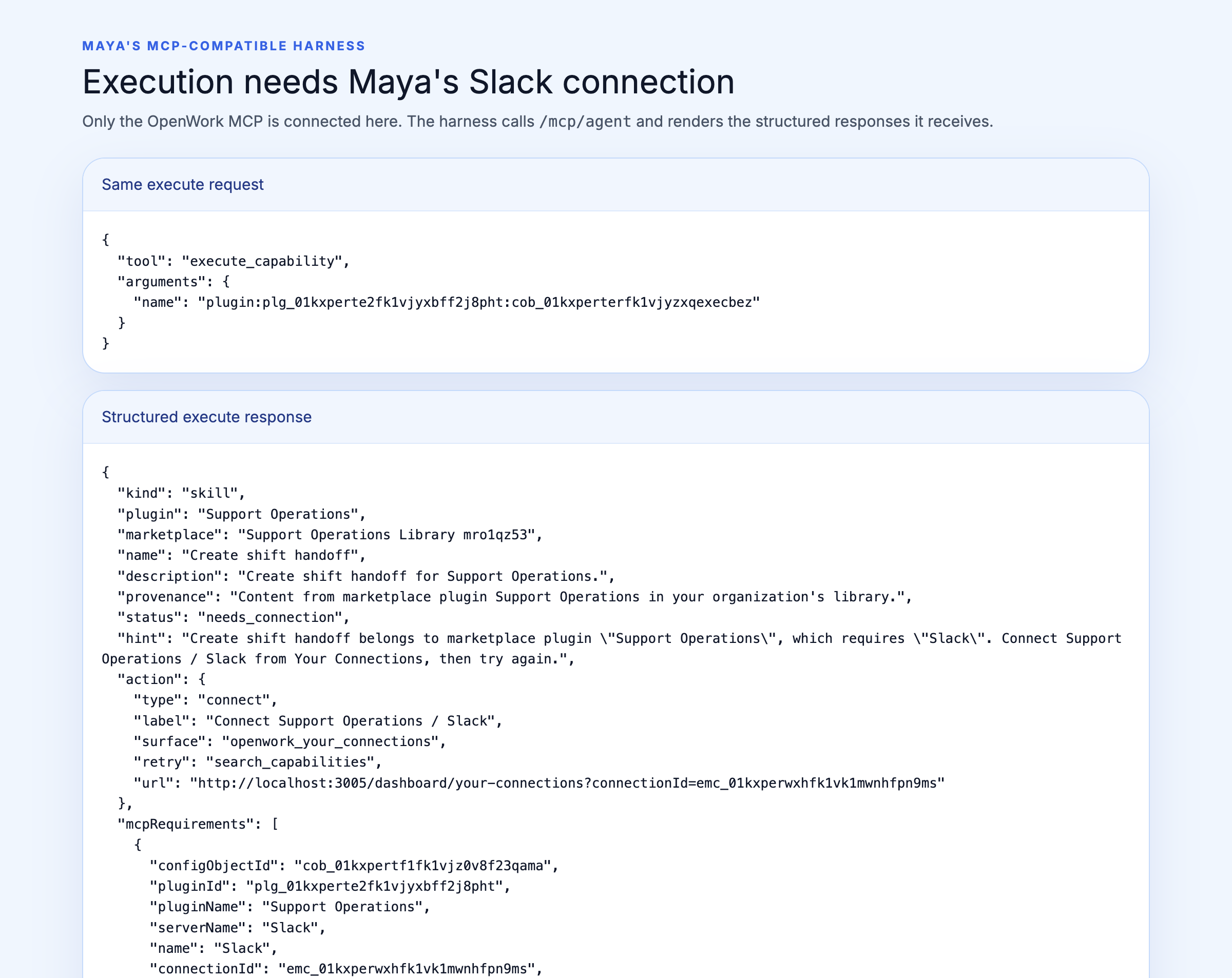
  10. Executing the discovered skill returns an actionable Slack needs_connection response and no provider call

🎙 When the harness tries to execute the capability, OpenWork sees that Maya has not connected Slack. Instead of returning a generic authentication error, it explains which connection is required, why it is needed, and gives Maya a secure OpenWork link to continue.

  • ✅ needs_connection action URL is a same-origin Your Connections URL scoped to the configured connection
  1. The harness sees an actionable needs_connection response for Slack with Support Operations provenance.

🎙 When the harness tries to execute the capability, OpenWork sees that Maya has not connected Slack. Instead of returning a generic authentication error, it explains which connection is required, why it is needed, and gives Maya a secure OpenWork link to continue.

  • 📸 marketplace-plugin-mcp-auth-06-frame-5-harness-needs-slack-connection.png — 9 validations passed

marketplace-plugin-mcp-auth-06-frame-5-harness-needs-slack-connection.png

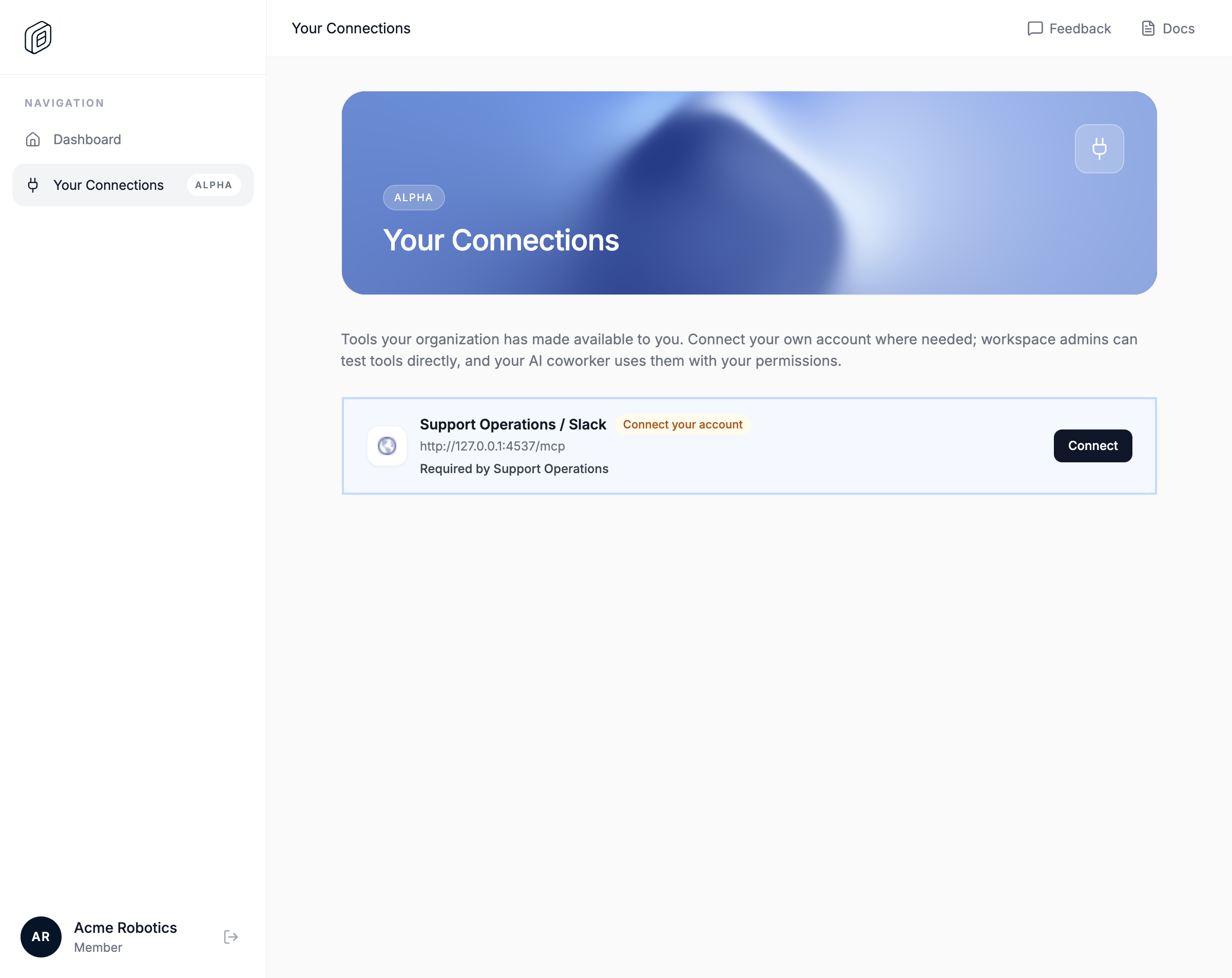
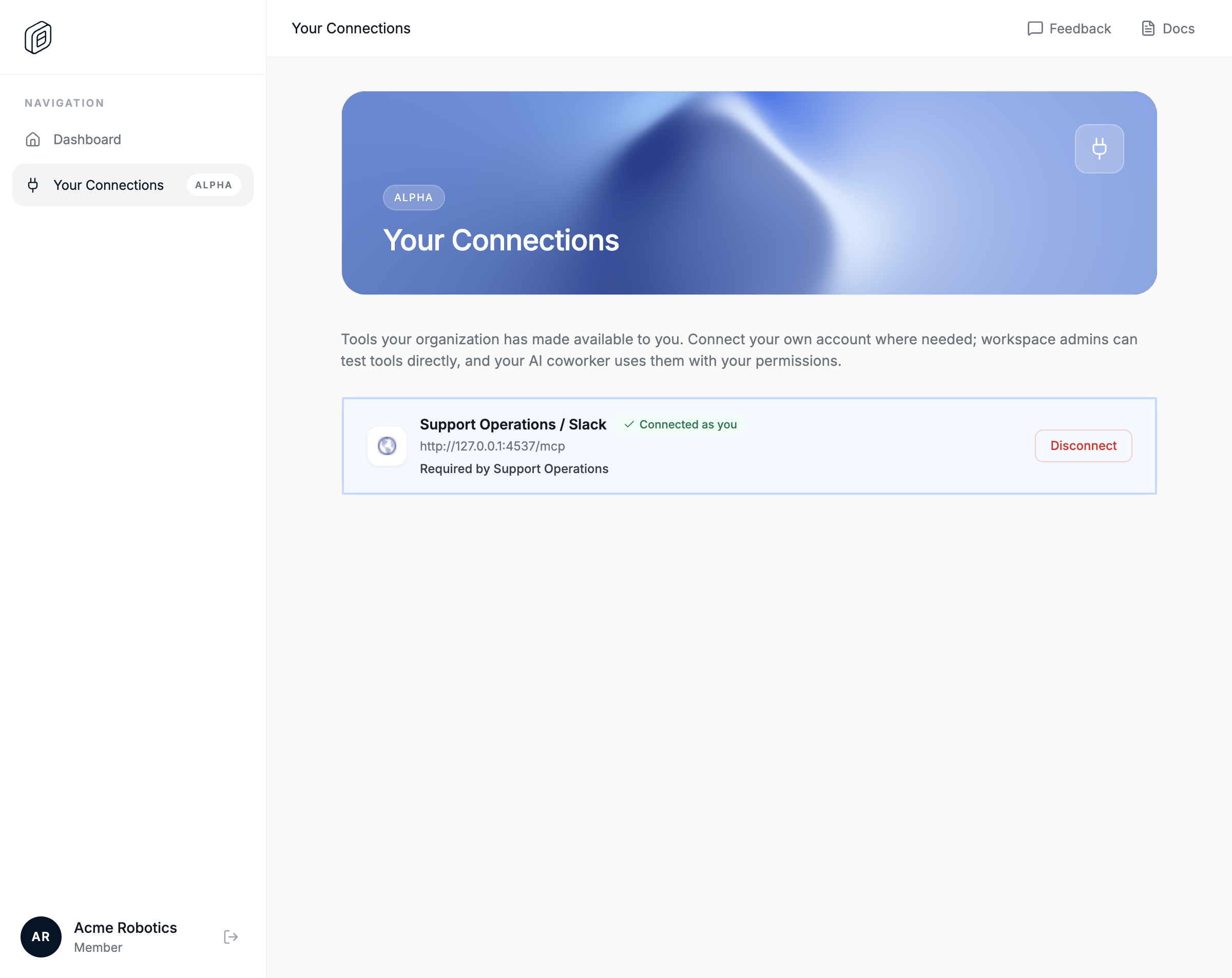
  1. Maya follows the exact Your Connections URL and connects only the focused Slack row

🎙 The link opens Your Connections directly on Slack. Maya sees that it is required by Support Operations, connects her own account through the provider's authorization flow, and returns with the connection marked ready.

  • ✅ needs_connection action URL is a same-origin Your Connections URL scoped to the configured connection
  1. The exact action URL opens Your Connections focused on the Slack row that requires Maya's click.

🎙 The link opens Your Connections directly on Slack. Maya sees that it is required by Support Operations, connects her own account through the provider's authorization flow, and returns with the connection marked ready.

  • 📸 marketplace-plugin-mcp-auth-07-frame-6-your-connections-focused-before-click.png — 9 validations passed

marketplace-plugin-mcp-auth-07-frame-6-your-connections-focused-before-click.png

  1. Your Connections remains focused on the authorized Slack row and shows Connected as you.

🎙 The link opens Your Connections directly on Slack. Maya sees that it is required by Support Operations, connects her own account through the provider's authorization flow, and returns with the connection marked ready.

  • 📸 marketplace-plugin-mcp-auth-08-frame-6-your-connections-connected-as-you.png — 8 validations passed

marketplace-plugin-mcp-auth-08-frame-6-your-connections-connected-as-you.png

  1. Maya retries the same request and then executes the discovered Slack MCP tool with her connected account

🎙 Maya retries the same request, and OpenWork executes the capability using her Slack permissions. If Alex had selected an organization-shared connection, the request would have worked immediately without asking Maya to sign in.

  1. The retry returns skill instructions, and the bound Slack MCP tool returns SHIFT_HANDOFF_READY.

🎙 Maya retries the same request, and OpenWork executes the capability using her Slack permissions. If Alex had selected an organization-shared connection, the request would have worked immediately without asking Maya to sign in.

  • 📸 marketplace-plugin-mcp-auth-09-frame-7-harness-slack-tool-success.png — 9 validations passed

marketplace-plugin-mcp-auth-09-frame-7-harness-slack-tool-success.png

  • ✅ Script frame 1 narrated: "Alex opens the marketplace and assigns Support Operations to the Support team. Its three"
  • ✅ Script frame 2 narrated: "OpenWork recognizes that the assigned plugin contains a Slack MCP and shows Alex exactly"
  • ✅ Script frame 3 narrated: "Alex chooses individual accounts. OpenWork configures the Slack requirement for the Supp"
  • ✅ Script frame 4 narrated: "In her MCP-compatible harness, Maya asks for a handoff of unresolved support issues. Ope"
  • ✅ Script frame 5 narrated: "When the harness tries to execute the capability, OpenWork sees that Maya has not connec"
  • ✅ Script frame 6 narrated: "The link opens Your Connections directly on Slack. Maya sees that it is required by Supp"
  • ✅ Script frame 7 narrated: "Maya retries the same request, and OpenWork executes the capability using her Slack perm"

@reachjalil
reachjalil marked this pull request as ready for review July 16, 2026 22:10
@reachjalil
reachjalil merged commit 19ff40a into different-ai:dev Jul 16, 2026
11 of 15 checks passed
@reachjalil
reachjalil deleted the feature/connect-import-auth-recovery branch July 16, 2026 22:12
Sign up for free to join this conversation on GitHub. Already have an account? Sign in to comment

Labels

None yet

Projects

None yet

Development

Successfully merging this pull request may close these issues.

1 participant