Description
According to Docker's documentation, using --isolation=hyperv should make most versions of windows images compatible:
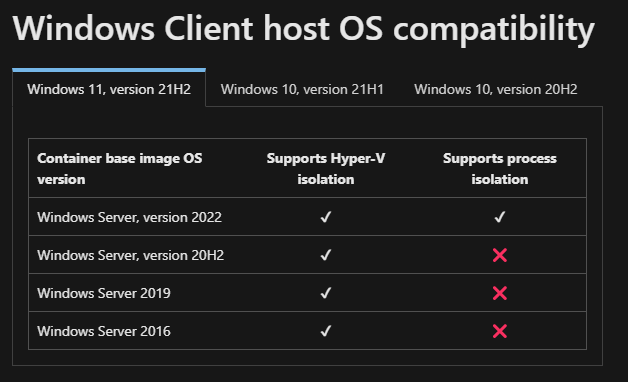
So it seems like compatibility shouldn't be an issue with hyper-v.
Well, when I run:
docker run mcr.microsoft.com/windows/servercore:ltsc2022 -i --isolation=hyperv
Describe the results you received:
I get the error (see the bottom of the thread, I'm aware the top is just a matter of the image being pulled):
    docker : Unable to find image 'mcr.microsoft.com/windows/servercore:ltsc2022' locally
    At line:1 char:1
    + docker run mcr.microsoft.com/windows/servercore:ltsc2022 -i --isolati ...
    + ~~~~~~~~~~~~~~~~~~~~~~~~~~~~~~~~~~~~~~~~~~~~~~~~~~~~~~~~~~~~~~~~~~~~~
        + CategoryInfo          : NotSpecified: (Unable to find ...sc2022' locally:String) [], RemoteException
        + FullyQualifiedErrorId : NativeCommandError

    ltsc2022: Pulling from windows/servercore
    8f616e6e9eec: Pulling fs layer
    037d5740b404: Pulling fs layer
    037d5740b404: Verifying Checksum
    037d5740b404: Download complete
    8f616e6e9eec: Verifying Checksum
    8f616e6e9eec: Download complete
    8f616e6e9eec: Pull complete
    037d5740b404: Pull complete
    Digest: sha256:343f8c95ec604913c74597f6d541e388f83bc0ce373ee8ea5bb26d268879f338
    Status: Downloaded newer image for mcr.microsoft.com/windows/servercore:ltsc2022
    docker: Error response from daemon: container 597ea2d8b5564b2a8771980c3c809b6e059d00d8bc831e97b3cf14a071820aed encountered an error during hcsshim::System::CreateProcess: failure in a Windows system call: The system cannot find
    the file specified. (0x2)
    [Event Detail:  Provider: 00000000-0000-0000-0000-000000000000]
    [Event Detail:  Provider: 00000000-0000-0000-0000-000000000000]
    [Event Detail: onecore\vm\compute\management\orchestration\vmhostedcontainer\processmanagement.cpp(173)\vmcomputeagent.exe!00007FF61BE0EFBD: (caller: 00007FF61BDB4E97) Exception(2) tid(3c8) 80070002 The system cannot find the
    file specified.
        CallContext:[\Bridge_ProcessMessage\VmHostedContainer_ExecuteProcess]
     Provider: 00000000-0000-0000-0000-000000000000].
This is after I've tried many different images, with and without hyper-v, restarted my PC, and reset Docker to factory default settings.
Removing --isolation=hyperv results in precisely the same error. I've also tried --isolation=process and gotten the same error.
Describe the results you expected:
A Windows shell
Additional information you deem important (e.g. issue happens only occasionally):
Output of docker version:
    Client:
     Cloud integration: v1.0.22
     Version:           20.10.13
     API version:       1.41
     Go version:        go1.16.15
     Git commit:        a224086
     Built:             Thu Mar 10 14:13:04 2022
     OS/Arch:           windows/amd64
     Context:           default
     Experimental:      true

    Server: Docker Desktop 4.6.1 (76265)
     Engine:
      Version:          20.10.13
      API version:      1.41 (minimum version 1.24)
      Go version:       go1.16.15
      Git commit:       906f57f
      Built:            Thu Mar 10 14:08:21 2022
      OS/Arch:          windows/amd64
      Experimental:     false
Output of docker info:
Client:
 Context:    default
 Debug Mode: false
 Plugins:
  buildx: Docker Buildx (Docker Inc., v0.8.1)
  compose: Docker Compose (Docker Inc., v2.3.3)
  scan: Docker Scan (Docker Inc., v0.17.0)

Server:
 Containers: 3
  Running: 0
  Paused: 0
  Stopped: 3
 Images: 4
 Server Version: 20.10.13
 Storage Driver: windowsfilter
  Windows:
 Logging Driver: json-file
 Plugins:
  Volume: local
  Network: ics internal l2bridge l2tunnel nat null overlay private transparent
  Log: awslogs etwlogs fluentd gcplogs gelf json-file local logentries splunk syslog
 Swarm: inactive
 Default Isolation: hyperv
 Kernel Version: 10.0 22000 (22000.1.amd64fre.co_release.210604-1628)
 Operating System: Windows 10 Pro Version 2009 (OS Build 22000.556)
 OSType: windows
 Architecture: x86_64
 CPUs: 16
 Total Memory: 31.92GiB
 Name: DESKTOP-4KS9BL7
 ID: CVZW:NI3U:JZC6:N763:N5AR:34KN:3QAO:KGIQ:SYDS:WODV:YDGK:U2X7
 Docker Root Dir: C:\ProgramData\Docker
 Debug Mode: false
 Registry: https://index.docker.io/v1/
 Labels:
 Experimental: false
 Insecure Registries:
  127.0.0.0/8
 Live Restore Enabled: false
 Product License: Community Engine
Additional environment details (AWS, VirtualBox, physical, etc.):
I'm running a valid, licensed copy of Windows 11 Pro on a physical PC.

Description
According to Docker's documentation, using
--isolation=hypervshould make most versions of windows images compatible:So it seems like compatibility shouldn't be an issue with hyper-v.
Well, when I run:
Describe the results you received:
I get the error (see the bottom of the thread, I'm aware the top is just a matter of the image being pulled):
This is after I've tried many different images, with and without hyper-v, restarted my PC, and reset Docker to factory default settings.
Removing
--isolation=hypervresults in precisely the same error. I've also tried--isolation=processand gotten the same error.Describe the results you expected:
A Windows shell
Additional information you deem important (e.g. issue happens only occasionally):
Output of
docker version:Output of
docker info:Additional environment details (AWS, VirtualBox, physical, etc.):
I'm running a valid, licensed copy of Windows 11 Pro on a physical PC.