Description
When using System.Diagnostics.Process.OutputDataReceived there is no way to determine if output has or doesn't have final newline
Reproduction Steps
Test that shows the issue:
using System;
using System.Collections.Generic;
using System.Diagnostics;
using System.Linq;
using System.Text;
using Xunit;

namespace ProcessRedirectOutputApiIssue;

public static class ProcessRedirectOutputTests
{
    private static Process EchoProcess(string output) =>
        new()
        {
            StartInfo =
            {
                FileName = "echo",
                ArgumentList = { "-n", output },
                RedirectStandardOutput = true
            }
        };

    // Capture output from Process.StandardOutput for the reference
    private static string Output_From_Stream(Process process)
    {
        process.WaitForExit();
        return process.StandardOutput.ReadToEnd();
    }

    // Capture output via Process.OutputDataReceived the way it is stated in the official documentation
    private static string Output_From_Event(Process process)
    {
        process.BeginOutputReadLine();
        var output = new StringBuilder();
        process.OutputDataReceived += (_, e) =>
        {
            if (e.Data != null)
            {
                output.Append(e.Data);
                output.Append('\n');
            }
        };
        process.WaitForExit();
        return output.ToString();
    }

    // Alternative way to capture output via Process.OutputDataReceived - skip final newline
    private static string Output_From_Event_Skip_Final_Newline(Process process)
    {
        process.BeginOutputReadLine();
        var output = new StringBuilder();
        process.OutputDataReceived += (_, e) =>
        {
            if (e.Data != null)
            {
                if (output.Length > 0)
                    output.Append('\n');
                output.Append(e.Data);
            }
        };
        process.WaitForExit();
        return output.ToString();
    }

    private static readonly string[] Outputs =
    {
        "",
        "\n",
        "ab",
        "ab\n",
        "ab\ncd",
        "ab\ncd\n",
    };

    private static readonly Func<Process, string>[] OutputCapturers =
    {
        Output_From_Stream,
        Output_From_Event,
        Output_From_Event_Skip_Final_Newline
    };

    public static IEnumerable<object[]> TestData => from o in Outputs
                                                    from oc in OutputCapturers
                                                    select new object[] {o, oc};

    [Theory]
    [MemberData(nameof(TestData))]
    public static void Process_Redirect_Output_Test(string output, Func<Process, string> outputCapturer)
    {
        using var process = EchoProcess(output);
        process.Start();
        var capturedOutput = outputCapturer(process);
        Assert.Equal(output, capturedOutput);
    }
}
csproj:
<Project Sdk="Microsoft.NET.Sdk">
  <PropertyGroup>
    <TargetFramework>net6.0</TargetFramework>
  </PropertyGroup>
  <ItemGroup>
    <PackageReference Include="Microsoft.NET.Test.Sdk" Version="17.4.0" />
    <PackageReference Include="xunit.runner.visualstudio" Version="2.4.5" />
    <PackageReference Include="xunit" Version="2.4.2" />
  </ItemGroup>
</Project>
Expected behavior
There should be some way to determine if there is a final new line or not. Maybe the case above where final newline is skipped should succeed
Actual behavior
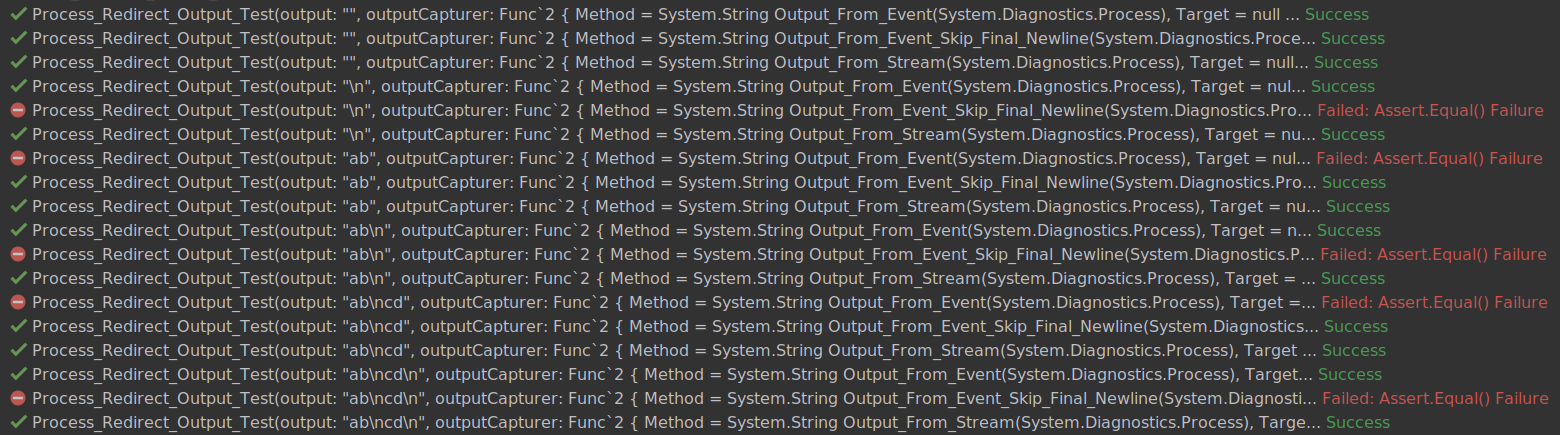
There is no way to determine from OutputDataReceived event if final newline exists or doesn't exist in the standard output:
Regression?
No response
Known Workarounds
No response
Configuration
Latest .NET 6 (or 7) SDK on Ubuntu 18.04
Other information
No response


Description
When using System.Diagnostics.Process.OutputDataReceived there is no way to determine if output has or doesn't have final newline
Reproduction Steps
Test that shows the issue:
csproj:
Expected behavior
There should be some way to determine if there is a final new line or not. Maybe the case above where final newline is skipped should succeed
Actual behavior
There is no way to determine from OutputDataReceived event if final newline exists or doesn't exist in the standard output:

Regression?
No response
Known Workarounds
No response
Configuration
Latest .NET 6 (or 7) SDK on Ubuntu 18.04
Other information
No response