A React component library that helps users find Google Camera (GCam) ports for their Android smartphones.
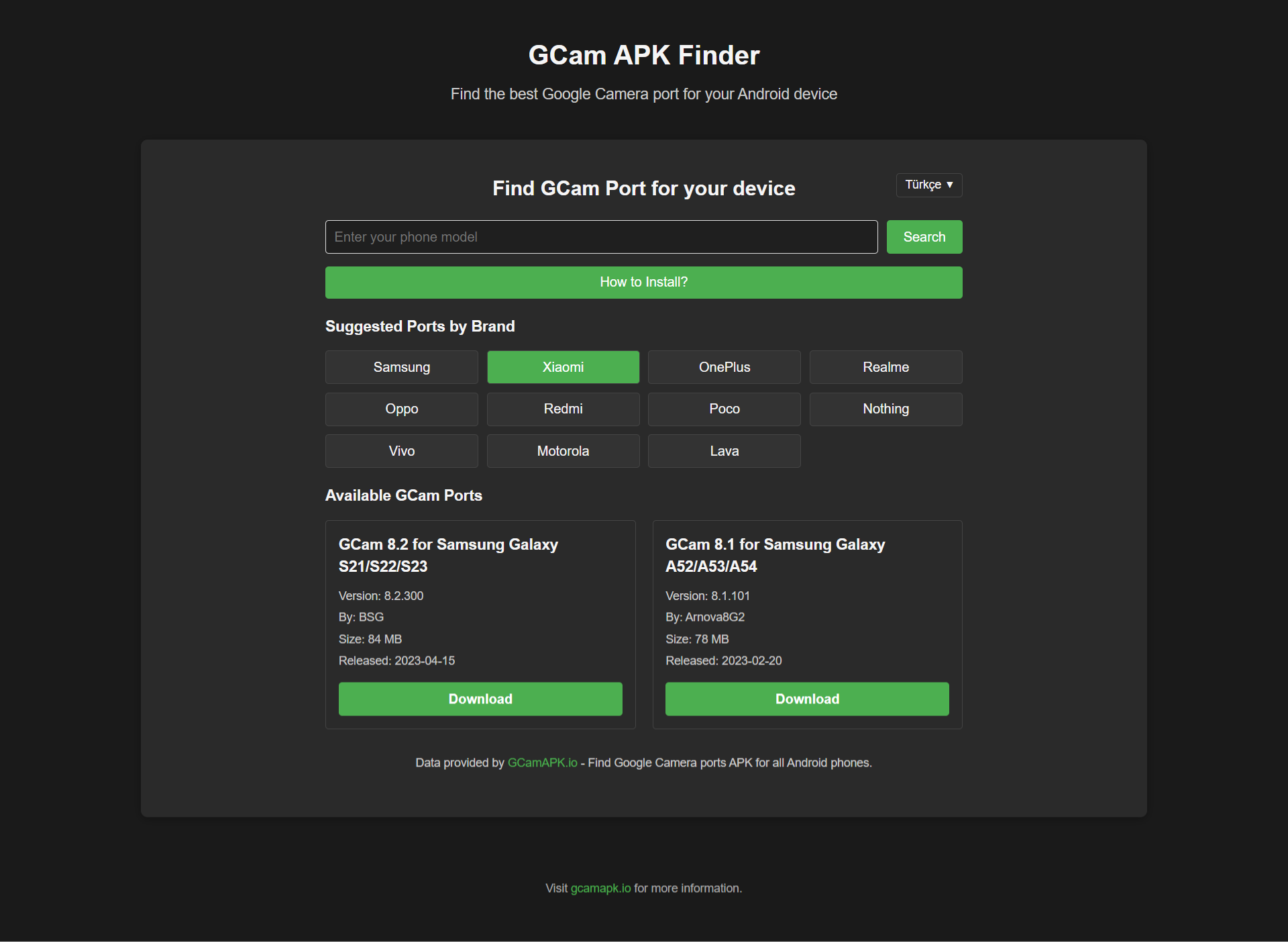
GCam APK Finder is a React component that allows users to easily search for compatible Google Camera ports for their Android devices. It features a user-friendly interface, multi-language support, and a comprehensive database of GCam ports for various smartphone brands.
The package provides integration with GCamAPK.io, the official website where users can find Google Camera ports APK for all Android phones.
# Using npm
npm install gcam-apk-finder

# Using yarn
yarn add gcam-apk-finder

# Using pnpm
pnpm add gcam-apk-finderBasic usage example:
import React from "react";
import { GCamFinder } from "gcam-apk-finder";

function App() {
  return (
    <div className="App">
      <h1>Find GCam For Your Android Device</h1>
      <GCamFinder />
    </div>
  );
}

export default App;
With custom configuration:
import React from "react";
import { GCamFinder } from "gcam-apk-finder";

function App() {
  const handlePortFound = (port) => {
    console.log("Found GCam port:", port);
    // You can track analytics or perform other actions here
  };

  return (
    <div className="App">
      <h1>Find GCam For Your Android Device</h1>
      <GCamFinder
        defaultBrand="samsung"
        defaultLanguage="en"
        showLanguageSelector={true}
        theme={{
          primaryColor: "#4CAF50",
          secondaryColor: "#333333",
          fontFamily: "Roboto, sans-serif",
          borderRadius: "8px",
        }}
        onPortFound={handlePortFound}
        showAttribution={true}
      />
    </div>
  );
}

export default App;- 🔍 Search by Phone Model: Find GCam ports specifically for your device
- 🏷️ Brand Filtering: Browse GCam ports by smartphone brand
- 🌍 Multi-language Support: Interface available in 20+ languages
- 🌓 Dark Mode Compatible: Works great in both light and dark themes
- 📱 Responsive Design: Optimized for all screen sizes
- 🎨 Customizable Theme: Adjust colors, fonts, and styling to match your application
- 🔄 Up-to-date Database: Regular updates with the latest GCam ports
| Prop | Type | Default | Description |
|---|---|---|---|
apiUrl |
string | 'https://gcamapk.io' | Base URL for the GCam API |
defaultBrand |
string | '' | Default selected brand |
defaultLanguage |
string | 'en' | Default selected language code |
onPortFound |
function | - | Callback function when ports are found |
theme |
object | - | Custom theme properties (see below) |
showAttribution |
boolean | true | Whether to show attribution link |
searchPlaceholder |
string | 'Enter your phone model' | Placeholder text for search input |
showLanguageSelector |
boolean | true | Whether to show the language selector |
| Property | Type | Default | Description |
|---|---|---|---|
primaryColor |
string | '#4CAF50' | Main color for buttons and accents |
secondaryColor |
string | '#F5F5F5' | Background color for brand buttons |
fontFamily |
string | 'Arial, sans-serif' | Font family for the component |
borderRadius |
string | '4px' | Border radius for buttons and cards |
The component supports 20 languages:
- English (en)
- Spanish (es)
- French (fr)
- German (de)
- Italian (it)
- Portuguese (pt)
- Russian (ru)
- Japanese (ja)
- Chinese (Simplified) (zh-CN)
- Chinese (Traditional) (zh-TW)
- Arabic (ar)
- Hindi (hi)
- Korean (ko)
- Dutch (nl)
- Polish (pl)
- Turkish (tr)
- Vietnamese (vi)
- Indonesian (id)
- Thai (th)
- Malay (ms)
The component includes GCam ports for the following brands:
- Samsung
- Xiaomi
- OnePlus
- Realme
- Oppo
- Redmi
- Poco
- Nothing
- Vivo
- Motorola
- Lava
- And more...
- Search: Users enter their phone model or select a brand
- Results: The component displays available GCam ports compatible with their device
- Download: Users can click on the download button to get the APK from GCamAPK.io
For more information and direct access to all Google Camera ports for Android phones, visit the official website: https://gcamapk.io
If you want to contribute to this package:
# Clone the repository
git clone https://github.com/download-now/GCam-APK-Finder/gcam-apk-finder.git

# Install dependencies
cd gcam-apk-finder
npm install

# Start development server
npm run dev# Build the package
npm run buildMIT
Google Camera (GCam) is Google's camera application that features advanced image processing capabilities like HDR+, Night Sight, and Portrait Mode. GCam ports are modified versions of the Google Camera app made compatible with non-Google devices.
This package is not affiliated with Google or Google Camera. All GCam ports provided through this component are developed by third-party developers and are available through GCamAPK.io.