Kill Port Desktop is a standalone application that helps you manage and terminate port processes regardless of your editor. Built with Avalonia UI, it offers cross-platform support (Windows verified).
- Standalone: Does not depend on VS Code, ready to use anytime.
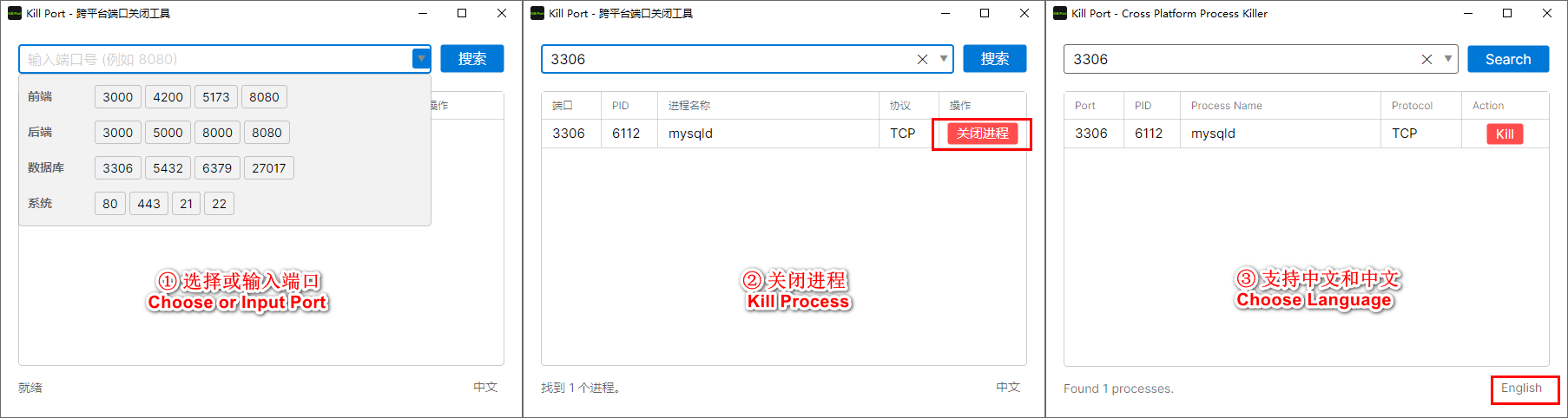
- Visual List: Clearly lists all processes occupying ports.
- One-Click Kill: Quickly release occupied ports.
- Multi-language: Supports switching between Chinese and English.
- Download/Build: Run the
killport-desktopapplication. - View Ports: The application automatically lists active ports upon startup.
- Filter/Search: Enter a port number to quickly find specific processes.
- Terminate Process: Click the Kill button for the corresponding port entry.
Download Address 1:Cloud Storage(Password:evgo2017)
Download Address 2:Release
- Ensure .NET SDK is installed.
- Navigate to the
killport-desktopdirectory. - Run
dotnet runto launch the application.