Describe the problem
Tab syncing seems to not work if the activating click is actually a click+drag. A picture is worth 1000 words; here I am highlighting text to make the click+drag more visible:
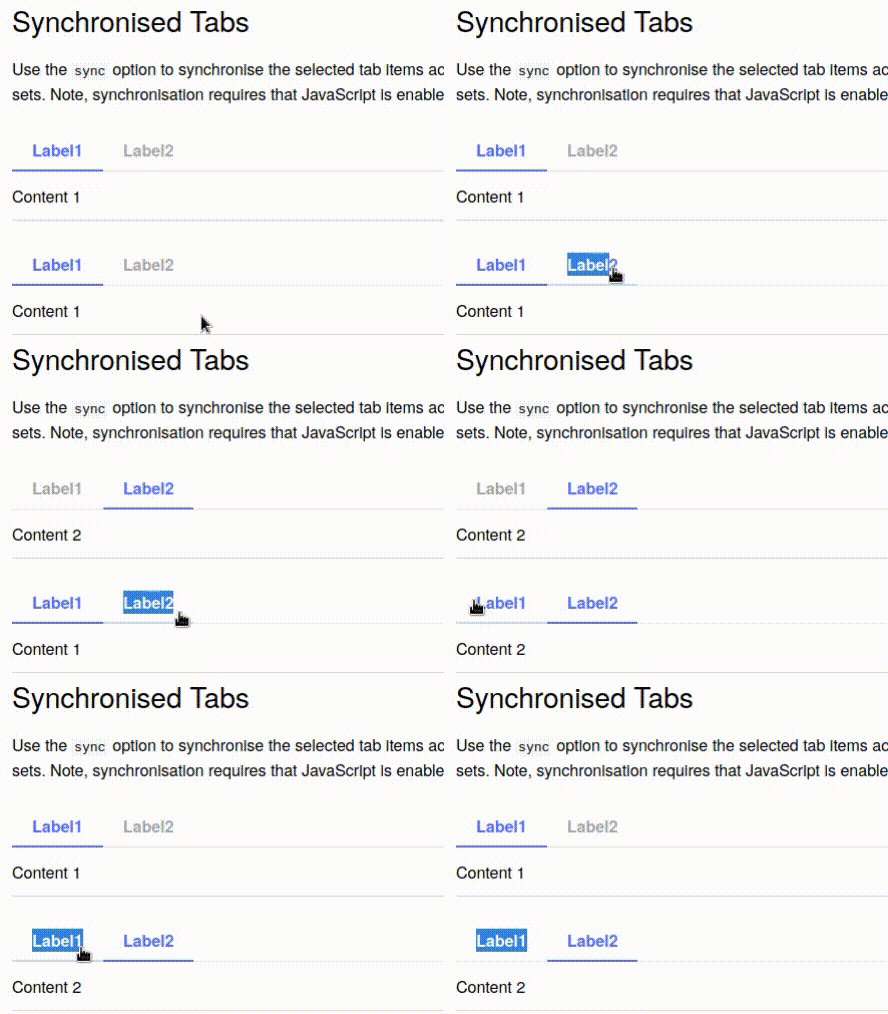
So the other tab switches when I release the mouse button at the end of the highlight, but the tab I am highlighting does not switch. I'd expect the tabs to switch simultaneously, as they do when using a normal click (not a click+drag).
Link to your repository or website
https://sphinx-design.readthedocs.io/en/furo-theme/tabs.html#synchronised-tabs
Steps to reproduce
- Go to https://sphinx-design.readthedocs.io/en/furo-theme/tabs.html#synchronised-tabs
- Click+drag on one of the non-activated tabs.
- The other tab will switch, but the one you dragged on won't.
The version of Python you're using
N/A
Your operating system
Firefox on Debian
Versions of your packages
No response
Additional context
No response
Describe the problem
Tab syncing seems to not work if the activating click is actually a click+drag. A picture is worth 1000 words; here I am highlighting text to make the click+drag more visible:
So the other tab switches when I release the mouse button at the end of the highlight, but the tab I am highlighting does not switch. I'd expect the tabs to switch simultaneously, as they do when using a normal click (not a click+drag).
Link to your repository or website
https://sphinx-design.readthedocs.io/en/furo-theme/tabs.html#synchronised-tabs
Steps to reproduce
The version of Python you're using
N/A
Your operating system
Firefox on Debian
Versions of your packages
No response
Additional context
No response