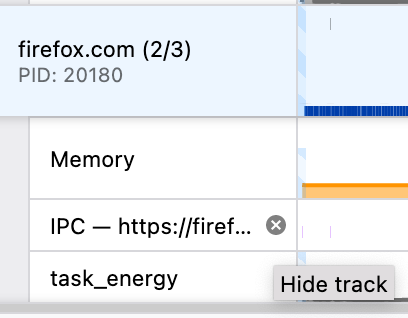
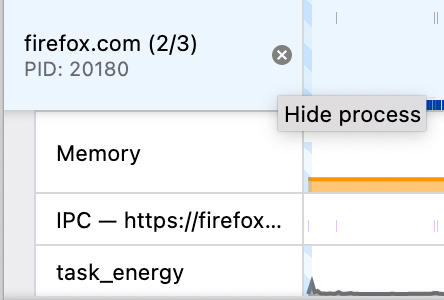
Add an [X] button on track names in the timeline to quickly hide unin…#4170
Conversation


…teresting tracks or processes.

Codecov Report
@@            Coverage Diff             @@
##             main    #4170      +/-   ##
==========================================
- Coverage   88.48%   88.45%   -0.03%
==========================================
  Files         280      280
  Lines       24518    24528      +10
  Branches     6535     6535
==========================================
+ Hits        21695    21697       +2
- Misses       2621     2629       +8
  Partials      202      202
Help us with your feedback. Take ten seconds to tell us how you rate us. Have a feature suggestion? Share it here. |


|
UI feedback:
|

Why? The end seemed the logical place to me, and matches what we see in Firefox tabs.
I agree about the rounded square background when the button is hovered, that would make the size of the click target visible. The Firefox behavior when the tab bar is crowded is to show the close icon only for the selected tab. (I think it used to show it on other tabs on hover, but I don't see this behavior when testing a current version.) The reason why I made the icon appear only on hover is to avoid wasting space in an area where we are already tight on space (some thread names aren't fully visible, and that's annoying, especially when the end of the name contains something that's required to identify the thread, Eg "BackgroundThreadPool #1"). I'm not sure which problem you want to solve when you say "Display the x at all times". Are you annoyed by the motion when moving the mouse if something appears on hover, or are you concerned about low discoverability? One thing we could do is to make the X be always visible on the selected track, and add a rounded square background when the icon is hovered. That would match the Firefox behavior pretty well. I think being able to hide a non-selected track with a single click (when the icon appears on hover) is useful, but I could live with needing to select the track first if the on-hover behavior has downsides I haven't noticed. |
Actually, UI consistency also matters, and I'm not sure introducing another X icon in addition to the one we already have would really be an improvement. |
|
Here's what I had in mind: Screen.Recording.2022-08-03.at.4.09.33.PM.mov |
|
The true answer to your questions about "why?" is: "not sure, this is very intuition-based, and screenshots don't convey the full experience anyway, you have to actually play with it and see how it feels". The most important aspect to me is the icon - the circle icon is based on the searchfield clear button of an old version of macOS. As for consistency, I'd be happy to change the searchfield so that we use the same icon in both places. By the way, the legal footer is already using a different x. And I've already gone back on the idea to keep the x visible at all times; it looked very crowded. Making it visible only on track hover adds more flashing as you move the mouse and more instability, but maybe that's the lesser evil. As for the position, it turns out I don't like either option very much :) Horizontally I think I have a slight preference for having it on the left, because it'll be in a fixed-width "pocket" of space. When putting it on the right, the space to the left of the icon varies based on the label string length, so the icon's position has a bit more of an arbitrarily floating feeling. |
|
I think position-wise, the most important question is: Which position is the best at avoiding accidental clicks? |

This would be my feedback, having a clear space where text doesn't get resized seems better.
The left would be less likely to be clicked I would think. I don't really have an opinion on the stylings of the X.
An opacity transition of 100ms-200ms may help a bit here. |
|
After thinking about it more, I agree with Florian now that the PR is good enough in the current state to land. Once it lands, I'll make a PR on top of it which switches out the icon and adds mouseover + mousedown feedback. The code looks fine to me but I'll let @canova do the actual review. |

 canova
left a comment
canova
left a comment
canova
left a comment
There was a problem hiding this comment.
Thanks for the PR, it looks good to me!
Also thanks for all the feedback! I trust you 100% since I'm really not great at UX 😄 Markus' conclusion sounds good to me.
| <Localized | ||
| id="TrackNameButton--hide-process" | ||
| attrs={{ title: true }} | ||
| > | ||
| <button | ||
| type="button" | ||
| className="timelineTrackCloseButton" | ||
| title="Hide process" | ||
| onClick={this._hideCurrentTrack} | ||
| /> | ||
| </Localized> |
There was a problem hiding this comment.
I'm thinking if we should hide this button when there is only one hideable track left. hideGlobalTrack action already handles this case and doesn't remove the last track but it could be good to also hide this button for this case so people don't see this option at all.
But if we decide to do it, we can still do it as a follow-up. I'm okay with landing it as is.
There was a problem hiding this comment.
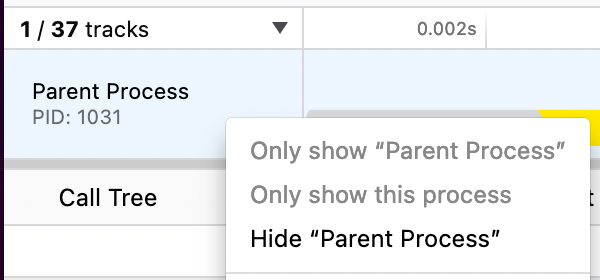
I think it's a good idea! We should also apply it to the context menu item, which currently is not disabled in that case, but does nothing.
There was a problem hiding this comment.
Yeah, we should also fix this one.


5 participants


…teresting tracks or processes.
deploy preview