Introduce Houdini to core#343
Conversation


Update to Avalon core
Install config when launching standalone tool
Introduce Houdini to Avalon core
Improvement on Houdini pipeline + small bugfix
… fetch current context
Improvements Houdini pipeline

| "avalon.tools", | ||
| "avalon.houdini"): | ||
| module = importlib.import_module(module) | ||
| reload(module) |


There was a problem hiding this comment.
It's upset because it thinks it's Python 3. This function is destined for refactoring anyway, happy to leave it as-is for now.
| @@ -0,0 +1,38 @@ | |||
| from .pipeline import ( | |||
There was a problem hiding this comment.
'.pipeline.Creator' imported but unused
'.pipeline.maintained_selection' imported but unused

| __all__ = [ | ||
| "install", | ||
| "uninstall", | ||
|
|
| maintained_selection | ||
| ) | ||
|
|
||
| from .lib import ( |

|
Happy to see this merged once you're happy @aardschok, great job! |

|
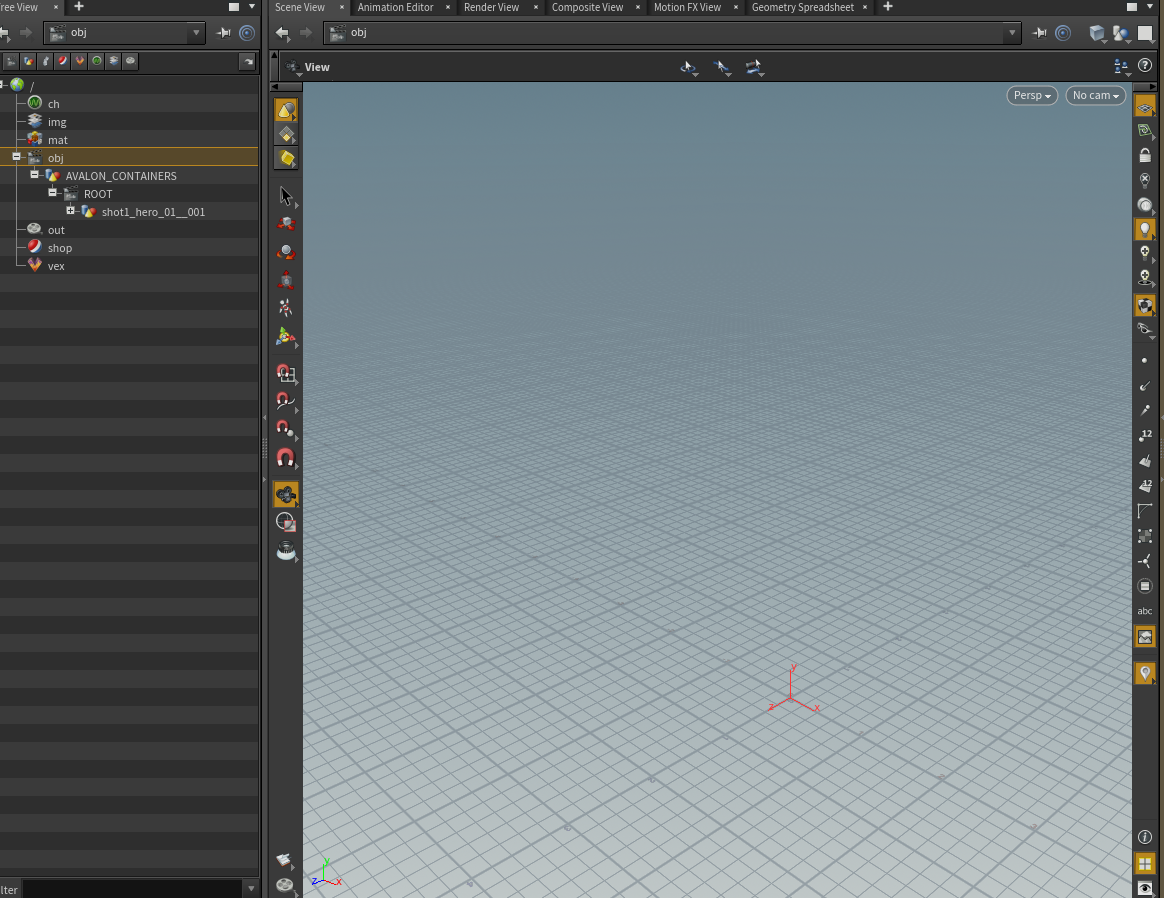
We discovered a flaw in the design. A secondary object network will not display any items created in that network in the parent object network. To visualize the issue: We will switch to a subnetwork node as its contents are displayable when going a level up. |


|
|
||
|
|
||
| def _on_scene_open(*args): | ||
| api.emit("open", *[]) |

There was a problem hiding this comment.
Not sure if you wanted this: *[]. It would always unpack to nothing - should this be args like how the emit calls are done in the Maya pipeline in core. Or is there a reason to do *[] in Python?
There was a problem hiding this comment.
I have tested the args and *args but both will prompt the following error, I opened a file to test it.
WARNING:avalon.pipeline:Traceback (most recent call last):
  File "C:\Users\Guest4\Development\colorbleed\core\avalon\pipeline.py", line 532, in emit
    callback(*args)
TypeError: on_open() argument after * must be a sequence, not EnumValue
Passing a simple list, [] will suffice, I will setup a fix for it

…ignore_project_change_on_refresh

Library loader refresh fix
4 participants


This PR will add Houdini to the list of available hosts of Avalon.
Important nodes:
123.pyis crucial to the implementation of Houdini into the pipeline. It is used to ensure that Avalon and the configuration are installed.From the documents
xmlfiles when it launches to create the menus. Houdini checksHOUDINI_PATHandHOUDINI_MENU_PATHfor anyxmlfiles which match a certain name, for more information look hereInstances
Creating instances is a bit more complex in Houdini than it is in Maya. To keep everything as close to the application as possible I chose make the
Creatorclass more dependent on the plugins. Example code:Depending on the output you want you to pass on the desired ROP node type in order to create it. Houdini uses the Out Network in which all render nodes reside.
In
processcan pass on any attribute adjustments or connections after thesuper.The active is controlled by the
isBypassedflag of the ROP node.Containers
I tried to keep everything as close as possible to the approaches used in Maya, for example:
AVALON_CONTAINERSto maintain some overview. In order to achieve that I have create a hierarchy which looks like this:/objis the object level in which the user 90% of the time worksAVALON_CONTAINERSis ageonode, this is required in order to create a secondary object networkROOTis aobjnetorobject network, this is similar to/obj, in which content can be loadedThere is a drawback on the AVALON_CONTAINER setup I have created here. If Houdini is used for compositing for example, it might need its own AVALON_CONTAINER setup. When this is the case we will need to review the
lsfunction for Houdini as it is currently focused on geometry.Publishing
Because the instances are each their own type, the logic for extracting instances differs but is also more streamlines. There are a few similarities which help a whole lot, each ROP node has the same logic for frames. The basic parameters are the same for each of them and the main output method is the same, which is
ropnode.render(). Their might be some alternative methods of rendering files, for example:executebackground()ongeometrynodes (used for VDB)Side note
This was a pretty cool DCC to develop a pipeline for as it has many things which help us developers.