@sentry/react-native - Tracking Issue - Feedback #612


Description

We just released the new version of our React Native SDK @sentry/react-native@1.0.0-beta.5 and we are looking for people to try it out and provide feedback.
https://www.npmjs.com/package/@sentry/react-native
- Support for react-native
>= 0.60 - Use
@sentry/browser - Supports autolinking
- Supports ram bundles
- Supports hermes
How to install it?
If you already have an existing React Native project install it with yarn like:
yarn add @sentry/react-native@1.0.0-beta.5
If you are using react-native <0.60 do:
react-native link @sentry/react-native
If react-native >=0.60 do:
yarn sentry-wizard -i reactNative -p ios android
After that, you need to
cd ios
pod install
always for project >= 0.60 and only if you have a Cocoapods setup if you run below 0.60.
What changed?
@sentry/react-native now joins the unified family and has pretty much the same API as @sentry/browser. There are also some internal improvements that should make the overall experience when using the SDK more stable and robust.
The new SDK is fully written in typescript and therefore provides full typing out of the box.
Upgrading from react-native-sentry
You first need to unlink the package like react-native unlink react-native-sentry.
Then remove it from your dependencies yarn remove react-native-sentry.
There are some code changes necessary you need to import and init the new SDK like this:
import * as Sentry from '@sentry/react-native';

Sentry.init({
  dsn: 'DSN',
});
You can remove the code in your AppDelegate.m
#import <React/RNSentry.h>
...
- (BOOL)application:(UIAppl...
{
  ...
  [RNSentry installWithRootView:rootView];
  ...
}
CodePush
The function Sentry.setVersion has been dropped in favor of Sentry.setRelease (which exactly sets the string you set as the release name, without any magic).
Same goes for Sentry.setDist, it just sets the dist to the string you set.
Why?
Reason for this change is that since the initial release of our React Native SDK a lot has changed on both our and React Native side. We wanted to make sure that we can keep up with the pace and future features that are yet to come for Sentry.
New Features
On device symbolcation for Debug builds
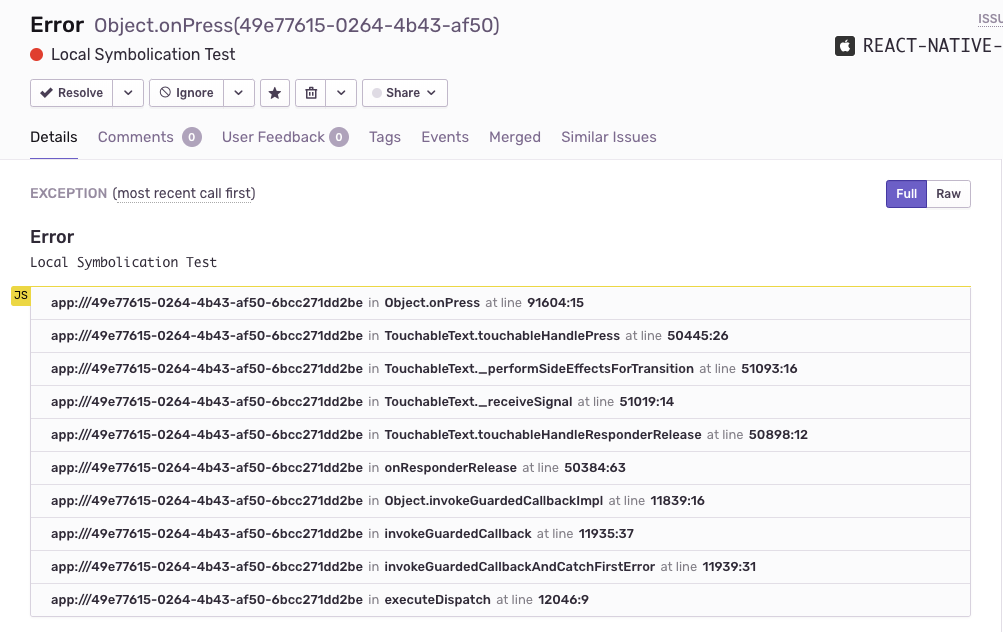
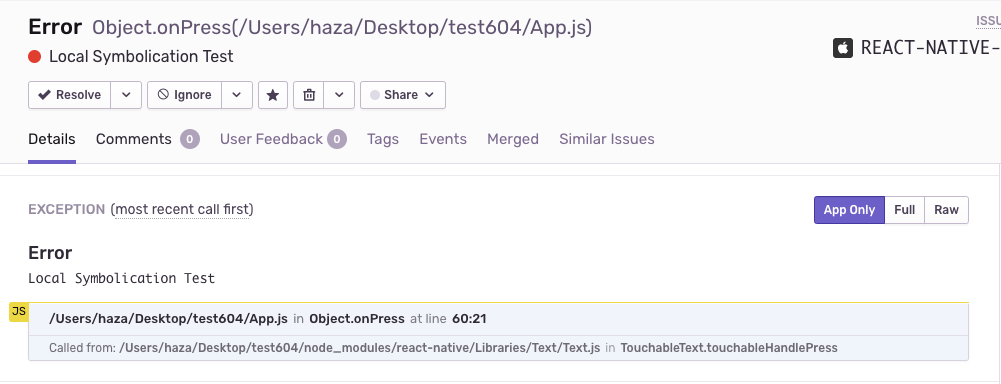
We now have an integration that runs only in debug doing symbolication on the device. Providing a better stack trace for debug builds with correct line numbers and filenames for application frames.
Before
After
Whishlist
- Use
symbolicateStackTraceof react-native to symbolicate on device in Debug. - Check stacktrace merging