Skip to content

Add new settings page and element positioning preview for goggle OSD#222

Merged
ligenxxxx merged 7 commits intohd-zero:mainfrom
Nikolas-S:feature/osd_settings_page
May 29, 2023
Merged

Add new settings page and element positioning preview for goggle OSD#222
ligenxxxx merged 7 commits intohd-zero:mainfrom
Nikolas-S:feature/osd_settings_page

Conversation

@Nikolas-S
Copy link
Contributor

@Nikolas-S Nikolas-S commented Apr 17, 2023

WARNING: The way settings are saved was modified on the main branch recently. If you test this PR and change the visibility of OSD elements, you will have to reset your settings using the reset button on the Firmware page just before going back to 9.0.12, otherwise your OSD elements may be invisible in 9.0.12.

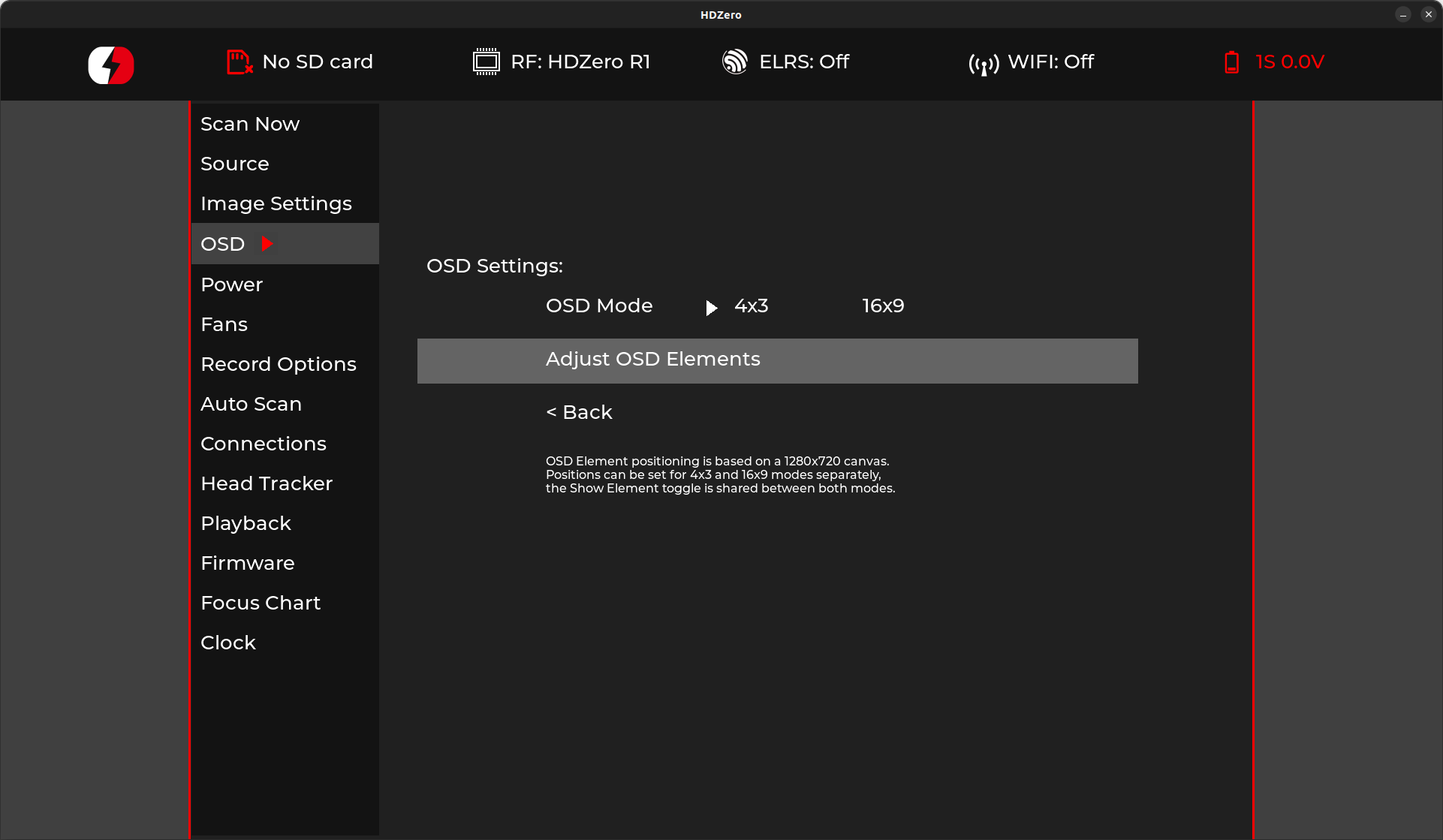
Created a new settings page for the goggle OSD.
Moved the osd mode setting from image settings to the new osd settings.

The new page allows for individual positioning and visibility settings for every goggle osd element.
The element position can be set separately for 4x3 and 16x9 modes, visibility is shared between modes.
The element position is set using x and y sliders. I think this is ok for now but the goal is to have the elements show and update live, similar to the image settings. (don't have my goggles yet and the osd seemed wonky on the emulator)

osd_page

I also added acceleration when moving the sliders to make positioning less tedious while not losing precision, would love some feedback on how it feels on real goggles.
If anyone has ideas for improvements, let me know.

For the devs:
I added a new app state APP_STATE_SUBMENU_ITEM_FOCUSED.
When in that state, a pages on_roller is called but without automatically changing the submenu item selection, allowing the page to correctly handle input for items like dropdown menus and sliders.
I propose we use the new state for future changes, seems cleaner than separate app states for every element or other workarounds.

@SumolX
Copy link
Contributor

SumolX commented Apr 17, 2023

Very Nice! May I make a few recommendations:

  1. Rename "Goggle OSD" -> OSD?
  2. Highly recommend that this PR does include the live view functionality to preview the modification as we are just guessing. This should work in the emulator.
  3. Perhaps add a Save Settings option (Similar to Update Clock) just in case you want to play with the values but aren't sure just yet if you want them saved.

Overall I really like the layout and excellent use of the dropdown.

As for they wonkyness I believe the main window is 1080p and the live view is 720p and thus it draws the live view within that area starting from the top left.... so for you testing purpose... maybe set the main window to 720p instead to ensure its going to display properly. I can test it out for you on the goggles.

@Nikolas-S
Copy link
Contributor Author

Very Nice! May I make a few recommendations:

1. Rename "Goggle OSD" -> OSD?

2. Highly recommend that this PR does include the live view functionality to preview the modification as we are just guessing.  This should work in the emulator.

3. Perhaps add a Save Settings option (Similar to Update Clock) just in case you want to play with the values but aren't sure just yet if you want them saved.

Overall I really like the layout and excellent use of the dropdown.

As for they wonkyness I believe the main window is 1080p and the live view is 720p and thus it draws the live view within that area starting from the top left.... so for you testing purpose... maybe set the main window to 720p instead to ensure its going to display properly. I can test it out for you on the goggles.

  1. Was going with goggle osd so that no one expects any magical betaflight integration but it's pretty obvious what the page does so might change it to OSD
  2. I took another look at the image settings, I think I understand what's going on, missed the part where it switches to 720p.
  3. With the blind sliders I didn't think it necessary but with a preview screen that's a good idea.

My goggles are already in the mail and should arrive later this week, I'll convert this pr to a draft for now and see if I can come up with a preview in the mean time. I'll let you know if i got something to test 😄

@Nikolas-S Nikolas-S marked this pull request as draft April 17, 2023 22:54
@Nikolas-S
Copy link
Contributor Author

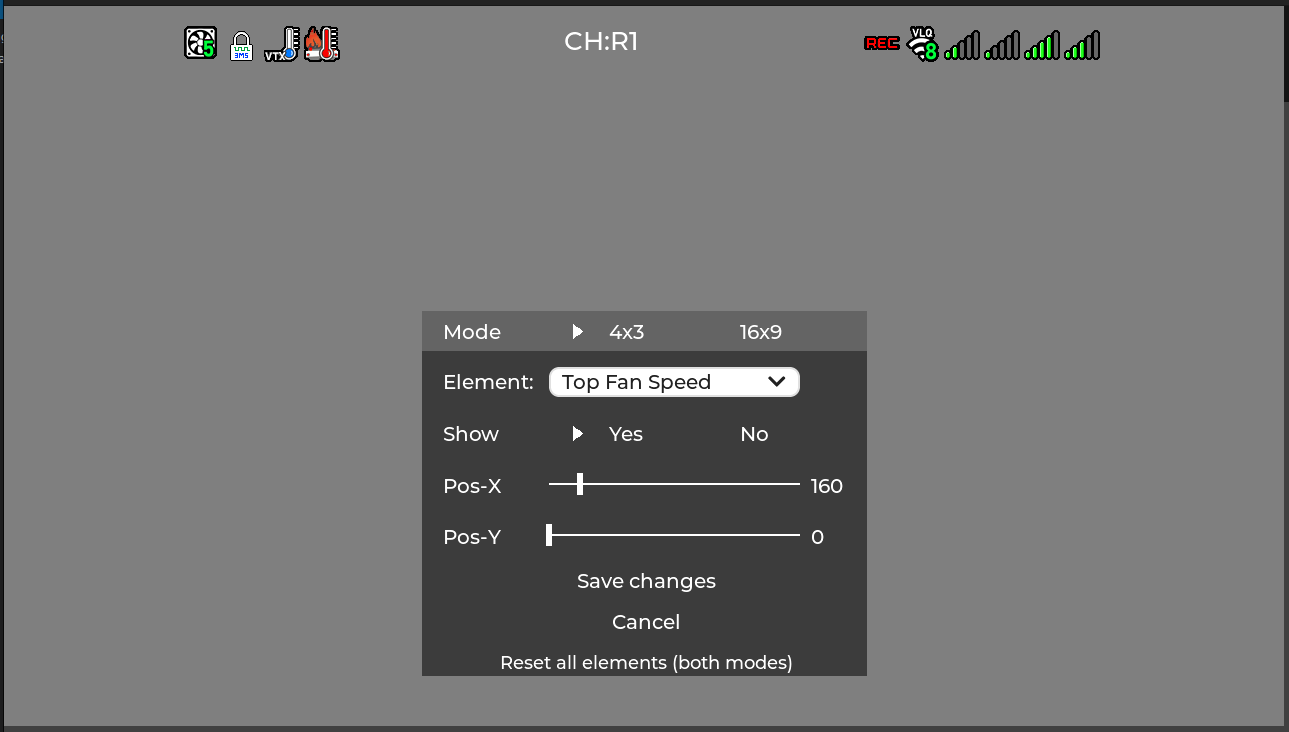
Added a preview for the element positioning, which is accessible from the OSD settings page.
The user can change the visibility/position of individual elements with a live preview of the changes.
The position can be set separately for both modes, while visibility is shared.
Resetting the elements resets positions for both modes, as well as visibility.
The OSD mode is accessible from both the OSD settings page for quick access and the preview UI.

I also added acceleration when moving the sliders to make positioning less tedious without losing precision. I would love some feedback on how it feels on real goggles.
If anyone has ideas for improvements, let me know.

Fair amount of new stuff with this one, so the more people hunting for bugs, the better.

image

image

@Nikolas-S Nikolas-S changed the title Add new settings page for goggle OSD Add new settings page and element positioning preview for goggle OSD Apr 19, 2023
@Nikolas-S Nikolas-S marked this pull request as ready for review April 19, 2023 23:08
@SumolX
Copy link
Contributor

SumolX commented Apr 19, 2023

Tested on my goggles and it works very well. The acceleration took some getting used to as when i tried slowing down to fine tune the position the movement still had a significant skip. I do have a question... without looking at the code are you handling 1080p live mode because I noticed the footnote stating 720p canvas? Otherwise I love it!

@Nikolas-S
Copy link
Contributor Author

Should get my goggles tomorrow, I'll see if I can make the acceleration feel better then, currently it's just a 1 second timeout to go from max speed back to precision (or scrolling in the other direction).
Yup, the positions were already saved with 720p coordinates, the osd logic upscales the coordinates to 1080p when needed.

@Nikolas-S Nikolas-S force-pushed the feature/osd_settings_page branch from 841882f to 815e70a Compare April 21, 2023 12:04
@Nikolas-S
Copy link
Contributor Author

Changed the slider scroll speed to depend on the time between inputs, aka how fast you spin the wheel.
Also rebased to use the new osd_resource_path function.

@SumolX
Copy link
Contributor

SumolX commented Apr 22, 2023

Changed the slider scroll speed to depend on the time between inputs, aka how fast you spin the wheel. Also rebased to use the new osd_resource_path function.

The scrolling is very good now. I can transition from rapid to fine movement nicely. Overall it i think it works great!

@pitts-mo
Copy link
Contributor

Just toggled on and off elements to test. Looks nice.

Suggestions for this PR:
-Somehow default all elements ON.
-Add a note about to the positioning screen eg: "Note: This interface will display all OSD elements to allow for positioning. However, some OSD elements will not persist during normal operation."

I was a little confused by the persistence of HDZero VRX elements while configuring OSD in analog mode :-)

Looking forward to goggle battery voltage display :-)

@pitts-mo
Copy link
Contributor

Hmm,
Seems like we need to handle or prevent the long press that returns you to the main menu.

You can return to the main goggle menu and leave the Adjust OSD elements menu stuck in the display. if you go back into Adjust OSD elements you can then cancel to clear it from the display.


// ###########################################################################
// ########################## local variables start ##########################
// ###########################################################################
Copy link
Contributor

Choose a reason for hiding this comment

The reason will be displayed to describe this comment to others. Learn more.

imho blocks like these have little utility.

Copy link
Contributor Author

Choose a reason for hiding this comment

The reason will be displayed to describe this comment to others. Learn more.

i suppose it's pretty obvious when looking at the code, removed the blocks.

@Nikolas-S
Copy link
Contributor Author

Just toggled on and off elements to test. Looks nice.

Suggestions for this PR: -Somehow default all elements ON. -Add a note about to the positioning screen eg: "Note: This interface will display all OSD elements to allow for positioning. However, some OSD elements will not persist during normal operation."

I was a little confused by the persistence of HDZero VRX elements while configuring OSD in analog mode :-)

Looking forward to goggle battery voltage display :-)

Not sure what you mean by default all elements ON, could you elaborate?
Improved the user hint in the latest commit.

@Nikolas-S
Copy link
Contributor Author

Nikolas-S commented Apr 26, 2023

Hmm, Seems like we need to handle or prevent the long press that returns you to the main menu.

You can return to the main goggle menu and leave the Adjust OSD elements menu stuck in the display. if you go back into Adjust OSD elements you can then cancel to clear it from the display.

Nice find! A long press should now discard any changes and return to the main menu correctly.
Probably noteworthy that a long press in the image settings preview returns to the main menu while saving all changes, but I think saving settings with a long press is not the best idea since it can happen accidentally and seems kinda unintuitive, so maybe worth a refactor at some point.

@pitts-mo
Copy link
Contributor

Just toggled on and off elements to test. Looks nice.
Suggestions for this PR: -Somehow default all elements ON. -Add a note about to the positioning screen eg: "Note: This interface will display all OSD elements to allow for positioning. However, some OSD elements will not persist during normal operation."
I was a little confused by the persistence of HDZero VRX elements while configuring OSD in analog mode :-)
Looking forward to goggle battery voltage display :-)

Not sure what you mean by default all elements ON, could you elaborate? Improved the user hint in the latest commit.

Maybe something with my usage caused all my elements to show as OFF?

I had been using 16x9 OSD and they were all showing in 9.0.12 release.
When I tried a master build I saw the OSD elements only display briefly (<1 second?) when starting into analog mode.
When I tried a build from this PR I saw the same behavior and on entering the Adjust OSD elements menu I found they were all off.

@Nikolas-S
Copy link
Contributor Author

Just toggled on and off elements to test. Looks nice.
Suggestions for this PR: -Somehow default all elements ON. -Add a note about to the positioning screen eg: "Note: This interface will display all OSD elements to allow for positioning. However, some OSD elements will not persist during normal operation."
I was a little confused by the persistence of HDZero VRX elements while configuring OSD in analog mode :-)
Looking forward to goggle battery voltage display :-)

Not sure what you mean by default all elements ON, could you elaborate? Improved the user hint in the latest commit.

Maybe something with my usage caused all my elements to show as OFF?

I had been using 16x9 OSD and they were all showing in 9.0.12 release. When I tried a master build I saw the OSD elements only display briefly (<1 second?) when starting into analog mode. When I tried a build from this PR I saw the same behavior and on entering the Adjust OSD elements menu I found they were all off.

That is interesting, perhaps it has something to do with my recent pr where the way bools are saved was changed? (#196)
I don't know if the settings file is reset during updates, if your settings file still has them saved as 0/1, but the goggle expects true/false that might explain it.
If you change the visibility and save, does it retain the configuration after reboot?

This is from just before the pr: https://github.com/hd-zero/hdzero-goggle/actions/runs/4685509451
This is from just after the pr: https://github.com/hd-zero/hdzero-goggle/actions/runs/4717254064

@pitts-mo
Copy link
Contributor

pitts-mo commented May 1, 2023

@Nikolas-S , I suspect your are correct about the change in settings storage.

My interest in this project is much greater than my working knowledge of it... Please let me know if you think I should create issue for any of the thoughts below.
Thank you,
-p

I do not see mechanisms to:
**-**restore firmware defaults?
**-**check settings version and update settings version when a saving a setting from a new APP version (same as APP version)?

Related observations:
-I did need to re-set some of my other google preferences when I began testing master and this PR from SD card (HDZero 9.0.12 release in firmware).
-when I removed SD card to test 9.0.12 firmware again I found the goggle OSD was not working, quick center press OSD element toggle is not there, and I could not determine another way to re-enable goggle OSD.

Other observations (may be helpful for long term dev testing):
**-**allow Firmware page to show currently running APP version string instead/independent of the APP version string installed in firmware
**-**allow builds running from SD card call/save settings file from SD card and import settings from firmware if they are compatible.

@Nikolas-S
Copy link
Contributor Author

@pitts-mo regarding your first two points, I created issue #236 which addresses them, those are important to get resolved before a next release.

Regarding your OSD being gone after going back to 9.0.12, I am not sure what exactly 9.0.12 is based off of but ever since #182 from late February, the visibility of OSD elements has been saved as 0/1 in the settings, just without any UI for the user to change the settings. So if pr #182 is included in 9.0.12, testing this new pr would have made your OSD element visibility settings incompatible with 9.0.12, since bools are now saved as true/false instead of 0/1.

Other than that, if you stay only within the new pr, are settings being retained correctly?
And were there any other issues you encountered during testing?

@pitts-mo
Copy link
Contributor

pitts-mo commented May 4, 2023

Sorry @Nikolas-S , I was away for a bit.

Yes, My observations appear to agree. And Yes, So far my settings have been working as expected even when switching between this PR and a recent build from master.
Thank you,
-P

@Nikolas-S Nikolas-S force-pushed the feature/osd_settings_page branch from 56912a8 to 92076af Compare May 12, 2023 19:57
@Nikolas-S
Copy link
Contributor Author

Rebased after recent OSD element changes.

@Nikolas-S
Copy link
Contributor Author

Nikolas-S commented May 12, 2023

Before merging this, we should finish up #249, which will hopefully allow people to go back to older versions after testing new developments which may make the settings file incompatible with older/stable versions that don't yet have a way to reset settings.

If there are no more ideas for improvements/known issues, think we could get this merged?
If so, we should either add a warning to the readme that changing settings will cause issues when going back to 9.0.12, or temporarily hide the OSD settings page by commenting out pp_osd from page_packs until the next release, so people testing won't accidentally make their settings incompatible with 9.0.12. (since there's no easy way to reset settings in 9.0.12)

@Dom4n
Copy link

Dom4n commented May 23, 2023

This PR is just awesome! Thank You very much for this! Now I can set antenna indicators so it makes sense for me 😄
I hope it will be approved and merged soon.
PR #249 is working as expected too, just tested it twice (hop between old and new firmware).

Now I`m on fw from this build: https://github.com/Nikolas-S/hdzero-goggle/actions/runs/5054980978 and it works as should. Flew today five packs and it was rock solid.

Nikolas-S added 3 commits May 24, 2023 11:16
move osd mode from image settings to osd settings
move positioning settings from osd settings page to preview ui
@Nikolas-S Nikolas-S force-pushed the feature/osd_settings_page branch from 92076af to e99d396 Compare May 24, 2023 09:58
@Nikolas-S
Copy link
Contributor Author

Rebased after merge of #249

@Nikolas-S
Copy link
Contributor Author

This PR is just awesome! Thank You very much for this! Now I can set antenna indicators so it makes sense for me 😄
I hope it will be approved and merged soon.
PR #249 is working as expected too, just tested it twice (hop between old and new firmware).

Now I`m on fw from this build: https://github.com/Nikolas-S/hdzero-goggle/actions/runs/5054980978 and it works as should. Flew today five packs and it was rock solid.

Thank you, glad you like it :)

Nice, just don't risk too much when flying PRs 😁

@ligenxxxx ligenxxxx merged commit 49259d5 into hd-zero:main May 29, 2023
@Dom4n
Copy link

Dom4n commented May 29, 2023

Feature request: import/export settings to/from SD card would be really useful.

Sign up for free to join this conversation on GitHub. Already have an account? Sign in to comment

Labels

None yet

Projects

None yet

Development

Successfully merging this pull request may close these issues.

6 participants