Linktools 是一套面向移动安全研究、逆向分析、合规检测工具集,采用 monorepo 结构拆分为多个独立子包,按需安装。
| 子包 | 说明 | 文档 |
|---|---|---|
| linktools | 核心框架:CLI 基础设施、环境管理、配置、工具管理 | README |
| linktools-common | 通用工具:ct-env、ct-grep、ct-tools |
README |
| linktools-mobile | 移动设备:Android(at-*)和 iOS(it-*)工具 |
README |
| linktools-cntr | 容器管理:Docker/Podman 部署工具(ct-cntr) |
README |
Python & pip(3.6 及以上):https://www.python.org/downloads/
# 安装方式一:安装所有包
python3 -m pip install -U "linktools[all]"

# 安装方式二:按需安装子包
python3 -m pip install -U "linktools-common[all]"
python3 -m pip install -U "linktools-mobile[all]"
python3 -m pip install -U "linktools-cntr"

# 安装方式三:安装 GitHub 最新开发版
python3 -m pip install --ignore-installed \
  "linktools@ git+https://github.com/linktools-toolkit/linktools.git@master#subdirectory=linktools" \
  "linktools-common@ git+https://github.com/linktools-toolkit/linktools.git@master#subdirectory=linktools-common" \
  "linktools-mobile@ git+https://github.com/linktools-toolkit/linktools.git@master#subdirectory=linktools-mobile" \
"linktools-cntr@ git+https://github.com/linktools-toolkit/linktools.git@master#subdirectory=linktools-cntr"在 ~/.bashrc 或 ~/.zshrc 中添加:
# 自动注册所有 linktools 命令及自动补全
eval "$(python3 -m linktools.cli.env alias --shell bash)"

# 配置全局 Java 环境(可通过 https://sap.github.io/SapMachine/#download 查找 LTS 版本号)
eval "$(ct-env --silent java 17.0.11 --shell bash)"

# 常用 alias
alias adb="at-adb"
alias sib="it-sib"
alias pidcat="at-pidcat"

alias apktool="ct-tools apktool"
alias burpsuite="ct-tools burpsuite"
alias jadx="ct-tools --set version=1.5.0 jadx-gui"$ python3 -m linktools
___ __ __ __
/ (_)___ / /__/ /_____ ____ / /____
/ / / __ \/ //_/ __/ __ \/ __ \/ / ___/ linktools toolkit (v0.9.0)
/ / / / / / ,< / /_/ /_/ / /_/ / (__ ) by: Hu Ji <669898595@qq.com>
/_/_/_/ /_/_/|_|\__/\____/\____/_/____/
📎 All commands
├── 📖 ct: Common scripts
│ ├── 📘 cntr: Deploy and manage Docker/Podman containers with ease
│ ├── 📘 env: Manage and configure the Linktools environment
│ ├── 👉 grep: Search and match files using regular expressions
│ └── 👉 tools: Execute tools directly from remote URLs
├── 📖 at: Android scripts
│ ├── 👉 adb: Manage multiple Android devices effortlessly with adb commands
│ ├── 👉 agent: Debug and interact with android-tools.apk for troubleshooting
│ ├── 👉 app: Retrieve detailed information about installed applications on Android devices
│ ├── 📘 cert: Display detailed X.509 certificate information for secure communication
│ ├── 👉 debug: Debug Android apps effectively using the Java Debugger (jdb)
│ ├── 👉 frida: Use Frida for dynamic analysis on rooted Android devices
│ ├── 👉 info: Collect detailed device information
│ ├── 📘 intent: Execute common Android intent actions for automation and testing
│ ├── 👉 objection: Simplify security testing with Objection on rooted Android devices
│ ├── 👉 pidcat: Filter logcat by package name
│ └── 👉 top: Fetch basic information about the currently running application
└── 📖 it: iOS scripts
├── 👉 frida: Use Frida for dynamic analysis on jailbroken iOS devices
├── 👉 ios: Manage multiple iOS devices effortlessly with go-ios commands
├── 👉 ipa: Parse and extract detailed information from IPA files
├── 👉 objection: Simplify security testing with Objection on jailbroken devices
├── 👉 scp: Securely copy files to/from a jailbroken iOS device using OpenSSH
└── 👉 ssh: Remotely login to jailbroken iOS devices using the OpenSSH client
环境配置管理命令,用于生成 alias 脚本、配置 Java 环境变量等。(依赖: linktools-common)
常用命令
# 生成 alias 脚本,常配合 ~/.bashrc 等文件使用
$ ct-env --silent alias --shell bash

# 生成配置 Java 环境变量脚本
$ ct-env --silent java 17.0.11 --shell bash

# 进入已初始化相关环境变量的 shell
$ ct-env shell

# 清除项目中 7 天以上未使用的缓存文件
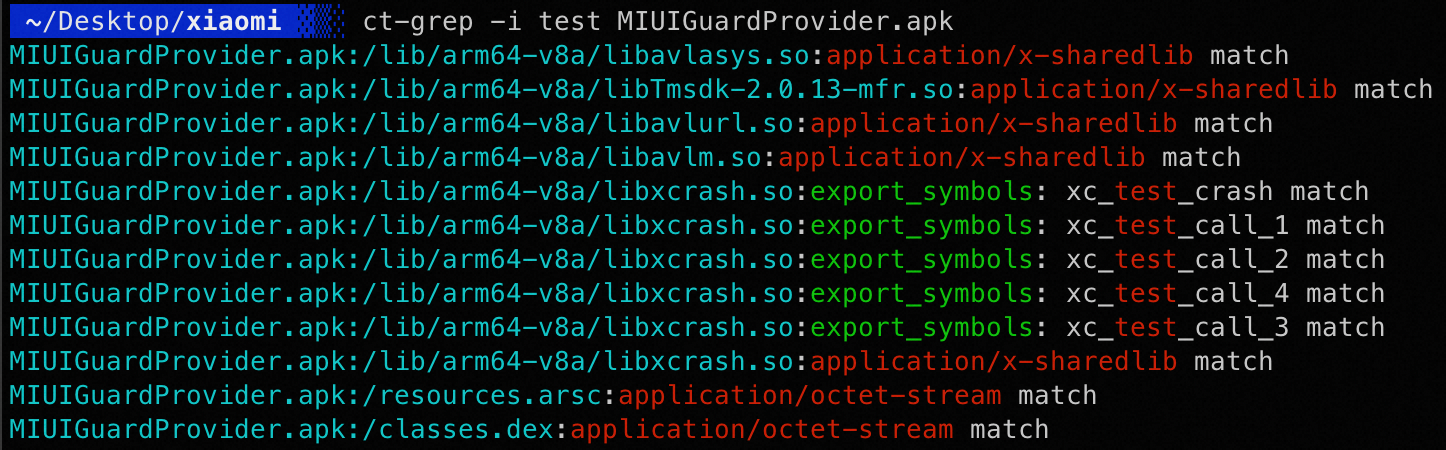
$ ct-env clean 7类似 Linux 中的 grep,使用正则表达式匹配文件内容,额外支持解析 ZIP、ELF 等格式。(依赖: linktools-common[lief],macOS需要使用以下命令安装libmagic: brew install libmagic)
效果预览
读取配置文件,自动下载并执行对应工具,内置声明了 adb、jadx、apktool、baksmali 等常用工具。(依赖: linktools-common)
常用命令
所有声明的工具可通过配置文件查看,以下以 apktool 为例:
# 初始化并执行 apktool 命令
$ ct-tools apktool -h

# 查看 apktool 相关配置
$ ct-tools --config apktool

# 只下载不执行
$ ct-tools --download apktool

# 清除 apktool 相关缓存文件
$ ct-tools --clear apktool

# 后台运行 apktool
$ ct-tools --daemon apktool

# 修改工具版本号
$ ct-tools --set version=2.5.0 apktoolDocker / Podman 容器部署和管理工具,详见 linktools-cntr README。(依赖: linktools-cntr)
常用命令
# 添加容器仓库
ct-cntr repo add https://github.com/linktools-toolkit/linktools-homelab

# 添加要部署的容器
ct-cntr add nginx lldap authelia portainer

# 启动容器
ct-cntr up

# 重启 / 停止容器
ct-cntr restart
ct-cntr down

# 查看 / 修改配置
ct-cntr config list
ct-cntr config set NGINX_ROOT_DOMAIN=example.com
ct-cntr config edit --editor vim自动检测并使用环境变量中的 adb,不存在时自动下载最新版本,支持同时管理多台设备。(依赖: linktools-mobile)
常用命令
at-adb 命令与标准 adb 完全兼容,以 adb shell 为例:
# 指定序列号连接
$ at-adb -s xxx shell

# 使用上次连接的设备
$ at-adb -l shell

# 连接远程 TCP 设备
$ at-adb -c 127.0.0.1:5555 shell

# 未指定时交互选择设备
$ at-adb shell
More than one device/emulator
>> 1: 18201FDF6003BE (Pixel 6)
   2: 10.10.10.58:5555 (Pixel 6)
Choose device [1~2] (1): 1集成并增强了 pidcat,修复了中文字符宽度显示问题。(依赖: linktools-mobile)
常用命令
# 查看指定包名的日志
$ at-pidcat -p me.ele

# 查看当前前台应用的日志
$ at-pidcat --top

# 查看指定 tag 的日志
$ at-pidcat -t XcdnEngine显示当前顶层应用信息,支持导出 APK、截屏等操作。(依赖: linktools-mobile)
常用命令
# 展示当前顶层应用的包名、Activity、APK 路径等信息
$ at-top

# 导出当前顶层应用的 APK
$ at-top --apk

# 截屏并导出
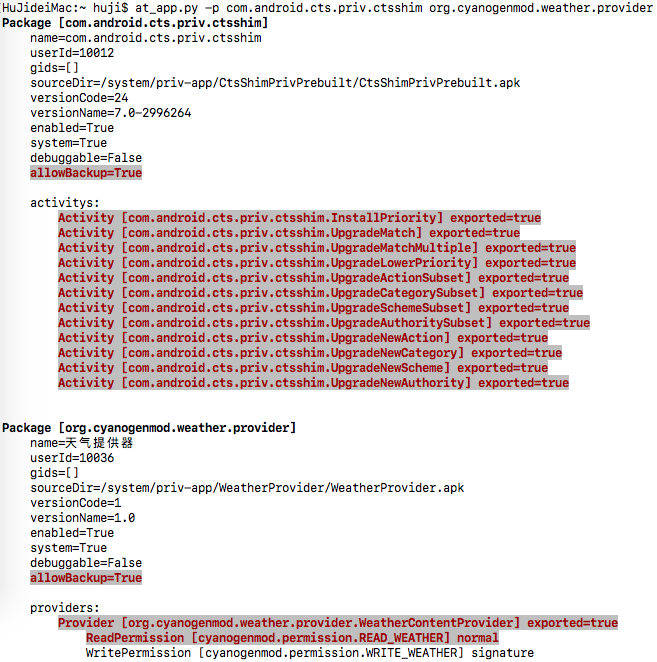
$ at-top --screen通过 agent 调用 PackageManagerService 获取应用信息,组件、权限等信息比静态分析更为准确。(依赖: linktools-mobile)
常用命令
# 显示当前前台应用的基本信息
$ at-app

# 显示应用的详细信息
$ at-app --detail

# 高亮显示危险权限等风险项
$ at-app --detail --dangerous

# 显示所有非系统应用信息
$ at-app --non-system
输出效果:
封装常用 Intent 操作,支持跳转设置界面、安装证书、打开浏览器链接等。(依赖: linktools-mobile)
常用命令
# 跳转到系统设置页
$ at-intent setting

# 跳转到开发者选项页
$ at-intent setting-dev

# 跳转到指定应用的设置页
$ at-intent setting-app

# 安装证书
$ at-intent setting-cert ~/test.crt

# 安装 APK(支持 URL)
$ at-intent install https://example.com/test.apk

# 在浏览器中打开链接(也可用于测试 URL Scheme)
$ at-intent browser https://example.com便捷使用 Frida 的工具,可自动下载、推送、运行 frida-server,支持加载远程脚本,内置常用功能(需要 root 权限)。(依赖: linktools-mobile[frida])
主要特性
- 根据设备架构和 Python 中 frida 版本,全自动下载、推送、运行 frida-server
- 监听 spawn 进程变化,可同时 hook 主进程和各子进程
- 监听 JS 文件变化,实时热重载
- 内置脚本封装常用功能(如绕过 SSL Pinning)
- 支持加载远程脚本(Codeshare)
- 支持将设备流量重定向到本地端口
命令行用法
# 以 spawn 模式加载本地脚本注入到指定进程
$ at-frida -l ~/test/frida.js -p me.ele --spawn

# 加载远程脚本,并将流量重定向到本地 8080 端口
$ at-frida -c https://raw.githubusercontent.com/linktools-toolkit/linktools/master/linktools-mobile/agents/frida/test/android.js -p me.ele --redirect-port 8080

# 只启动 frida-server,不注入脚本
$ at-frida --serve --remote-port 27042 --local-port 27042 -p fake_package

# 使用设备上已运行的 frida-server
$ at-frida --no-serve --remote-port 27042 -p me.ele
Python API 用法
#!/usr/bin/env python3
# -*- coding: utf-8 -*-
from linktools.cli import BaseCommand
from linktools.mobile.frida import FridaApplication, FridaEvalCode, FridaAndroidServer


class Command(BaseCommand):

    def init_arguments(self, parser):
        pass

    def run(self, args):
        code = """
            Java.perform(function () {
                JavaHelper.hookMethods(
                    "java.util.HashMap",
                    "put",
                    {stack: false, args: true}
                );
            });
            """

        with FridaAndroidServer() as server:
            app = FridaApplication(
                server,
                user_scripts=(FridaEvalCode(code),),
                enable_spawn_gating=True,
                target_identifiers=rf"^com.topjohnwu.magisk($|:)"
            )
            app.inject_all()
            app.run()


command = Command()
if __name__ == "__main__":
    command.main()
内置 JS 接口(Java 层)
Java.perform(function () {

    // hook 指定类的指定重载方法
    JavaHelper.hookMethod(
        "me.ele.privacycheck.f",
        "a",
        ['android.app.Application', 'boolean'],
        function (obj, args) {
            args[1] = true;
            return this(obj, args);
        }
    );

    // hook 指定类的所有同名方法
    JavaHelper.hookMethods(
        "anet.channel.entity.ConnType",
        "isHttpType",
        () => true
    );

    // hook 指定类的全部方法
    JavaHelper.hookAllMethods(
        "p.r.o.x.y.PrivacyApi",
        JavaHelper.getEventImpl({
            stack: true,   // 打印调用栈
            args: true,    // 打印参数和返回值
            thread: false,
            extras: { customKey1: "自定义参数" }
        })
    );

    // 等待动态加载的 class(持续监听 ClassLoader)
    JavaHelper.use("p.r.o.x.y.PrivacyApi", function(clazz) {
        JavaHelper.hookAllMethods(
            clazz,
            JavaHelper.getEventImpl({ stack: true, args: true })
        );
    });

    // 禁用 SSL Pinning
    JavaHelper.bypassSslPinning();

    // 开启 WebView 调试模式
    JavaHelper.setWebviewDebuggingEnabled();
});与 android-tools.apk 交互,支持剪贴板操作、系统服务信息获取等,也支持加载插件 APK。(依赖: linktools-mobile)
常用命令
# 设置剪贴板内容
$ at-agent common --set-clipboard "剪切板内容"

# 获取剪贴板内容
$ at-agent common --get-clipboard

# 以 root 权限 dump 系统服务信息(需要 root 设备并挂载 DebugFS)
$ at-agent -u root --debug service --detail

# 加载插件 APK 并调用插件方法
$ at-agent --plugin app-release.apk自动检测或下载 go-ios,支持同时管理多台 iOS 设备。(依赖: linktools-mobile)
常用命令
# 列出所有已连接设备
$ it-ios list

# 指定 UDID 执行命令
$ it-ios -s xxx info

# 使用上次连接的设备
$ it-ios -l info

# 未指定时交互选择设备
$ it-ios info
More than one device/emulator
>> 1: 00008030-001174D10CC1802E (iPhone)
   2: 00008030-001174D10CC1803E (iPhone)
Choose device [1~2] (1): 1通过 SSH 连接已越狱设备(需要设备已安装 OpenSSH)。(依赖: linktools-mobile[ssh])
常用命令
# 连接设备
$ it-ssh

# 连接设备并执行命令
$ it-ssh sh -c "id"通过 SCP 与已越狱设备进行文件传输(需要设备已安装 OpenSSH)。(依赖: linktools-mobile[ssh])
常用命令
远程路径需加 : 前缀与本地路径区分:
# 从设备下载文件到本地
$ it-scp :/var/mobile/Documents/data.db ./data.db

# 上传本地文件到设备
$ it-scp ./payload.dylib :/usr/lib/payload.dylib

# 指定用户名和端口(默认 root:22)
$ it-scp -u mobile -p 2222 :/var/mobile/test.txt ./test.txt解析 IPA 文件,提取应用元数据、权限、组件等信息。(依赖: linktools-mobile)
常用命令
# 解析并展示 IPA 信息
$ it-ipa app.ipa便捷使用 Frida 进行 iOS 动态分析(需要设备已越狱并安装 frida)。(依赖: linktools-mobile[frida,ssh])
常用命令
# 以 spawn 模式加载脚本注入到指定 Bundle ID
$ it-frida -l ~/test/frida.js -b com.example.app --spawn

# 加载 Codeshare 脚本
$ it-frida -c https://codeshare.frida.re/@xxx/yyy -b com.example.app

# 执行内联代码
$ it-frida -e "console.log('hello')" -b com.example.app使用 Objection 对越狱 iOS 设备进行安全测试。(依赖: linktools-mobile[frida,ssh])
常用命令
# 注入到当前前台应用
$ it-objection

# 注入到指定 Bundle ID
$ it-objection -b com.example.app

# 注入时执行启动命令(可多次指定 -s)
$ it-objection -b com.example.app -s "ios sslpinning disable"

# 注入时执行启动脚本
$ it-objection -b com.example.app -S ./startup.js