Screen Reader: Narrator, NVDA
Repro Link : https://codepen.io/kusudh/pen/bGENygv?editors=0010
Browser Details:
OS: Windows 10 (Version 1909, Build: 18363.778)
Microsoft Edge Dev Version 84.0.495.2 (Official build) dev (64-bit)
Repro Steps:
- Start Narrator/NVDA and navigate to https://codepen.io/kusudh/pen/bGENygv?editors=0010
- Tab till 'black' selected list item.
- Wait until narrator finishes to read the information.
Actual Result:
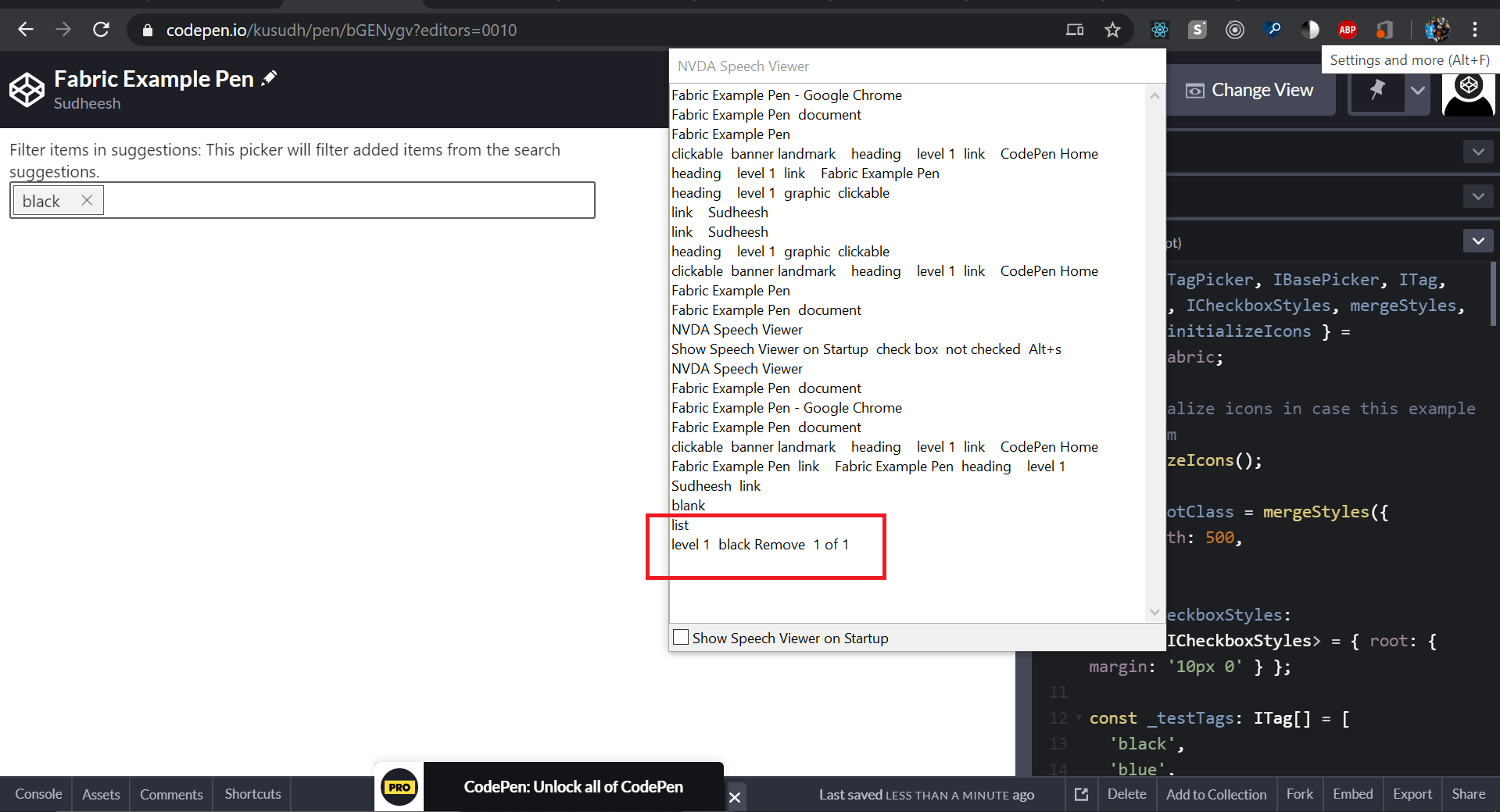
Narrator/NVDA is reading black Remove Level 1 of 1, as per screen readers users, if it reads as level 1 of 1 then, they will not use the arrow key to navigate by which user will not able to know about remove button and will use tab.
Expected Result:
- The main issue is there in a remove button, which can be navigated using the arrow key, if the screen reader/NVDA reads as level 1 of 1, the user will not use the arrow and use the tab key for navigation, which makes the user to miss about the remove button. if it reads as level 1 of 2, the user will navigate to the remove button using the arrow key then the screen reader should read about the Remove button and announce level 2 of 2.
- Because, level 1 of 1 means only 1 item is present, so when the focus is on the selected item, it should just announce the "selected item" and level 1 of 2 then the user will navigate using the arrow key to go to the remove button.
Please find the screen shot for reference,


Screen Reader: Narrator, NVDA
Repro Link : https://codepen.io/kusudh/pen/bGENygv?editors=0010
Browser Details:
OS: Windows 10 (Version 1909, Build: 18363.778)
Microsoft Edge Dev Version 84.0.495.2 (Official build) dev (64-bit)
Repro Steps:
Actual Result:
Narrator/NVDA is reading black Remove Level 1 of 1, as per screen readers users, if it reads as level 1 of 1 then, they will not use the arrow key to navigate by which user will not able to know about remove button and will use tab.
Expected Result:
Please find the screen shot for reference,
