Fix an issue in IE11 where focus outline was not visible in BaseButton component#3807
Fix an issue in IE11 where focus outline was not visible in BaseButton component#3807mohitbagra wants to merge 4 commits into
Conversation


|
I'm a bit concerned of the visual affect this will have on the majority of our users to support a small percentage of them. Can you include screenshots of buttons before/after this change? It seems our visual regression tests aren't capturing focused states. |

|
yes, please. Ideally we get a snapshot, but a screenshot here would be good. |
|
I believe the change to -1 outline was intentional. and I wouldn't want to undermine the purpose for which that was done. Might be high contrast mode related as well. |

|
Chrome: IE11 Edge: Firefox: |
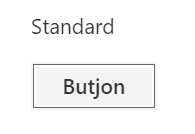
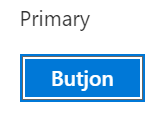

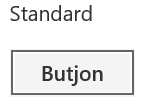
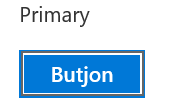

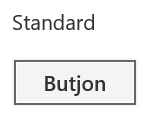
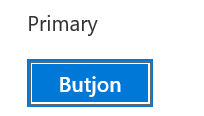


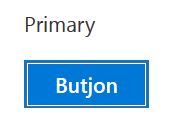
|
The issue doesnt repro at https://developer.microsoft.com/en-us/fabric#/components/button Due to this overflow rule, the outline border is visible even in IE11. So if my current fix is not acceptable, how about adding this overflow rule in BaseButton? |
|
Those screenshots don't look right. There are one too many outlines...that blue or grey one on the outside shouldn't be there. It looks like the focus rectangle and margin are getting shrunk by 1px all around. |
|
Thanks though for pointing out the unexpected CSS overflow styles. That's a bug! They're coming from another framework's CSS that is not supposed to be on that page. We're working to remove that so that your bugs repro properly.
Sent from Outlook<http://aka.ms/weboutlook>
…________________________________
From: Ben Truelove <notifications@github.com>
Sent: Friday, January 26, 2018 10:28 AM
To: OfficeDev/office-ui-fabric-react
Cc: Micah Godbolt; Review requested
Subject: Re: [OfficeDev/office-ui-fabric-react] Fix an issue in IE11 where focus outline was not visible in BaseButton component (#3807)
Those screenshots don't look right. There are one too many outlines...that blue or grey one on the outside shouldn't be there. It looks like the focus rectangle and margin are getting shrunk by 1px all around.
—
You are receiving this because your review was requested.
Reply to this email directly, view it on GitHub<https://na01.safelinks.protection.outlook.com/?url=https%3A%2F%2Fgithub.com%2FOfficeDev%2Foffice-ui-fabric-react%2Fpull%2F3807%23issuecomment-360865302&data=02%7C01%7Cmgodbolt%40microsoft.com%7Cede458ce746f4ac8ce6b08d564ea99a3%7Cee3303d7fb734b0c8589bcd847f1c277%7C1%7C0%7C636525881115571379&sdata=x1R2uBFhsLZwpgfMNHJQwB9Qz4ldZzswZhE9O9TEHn4%3D&reserved=0>, or mute the thread<https://na01.safelinks.protection.outlook.com/?url=https%3A%2F%2Fgithub.com%2Fnotifications%2Funsubscribe-auth%2FABXlTOUX39gqTycFugESVKadZ7cUGQNjks5tOhlNgaJpZM4RtU-s&data=02%7C01%7Cmgodbolt%40microsoft.com%7Cede458ce746f4ac8ce6b08d564ea99a3%7Cee3303d7fb734b0c8589bcd847f1c277%7C1%7C0%7C636525881115571379&sdata=guyO3L35NVoJHlIAey5%2FWmFC2cu1UVXbRZ%2FHORZNDMU%3D&reserved=0>.
|
|
This is on chrome: After the fix: I agree that in non IE browser the outline will be little thicker, but without this fix, IE is showing no focus outline. |
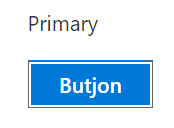
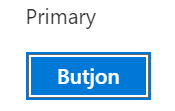
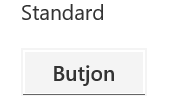
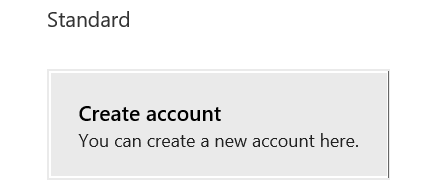
|
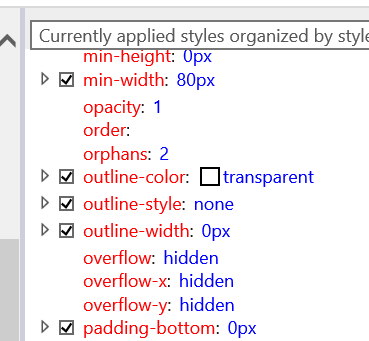
TADA! IE11 button defaults to overflow: hidden, whereas chrome/ff/edge default to overflow: visible
Sounds like the safest bet is to just specify overflow:visible for our buttons. We should probably communicate this pretty well, as anyone that expected an overflow:hidden to work with just a single class selector, might see their code break. |
|
@micahgodbolt (Add this rule in fabric.css) I assume this issue would not just be scoped to baseButton, so we should add this rule to fabric css file to all buttons under ms-Fabric |
|
@micahgodbolt, does this fix the issue without the visual regression? We can't break the other, supported and active browsers for this fix. |

|
@micahgodbolt . You are right. If I add overflow: hidden to button in non-IE browsers, they start to show this issue too. |
|
@betrue-final-final Since all non-IE browsers (I tested Chrome, Edge and Firefox) already have "overflow: visible" for buttons by default and fabric is not overriding them right now, adding this rule in fabric css wont cause any regressions in non IE browsers. .ms-Fabric button { |
|
My only other thought would be to add the style to our Fabric component, and apply it just like MWF did, to the button. That way any .foo {overflow:hidden} will override the style. @mikewheaton @battletoilet - thoughts on adding this browser compat style to |
|
we want the fix to be as low specificity as possible to avoid breaking downstream users |
|
@micahgodbolt @mikewheaton @battletoilet - Any thoughts? |
|
my vote is putting it into the Fabric component as it is not a style specific to our buttons, it is a browser consistency concern. i.e. I don't want any global styles in the button component, but I also don't want this style to have the specificity of a class. |
|
Any idea where do I make this change? I think the css would look like - |
|
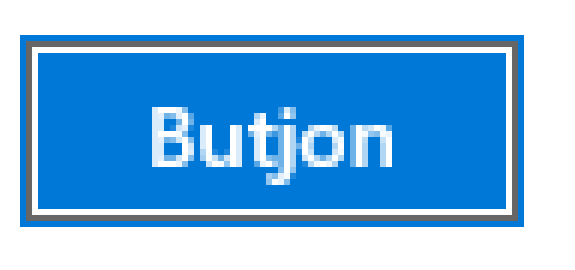
The current fix still messes up the focus rectangle in other browsers. |
|
we really don't want to drop this style into |
|
Pulling the V-team into this response. Curious who is changing button overflow to hidden, and if they have problems with focus rectangle.
…------
So, it turns out that IE11 and Edge/Chrome/FF have different defaults for a button's overflow values.
IE11 default
button {overflow: hidden}
Edge/Chrome/FF default
button { overflow: visible}
This difference is causing a focus bug in IE11, as the focus ring is outside of the visible area
IE11
[cid:f7ca567e-ecea-4f58-80d7-2f40945805bb]
Edge
[cid:0ae0b4a4-9692-4f55-9e7f-e603ceee9c20]
Fix #1
Add button {overflow : visible} to the Fabric component so that it registers a global style and browsers are consistent
Problem #1
This introduces a global style, which we generally try to avoid. We can scope it due to ".ms-Fabirc button" being WAY too specific and breaking any .myCoolButton {overflow: hidden} which would have worked prior.
Fix #2
Add .ms-Button {overflow: visible} to the Button root styles.
Problem #2
This is cleaner, and targeted on where the issue is, but it is still a higher specificity fix and could break anyone using a single class to apply hidden. Button focus is still broken for buttons set to overflow: hidden.
Fix #3
Come up with a new focus style method that doesn't involve putting a pseudo element outline on top of the button border (as anything AT or BEYOND the border is hidden via overflow).
Problem #3
We spent a ton of time coming up with the current approach, and it'll take a bit of work to devise another that works across various theme/high contrast mode etc.
Sent from Outlook<http://aka.ms/weboutlook>
________________________________
From: Ben Truelove <notifications@github.com>
Sent: Monday, January 29, 2018 8:12 AM
To: OfficeDev/office-ui-fabric-react
Cc: Micah Godbolt; Mention
Subject: Re: [OfficeDev/office-ui-fabric-react] Fix an issue in IE11 where focus outline was not visible in BaseButton component (#3807)
The current fix still messes up the focus rectangle in other browsers.
[image]<https://na01.safelinks.protection.outlook.com/?url=https%3A%2F%2Fuser-images.githubusercontent.com%2F20363037%2F35520473-fb02530e-04cb-11e8-908e-fd57d57e99f9.png&data=02%7C01%7Cmgodbolt%40microsoft.com%7C56744d402c5f4dc509a408d567331181%7Cee3303d7fb734b0c8589bcd847f1c277%7C1%7C0%7C636528391387426094&sdata=2BkVUjVgW3G685ayi0Ve4hSPGSCXv2hu2V9ZkUNY1lA%3D&reserved=0>
—
You are receiving this because you were mentioned.
Reply to this email directly, view it on GitHub<https://na01.safelinks.protection.outlook.com/?url=https%3A%2F%2Fgithub.com%2FOfficeDev%2Foffice-ui-fabric-react%2Fpull%2F3807%23issuecomment-361296270&data=02%7C01%7Cmgodbolt%40microsoft.com%7C56744d402c5f4dc509a408d567331181%7Cee3303d7fb734b0c8589bcd847f1c277%7C1%7C0%7C636528391387426094&sdata=PfOViMKT9kzVoprWe5lNT%2Bu2OVBB43bcnIpUujAzBKU%3D&reserved=0>, or mute the thread<https://na01.safelinks.protection.outlook.com/?url=https%3A%2F%2Fgithub.com%2Fnotifications%2Funsubscribe-auth%2FABXlTE-1PiVVqN6vZvVNhiXDbLgDwKUXks5tPe3ggaJpZM4RtU-s&data=02%7C01%7Cmgodbolt%40microsoft.com%7C56744d402c5f4dc509a408d567331181%7Cee3303d7fb734b0c8589bcd847f1c277%7C1%7C0%7C636528391387426094&sdata=ljZUV0v7lPX6YWmT3d3M3SZVAJk6%2FoFmv1XPdqEd6Pc%3D&reserved=0>.
|


3 participants


Pull request checklist
$ npm run changeDescription of changes
The current alignment of focus outline around BaseButton is making the outline invisible in IE11. Fixed the issue by incrementing the inset by 1px in BaseButton styles.
Focus areas to test
Tested other areas of the application to verify that changes did not affect other portions of the application. Also tested the fix in major browsers (Chrome, FF, Edge, IE11)